One click, whole workflow
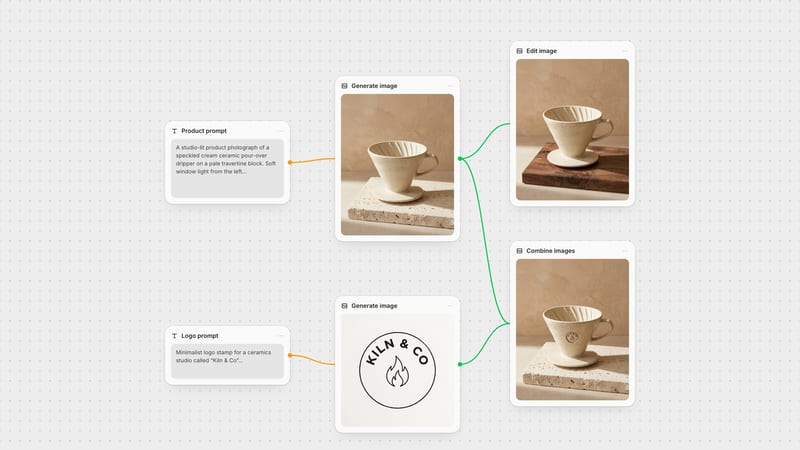
Recipes are here. Package a whole workflow and run it in one click
Explore recipesOne click, whole workflow
Recipes are here. Package a whole workflow and run it in one click
Explore recipesHow to prompt Krea 3 in Fuser: the shot-note formula, Berry and Jam, tagged reference images, style references with Krea 2, FLUX.1 Krea image-to-image strength, sizes, seeds and text, with real prompts and outputs.
Quick answer: the best way to prompt Krea 3 in Fuser is like a photographer's shot note: name the medium and film, one subject doing one thing, the light and where it comes from, and the frame you want; then tag each reference image by its <image-N> number and say what to take from it.
The Krea node in Fuser is one node with a Model menu: Krea 3 (the default), Krea 2 Large, Krea 2 Turbo, which becomes Turbo Style when you connect a style reference, and FLUX.1 Krea [dev]. Krea describes Krea 3 as its newest image model, made to generate from text and to edit from plain-language instructions, and asks you to say what each reference contributes (Krea docs). This guide centres on Krea 3, then covers the jobs where another model in the menu does better: style references, image-to-image and cheap drafts. Every example is a real prompt we ran with the node's settings on 22 and 23 October 2026, shown with its output.
Krea 3 rewards concrete photographic language. Write the prompt in this order:
Medium and period. "Shot on grainy 1990s colour film", "35mm colour negative", "disposable camera snapshot". This sets grain, colour and contrast more reliably than "cinematic" or "aesthetic".
One subject doing one thing. Who, wearing what, and a single action: "a locksmith squinting at a freshly cut brass key".
Light with a source. "Raw studio strobe against a terracotta wall", "flat light from a grey overcast sky", "practical lamps only".
The frame. "Vertical frame" or "wide horizontal frame". At Auto size, Krea 3 chooses the aspect ratio from these words.
What to keep out. The Negative Prompt field, read by the Berry variant only, takes the things that keep creeping in.
Portrait (text-to-image, Berry, Medium, Auto, seed 2293, negative prompt "plastic skin, airbrushed, extra fingers, deformed hands, logo, text, hat"): "Medium close-up of a young male fencer just after a bout, his black mesh fencing mask tucked under one arm, sweat-soaked dark curls flattened at the hairline, the padded white jacket collar unzipped, flushed cheeks and a faint red pressure line across his forehead, lips parted, looking straight into the lens. Shot on grainy 1990s colour film with cross-processed amber and chartreuse tones, deep contrasty shadows, raw studio strobe against a terracotta wall. Unretouched skin with pores, stubble and sweat sheen, vertical portrait frame."
Documentary (text-to-image, Berry, Medium, Auto, seed 4521, negative prompt "text, signage, numbers, lettering, logo, extra fingers, deformed hands"): "Over-the-shoulder, overexposed high-key documentary photograph: a cloakroom attendant in a dark waistcoat slumped asleep on a tall stool behind the counter of an old theatre cloakroom, chin on her chest, rows of hanging wool coats and brass hooks behind her, the blurred shoulder of a waiting patron in the foreground. Practical lamps only, olive, cream and black palette, flat even light, candid and still. Vertical frame, full-bleed, edge to edge."
Both came back in the medium we named: the fencer in cross-processed amber and green with sweat and stubble, the attendant in pale, high-key light between rows of coats. The "hat" in the first negative prompt is there for a reason: an earlier run turned the fencing mask into a hat, so we named it and ran again.
Krea 3 rewrites every prompt before it draws, and the rewrite comes back with the image. Our 97-word domino prompt came back about twice as long, with "spare dominoes" and "shuttered windows" added. In our runs the rewrite took 15 to 27 seconds per image. When an output surprises you, read the rewrite before you change your own words.
Variant: Berry favours quality and is the only variant that reads the negative prompt; Jam favours speed. We ran everything in this guide on Berry.
Reasoning Level: Low and Medium (the default) work with or without references. High and Ultra need at least one reference image; without one, the node sends Medium. Higher levels are slower and cost more.
High plans an edit before it runs: it segments the image, keeps unedited areas of a single input image and corrects text the prompt requires. Ultra renders at 2K, ignores the image size and the negative prompt, and is priced per reference. We used Medium throughout.
Connect up to eight images to Reference Images and Krea 3 switches from generating to editing. The order you connect them sets the tags: <image-1> for the first, <image-2> for the second, up to <image-8>. Krea's own tips are to explain what each reference contributes and to name the details that must stay intact (Krea docs), so the prompt below says what to take from each image and lists what to keep.
Two references (reference edit, <image-1> = a portrait, <image-2> = a jacket on a hanger, Berry, Medium, Auto, seed 2738, negative prompt "extra fingers, deformed hands, melted birds, extra wings, logo, text, different face"): "The woman from <image-1> wearing the hot-pink sequinned biker jacket from <image-2>, sitting on a green-painted park bench and flinging a handful of seed as a flock of grey pigeons explodes into the air around her. Hard direct on-camera flash against bright overcast daylight: a crisp dark flash shadow on the bench behind her, the sequins blazing, pigeons frozen mid-flap with wings spread wide. Keep her face, silver bob and fringe, tortoiseshell glasses and coral lipstick exactly; one eyebrow raised, utterly unimpressed. Match the jacket's pink paillettes, silver zip, snaps and belt. Vertical frame, slightly low angle, park path and plane trees behind, 35mm flash snapshot, saturated colour."
Her face, silver bob, glasses and coral lipstick came across from <image-1>, and the jacket's sequins, zip and belt from <image-2>. The negative prompt carries "different face" and "melted birds" because a flock in motion is where faces and wings go wrong first.
Plain words work too. In our Krea 3 vs FLUX.3 Image test, "this exact radio" with one reference was rewritten to "the vintage radio from <image-1>". That edit also shows the limit: Krea 3 turned the radio towards the camera and spelled its VOLUME label "VOLME". When a product must not change, name every part that matters, check labels letter by letter, and try the High reasoning level, which is built to keep unedited areas and fix required text.
Krea 3 has no style-reference input; Krea says it doesn't yet support Krea 2's style-reference or LoRA controls and points to Krea 2 for moodboards and weighted style references (Krea docs). In the node, Style Reference and Additional Style References appear for Krea 2 Large (up to 10 images) and Krea 2 Turbo (up to 3). Connecting one to Turbo switches it to Turbo Style and shows a Style Strength slider from 0 to 4, default 1.
We gave both models an antique postcard of a crowned saint's statue as the style reference, with this prompt and seed 6604:
Style test (Krea 2 Turbo, Style Strength 1, 2, 3 and 4, landscape 16:9): "A teenage lifeguard in a tall white sun visor and a towel draped over her shoulders like a mantle sits high on a wooden lifeguard chair beside a municipal swimming pool, holding a long-handled pool skimmer upright at her shoulder like a sceptre, gazing softly to the right. Wide horizontal frame, tiled pool edge and a diving board behind her."
At 1 the postcard barely registered. At 2 Turbo Style took the damask texture, the torn edge and the statue-like face, but not the sepia. At 3 the chair disappeared and the visor became a cone; at 4 the picture broke into texture. At 2.5, two of two seeds fused her arm into the chair. Krea 2 Large, with the same reference and seed, carried the whole look: sepia, vignette, worn edge and the devotional pose.
Start Turbo Style between 1 and 2 and raise it in small steps. When the look matters more than speed, use Krea 2 Large. If a figure starts merging with furniture, say so in the prompt: our final Turbo Style run at 2 added "her full figure clearly separate from the chair" and came back clean.
Image-to-image lives on FLUX.1 Krea [dev]: pick it in the Model menu and connect an image to Image Prompt. The node's Image Strength slider reads as the label says, higher keeps more of the original, but it is the reverse of the model's own strength setting. Fuser sends 1 − 0.99 × the slider value, so the default of 0.95 sends 0.06 and returns almost your source unchanged. Lower the slider to change more.
Restyle a room (FLUX.1 Krea [dev] image-to-image, source = a sunroom with green windows and a coral tile bench, 28 steps, CFG 3.5, seed 7121, Image Strength 0.45, 0.6 and 0.75): "Editorial interior photograph of the same small sunroom on a rainy grey morning: window frames painted gloss black, rain streaming down the glass, the tiled bench re-glazed in pale celadon green, plain white muslin curtains, a wet mustard-yellow raincoat thrown over the rattan armchair, ferns and rug, cool soft diffuse daylight, quiet and still."
Clockwise from the source at top left: at 0.45 the model followed the prompt, with black frames, rain on the glass, a celadon bench and the yellow raincoat, but rebuilt the tiled bench as a freestanding settee. At 0.75 (bottom right) the room is almost untouched apart from a yellow throw. At 0.6 (bottom left) the layout, coral bench and green frames held and only the raincoat arrived. With a snowy-night prompt, 0.35 put snow on the indoor bench, and about 0.2 lost the room. The useful window is narrow: for a restyle that keeps the layout, work between about 0.45 and 0.6 in steps of 0.05.
We ran one prompt with seed 3301 through all four models:
Selector test (Krea 3 at landscape 16:9, Krea 2 Large at 16:9, Krea 2 Turbo at landscape 16:9, FLUX.1 Krea [dev] at landscape 16:9): "Four quirky night-train passengers squeezed into a tiny wood-panelled sleeper compartment, all leaning in over a fold-down table. Mismatched striped pyjamas, a quilted dressing gown, a satin sleep mask pushed up on a forehead, a bandaged thumb. One holds a single lit match over a folded paper timetable while the others peer at it in total concentration. Tightly framed chest-up group shot across a wide horizontal frame, a dark train window behind them, warm nostalgic palette, grainy celluloid texture, subdued lighting from the match and a weak reading lamp."
Top left to bottom right: Krea 3, Krea 2 Large, Krea 2 Turbo and FLUX.1 Krea [dev]. Krea 3 and Krea 2 Large gave four different people with the dressing gown, sleep mask and match; Large had the most varied faces and costumes. Turbo and FLUX.1 Krea came back as four similar young men. What each model is for in Fuser:
Krea 3: editing with up to eight references, close prompt following and photographic finals at Auto size.
Krea 2 Large: text-to-image looks and style references, with aspect ratios from 9:16 to 2.35:1 and a Creativity setting from Raw to High. It doesn't edit images. It costs about three-fifths as much as a Krea 3 image at Auto.
Krea 2 Turbo: the cheapest way to explore layouts, about a twelfth of a Krea 3 Auto image at Square HD, with an Expand Prompt switch and cheap style transfer as Turbo Style. Expect flatter, more alike faces.
FLUX.1 Krea [dev]: image-to-image from a photo, sketch or 3D blockout, LoRA styles through the Style input, and Steps and CFG controls. It costs about a quarter of a Krea 3 Auto image.
Image Size offers Auto and six presets. Choosing Krea 3 in the Model menu sets Auto, which lets Krea pick the aspect ratio from your prompt at about 2048 × 2048, up to about 4.2 megapixels. "Vertical frame" gave us 1824 × 2288, "square 1:1 frame" 2048 × 2048, "horizontal 3:2 frame" 2512 × 1680 and "wide horizontal frame" 2736 × 1536. Krea recommends 2K output when small text, product details or a final deliverable need definition (Krea docs).
The presets are 1 megapixel or less: Landscape 16:9 is 1024 × 576 and Portrait 4:3 is 768 × 1024. Krea 3 is priced by output megapixels, plus each reference when editing, so a preset draft costs a quarter to a seventh of an Auto render. Fuser shows the cost on the node before you run it. Draft at a preset, then render the keeper at Auto.
Plan for this: an Auto render is a new image, not an upscale. With the same prompt and seed, the shaker kept its composition but the turquoise came out lighter, and a fencer's face changed slightly. To fix one thing, keep the seed and change the words. Our market shot at seed 5184 came back with fruit stalls around the man carrying the mirror, when the watermelons belonged only in its reflection. One added sentence ("The stalls around him sell second-hand clothes, rugs and household goods; the watermelons appear only inside the mirror") and "fruit stalls" in the negative prompt fixed it at the same seed, with the man and the mirror where they were. That is the image at the top of this guide.
Short words in quotation marks usually land. These two record sleeves rendered TARN and "low acre" correctly, and in our FLUX.3 test Krea 3 spelled a shop sign and a gold-leaf window line exactly.
Overlay text (text-to-image, Berry, Medium, Auto, seed 5532, negative prompt "extra text, misspelling, logo, watermark, border"): "Unpolished digital snapshot used as an album cover: at night, hard on-camera flash lights a person in a pale anorak standing knee-deep in a flooded field, the figure blown out bright white against a pure black night, wet grass glinting in the foreground. Bleak, still mood, bold tonal contrast of white against black. Plain lowercase white sans-serif overlay text along the bottom reads low acre. Vertical frame."
Small text is where it slips: a handwritten "minutes" with a malformed n, the "VOLME" label, and black letters that sank into a black coat on the TARN sleeve. An earlier run of that sleeve also gained catalogue text nobody asked for, from the prompt rewrite; with "extra text, catalogue number, small print" in the negative prompt, the next run came back with TARN alone. When lettering must be exact, set it as a text layer in Fuser's Compositor instead.
Extra text or objects: read the rewritten prompt, then name the intruder in the negative prompt (Berry only).
A detail turns into something else: our fencing mask became a hat. Name the wrong thing in the negative prompt and run again.
The wrong shape at Auto: state the frame in words ("vertical 4:5 frame") or pick a preset.
Anatomy merging under a strong style: lower Style Strength and say the figure is separate from the furniture.
A failed run: once, Krea 3 returned "prompt expansion temporarily unavailable" and no image. Running it again worked.
The Krea node shows different controls for each model:
Krea 3: Prompt, Reference Images (up to 8), Variant (Berry or Jam), Reasoning Level (Low, Medium, High, Ultra), Negative Prompt (Berry), Image Size (Auto or presets), Output Format (PNG or JPEG), Seed and Block NSFW.
Krea 2 Large: Prompt, Style Reference plus Additional Style References (up to 10), Aspect Ratio, Creativity and Seed.
Krea 2 Turbo: Prompt (up to 5,000 characters), up to 3 style references, Style Strength, Image Size, Seed, Expand Prompt and Block NSFW.
FLUX.1 Krea [dev]: Prompt, Image Prompt with Image Strength, Style (LoRA), Image Size, Steps (10 to 50, default 28), CFG Scale (default 3.5), Seed and Block NSFW.
Krea 3 is strongest when it edits inputs you control. In Fuser, generate a character or product with any image node, wire it into the Krea node as <image-1>, and keep the prompt in its own Text node so a preset draft node and an Auto final node can share it. When a frame needs exact lettering or a product that must not change, send the same prompt to a FLUX.3 Image node beside it; the FLUX.3 Image prompt guide covers its layout boxes and text. Still choosing? See how Krea 3 compares with Nano Banana on the same prompts, or the GPT Image prompt guide for copy-heavy layouts.
What to write and set for each part, in order.
| Part | Write or set | Example |
|---|---|---|
| The formula | ||
| Medium | Film stock, camera or period. | shot on grainy 1990s colour film |
| Subject | One person or object doing one thing. | a locksmith squinting at a fresh brass key |
| Light | Name the source. | raw studio strobe against a terracotta wall |
| Frame | State the shape; Auto follows it. | vertical frame |
| References | One job per <image-N>, plus what to keep. | the jacket from <image-2>; keep her face |
| Negative prompt | Berry only: what keeps creeping in. | extra text, hat, different face |
| Size | Preset to draft, Auto to finish. | Landscape 16:9, then Auto |
| Style or image-to-image | Switch model: Krea 2 or FLUX.1 Krea. | Image Strength 0.45 to 0.6 |
Write it like a photographer's shot note: the medium and film, one subject doing one thing, the light and its source, then the frame ("vertical frame"). Add a negative prompt for anything that keeps appearing; only the Berry variant reads it.
Up to eight in Fuser's Krea node. Their order sets the tags <image-1> to <image-8>; say what to take from each and what must stay the same.
Not as a separate input. Use Krea 2 Large or Krea 2 Turbo in the same node: connect the image to Style Reference. In our test Krea 2 Large carried a postcard's whole look; Turbo Style worked best between Style Strength 1 and 2.
On FLUX.1 Krea [dev] the Image Strength slider keeps more of the original as it rises, and its default of 0.95 changes almost nothing. In our test, 0.45 to 0.6 restyled a room while keeping its layout.
Auto for finals: Krea picks the aspect ratio from your prompt at about 4 megapixels. Draft at a preset such as Landscape 16:9, which costs a quarter to a seventh as much, and expect the Auto render to differ slightly.
Short words in quotation marks usually render correctly. Small and handwritten text can slip, so check every letter, and set exact lettering as a text layer in Fuser's Compositor.
References, style and image-to-image on one Krea node, from a cheap preset draft to the Auto keeper.