One click, whole workflow
Recipes are here. Package a whole workflow and run it in one click
Explore recipesOne click, whole workflow
Recipes are here. Package a whole workflow and run it in one click
Explore recipesEach AI music model reads section tags differently. Here is the documented lyric format for MiniMax Music 3, Lyria 3.5 and Music-01, and what happened when we gave all three the same verse, chorus and bridge.
All guides · MiniMax Music 3 · Lyria 3.5 · Minimax Music
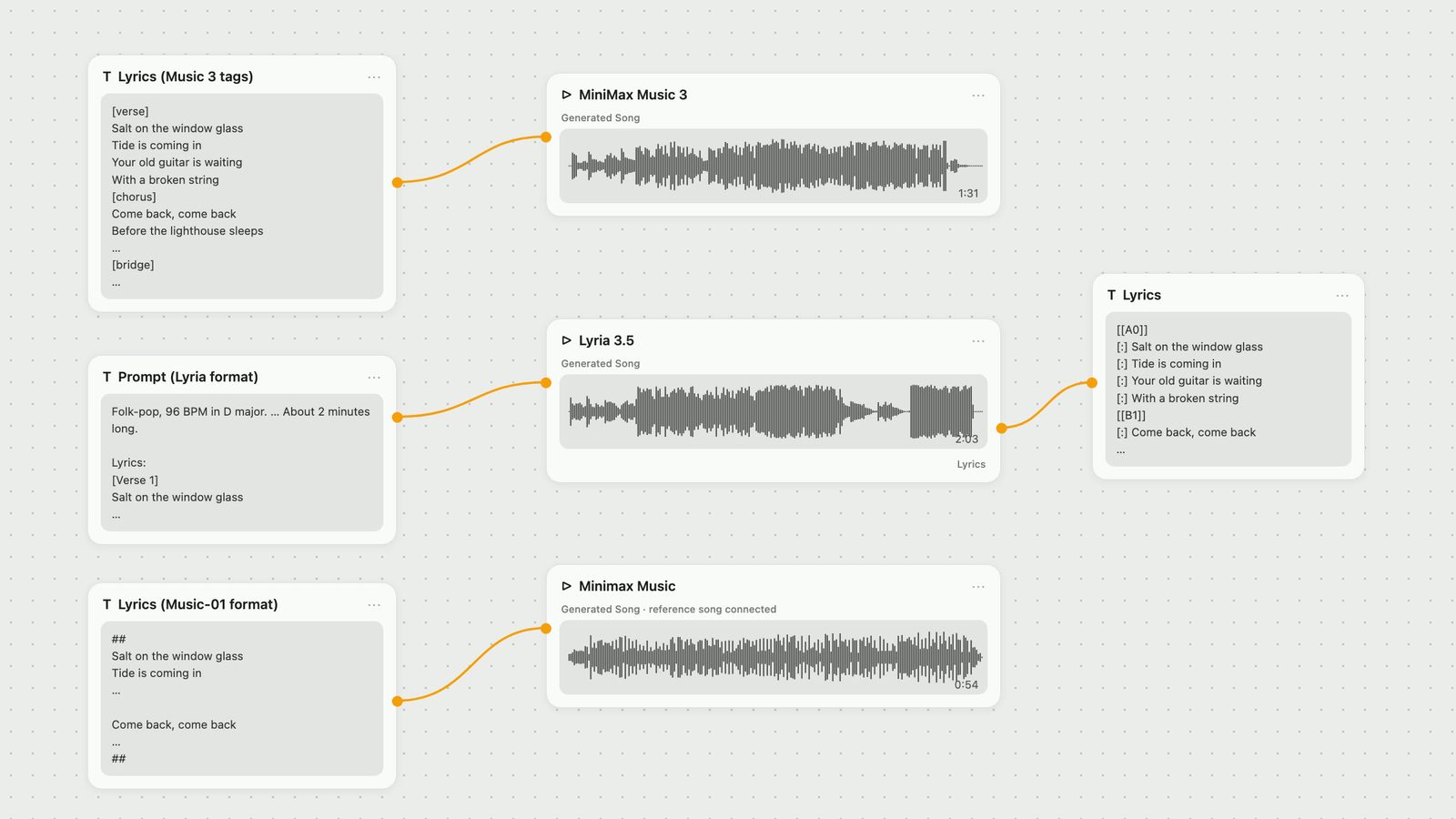
Quick answer: Write the song as labelled blocks of short lines, then format the labels the way each model's maker documents them. MiniMax Music 3 takes lyrics in their own field, with section tags such as [verse], [chorus] and [bridge], each on its own line. Lyria 3.5 has a single prompt: put the musical direction first, then a "Lyrics:" header followed by tags such as [Verse 1], [Chorus] and [Bridge]. Minimax Music (Music-01) has no section tags at all: one sung line per line, a blank line for a pause, ## at the start and end, and a reference song. Its documented limit is 600 characters, but in our test a 547-character sheet was refused. We sent the same verse, chorus, verse, chorus, bridge, chorus sheet through all three. Every one of the six songs sang the sections in the order written. Music 3 added a chorus that was not on the sheet in two of its three runs, and only Lyria 3.5 sent the lyrics back as text with the sections labelled.
Short lines, four per verse and chorus, a two-line bridge, and a chorus that comes back word for word three times. Repeating the chorus exactly is what makes it a chorus to a listener, and it also made the results easy to check: when speech-to-text heard "Come back, come back", we knew which section we were in.
VERSE 1
Salt on the window glass
Tide is coming in
Your old guitar is waiting
With a broken string

CHORUS
Come back, come back
Before the lighthouse sleeps
Come back, come back
The harbour lights still keep

VERSE 2
Gulls above the ferry
Rope around the pier
Every boat that passes
Sounds like you are near

CHORUS (same four lines)

BRIDGE
And if the sea won't bring you
I will learn to swim

CHORUS (same four lines)
The words were the same for every model. Only the section labels and the surrounding format changed, following each vendor's documentation. The musical direction was also the same: folk-pop, 96 BPM, D major, a clear and warm female lead, acoustic guitar and piano, bass and soft drums from the first chorus, a bridge that drops to piano and voice, and a final chorus that is the fullest.
MiniMax says that in Music 3 "section tags in the lyrics", naming [intro], [verse], [pre-chorus], [chorus], [bridge], [instrumental], [solo] and [outro], "define the song's macrostructure" (MiniMax). The model card adds [Post-Chorus] to that list and says to put structure tags "on their own lines" (model card). The input specification for the model version Fuser runs lists the same nine tags and says that text on the same line as a leading tag is dropped. Fuser's MiniMax Music 3 node guards against that: if you type "[chorus] Come back, come back", it moves the words onto the next line before the request is sent. It does this only for those nine tag names.
How to write it:
Put style, tempo, voice and arrangement in the Prompt field and only the words and tags in the Lyrics field. MiniMax's own caption tool keeps "musical instructions attached to lyric section tags in the arrangement description while keeping the lyric text in the lyrics input" (model card). In practice, write "the bridge drops to piano and voice" in the Prompt, not in the lyrics.
Use the tag names MiniMax lists, without numbers: [verse], [chorus], [bridge]. MiniMax's announcement and the API example write them in lowercase, while the model card capitalises them ([Verse], [Chorus]). We used lowercase.
Lyrics are required. The node will not run without them.
Set Duration with room to spare. It is an upper limit, not a target: the song can end earlier, and the node's Actual Duration output tells you what you got.
MiniMax is open about the limits: section tags "provide generative control rather than strict symbolic guarantees", and the song structure "may not always match every requested detail exactly" (model card). Our runs showed exactly that.
What we got. Two runs with the same prompt and lyrics, seeds 11 and 12, Duration set to 150 seconds:
Seed 11 ended on its own at 91.2 seconds. All six sections came in order: verse 1 started singing at 0.8 s, the chorus at 14.0 s, verse 2 at 29.0 s, the second chorus at 44.0 s, the bridge at about 61 s and the last chorus at about 71 s.
Seed 12 used the full 150 seconds. Speech-to-text heard an "ooh" at about 9 seconds and verse 1 from 11.9 s, then the sheet in order through the third chorus, which ended at about 75 seconds. It then found no words for about 30 seconds while the music kept playing, then the chorus sung twice more (between about 110 and 135 s), then a "come back" ad-lib, and the music was still going when the 150-second limit cut it off.
So a 150-second limit on a sheet that needs about 75 seconds of singing gave one tidy song and one that kept going. If you want a song to end, keep Duration close to the length you need and trim in your editor. Our MiniMax Music 3 prompt guide covers Duration and the other controls in detail.
Does the tag spelling matter? We ran seed 11 again with the same prompt, changing only the tags to the Lyria style: capitalised, with numbered verses ([Verse 1], [Chorus], [Verse 2], [Bridge]). The model card capitalises its tags too, but none of MiniMax's pages number them. The song still followed the sheet in order through the third chorus, but it came back at 120.9 seconds instead of 91.2 and added an extra chorus at about 93 seconds. One pair of runs cannot tell you that one spelling is better. It does show that with the seed held fixed, the tag text alone changed the song, so stick to the tag names MiniMax lists.
The Lyria 3.5 node has one text input, so the lyrics share it with everything else. Google's prompt guide says to put your lyrics "beneath a Lyrics: header" and to "tag each section to guide vocal delivery", with examples such as [Intro], [Verse 1] and [Chorus], and to use parentheses for "backing vocals, echoes, or ad-libs" (Lyria prompt guide). Google's API documentation names [Verse], [Chorus] and [Bridge] as the tags that "help the model understand the song structure", and asks you to "clearly separate" your lyrics from the musical direction (Gemini API docs). The guide also shows song order written with arrows, for example [Intro] -> [Verse 1] -> [Chorus].
How to write it:
Musical direction first: genre, tempo as a number, key, instruments, voice, mood, and how sections should change.
A length hint if you need one. Google says length is "controllable using prompt" (Gemini API docs). We wrote "About 2 minutes long."
A blank line, then "Lyrics:", then the tagged sheet.
Folk-pop, 96 BPM in D major.
Acoustic guitar and piano; bass
and soft drums enter at the first
chorus; the bridge drops to piano
and voice, and the final chorus is
the fullest. Female lead vocal,
clear and warm, with light
harmonies on the chorus. ...
About 2 minutes long.

Lyrics:
[Verse 1]
Salt on the window glass
...
[Bridge]
And if the sea won't bring you
I will learn to swim
[Chorus]
...
What we got. Two runs of that exact prompt came back at 122.8 and 120.7 seconds, close to the two minutes we asked for. Both sang the sections in order: the chorus started at 20.9 s in run 1 (the first chorus line we found in run 2 was at 26.3 s), the bridge at 83.5 and 85.3 s, and the last chorus at 102.3 and 101.3 s. Neither added a sung section that was not on the sheet.
Lyria 3.5 also returns a Lyrics output. Both runs sent back all 22 of our lines, word for word and in order, with each section labelled: A0 for verse 1, B1 for the chorus, A2 for verse 2, B3, C4 for the bridge and B5. The letter repeats when a section repeats, so both verses are A and all three choruses are B, which matches the sheet. Run 2 added a seventh label, D6, after the last chorus, with no words under it. Because Lyrics is an output socket, the words and section map stay on the canvas next to the song and can feed another node. Our Lyria 3.5 prompt guide explains that format in more detail.
One caution on the last chorus: in both Lyria runs our two speech-to-text passes picked up only its opening words ("Come back, come back"), although the audio there is at full level. The Lyrics output lists the full chorus, but whether all four lines were sung clearly is something to check by ear.
Music-01 works differently. MiniMax describes it as a model that learns "the rhythm and style of the vocals and accompaniment" from reference music you upload, then sings your lyrics (MiniMax). The Fuser Minimax Music node takes the lyrics in its Prompt field, up to 600 characters, plus a required reference song (a .wav or .mp3 over 15 seconds, with music and vocals). There is no section tag syntax, no style prompt and no length setting. When MiniMax announced Music-01 it said the model generates music "up to 60 seconds long" (MiniMax). The node documents three formatting marks: a new line for each sung line, two new lines for a pause, and ## at the start and end of the lyrics to add accompaniment.
So the structure comes from the text itself: blank lines between sections, and the chorus repeated in full.
##
Salt on the window glass
...
With a broken string

Come back, come back
...
The harbour lights still keep

Gulls above the ferry
...
##
The 600-character limit is tighter than it looks. Our full sheet in this format was 547 characters, under the documented 600, yet it was rejected twice with a prompt-length error. We cut the final chorus to its first two lines, which brought the sheet to 496 characters, and that ran. A 498-character sheet also went through in our Music 3 vs Music-01 test. If a sheet is refused, shorten it; do not count on the full 600.
What we got. One run, using the same 40-second reference song as our earlier MiniMax tests. The song was 53.8 seconds long, and speech-to-text found all 20 lines we sent, in order: verse 1 from 2.7 s, chorus 13.2 s, verse 2 22.7 s, chorus 33.3 s, bridge 42.8 s and the two-line closing chorus at 49.9 s. Each blank line became a gap of about 2.5 to 4 seconds between sections, while lines inside a section ran on without a break. Music-01 sang the most compact version of the song, but its voice and style come from the reference track, not from a description, so you cannot ask it for a female lead or a quieter bridge in words.
The order held in every run. What differed was what the models did around the sheet:
Intros. We did not include an [Intro] tag. Four of the six songs started singing within 1.2 seconds. If you want an instrumental opening, both MiniMax and Google document an intro tag ([intro] and [Intro]); we did not test it here.
Endings. Both Lyria runs ended close to the two minutes requested. Music 3 ended on its own once (91.2 s) and twice carried on past the last written chorus.
Section dynamics. Our prompt asked for a quieter bridge and a full final chorus. We measured average loudness per section rather than judging by ear. In Lyria run 1 the bridge was more than 7 dB quieter than the chorus before it, and the final chorus was the loudest part of the song. In Lyria run 2 the bridge was only about 1 dB quieter. In none of the three Music 3 runs was the bridge quieter than the chorus before it. Loudness is a rough proxy for an arrangement change, so listen before you decide.
Here are the first seconds of the switch from verse 1 into the first chorus in three of the songs. The clip plays muted inline; open it to hear it with sound.
One sung line per line of text. All three formats rely on line breaks. Our lines were 4 to 7 words long.
Repeat the chorus in full every time. We wrote it out all three times. None of the vendor pages cited here describes a shorthand for repeats, and we did not test one.
Keep direction out of the lyrics. Lyria wants the lyrics clearly separated from the musical direction, MiniMax keeps arrangement in the Prompt field, and Music-01 takes no direction at all. Anything that is not meant to be sung goes outside the lyric block.
Use only your own words. Google blocks prompts that request "the generation of copyrighted lyrics" (Gemini API docs).
Check the result, not just the order. Tags guide structure but do not guarantee it, as MiniMax says itself. Look at the waveform on the node, and with Lyria read the Lyrics output, before cutting the song to picture.
Pick Lyria 3.5 when you want the lyrics returned as text with the sections marked. In our two runs it also followed the sheet without adding sung sections and came back within three seconds of the length we asked for. Pick MiniMax Music 3 when you want separate fields for words and direction, a seed you can reuse, and a song of up to five minutes. Set Duration carefully and expect to trim. Pick Music-01 when you already have a track whose sound you want to reuse and the lyric is short.
On cost, Lyria 3.5 charges one flat amount per song, and Music-01 costs about a third of that. Fuser prices a MiniMax Music 3 run from the Duration you set, not from the length you get back: a 50-second limit costs about the same as one Lyria song, and our 150-second limit cost about three times as much.
For the full comparison of the two newer models, see Lyria 3.5 vs MiniMax Music 3. To score a finished edit, see AI music for video, and for the wider field, the best AI music and sound effect generators.
What each model documents, and what it did with our verse, chorus, verse, chorus, bridge, chorus sheet.
| Topic | How to write it | What our runs did |
|---|---|---|
| MiniMax Music 3 | ||
| Where lyrics go | Lyrics field; style and arrangement in Prompt. | Same prompt and lyrics in every run. |
| Section tags | [intro] [verse] [pre-chorus] [chorus] [post-chorus] [bridge] [instrumental] [solo] [outro], each on its own line. | Sections in order in all 3 runs. |
| Length | Duration is an upper limit, up to 300 s. | All at a 150 s limit: 91.2 s and 150.2 s with documented tags, 120.9 s with [Verse 1]-style tags; 2 of 3 runs added a chorus. |
| Lyria 3.5 | ||
| Where lyrics go | One prompt: direction first, then "Lyrics:". | Lyrics output returned all 22 lines, sections labelled. |
| Section tags | [Intro] [Verse 1] [Chorus] [Bridge] [Outro]; (parentheses) for backing vocals. | Sections in order in both runs, nothing added. |
| Length | A hint in the prompt: "About 2 minutes long." | 122.8 s and 120.7 s. |
| Minimax Music (Music-01) | ||
| Where lyrics go | Prompt field (lyrics only) plus a reference song. | Voice and style followed the reference. |
| Section tags | None. New line per line, blank line for a pause, ## at start and end. | All 20 lines found in order, gaps of 2.5 to 4 s between sections. |
| Length | Up to 600 characters; no length setting. | 547 characters refused twice; 496 ran, 53.8 s. |
It depends on the model. MiniMax Music 3 documents [intro], [verse], [pre-chorus], [chorus], [post-chorus], [bridge], [instrumental], [solo] and [outro], each on its own line in the Lyrics field. Lyria 3.5 uses a "Lyrics:" header inside the prompt with tags such as [Intro], [Verse 1], [Chorus] and [Bridge]. MiniMax Music-01 has no tags; sections are separated by blank lines.
No. MiniMax says its tags give "generative control rather than strict symbolic guarantees". In our test all six songs sang the sections in order, but two of three MiniMax Music 3 runs added a chorus after the sheet ended.
MiniMax lists [verse] without a number. In one test with the same seed, switching to [Verse 1]-style tags still kept the section order but changed the song from 91.2 to 120.9 seconds and added a chorus. Use the documented tags.
Type them into the same prompt as the musical direction. Put the direction first, then a blank line, then "Lyrics:" and your tagged sections. The node returns the song plus a Lyrics output listing the words with section labels.
The node allows 600 characters, but in our test a 547-character sheet was refused with a prompt-length error, while 496 and 498 characters ran. Keep it under about 500 characters and repeat the chorus in full.
No. Lyria asks for lyrics to be clearly separated from musical direction, and MiniMax keeps arrangement notes in the Prompt field and only the sung words in Lyrics. Anything inside the lyric block may be sung.
Google says Lyria 3.5 generates lyrics in the language of your prompt. We tested only English lyrics in this guide.
Format one lyric sheet for MiniMax Music 3, Lyria 3.5 and Music-01, run all three on the same canvas and compare the songs side by side.