One click, whole workflow
Recipes are here. Package a whole workflow and run it in one click
Explore recipesOne click, whole workflow
Recipes are here. Package a whole workflow and run it in one click
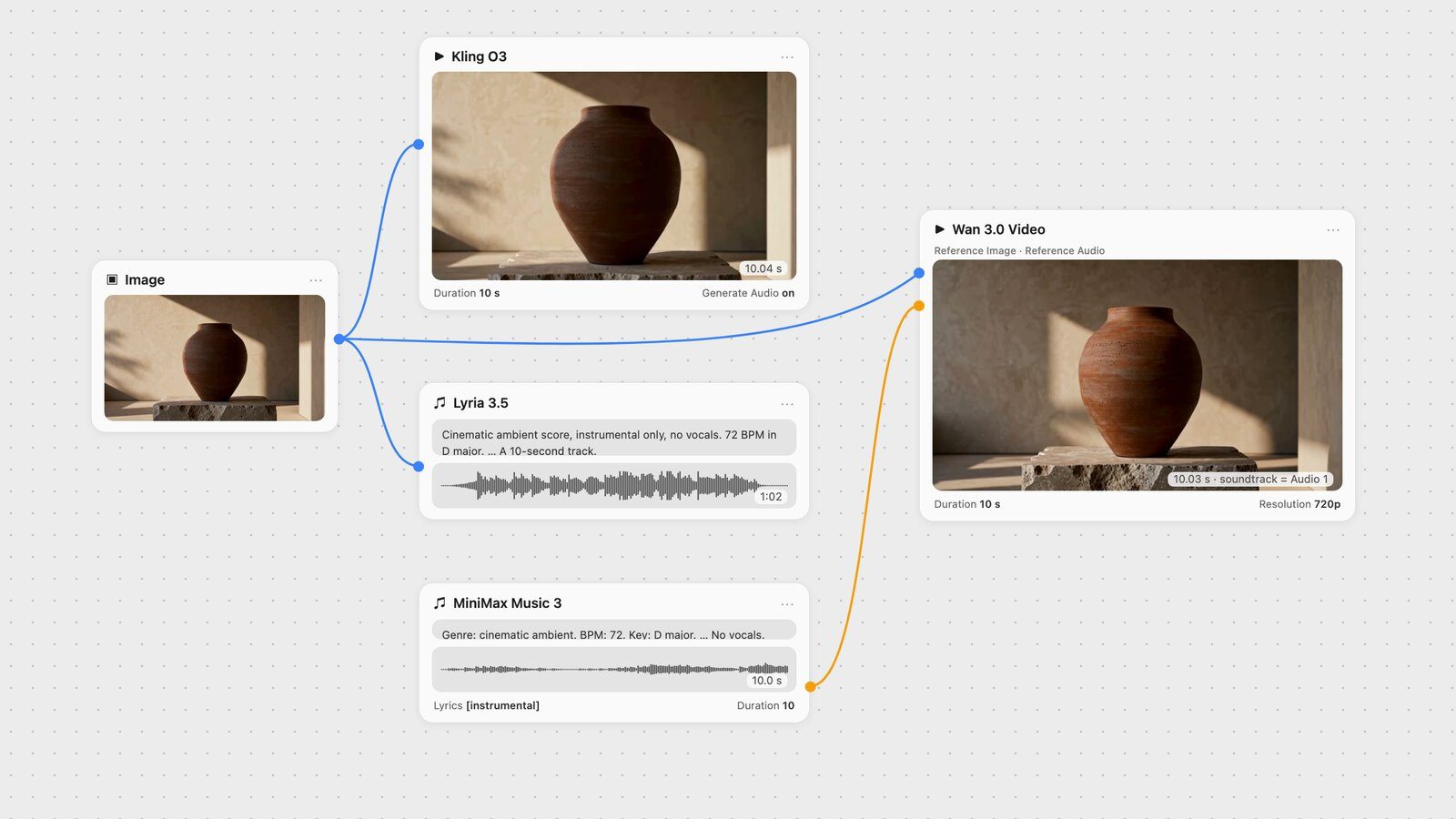
Explore recipesGenerate a score that fits your clip, join the two in your editor, or let Wan 3.0 build a shot around your track. Every route here was tested on the same 10-second clip.
All guides · Lyria 3.5 · MiniMax Music 3
Quick answer: To score a generated clip in Fuser, read the clip's length, then generate the music to fit. MiniMax Music 3 has a Duration setting: we set it to 10 for a 10-second clip and got a 10.00-second track. Lyria 3.5 takes the length only as a prompt hint plus one image for mood; "a 10-second track" came back at 62.5 seconds, so you cut a section from it. Fuser has no node that lays a music file under an existing clip, and the Compositor exports video without sound, so you join picture and music in your video editor after downloading both. If you want the music inside a generated video instead, Wan 3.0 can take your track as Reference Audio: in our test its output soundtrack was our track, essentially unchanged.
Be clear about this before you start, because it decides the workflow:
Generating the music: yes. Lyria 3.5 and MiniMax Music 3 each output an audio file on the canvas, next to the video node it is meant for.
Laying a track under a clip you already have: no. No node in Fuser mixes a music file into an existing video. The Compositor works on images and video frames and exports an MP4 with no audio track, and the lip-sync nodes that take a video plus an audio file re-animate a face to match speech. That step happens in your video editor.
Generating sound for a clip you already have: yes, but built for effects. MMAudio and Mirelo SFX take the video itself and return it with a generated track synchronized to the action. Mirelo is described as a sound-effects model; we did not test either for a music score.
Video with sound made in one pass: yes, from the video models that generate their own audio (Kling O3, Wan 3.0, Seedance 2.5, Veo 3.1). That sound is theirs, not your track.
A new video built around your track: yes, by connecting your music as a reference to Wan 3.0 or Seedance 2.5. You get a new shot, not your original clip with music added.
The steps below cover the first route, then the two alternatives, all tested on the same 10-second shot of a terracotta vase. Each test was one run.
We animated our vase still with Kling O3 Standard, image-to-video, Duration 10, and a slow push-in prompt. The file came back at 10.04 seconds, 24 frames per second. That number is your target: the score should be at least as long as the clip, and ideally end where the picture ends.
MiniMax Music 3 is MiniMax's music model, released on 13 August 2026 with open weights and songs "up to five minutes" long (MiniMax). The Fuser node has a Prompt, a Lyrics field, and a Duration slider from 1 to 300 seconds. The node treats Duration as a maximum, "the model can finish earlier", and reports the real length on its Actual Duration output, so check that number rather than assuming.
Two things to know for scoring:
Lyrics are required in Fuser. For an instrumental, put a structure tag on its own: we used [instrumental], one of the tags MiniMax lists alongside [intro], [verse] and [outro] (Hugging Face model card). Speech-to-text found no words in the result.
Write the cue like a brief. Our prompt gave genre, tempo, key, the mood over time, and the arrangement, and named the job: "background score for a 10-second product film of a terracotta vase in late-afternoon sunlight".
Genre: cinematic ambient. BPM: 72. Key: D major. Emotional progression:
calm and warm, a slow gentle swell, then settling. Listening scenario:
background score for a 10-second product film of a terracotta vase in
late-afternoon sunlight. Production profile: clean, wide, premium.
Vocal Details: No vocals. Purely instrumental.
Arrangement: Felt piano motif over a soft string pad; a low cello note
enters halfway; ends on a sustained piano chord.

Lyrics: [instrumental]    Duration: 10
What came back: a 10.00-second WAV. A low note entered at 4.85 seconds, close to the "halfway" we asked for. The track did not wind down at the end, though: its last tenth of a second was still at full level, so it stops rather than resolves. Fade the last half second in your editor, or set Duration a few seconds longer than the clip and choose where to cut.
Because MiniMax Music 3 is priced by the duration you set, a 10-second cue costs about a fifth of one Lyria 3.5 song. The MiniMax Music 3 prompt guide covers the prompt format in depth.
Lyria 3.5 is Google DeepMind's music model, announced on 29 July 2026 (Google). Google describes its output as songs of "a couple of minutes (controllable using prompt)", with duration set "by specifying it in your prompt" or by timestamps, in 44.1 kHz stereo (Gemini API docs). There is no duration setting. What it adds for video work is the Image Inspiration input: Google says the model composes music inspired by the images you give it. The API takes up to 10 images; the Fuser node takes one.
We connected the vase still the clip started from to Image Inspiration and used the same brief in Lyria's style, ending with "A 10-second track." The song came back at 62.5 seconds. It opened very quietly and built up: the first second measured about -50 dB and the music reached full level only around 6 seconds in, then ran steadily until a fade near the minute mark. For a 10-second clip that means picking a 10-second section, not using the start.
Our Lyria 3.5 prompt guide found the same pattern: a 60-second request returned 66 seconds and a 2-minute request 118 seconds, but all three 30-second requests came back at about a minute. Lyria suits a scene that needs a longer cue, or when you want the picture itself to steer the mood; MiniMax Music 3 suits a cue that must be an exact length. Lyria 3.5 vs MiniMax Music 3 compares them on the same prompts.
Google states that all Lyria output carries an inaudible SynthID watermark (Gemini API docs).
Use Download media on the video node and on the music node, then in any video editor:
Place the music at the start of the timeline, under the clip.
Trim it to the clip's length (or slide a longer Lyria track until the section you want lines up).
Fade the last half second.
Mute the clip's own audio, or keep it under the music if it carries useful room sound.
We did exactly this with the Kling clip and the MiniMax track, adding a 0.6-second fade. The track was 0.04 seconds shorter than the clip, too little to see.
Several video models in Fuser generate audio with the picture. It is quicker than scoring, but you don't choose the track, and you can't change the music later without regenerating the shot.
Kling O3. Kling describes its native audio as "synchronized dialogue, ambient sounds, and sound effects" (Kling). In Fuser, Generate Audio is off by default. Our clip in Step 1 had it on, and the prompt ended with "Audio: a slow, warm solo piano melody over soft room tone". The soundtrack did contain music: a run of struck, decaying pitched notes from 0.3 seconds to the end, with no speech. It was also quiet, about 9 dB lower on average than the MiniMax track.
Wan 3.0. Alibaba says it "natively outputs dialogue, BGM, and sound effects" (Alibaba Cloud). Its Generate Audio toggle is on by default in Fuser.
Seedance 2.5 generates synchronized sound effects, ambience and speech when Generate Audio is on.
Veo 3.1 is, in Google's words, "a model for generating video with native audio" (Gemini API docs).
For a side-by-side of these models' audio, see the best AI video generators with audio.
Two video models in Fuser accept audio as an input. Here the music comes first and the model generates a new video around it, so this suits a shot you haven't made yet. We sent each one the same three things: the vase still as a reference image, the 10-second MiniMax track as reference audio, and a prompt ending "Use Audio 1 as the background music for the whole video" (written "@Audio1" for Seedance). Both were set to 10 seconds with audio on. To check what came back, we compared each output soundtrack with our track sample by sample. As a control, the same comparison against the Kling clip's unrelated audio scored 0.02 overall.
Wan 3.0: our track, essentially unchanged. The Wan 3.0 node takes up to five Reference Audio clips totalling 15 seconds, addressed in the prompt as Audio 1, Audio 2 and so on (Alibaba Cloud). Alibaba's guide describes audio references as a way to "provide music or voice to generate dance or lip-sync animation synchronized with the beat/tone" (Alibaba Cloud). In our 720p run on the Standard model, the output's soundtrack matched our track with a correlation of 0.98 at zero offset, within 1 dB of its level, with the low note at 4.85 seconds as in the original. The picture was a new 10.03-second shot of the vase, not our Kling clip. One limit: reference media can't be combined with a start or end image. Fuser asks you to remove them, so you can't pin the exact first frame in this mode. The Wan 3.0 guide covers the other reference types.
Seedance 2.5: the right notes, stretched out. The Seedance node takes reference audio on Seedance 2.5 only: up to 10 MP3 or WAV files, each 2 to 30 seconds, 30 seconds in total. Fuser also needs at least one reference image or video alongside it, referred to as @Image1, @Audio1 and so on. Our 480p run kept our notes at the same pitch but stretched them out, so the music took about 12 to 14 percent longer to play. The low note arrived at 5.5 seconds instead of 4.85, and the gap grew as the track went on: under 0.1 seconds at the start, about 0.6 seconds by the 4-second mark and 1.2 seconds by 8 seconds. The 10.1-second video ran out when it had reached roughly 8.7 seconds into our track, so the ending we wrote never played. For a wider comparison of the two models, see Wan 3.0 vs Seedance 2.5.
These are single runs, so treat them as what happened once, not a guarantee. If the exact track matters, as it does for a licensed cue or a voiceover, check the waveform after generation, or keep the music out of the video model and combine the two in your editor as in Step 3.
You have the clip and need music that fits it exactly: MiniMax Music 3 with Duration set to the clip length, then your editor.
You want the picture to set the mood, or need a longer cue: Lyria 3.5 with the clip's start image as Image Inspiration, then cut a section in your editor.
You haven't made the shot yet and the music is fixed: connect the track to Wan 3.0 as Reference Audio.
You want sound effects and ambience more than a score: turn on the video model's own audio. For sound effects on their own, see the ElevenLabs sound effects guide.
All of these run as nodes on one canvas, so the clip, both scores and any reference-audio test stay side by side while you choose. For longer chains that take a still through video and sound, see how to chain AI models in one workflow.
What each route does, and what it did in our tests on one 10-second shot.
| Route | How it works in Fuser | What we measured |
|---|---|---|
| Score your clip, combine in an editor | ||
| MiniMax Music 3 | Duration slider (1 to 300 s, a maximum); Lyrics required, [instrumental] for no vocals. | Duration 10 gave 10.00 s; no words detected; ends at full level, so add a fade. |
| Lyria 3.5 | Length only as a prompt hint; one Image Inspiration input. | "A 10-second track" gave 62.5 s; full level only from about 6 s. |
| Music made inside the video | ||
| Native audio | Generate Audio on Kling O3 (off by default), Wan 3.0 and Seedance 2.5 (on by default), Veo 3.1. | Kling O3 asked for piano: pitched notes throughout, about 9 dB quieter than our score. |
| Wan 3.0 reference audio | Up to 5 clips, 15 s total; no start or end image in this mode. | Soundtrack matched our track: correlation 0.98, no offset. |
| Seedance 2.5 reference audio | Up to 10 files, 30 s total; needs an image or video reference too. | Same notes and pitch, stretched about 12 to 14 percent; the last second or so of our track never played. |
Not directly. No node mixes a music file into an existing video, and the Compositor exports video without an audio track. Generate the music in Fuser, download both files, and join them in your video editor. MMAudio and Mirelo SFX can generate sound for an existing clip, but they are built for synchronized sound effects rather than a score.
Use MiniMax Music 3 and set Duration to the clip length. It is a maximum, so check the Actual Duration output. In our test, Duration 10 returned a 10.00-second track for a 10.04-second clip.
Not reliably. Lyria 3.5 has no duration setting, only prompt hints. Asking for "a 10-second track" gave us 62.5 seconds, so plan to cut a section in your editor.
The Lyrics field is required, so enter a structure tag such as [instrumental] on its own and write "No vocals. Purely instrumental." in the prompt. Speech-to-text found no words in our result.
Wan 3.0 and Seedance 2.5 accept reference audio. In our single test, Wan 3.0 returned a video whose soundtrack was our track, essentially unchanged, while Seedance 2.5 kept the notes but stretched them out by about 12 to 14 percent. Both generate a new shot rather than adding music to an existing clip.
They can. Wan 3.0 is documented as generating background music. Kling describes Kling O3's audio as dialogue, ambience and sound effects, but when our prompt asked for a piano melody its soundtrack contained pitched notes throughout. Either way, the music is the model's, not a track you chose.
Generate the clip and its music side by side, compare scores against the picture, then take the winner to your edit.