One click, whole workflow
Recipes are here. Package a whole workflow and run it in one click
Explore recipesOne click, whole workflow
Recipes are here. Package a whole workflow and run it in one click
Explore recipesAI video face swap tested on one clip: MiniMax H3 Recast with and without a face-only prompt, Kling O3 Edit, and the swap-frame-one-then-animate route, with what each kept of the face, hair, clothes, lips and voice.
All guides · Replace people in a video · MiniMax H3 Recast guide
Quick answer: To face swap a video, give MiniMax H3 Recast in Fuser the clip (5–30 s, no shot over 15 s) and one photo per face, up to four. Recast keeps the motion, camera, cuts, lip movement and original sound, but with no prompt it replaces the person's whole look: in our AI video face swap test, a tight headshot still swapped her silver hair for the photo's black hair and her rust cardigan for a green one. Add a prompt that says to replace only the face and keep the hair and clothes, and Recast kept both. For a face-only swap on a single 3–15 s shot, Kling O3 Edit takes the clip, the photo as @Image1 and a written instruction; in our run it kept the cardigan and the actions but gave a blend of the two faces and darkened the hair. We ran each method once on one 6-second clip on 23 October 2026. Everyone on this page is AI-generated.
The source is a 6-second, 1280 × 720, 24 fps clip with sound, generated with Kling 3.0 so that no real person appears in it: a ceramicist in her late fifties with short silver-grey hair and a rust-orange wool cardigan lifts a cracked bowl, turns it to the camera and says "This one cracked in the kiln, and I kept it anyway." The face photo is a tight headshot made with Nano Banana 2.1 in Gemini Image: a woman in her early thirties with freckles, a small mole above her lip, black hair pulled back and a gold hoop earring, cropped from forehead to chin.
We picked the two to be easy to tell apart, so you can see what each method takes from the photo and what it keeps from the clip: face, hair, clothes, lip movement and voice. Then we ran three methods, one run each:
Recast, with no prompt and again with a face-only prompt, at 768p.
Kling O3 Edit, Edit mode, Standard, Keep Audio on, with the photo as @Image1.
The first-frame route: swap the face in frame 1 with an image model, then animate that frame with MiniMax H3.
With no prompt, Recast did exactly what the node says it does: it replaced the person with the person in the photo. Her face matches the headshot closely, mole and earring included, though the freckles came out fainter and the skin smoother. Every head turn, the lift and turn of the bowl, the hand positions and the camera drift match the source. The mouth shapes line up with the source frame for frame, and the output plays the original soundtrack at the same loudness (we measured both at −30.2 dB mean). The output came back at 1344 × 768, the same 6.04 seconds.
What surprised us is how much else came with the face. The photo shows almost nothing below the chin, but Recast still gave her the photo's black, pulled-back hair and swapped the rust cardigan and cream shirt for a sage-green cardigan and a pale green top. The Recast model page says hair and outfit follow the reference photo when it shows more than a face; in our run they changed even from a cropped headshot. If your shot depends on wardrobe or hair continuity, don't run Recast without a prompt.
So we ran it again with this prompt and nothing else changed:
"Replace only the face of the woman with the face from the photo. Keep her short silver-grey hair, her rust-orange wool cardigan and cream shirt, the cracked bowl and every action exactly as they are."
That run kept the silver hair, the rust cardigan and the cream shirt, and put the headshot's face under them: the eyebrows, nose, skin tone and the mole above the lip all came from the photo. Her face reads a little older than the photo, closer to the source's age lines, so on one run each we'd call the likeness strong but not exact. Lip movement and the original voice were kept again. In the clip below, the divider sweeps between the two Recast runs.
For a face swap video, then, Recast plus a short "replace only the face, keep the hair and clothes" prompt is the setup we'd start with. Leave the prompt empty when you want the whole person from the photo, outfit and all.
Kling O3 Edit edits a single input clip of 3 to 15 seconds from a written instruction, with up to four reference images cited as @Image1 to @Image4. Kling's own template for this kind of edit is "Change [describe specified subject] in [@Video] to [describe target subject] from [@Image]" (Kling VIDEO O1 user guide). We wrote ours the same way:
"Change only the face of the woman in @Video1 to the face from @Image1. Keep her short silver-grey hair, her rust-orange wool cardigan and cream shirt, the cracked bowl, the studio, the camera movement and every action and mouth movement exactly as they are."
Kling kept the cardigan, the shirt, the bowl, every action, the lip movement and, with Keep Audio on, the source sound at the same loudness, at 1280 × 720. It was weaker on the two things a face swap is for. The face is a blend: younger than the source and with the photo's earring and a hint of freckles, but with the source's face shape and no mole, so it doesn't read as the woman in the photo. And the hair turned dark at the sides and back with silver only on top, although the prompt asked to keep it. On this clip, with one run each, Recast with the face-only prompt was clearly closer to the photo.
Kling O3 Edit still has a place. It can change other things in the same instruction, such as the outfit or the set, and per second of output it costs about half as much as Recast at 768p. Our Kling O3 Edit guide covers its Edit and Reference modes.
The third method is the one many face swap tutorials teach: take the first frame, swap the face with an image model, then animate the edited frame with an image-to-video model. We gave frame 1 and the headshot to GPT Image (GPT Image 2.5 Sunburst, high quality) and to Nano Banana 2.1 in Gemini Image with the same instruction: replace only the face, keep the hair, the cardigan, the glance, the hands and the framing.
Both image swaps are good. Each put the photo's face, freckles and mole under the silver hair and kept the cardigan, the bowl and the light. GPT Image kept the exact 1280 × 720 framing; Nano Banana returned 1376 × 768 and sat slightly closer. We animated the GPT Image frame with MiniMax H3 (H3, 768p, 6 s) and a prompt describing the same action and line.
The result looks right and keeps the face from the edited frame, but it is a new take, not your video. MiniMax H3 invented its own timing and gestures, the crack in the bowl changed shape as she turned it, and the clip came back at 6.58 seconds. It also generated a new voice: a transcription of the output reads "This one cracked in the kiln, and I kept it anyway", but in a different voice from the source, mixed louder. Use this route when you want a fresh shot of the new face, or when the source is shorter than Recast's 5-second minimum. When the performance itself has to survive, use Recast.
Trim the clip. Recast needs 5 to 30 seconds with no single shot over 15 seconds; Kling O3 Edit needs one clip of 3 to 15 seconds, 720 to 3,840 pixels per side, at 24 to 60 fps.
Add a Video node with the clip and an Image node with a sharp, front-facing photo of the new face, one photo per person, up to four.
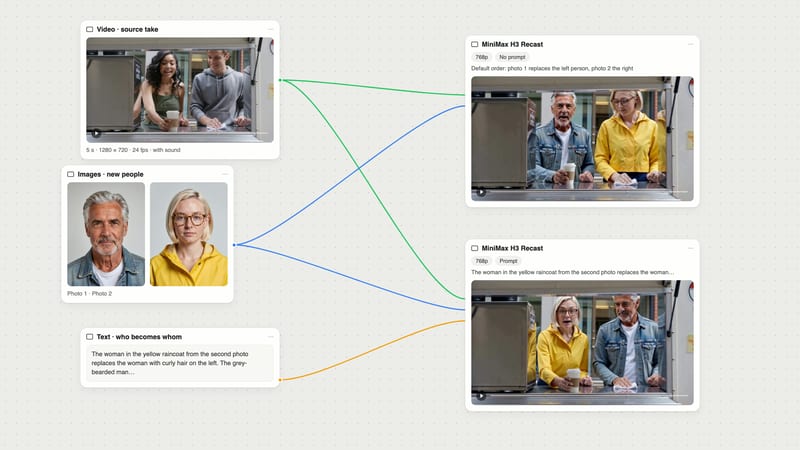
Connect the video to a MiniMax H3 Recast node's Video input and the photos to People. With several people and no prompt, the photos replace the main people from left to right.
For a face-only swap, add a Text node to Prompt: "Replace only the face of [who] with the face from the photo. Keep [their hair], [their clothes] and every action exactly as they are." Leave Prompt empty to bring in the whole look from the photo.
Run at 768p to check the likeness, then rerun the keeper at 1080p, the node's default. The output keeps the source's length and sound.
To compare, wire the same video and photo into a Kling O3 Edit node, cite them as @Video1 and @Image1 in its prompt, and run both from the same canvas.
A face swap and a full replacement use the same Recast node; the prompt decides which you get. Our tests show the default leans towards the whole person. If you want to recast a scene with different people entirely (face, hair, body and clothes, several people at once, across cuts), read how to replace people in a video with AI, where we ran Recast on a two-person clip with and without a who-becomes-whom prompt. The MiniMax H3 Recast guide goes deeper into the node.
If you have a performance and a character image and want a new clip of that character doing it, rather than an edit of the original scene, that is motion transfer: Kling 3.0 Motion Control animates the image with the driving clip's movement.
All three video-to-video methods keep the source voice. Recast keeps the source soundtrack, and Kling O3 Edit does too with Keep Audio on, the node's default, so the new face speaks in the original performer's voice. That is usually right for a face swap, and wrong when the new face belongs to someone else who should sound like themselves.
To change it, make the new line with ElevenLabs TTS or a recording, then re-sync the mouth with LatentSync, which takes a video and an audio track. We tried it on the no-prompt Recast output with a 3.87-second ElevenLabs line. LatentSync moved the mouth to the new audio, but its output ran only as long as the audio, 3.84 seconds, and the speech started while she was still looking down at the bowl. Make the new audio as long as the clip, with the pauses where the original ones were, before you sync. For more options, see the best AI lip sync tools.
A face swap puts one person's face on another person's performance, so it involves both of them, and your audience.
Get written permission from the person whose face you use and from the performer in the source, whose movement, expressions and voice remain. Don't use photos of people who haven't agreed, including public figures. We used only AI-generated people.
Label the result. YouTube says creators must disclose content that "makes a real person appear to say or do something they didn't do", and that creators who consistently don't disclose "may be subject to manual application of a label, or penalties from YouTube, including removal of content or suspension from the YouTube Partner Program" (YouTube Help).
TikTok's guidelines require "creators to label AI-generated or significantly edited content that shows realistic-looking scenes or people" (TikTok Community Guidelines). Check the rules of every platform you publish to.
Keep the source clip, the photos and the permissions with the project, so you can show what was changed and who agreed.
Limits from the Fuser nodes; results from our runs on 23 October 2026, one run each on one 6-second clip.
| Method in Fuser | Use it when | Catch |
|---|---|---|
| Swap the face in your video | ||
| MiniMax H3 Recast, face-only prompt | Only the face should change: hair, outfit, actions, lip movement and voice stay. 5–30 s, cuts allowed, up to four people. MiniMax H3 Recast | Strong likeness, but the face read a little older than the photo, closer to the source. |
| MiniMax H3 Recast, no prompt | You want the person from the photo in the clip, look and all. | Hair and clothes change too: a cropped headshot still brought the photo’s hair and a new cardigan. |
| Kling O3 Edit | One shot of 3–15 s, and you also want to change other things by instruction. Kling O3 Edit | The face was a blend of both women, with no mole, and the hair darkened despite the prompt. |
| Make a new take or a new voice | ||
| First frame + MiniMax H3 | You want a fresh shot of the new face, or the clip is under 5 s. MiniMax H3 | New performance and new voice: timing, gestures and the crack in the bowl changed. |
| LatentSync after the swap | The new face should say a new line in a new voice. LatentSync | The output ran only as long as the new audio (3.84 s), so match the audio to the clip first. |
Connect the clip and one photo of the new face to MiniMax H3 Recast in Fuser, and add a prompt such as "Replace only the face of the woman with the face from the photo. Keep her hair, her clothes and every action exactly as they are." Recast keeps the motion, camera, cuts, lip movement and sound. Without a prompt it also brings in the photo’s hair and clothes.
Fuser has no free plan. Eligible new accounts receive a 30-day Professional trial and 500 starting credits, and every run, including MiniMax H3 Recast in Fuser, uses credits. Run Recast at 768p to check the likeness before you rerun the keeper at 1080p.
Yes. MiniMax H3 Recast in Fuser keeps the source soundtrack, and in our test the output matched the source loudness exactly; Kling O3 Edit does the same with Keep Audio on. To give the new face a different voice, generate a new line with ElevenLabs TTS and re-sync the mouth with LatentSync.
MiniMax H3 Recast in Fuser takes 5 to 30 seconds, with no single shot longer than 15 seconds, and keeps the source’s length. Kling O3 Edit takes one clip of 3 to 15 seconds. Split anything longer into parts and run each one.
It depends on where you are and how you use the result, so get written permission from the person whose face you use and from the performer in the source before you run MiniMax H3 Recast in Fuser or any other tool. Platforms also require labels: YouTube requires disclosure of content that makes a real person appear to say or do something they didn’t do, and TikTok requires labels on realistic AI-generated or significantly edited content.
Connect a clip and a face photo to MiniMax H3 Recast, add a face-only prompt, and run Kling O3 Edit beside it on the same canvas.