One click, whole workflow
Recipes are here. Package a whole workflow and run it in one click
Explore recipesOne click, whole workflow
Recipes are here. Package a whole workflow and run it in one click
Explore recipesHow to swap the people in an existing video while keeping its cuts, camera and sound: MiniMax H3 Recast tested with and without a who-becomes-whom prompt, compared with Kling O3 Edit on the same clip, plus motion transfer, voices, consent and disclosure.
All guides · MiniMax H3 Recast guide · Best AI video editing models
Quick answer: To replace the people in a video you already have, give MiniMax H3 Recast the clip (5 to 30 seconds, no single shot longer than 15 seconds) and one photo per new person, up to four. With no prompt, the photos replace the main people from left to right; a short prompt saying who becomes whom overrides that order. Recast keeps the source's motion, camera, cuts and sound. For a single shot of 3 to 15 seconds, Kling O3 Edit can do the same job from a written instruction plus reference images. If you want a new clip of a new character driven by an existing performance, rather than an edit of the original scene, use Kling 3.0 Motion Control or Runway Act-Two. We ran Recast twice and Kling O3 Edit once on one 5-second two-person clip, one run each: both models put the right person in the right place and kept the actions, the handheld camera and the soundtrack. Everyone shown on this page is AI-generated.
"Replace the person" covers three different jobs, and each tool in Fuser handles one of them.
Keep the whole edit, change who is in it. The cuts, framing, timing and audio of your video are final; only the faces and bodies change. This is what Recast is built for: the Fuser node takes 5 to 30 seconds and up to four new people, and Recast puts each one into every shot they appear in.
Change one shot with words. You have a single shot of 3 to 15 seconds and want to swap a person, an outfit or anything else by instruction. Kling O3 Edit's Edit mode does this, with up to four reference images. Kling says video editing in its 3.0 Omni model works the same as in O1 (Kling VIDEO 3.0 Omni guide), and its O1 guide gives the template "Change [describe specified subject] in [@Video] to [describe target subject] from [@Image]" (Kling VIDEO O1 guide).
Make a new clip from an existing performance. You have a performance on video and a picture of a different character, and you want that character doing the performance. Kling 3.0 Motion Control and Runway Act-Two do this. The result is a new clip built from your character image, not your original scene with a different person in it.
Two tools that sound right are weaker fits. Runway Aleph 2 edits an input video by instruction (add, remove, replace, re-light, restyle), but Fuser's node warns that "subjects and objects from images may not be consistent at this time", so a reference photo steers colour, style and lighting better than it carries a specific person's identity. And lip-sync tools change only the mouth to match new audio; if that is all you need, see the best AI lip sync tools.
Recast replaces the people in an existing video with the people in your reference photos while preserving the source's motion, camera work, cuts and audio. Those are the Fuser node's own terms, and they set its limits:
Video: 5 to 30 seconds, with no single shot longer than 15 seconds. The output keeps the source's length and sound.
People: one photo per new person, up to four. By default they replace the main people in the video from left to right.
Prompt: optional, up to 2,000 characters, for who becomes whom or anything else to keep or change.
Resolution: 768p or 1080p, with 1080p as the node's default. 1080p costs half as much again per second as 768p, and Recast bills by the second of output, so trim the source before you run it.
Recast runs on H3 Max, which is built on MiniMax H3. MiniMax's H3 announcement describes the base model editing an existing video from references, in its reference mode, with a prompt that cites the inputs as tags such as "<Video 1>" and "<Subject 1>" and asks for "an edited version of <Video 1>" (MiniMax H3 announcement). Recast needs no tags: you connect the photos and, if needed, describe the people in plain words. Our MiniMax H3 Recast guide goes deeper into the node itself.
Trim the clip to the moment you need before anything else. It has to be at least 5 seconds long, and any shot over 15 seconds must be cut down or split by an edit. Our test clip is a 5-second, 1280 × 720, 24 fps take with sound: two people behind the counter of a coffee cart, the woman on the left sliding a cup towards the camera and saying "One flat white, extra hot", the man on the right wiping the counter. We generated it with Kling 3.0 (Standard, native audio on) so that no real person appears in it.
For the new people we generated two head-and-shoulders portraits with FLUX.3 Image: an older man with a grey beard in a denim jacket (photo 1) and a younger woman with a platinum bob, round glasses and a yellow raincoat (photo 2). Both face the camera against a plain grey background in even daylight, so the face, hair and clothes are easy to read. That is how we built ours, not a documented requirement, but it removes guesswork about which person in the photo you mean.
Write down the photo order. With no prompt, the order you connect the photos in is the order they replace people from left to right.
We ran Recast twice on the same clip and the same two photos, at 768p, one run each. The first run had no prompt. The second had this one:
"The woman in the yellow raincoat from the second photo replaces the woman with curly hair on the left. The grey-bearded man in the denim jacket from the first photo replaces the young man in the grey hoodie on the right. Keep the coffee cart, the street, the camera movement and every action exactly as they are."
No prompt: the default order held. Photo 1, the grey-bearded man, replaced the woman on the left; photo 2 replaced the young man on the right. Each new person took over the original's actions: the man now slides the cup and mouths the line, and the woman wipes the counter.
With the prompt: the mapping followed the prompt instead of the photo order. The woman in yellow took the left position and the cup, and the bearded man took the right and the cloth.
In both runs the coffee cart, the street, the handheld camera movement and the timing match the source, and the reflections in the cart's side glass changed along with the people. The output came back at 1344 × 768, the same 5.04 seconds, with the source soundtrack at the same loudness. One difference between the runs: in the prompted run, the woman from photo 2 reads older than her reference photo; in the default run she stays closer to it. With one run each, we can't say whether the prompt caused that. If a likeness matters, budget for more than one run and compare.
If the default order already gives the result you want, leave the prompt empty. If not, describe each person by something visible in the source ("the woman with curly hair on the left") and in the photo ("the woman in the yellow raincoat from the second photo"), as above.
For a single short shot, Kling O3 Edit is the other option in Fuser, so we gave it the same source and the same two photos as @Image1 and @Image2, on Standard with Keep Audio on, one run. The prompt asked for the same mapping as Recast's prompted run, written in Kling's template:
"Change the woman with curly hair on the left in @Video1 to the woman in the yellow raincoat from @Image2, and change the young man in the grey hoodie on the right in @Video1 to the grey-bearded man in the denim jacket from @Image1. Keep the coffee cart, the street, the camera movement and every action exactly as they are."
On this clip the two came out close. Kling O3 Edit put each person where the prompt asked, kept both actions, the handheld camera and the reflections, and returned the source sound at the same loudness, at 1280 × 720 to match the input. Its version of the woman from photo 2 also reads older than her reference, much like Recast's prompted run. With one run each on one 5-second shot, that is not enough to call either one more faithful.
The useful differences are in what each accepts and what it costs:
Length and cuts. Kling O3 Edit takes a single input clip of 3 to 15 seconds in Fuser. Recast takes 5 to 30 seconds and handles multiple shots, so a cut sequence can go through in one run.
Instruction. Recast needs no prompt for a left-to-right swap. Kling O3 Edit needs a written instruction for every edit, but the same run can also change things other than people, and Reference mode can generate a new shot from the clip instead (Kling O3 Edit guide).
Cost. Per second, Recast at 768p costs more than twice as much as Kling O3 Edit Standard.
For a short single shot, try Kling O3 Edit first. For a finished edit with cuts, longer than 15 seconds, or with three or four people to replace, use Recast.
Motion transfer takes a different route: you give a character image and a driving video, and the model animates the image with the video's movement. The new clip has the image's character, setting and light. Two Fuser nodes do this.
Kling 3.0 Motion Control follows the driving clip's movement. In Video orientation the driving clip can run to 30 seconds for full-body motion; Image orientation caps it at 10 seconds. Kling's guide asks for a single continuous shot, and with more than one person in the driving clip, "the motion of the character occupying the largest portion of the frame will be used" (Kling motion control guide). It is a one-person tool.
The closest it gets to a person swap is to build the character image from the driving clip's first frame. In our Kling 3.0 Motion Control guide we did exactly that: the clip's first frame, edited with FLUX.2 to put an older potter in place of the woman, then animated with her performance.
Image B, built from the clip's first frame, is the one that works: his hands close around the vase where hers were. Image A, a different composition, does not. These are that guide's inputs, not the coffee-cart clip, so they don't compare directly with the Recast runs above.
Runway Act-Two transfers a 3 to 30 second driving performance, including motion, speech and expression, to a character image or a character video. With an image, the character performs in the image's static setting; with a character video, the character keeps its own animated environment and some of its own movement. Expression intensity and an optional body control (gestures as well as the face) tune the result. See our Runway Act-Two guide for how to build the character input.
MiniMax H3 in reference mode is a third route. Fuser's node takes subject images and reference videos (2 to 15 seconds each, 15 seconds combined), cited in the prompt as Image 1 and Video 1, and generates a shot of up to 15 seconds. MiniMax's announcement shows the base model producing "an edited version of <Video 1>" in this mode (MiniMax H3 announcement), but you write the whole shot yourself; nothing is preserved by default the way Recast preserves the edit.
Recast and Kling O3 Edit (with Keep Audio on, the node's default) both keep the source soundtrack, voices included. In our default Recast run, the older man now speaks the woman's line in her voice. If a new person should sound different, replace the dialogue as a separate step: record or generate the new line, then re-sync the mouth with a lip-sync model (the best AI lip sync tools). Recast's prompt is for people and what to keep, not for changing what someone says.
Replacing people in video is a likeness tool, and three groups of people are involved: the performers in the source, whose movement, timing and voice remain; the people in the reference photos, whose faces and bodies are added; and the audience.
Get permission from everyone whose likeness or performance is used, in writing for commercial work. That includes the original performer when only their face is replaced, because their performance and voice are still in the result.
Don't use photos of people who haven't agreed, including public figures. We used only people generated for this test.
Label the result as synthetic. YouTube requires creators "to disclose content that is generated or meaningfully altered with AI when it appears realistic", and lists making "a real person appear to say or do something they didn't do" as an example (YouTube Help: disclosing AI content). TikTok says it has "required creators to label realistic AIGC" (TikTok newsroom). Check the rules of every platform you publish to.
Keep your inputs. Save the source clip, the reference photos and the permissions with the project, so you can show what was changed and who agreed.
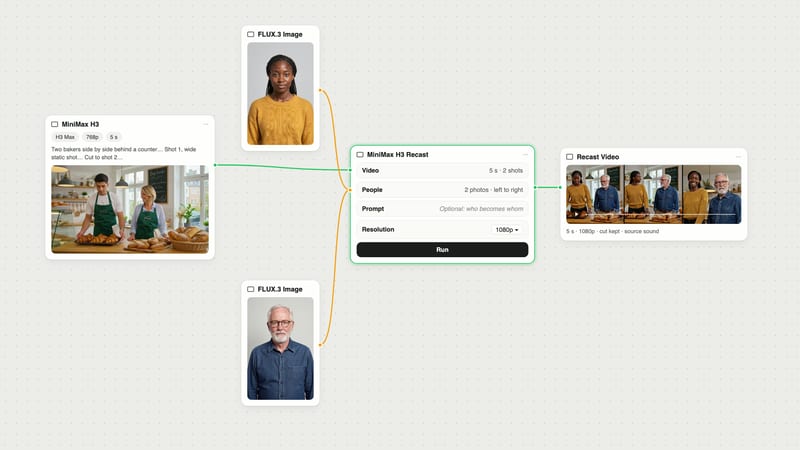
The canvas at the top is the test in section 4.
Add a Video node with your source, trimmed to 5 to 30 seconds, and connect it to a MiniMax H3 Recast node's Video input.
Add or generate one photo per new person and connect them to People, in the left-to-right order you want.
Leave Prompt empty for the default order, or connect a Text node that says who becomes whom.
Pick 768p for test runs and 1080p for the keeper, then run.
To compare, connect the same video and photos to a Kling O3 Edit node as @Image1 and @Image2, and run both from the same canvas.
For keeping a new character the same across shots you generate from scratch, see consistent characters across images and video; for other text-instruction edits, see how to edit a video with text prompts.
Limits from the Fuser nodes and vendor docs; test notes from our runs on 2 October 2026, one run each.
| Tool in Fuser | Use it when | Inputs in Fuser |
|---|---|---|
| Swap people inside the original video | ||
| MiniMax H3 Recast | The edit is final and only the people change. Default left-to-right swap with no prompt; our prompted run followed the who-becomes-whom prompt. | 5 to 30 s video, no shot over 15 s; up to 4 photos; optional prompt; 768p or 1080p; source sound kept |
| Kling O3 Edit | One short shot, swapped by a written instruction with reference images. Close to Recast on our 5 s clip; cheaper per second. | 3 to 15 s, at least 720 px per side, 24 to 60 fps; up to 4 images; Standard or Pro; Keep Audio |
| Runway Aleph 2 | Restyling, re-lighting or removing things around people. Weak for putting a specific person in. | Input video plus optional reference image for colour, style and lighting |
| Make a new clip from an existing performance | ||
| Kling 3.0 Motion Control | One character image should copy one performer’s movement. Build the image from the clip’s first frame if hands must meet objects. | Character image plus 3 to 30 s driving clip (Video orientation) or up to 10 s (Image orientation) |
| Runway Act-Two | A character should take over a performance with speech and expression. | 3 to 30 s driving performance; character image or video; expression intensity, body control |
| MiniMax H3 (reference mode) | You want to write the whole shot around reference subjects and clips. | Subject images plus 2 to 15 s reference videos (15 s combined); up to 15 s output |
Connect the video and a photo of the new person to MiniMax H3 Recast. With no prompt, photos replace the main people from left to right; add a prompt to say who becomes whom. Recast keeps the motion, camera, cuts and sound. For a single shot of 3 to 15 seconds, Kling O3 Edit can do the same from a written instruction and reference images.
Up to four, one photo each. The source video must be 5 to 30 seconds long, with no single shot longer than 15 seconds.
Yes. Recast and Kling O3 Edit (with Keep Audio on) both kept our source soundtrack, at the same loudness, so the new person speaks with the original performer’s voice. Replace the dialogue and re-sync the lips as a separate step if the voice should change.
Recast edits your existing video: the scene, camera and cuts stay and the people change. Motion control, such as Kling 3.0 Motion Control or Runway Act-Two, makes a new clip of the character in your image, moving like the performer in your driving video.
It depends on where you are and how you use it, so get written permission from everyone whose face, body, performance or voice is in the source or the reference photos. Platforms also require disclosure: YouTube requires creators to disclose realistic content that is generated or meaningfully altered with AI, and TikTok requires creators to label realistic AI-generated content.
Run tests at 768p, which costs a third less per second, then rerun the version you keep at 1080p, the node’s default. The output keeps the source’s length either way.
Connect a clip and up to four photos to MiniMax H3 Recast, and run Kling O3 Edit beside it on the same canvas to compare.