One click, whole workflow
Recipes are here. Package a whole workflow and run it in one click
Explore recipesOne click, whole workflow
Recipes are here. Package a whole workflow and run it in one click
Explore recipesWhich model to use when you already have the shot and need to change it: what Runway Aleph 2.0, Luma Ray 3.2, Grok Imagine Edit and Gemini Omni 1.1 Flash each do, and what three of them did to the same five-second clip.
All guides · Best image-to-video models
Quick answer: Fuser has four current models that edit footage you already have instead of generating a new shot: Runway Aleph 2.0, Luma Ray 3.2 in Video Edit mode, Grok Imagine Edit and Gemini Omni 1.1 Flash. In our same-clip test, Gemini Omni 1.1 Flash changed only what we asked: it re-lit and restyled a five-second take while keeping the performer, the set, the vase, the timing and the sound. Grok Imagine Edit was nearly as faithful but under-delivered on the night look and reshaped the vase in the restyle. Luma Ray 3.2 made the boldest, most cinematic change but rebuilt parts of the scene around it. Reach for Aleph 2.0 when a clip is long (up to 30 seconds) or needs keyframe-guided edits. When only a few seconds are wrong, such as one line or an ending, retake that section with Fuser's LTX 2.5 node instead of editing the whole clip.
A video generator starts from a prompt or an image and invents the motion. An editing model starts from a finished take and has to keep most of it: the performance, the camera move, the cut points and ideally the audio. The hard part is restraint. Every model below can make a striking change; the difference is how much of your shot survives it.
These are the video-to-video editors available as nodes in Fuser:
Runway Aleph runs Aleph 2.0 (API model id aleph2), Runway's in-context editing model.
Luma Ray in Video Edit mode runs Ray 3.2 with an adjustable edit strength.
Grok Imagine edits run in a separate Grok Imagine Edit node, which also extends clips.
Gemini Omni Video runs Gemini Omni 1.1 Flash (preview) and switches to editing when you connect a video.
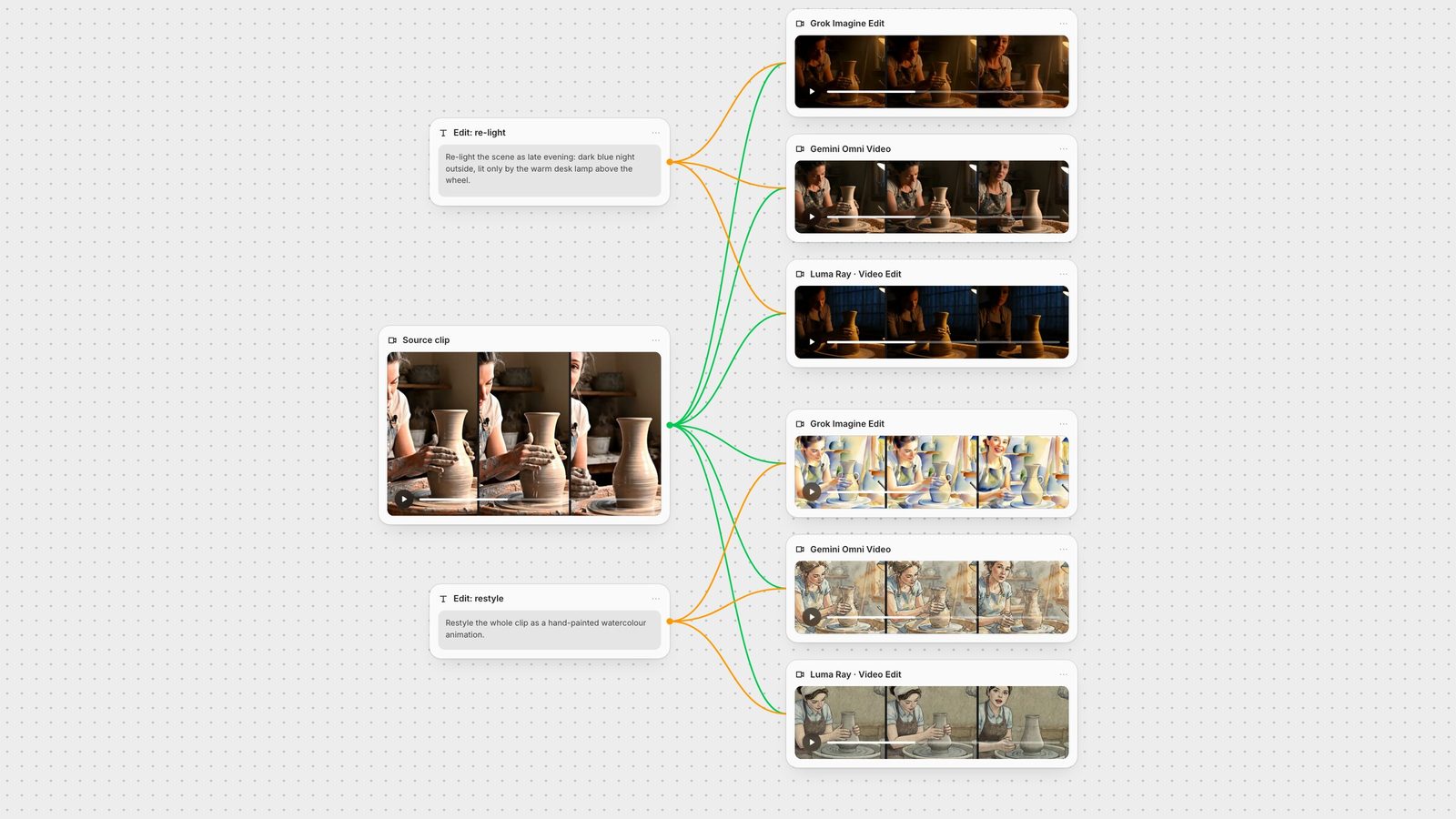
We took one source clip, a 5-second, 1280 × 720 take of a ceramicist at a pottery wheel who looks up and says "Almost there" (the Veo 3.1 clip from our model comparison, trimmed), and gave it two common edits: a re-light and a full restyle. Each model got the identical prompt and source at 720p, on 28 September 2026. Grok Imagine Edit and Luma Ray 3.2 ran through the same endpoints the Fuser nodes call. Fuser's Gemini Omni node calls Google's API directly; we generated our Gemini edits with the same model version, Gemini Omni Flash 1.1, through a hosted edit endpoint instead.
Aleph 2.0 runs only through Runway's own API and wasn't part of this test, so its section below rests on Runway's documentation, not on our output.
The prompt: "Re-light the scene as late evening: outside the window it is dark blue night, and the workshop is lit only by the warm desk lamp above the wheel. Keep the ceramicist, her movements, the wheel, the vase and the camera exactly as they are."
Grok Imagine Edit turned the lamp on and dropped the room into warm lamplight, with a darker window behind. Her hands, the spinning vase, the moment she looks up and the line of dialogue all land where they did in the source. The window read as dusk rather than "dark blue night", so the change was a little timid.
Gemini Omni 1.1 Flash gave the most faithful re-light: a dark blue window, the lamp switched on and warm light on the clay, with the ceramicist, her apron, the shelves, the vase and every movement and line of dialogue matching the source frame for frame. If anything the room stayed a little brighter than "lit only by the lamp".
Luma Ray 3.2, first run delivered the most convincing night: deep blue light through a window and a hard pool of lamplight on the clay. But it replaced the back wall with a large paned window, removed the shelves, and changed the ceramicist's face and hair. She no longer looks up at the camera the way she does in the source.
Luma Ray 3.2, second run. Luma's documentation asks for the finished scene rather than instructions, so we gave it one more run with a prompt written that way ("A pottery workshop late in the evening: dark blue night outside the window, the room lit only by the warm desk lamp above the wheel. A ceramicist in a grey T-shirt and clay-covered apron shapes a tall clay vase on the wheel, looks up at the camera and smiles.") and the Edit Mode set to Adhere 2. This time the set, the lamp, the vase and the timing of the look up and smile all held, under a convincing blue window. But the ceramicist became a different person, a man, because nothing in the prompt said who she was and nothing held her face. If identity matters, describe the person in the prompt.
The prompt: "Restyle the whole clip as a hand-painted watercolour animation with soft paper texture and loose ink outlines. Keep the ceramicist, her movements, the wheel, the vase and the camera exactly as they are."
Grok Imagine Edit produced a real watercolour look, with washes and paper texture, and kept the set: shelves, window, lamp and brush pots all stayed in place, and so did the look up and the smile. It did add two handles to the vase, turning it into a jug, which is the kind of object change to check for before you use an edit.
Gemini Omni 1.1 Flash produced watercolour washes with ink outlines on a paper texture and kept everything else: the same woman, the apron straps, the shelves and brush pots, the lamp, and a vase that stays a vase. Her mouth movement stays in sync with the spoken line.
Luma Ray 3.2 went for an inked, textured illustration rather than watercolour. It kept her motion and even the mouth movement on the spoken line, but redesigned her (a headscarf and a blue shirt), dropped the window and turned the lamp into a cloud-like shape.
Every output kept the source clip's soundtrack. Grok's and Luma's audio matched the source almost exactly; Gemini Omni's was the same dialogue and room sound, closely but not bit-for-bit matched, and within 0.7 dB of the source's loudness. Grok's files ran 4.71 seconds against the 5-second source, so the last fraction of a second was dropped; Gemini's and Luma's ran the full 5 seconds.
What the two tests say: for a change that has to leave the shot intact, Gemini Omni 1.1 Flash was the most reliable here, with Grok Imagine Edit close behind and cheaper. Luma Ray 3.2 is the one to try when you want the model to re-imagine the scene, and it responds to its own prompting style, so write for it rather than reusing a prompt from another model.
Aleph 2.0 arrived on Runway's API on 2 June 2026 and edits existing videos "with text prompts and optional keyframe images placed at specific timestamps". It accepts input clips from 2 to 30 seconds and up to five keyframe images (Runway API changelog), the longest input of the four. Runway's own guidance is to write an action verb for the scope of the change, such as add, remove, change, replace, re-light or re-style, followed by a description of the result (Runway: Aleph 2.0 prompting guide).
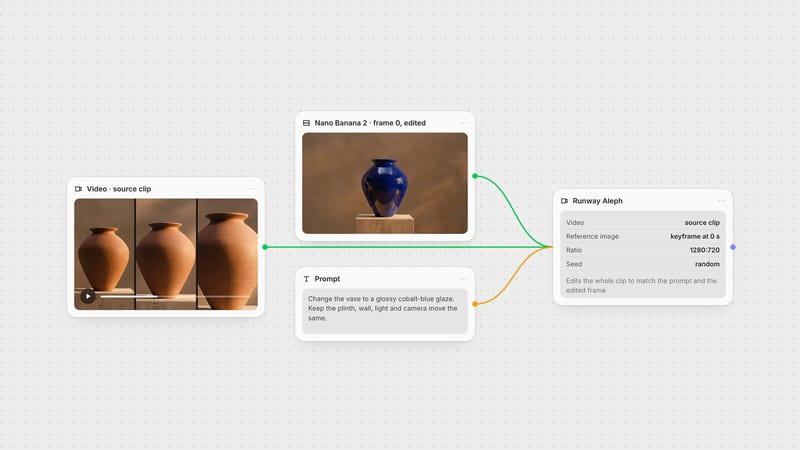
In Fuser, the Runway Aleph node takes a Prompt (up to 1,000 characters), the Video, an optional Reference Image, one of eight output ratios from 1280:720 to 1584:672, and a Seed. The API accepts up to five keyframes; the node sends its one reference image as a keyframe pinned to the first frame, so it steers how the edit starts. Runway bills Aleph 2.0 per second with a two-second minimum charge per generation, and per second it costs more than any other model here at 720p (Runway API pricing).
Luma's advice for Ray 3.2 video-to-video is specific: "Describe the target end state. Do not write commands. Do not describe the transformation process." It suggests avoiding imperative verbs like "change", temporal phrases like "over time" and negations such as "no" or "without", and exploring at 720p before rendering the final pick at 1080p (Luma: Ray 3.2 Video to Video).
In Fuser, the Luma Ray node's Video Edit mode takes the Video, an optional Start Image and an Edit Mode: Adhere 1 to 3 stays closest to the source, Flex 1 to 3 is balanced and Reimagine 1 to 3 moves furthest away, with Auto Controls letting the model decide. Output is 5 or 10 seconds at 540p, 720p or 1080p, with HDR at 720p and above. A 720p edit costs one and a half times as much as 540p, and 1080p costs twice as much as 720p. For the rest of Ray's modes, see our Luma Ray 3.2 guide.
xAI describes its edit model as applying "high-fidelity edits with strong scene preservation, modifying only what you ask for", and the output takes its duration and aspect ratio from the input, capped at 720p (xAI video editing docs). In Fuser, the node resizes the source to a maximum of 854 × 480 and cuts it to 8 seconds before editing, so it is a tool for short takes. The same node's Extend mode adds 2 to 10 seconds to a clip.
It is also the cheapest of the models here: it is billed per second of both output and input video, and each of our two 720p edits cost about three-quarters as much as a Gemini Omni run. For text-to-video, image-to-video and extend tests with the same model family, see the Grok Imagine video guide.
Google's Gemini Omni Flash edits a clip you upload and can keep editing it across turns of the same conversation. Input videos for editing must be 10 seconds or less, and Google's advice is that "Simple prompts work best for video editing", with "Keep everything else the same" at the end of the instruction. Voice editing isn't supported, and editing uploaded videos isn't available in the EEA, Switzerland or the UK (Gemini API: Omni). Google announced version 1.1 on 27 August 2026 with 360p drafts, 720p generation and upscaling to 4K (Google). Both of our test prompts ended with a "keep ... exactly as they are" clause close to Google's suggestion, and it held in both edits. A 720p edit is billed per second; each of our 5-second runs cost about a third more than a Grok Imagine Edit run and under half as much as a 720p Luma edit.
In Fuser, the Gemini Omni Video node edits when you connect a Video (up to 10 seconds; the node refuses longer clips before it runs) and generates when you connect up to five Images instead; it won't take both at once. You choose 360p, 720p, 1080p or 4K and 16:9 or 9:16. An edit keeps the source clip's duration, and anything above 720p is upscaled from the native render.
The four editors above rework the entire take. Sometimes only part of it is wrong: a line, a gesture, the last beat. For that, connect the video to Fuser's LTX 2.5 node and it switches from generating to retaking. You set Retake Start Time in whole seconds and a Duration for the window, choose in Retake Mode whether to replace the picture, the sound or both, and describe in the prompt what should happen in that window. Everything outside it is kept.
The retake itself runs LTX-2.3, not LTX-2.5: Lightricks lists retake as unsupported on both LTX-2.5 variants (LTX-2.5 docs), so the node uses the LTX-2.3 retake model (LTX retake API). It accepts any video, not only LTX clips, and costs the same per second as a 720p Gemini Omni edit.
In our LTX-2.5 guide we retook 3.0 to 6.0 seconds of a 6-second pottery clip with a new line. A frame-by-frame comparison showed the first 2.8 seconds unchanged, and the potter said the new line, "Let's glaze it blue.", in the same room, apron and vase. It didn't follow the prompt exactly: she waved her hands instead of looking up. Two limits matter in Fuser. The node's Duration menu starts at 6 seconds, so the shortest window it can retake is 6 seconds; we called the retake API directly for this 3-second one. And when we retook 6 seconds of a 10-second clip through the node, the join came with a short glitch at the new cut that would need trimming. Check the join before you use a retake.
The vendors disagree on grammar. Runway wants an action verb ("re-light the room..."), Luma wants the finished scene described with no commands ("a pottery workshop late in the evening..."), and Google and xAI both favour one short, direct instruction. The rule they share is to ask for one change at a time and say what must stay. If an edit drifts, the fixes are model-specific: move Luma toward Adhere, shorten the instruction for Grok or Gemini Omni, or give Aleph a keyframe image of the frame you want.
Watch for the things our test caught: objects that change shape (the vase that grew handles), people who change identity, set pieces that disappear, and clips that come back shorter than the source. Scrub the whole output against the original before it goes into an edit.
The advantage of editing on a canvas is running the same shot through several editors at once. In Fuser, connect one video node and one prompt to Grok Imagine Edit, Gemini Omni Video, Luma Ray and Runway Aleph side by side, compare, and keep the take that preserved the most. From there the clip can go to an upscaler such as Topaz or SeedVR, to MMAudio if an edit lost its sound, or to Whisper to check the dialogue survived. If only one section went wrong, send the clip to an LTX 2.5 node and retake that window. If the shot needs to be longer rather than different, see how to extend AI video length; for the Runway model on its own, see the Runway Aleph 2.0 guide.
Limits from vendor documentation; test notes from our 28 September 2026 runs.
| Model | Limits in Fuser | Reach for it when |
|---|---|---|
| Video-to-video editors | ||
| Grok Imagine Edit | Up to 8 s of source, resized to 854 × 480; 480p or 720p out; keeps source audio. Kept the shot intact in both of our tests. | You need a targeted change on a short take and the performance must survive. |
| Luma Ray 3.2 (Video Edit) | 5 or 10 s out, 540p to 1080p, HDR; Adhere, Flex or Reimagine. Boldest change in our test, but rebuilt parts of the scene. | You want a dramatic re-look and are willing to direct it with end-state prompts and edit strength. |
| Runway Aleph 2.0 | 2 to 30 s of source; one reference image pinned to the first frame; eight output ratios. Not in our test. | The clip is long, or you want an edited frame to guide the whole take. |
| Gemini Omni 1.1 Flash | Source up to 10 s; 360p to 4K out (above 720p upscaled); 16:9 or 9:16. Most faithful edit in both of our tests. | The performer, set and timing must survive, or you want to refine a clip over several edits. |
| LTX 2.5 node, retake (LTX-2.3) | Any video; replaces picture, sound or both in a 6–20 s window from a whole-second start. Not in our re-light or restyle test. | Only part of a take is wrong, such as a line or an ending. |
It depends on how much of the shot must survive. In our same-clip test, Gemini Omni 1.1 Flash changed the lighting and style while keeping the performer, set, props, timing and audio, and Grok Imagine Edit came close. Luma Ray 3.2 made bolder changes but rebuilt parts of the scene. Runway Aleph 2.0 takes the longest clips, up to 30 seconds.
Yes. All four models here accept a re-light instruction. In our test, Gemini Omni 1.1 Flash re-lit a daytime take as night with a dark blue window and the lamp on, without changing the action. Grok Imagine Edit gave a warmer dusk, and Luma Ray 3.2 produced a darker, bluer night but also changed the set and the performer.
In our test, Grok Imagine Edit, Luma Ray 3.2 and Gemini Omni 1.1 Flash all kept the source clip's soundtrack. Google says Gemini Omni doesn't support voice editing, so changing dialogue is out of scope there.
Grok Imagine Edit uses the first 8 seconds, Gemini Omni takes clips up to 10 seconds, Luma Ray 3.2 edits return 5 or 10 seconds, and Runway Aleph 2.0 accepts 2 to 30 seconds.
Ask for one change, say what must stay, and use the model's own controls: Adhere levels in Luma Ray, a short direct instruction for Grok or Gemini Omni, or a keyframe image for Aleph. Then scrub the result against the source for changed objects or faces.
Yes. In Fuser, connect the clip to an LTX 2.5 node and it retakes a window you choose with LTX-2.3, replacing the picture, the sound or both and keeping the rest. The window is at least 6 seconds in the node. In our test the frames before the window were unchanged and the new spoken line came through, with a small glitch at one join.
Yes. In Fuser you can wire one source video and one prompt into several editing nodes on the same canvas and compare the outputs side by side before choosing.
Wire a clip into Grok, Luma, Runway and Gemini editors on one canvas, retake a section with LTX 2.5, and keep the best version.