One click, whole workflow
Recipes are here. Package a whole workflow and run it in one click
Explore recipesOne click, whole workflow
Recipes are here. Package a whole workflow and run it in one click
Explore recipesWe gave LatentSync, HeyGen Avatar IV, MiniMax H3 and Seedance 2.5 the same potter and the same six-second voice line. Here is what each returned, what it changed, and when to use it.
All guides · Best AI avatar video generators
Quick answer: to make someone in an existing video say new words, use LatentSync. It rewrites the mouth and keeps everything else in the take. To make a still portrait talk, use HeyGen Avatar IV, which animates the head, face and hands to your audio. If you're generating the shot anyway, MiniMax H3 takes your voice file as a reference and builds the scene around it, speech included. Seedance 2.5 also takes reference audio, but it re-voices the line rather than using your recording, and it refused our photoreal face. To transfer a performance from a video of an actor instead of an audio file, use Runway Act-Two.
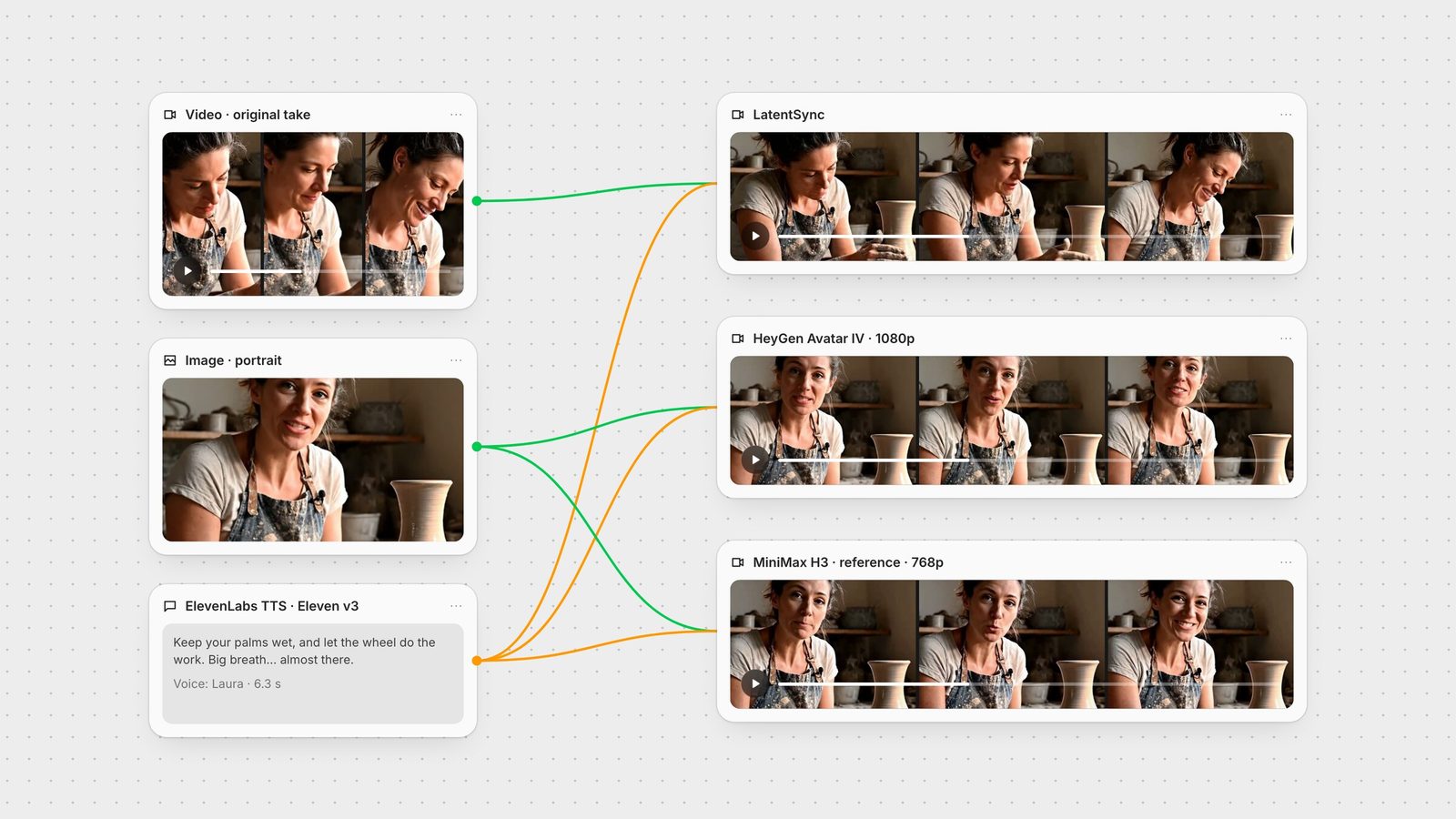
All four models got the same inputs. The face is the potter from our Veo 3.1 tests: the first six seconds of that clip with its sound removed, plus one frame from it at 3.5 seconds for the models that start from an image. The voice line came from ElevenLabs Eleven v3 (voice "Laura"): "Keep your palms wet, and let the wheel do the work. Big breath... almost there." It runs 6.3 seconds and has three pauses, and the pauses are the useful part. A good lip sync closes or relaxes the mouth when the voice stops.
To check what each model did with the sound, we compared the audio it returned against our file. HeyGen's matched exactly, LatentSync's was the same apart from encoding, and H3's was our line with workshop sound mixed underneath. Seedance's did not match at all: the words and pauses were the same, but it was a new recording.
LatentSync is ByteDance's open lip-sync model, an audio-conditioned latent diffusion model that uses Whisper to read the speech (GitHub). You give it a video and an audio file. It left the rest of the take alone: the potter still looks down at the wheel, shapes the vase and glances up, just as in the source. Only the mouth changed. Where the original Veo take had her say "Almost there" at about three seconds, her mouth now rests through our pause. The sync is easiest to read when she faces the camera. When her head tips down toward the wheel, the mouth shapes get smaller.
Our first run came back at 5.76 seconds, shorter than both the 6-second video and the 6.3-second line, so the last word was cut. We padded the audio with silence to 7 seconds and ran it again, and the second run returned 6.4 seconds with the whole line. The clip above is that second run. When the audio is longer than the video, the node's Loop Mode (pingpong by default, or loop) decides how the video is extended. The node also has a Guidance Scale from 1 to 2 and a Seed. Even counting the rerun, the two runs together cost a small fraction of one Seedance 2.5 clip.
HeyGen Avatar IV starts from one image. HeyGen describes an "audio-to-expression engine" that adds "head tilts, natural pauses, subtle cadences, and micro-expressions" (HeyGen). In our run it did all of that: the head moves, she blinks, the hands shift on the clay, and she smiles through the pauses. The face stayed close to the photo. It returned 1920 × 1080 at 25 fps, the same length as the audio. This is on the Stable talking style, which is the node's default. Expressive animates more.
Pick by your starting point. If the shot, the camera move and the acting already exist and only the words need to change, as in a dub, a fixed line or a translated ad, use LatentSync. If all you have is a still, use HeyGen. In Fuser the HeyGen node also works with no audio: type the script, choose one of HeyGen's voices, and it generates the speech too. The node offers 360p to 1080p, aspect ratios from 9:16 to 16:9 (or auto) and optional burned-in captions. Per second of output it costs about twenty times what LatentSync does.
These are video generators, not lip-sync tools, but both accept reference audio next to reference images. We gave both the same prompt: the woman from the image "looks into the camera and says the words in Audio 1, her lips matching Audio 1 exactly. Use Audio 1 as her voice", with a static medium shot.
MiniMax H3 used our recording as the dialogue track. Its own prompt expansion said so, and the audio it returned is our line in the same place, with wheel hum added underneath. The difference from HeyGen is that H3 regenerates the whole shot: her hands work the vase, she looks at the camera, and she smiles at the end. The face drifted a little from the reference frame, which is the price of generating new video. MiniMax's own example of this feature is "have the character in Image 2 sing, with the vocals matching Audio 3" (MiniMax). In Fuser, reference audio clips must be 2 to 15 seconds each and 15 seconds combined, cited as Audio 1, Audio 2 and so on, and audio can't be the only reference. Our 768p run returned 1344 × 768.
Seedance 2.5 rejected our first request. The model returned a content-policy error on the image: it "may contain likenesses of real people". That happened even though the potter is AI-generated. So we made a clay-animation version of the same frame with GPT Image and ran the same prompt again. This time Seedance delivered the line with the same words and close to our pauses, and the mouth follows the speech. But the audio was a new performance, not our file. The reference audio guided the rhythm, timing and voice, but the output isn't a copy of it. Budget for it, too. Seedance 2.5 bills per token, and our 6-second 720p clip cost many times more than the dedicated tools.
Use H3 when the scene doesn't exist yet and you want the character to speak your exact recording in it. Use Seedance's audio reference for stylised characters, where hitting the rhythm matters more than keeping the exact recording.
Runway Act-Two doesn't take an audio file. It takes a video of a person performing, 3 to 30 seconds long, and moves their facial expression, and optionally their gestures, onto a character image or video (Runway). If you can film yourself saying the line, you get your delivery, not a model's guess at it. See the Act-Two guide for how to shoot the take.
Pad the audio. LatentSync's first output came back shorter than both inputs and cut the last word. Half a second or more of trailing silence fixed it.
Face the camera for the key words. LatentSync's mouth shapes were clearest when the potter looked up. Pick takes where the face is visible when the important words land.
Leave pauses in the script. Pauses show sync problems quickly, and they give HeyGen and H3 room to act.
Keep the voice file clean. LatentSync reads the speech through Whisper audio embeddings, so give it dialogue only and add music after the lip sync.
In Fuser the voice, the face and the lip-sync models sit on one canvas. Generate or record the line, wire it into LatentSync, HeyGen and H3 side by side as in the image at the top, and keep the version that suits the shot. From there you can add captions with VEED subtitles, check the words with Whisper, or send the clip to an upscaler (best AI upscalers). To run the same steps on the next line, save the graph as a Recipe. For presenter-style videos made from scratch, see best AI avatar video generators. For video models that generate their own dialogue from a prompt, see best AI video generators with audio.
Last verified September 28, 2026.
Tested with the same face and the same 6.3-second voice line on 28 September 2026.
| Model | Reach for it when | Watch out for |
|---|---|---|
| Dedicated lip sync | ||
| LatentSync | You have the video and only the words need to change. Keeps the rest of the take; about a twentieth of HeyGen's cost per second. | Small mouth shapes when the face turns away; our first output came back short. |
| HeyGen Avatar IV | You have one portrait. Animates head, face and hands to your audio, or to a typed script in a HeyGen voice. | Adds its own gestures and smiles; about twenty times LatentSync's cost per second. |
| Video generators with audio reference | ||
| MiniMax H3 | The shot doesn't exist yet and the character should speak your exact recording. | Regenerates everything, so the face can drift; audio clips 2 to 15 seconds. |
| Seedance 2.5 | Stylised characters where the line's rhythm matters more than the exact recording. | Refused our photoreal face; re-voices the line; costs many times more than the dedicated tools. |
| Performance transfer | ||
| Runway Act-Two | You can film someone performing the line and want that delivery on a character. | Takes a driving video, not an audio file; 3 to 30 seconds. |
It depends on your input. For an existing video, LatentSync changes the mouth and leaves the rest of the take alone. For a single photo, HeyGen Avatar IV animates the whole face and head. To generate a new shot that speaks your recording, MiniMax H3 can use the audio file as its dialogue track.
Yes. LatentSync takes a video and an audio file and regenerates the mouth to match the speech. In our test it replaced the potter's original line with a new one and kept her head movement, hands and framing from the source take.
Yes. HeyGen Avatar IV takes one portrait and an audio file and returns a talking video the length of the audio, up to 1080p. It can also generate the speech itself from a typed script and a choice of HeyGen voices.
Both accept reference audio. In our test H3 used our recording as the dialogue track and animated the speaker to it. Seedance 2.5 produced the same words with similar timing but as a new voice performance, and it refused our photoreal portrait as a reference image.
It can happen when the video is shorter than the audio. Our first LatentSync run came back at 5.76 seconds for a 6-second video and a 6.3-second line, cutting the last word. Padding the audio with about half a second of silence fixed it: the second run returned 6.4 seconds with the full line.
No. Lip sync drives the mouth from an audio file. Performance capture, such as Runway Act-Two, transfers facial expression and gestures from a video of a real performer onto a character.
Wire one voice line into several lip-sync models on one canvas and keep the best take.