One click, whole workflow
Recipes are here. Package a whole workflow and run it in one click
Explore recipesOne click, whole workflow
Recipes are here. Package a whole workflow and run it in one click
Explore recipesHiggsfield is built around one-click video generation, presets and effects. If your work has outgrown single generations, here are six alternatives organised by the job you need done.
Quick answer: choose Fuser when a video is one part of a larger campaign and you need keyframes, several video models, editable end cards and a workflow the team can run again. Choose Runway for its own frontier video models, Krea or FLORA for a hosted creative canvas built around their toolsets, Magnific Spaces when a stock library matters, and Figma Weave when image editing sits at the centre of the job. Stay with Higgsfield if one-click effects and presets are what you actually use.
Higgsfield presents itself as an AI-native creative suite. Its homepage leads with the Seedance 2.5 video model, Nano Banana Pro for images, Cinema Studio for cinematic scenes, Genjutsu for making many versions of one video, a library of effects and a plugin that generates images and video inside ChatGPT. That is a fast route from prompt to a finished, shareable clip.
People start looking for an alternative when the job changes shape. A campaign needs a consistent keyframe, several takes from different models, a title card with real typography and a process the next designer can repeat. Decide which of those jobs matters before choosing a replacement.
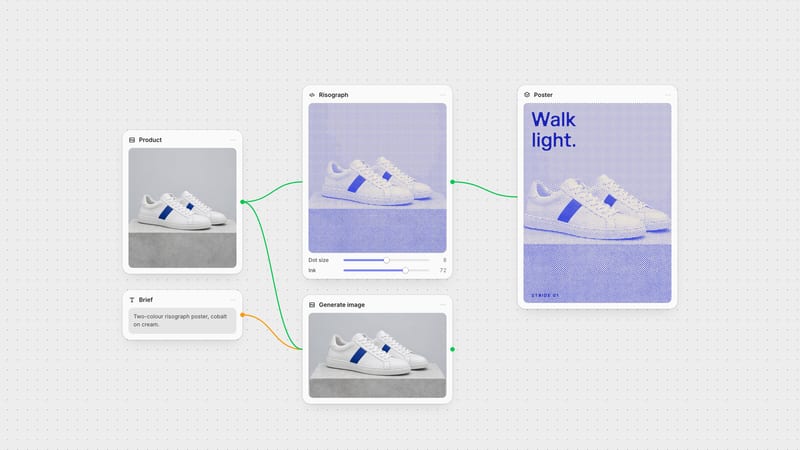
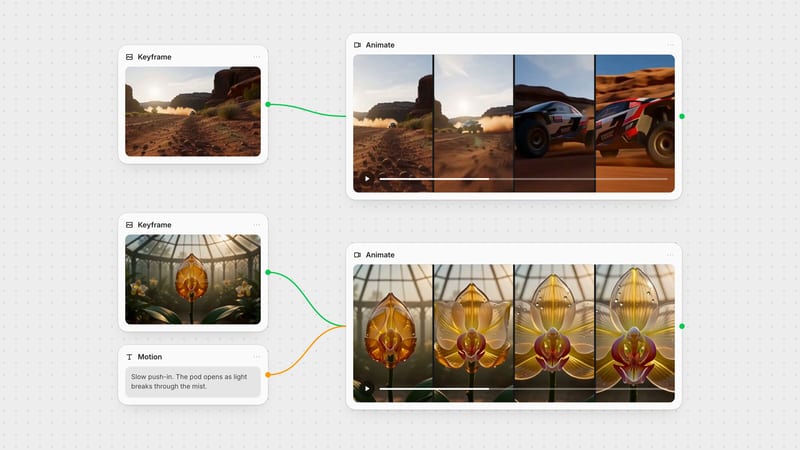
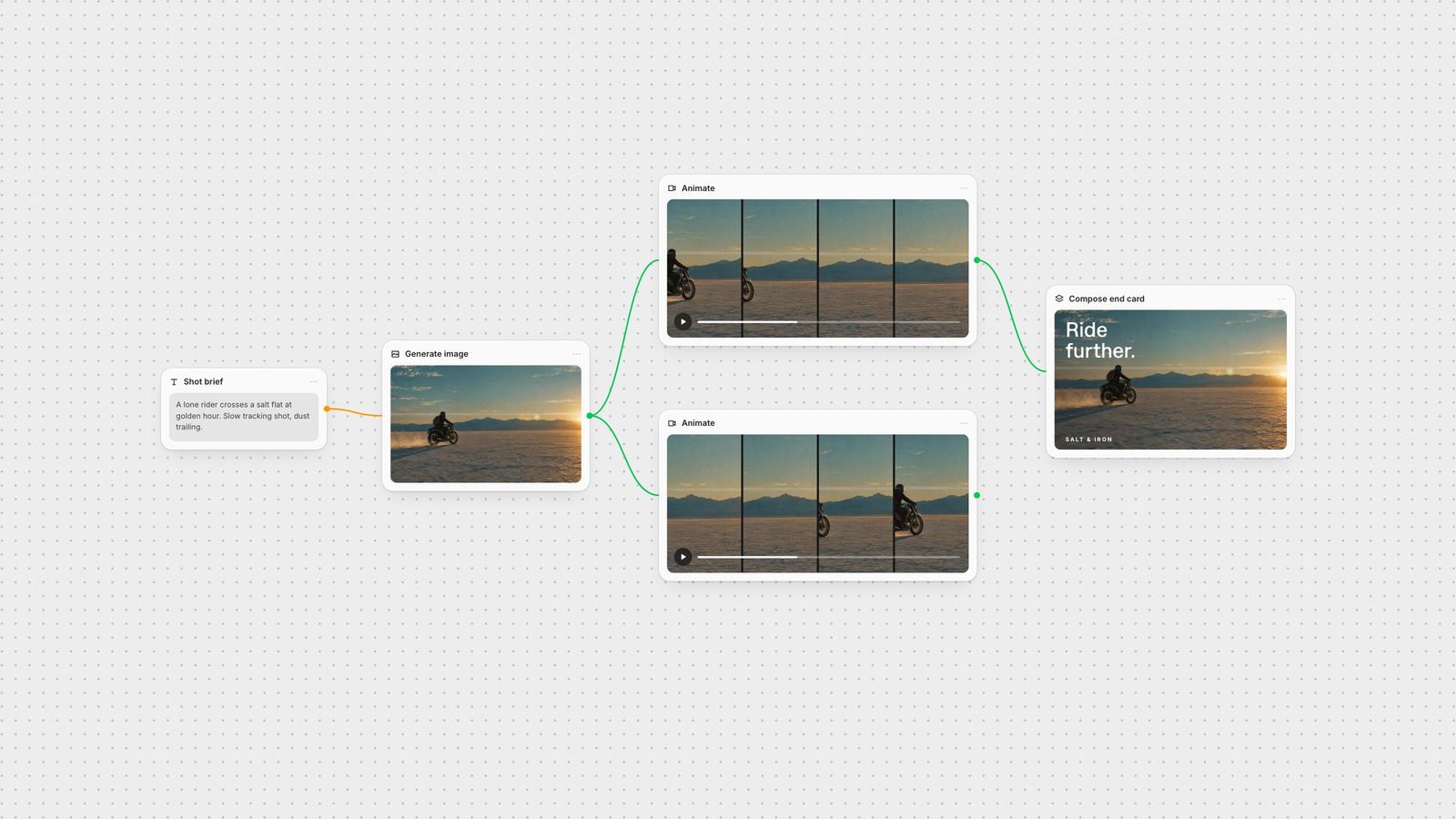
Fuser is a node-based AI workflow builder on an infinite canvas, built for creative teams. Generate the keyframe, send it to Kling, Veo, Seedance, Wan or another video model side by side, and keep the takes connected to the brief that produced them.
What Higgsfield does not give you is the finishing layer. In the Compositor, the end card is made of editable layers: footage, headline, logo and background. Change the headline without regenerating the shot, then export an MP4 or PNG (export docs). When the sequence works, package it as a Recipe so the next campaign starts from a working process instead of a blank prompt (Recipe docs).
For bespoke needs, build the tool yourself: Creative Code turns a prompt into an adjustable visual instrument, and Apps builds running web tools with inputs and outputs connected to the canvas.
Choose it when: the deliverable is a campaign, not a single clip, and several people need to run and revise the process.
Runway builds its own models. Its site describes Gen-4.5 as its flagship video model and lists Aleph and Act-Two alongside an all-in-one creative workspace for video, images and audio. If you want the newest Runway model features the day they ship, going to the source makes sense.
Choose it when: Runway's own models and editing tools are the reason you generate video.
Krea combines image and video generation, enhancement and upscaling with Krea Nodes, a workflow builder that chains tools, runs models in parallel and shares templates. It also offers App Builder, Nodes Agent and LoRA training. Krea Apps package creative workflows, which is the same job Fuser Recipes and FLORA Techniques do.
Choose it when: Krea's own generation and enhancement tools already anchor your work. Read the Fuser vs Krea comparison.
FLORA is an AI canvas for designers, brand teams and agencies, with more than 50 image, video and text models under one plan, real-time collaboration and reusable Techniques such as Character Lock and Mood Board Maker.
Choose it when: its Techniques library matches your production. Read the Fuser vs FLORA comparison.
Magnific, formerly Freepik, offers Spaces, a node-based canvas for image and video with real-time collaboration and templates for jobs such as adapting ads and storyboard-to-motion. Eligible plans sit alongside Magnific's stock library.
Choose it when: licensed stock assets are part of every brief. Read the Fuser vs Magnific Spaces comparison.
Figma Weave, formerly Weavy, pairs node-based generation with layers, type, masks, inpainting, relighting and depth tools, and can turn a workflow into a simplified interface for a team.
Choose it when: editing generated images is the core of the job. Read the Fuser vs Figma Weave comparison.
If your work is short social video built from presets, such as a viral effect, a motion template or a quick UGC-style clip, Higgsfield's preset and effects library is the point. A canvas workflow adds structure you may not need. Move when you find yourself rebuilding the same sequence by hand, fixing typography outside the tool or explaining to a teammate how a shot was made.
Take one real brief: a product or character reference, one shot description and the end card copy. Build it in each tool and check three things: whether the keyframe stays consistent across takes, whether the final title card is still editable, and whether a teammate can run the process again with a new input. For a broader view of canvas tools, see the best node-based AI tools.
Where each Higgsfield alternative is strongest, and what to check before switching. Product details verified on 28 September 2026.
| Tool | Choose it for | Check before choosing |
|---|---|---|
| The shortlist | ||
| Fuser | Keyframes, several video models, editable end cards and reusable Recipes on one canvas. | Finish type and layout in Compositor; package repeat work as a Recipe. |
| Runway | Its own frontier video models and editing tools. | Model choice centres on Runway's models. |
| Krea | Fast generation, enhancement and Krea Nodes workflows. | Krea Apps package workflows; compare them with Fuser Recipes. |
| FLORA | A shared canvas with 50+ models and Techniques. | Match its Techniques library to your jobs. |
| Magnific Spaces | Node workflows beside a stock library. | Check which plans include stock assets. |
| Figma Weave | Generation with layers, masks and relighting. | Weave's plans are separate from Figma's. |
| Higgsfield | One-click effects, presets and quick social video. | Stay if presets are the job. |
It depends on the job. We recommend Fuser for campaigns that combine keyframes, several video models, editable titles and reusable workflows. Runway suits teams that want Runway's own video models, and Krea or FLORA suit teams that want a hosted canvas built around their own toolsets.
Yes. Fuser, Krea Nodes, FLORA, Magnific Spaces and Figma Weave all connect generation steps on a canvas. Fuser adds an editable Compositor for final layouts and Recipes for rerunning a whole process with new inputs.
Yes. Several canvas tools offer these model families. In Fuser you can run Kling, Veo, Seedance and other video models side by side from the same keyframe and compare the takes.
Stay if your work is mostly short social video made from its presets and effects. Consider moving when you need editable titles, consistent keyframes across models or a process a teammate can repeat.
Generate the keyframe, compare video models and finish the end card on one canvas.