One click, whole workflow
Recipes are here. Package a whole workflow and run it in one click
Explore recipesOne click, whole workflow
Recipes are here. Package a whole workflow and run it in one click
Explore recipesOpenAI discontinued the Sora app in April 2026 and removed Sora 2 from its API on 24 September 2026. Here is what to use instead, organised by the job you used Sora for, with real outputs from the replacements.
All guides · Best image-to-video models
Quick answer: Sora is gone. OpenAI closed the Sora app and web experience on 26 April 2026 and removed Sora 2, Sora 2 Pro and the Videos API from its developer platform on 24 September 2026 (OpenAI Help Center, OpenAI deprecations). OpenAI names no replacement model. For a character speaking on camera, use Veo 3.1. For cinematic camera work, use Kling 3.0 or Seedance 2.5. For recurring characters built from your own reference images, use a reference-to-video model such as Seedance 2.5, Vidu Q1 or Grok Imagine Video 1.5. For cheap drafts, use Seedance 2.0 Mini, Seedance 2.0 Fast or LTX-2.5 Fast.
OpenAI shut Sora down in two stages. The Sora app and web experience closed on 26 April 2026, and OpenAI said it would permanently delete Sora data once any final export window ends (OpenAI Help Center). The API followed on 24 September 2026: the Videos API, the sora-2 and sora-2-pro aliases and their dated snapshots were all removed, after being announced as deprecated on 24 March 2026 (OpenAI deprecations).
Any tool that called Sora through the API stopped generating on that date. In Fuser, the Sora 2 node is marked deprecated: a canvas that still contains one opens as normal, but running the node shows a notice to switch to another video node. Your prompt, reference images and everything downstream stay on the canvas, so switching models means connecting the same inputs to a new node.
Sora 2 launched with synchronised dialogue and sound effects, more accurate physics and a "characters" feature (first called cameos) that put a verified person into generated scenes (OpenAI). No single replacement covers all of that equally well, so choose by the job.
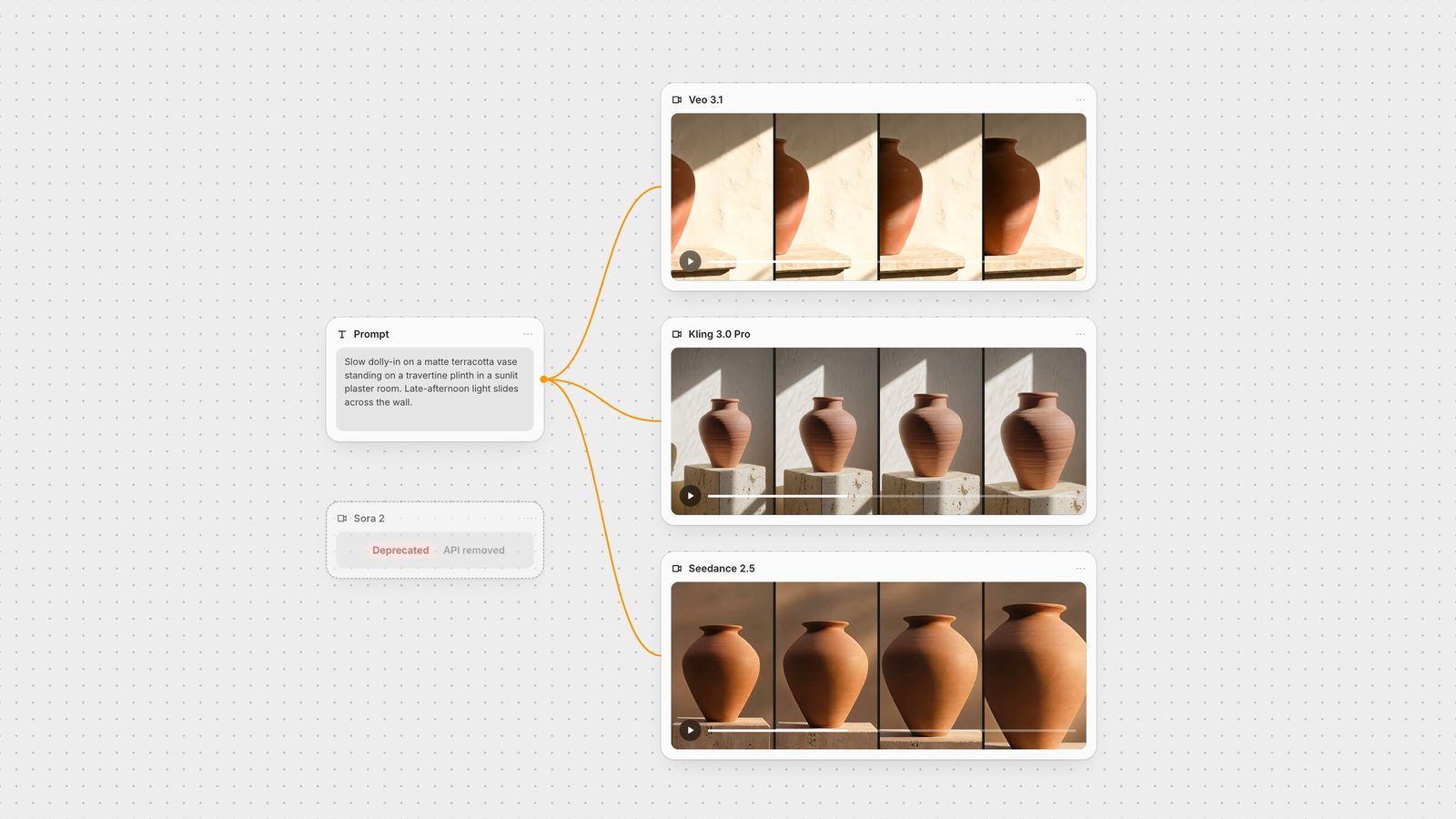
We ran the same product-film prompt through the three leading options: "Slow dolly-in on a matte terracotta vase standing on a travertine plinth in a sunlit plaster room. Late-afternoon light slides slowly across the wall as dust drifts through the beam. Calm, premium product film, shallow depth of field. Audio: soft room tone and a faint breeze." Settings were matched at 6 seconds, 16:9, audio on, one run each.
Kling 3.0 delivered a clear push-in and built the travertine block as written. It generates 3 to 15 seconds in Standard or Pro, takes start and end frames and generates native audio (Kling VIDEO 3.0 guide).
Seedance 2.5 gave the steadiest, most visible dolly-in. It is the choice for long single takes: up to 30 seconds in one generation (ByteDance Seed).
Veo 3.1 produced the most atmospheric light and dust but barely moved the camera.
The full method and frame-by-frame notes are in Seedance 2.5 vs Kling 3.0 vs Veo 3.1. For writing camera direction, see the Kling 3.0 prompt guide and the Seedance 2.5 prompt guide.
If you used Sora because it made people talk, start with Veo 3.1. In the same test, a potter at a wheel glancing up to say "Almost there", Veo 3.1 held one continuous shot, kept her face in frame and delivered the line cleanly at about three seconds. Seedance 2.5 also kept a single take. Kling 3.0 Pro framed her from the chest down, then cut to a wider shot to deliver the line.
Veo 3.1 generates 4, 6 or 8 second clips with audio at 720p, or at 1080p for 8-second clips, and takes a first frame, a first and last frame, or up to three reference images (Gemini API: Veo). In Fuser, the Veo node defaults to Veo 3.1 Fast for text prompts; switch the model to Veo 3.1 when you want reference images. The Veo 3.1 prompt guide covers how to write spoken lines.
Two other shipped models generate multi-speaker dialogue. Wan 2.6 plans multiple shots from one prompt and runs 5, 10 or 15 seconds at up to 1080p with sound (Alibaba Cloud: Wan 2.6). Kling 3.0 matches each character to their own lines when you write the dialogue per character in the prompt (Kling VIDEO 3.0 guide). LTX-2.5 also generates speech with the picture and cuts between shots inside one clip when you name each cut in the prompt; in our test a three-shot, 10-second prompt kept the same woman and vase across the cuts and ended on her spoken line (LTX-2.5 guide). For a wider comparison, see the best AI video generators with audio.
Sora's characters feature relied on a one-time video and audio recording to verify a person's identity (OpenAI). None of the replacements offers that. What they do offer is reference-to-video: you supply images or clips of a character you have the rights to use, cite them in the prompt, and the model keeps that subject across new scenes.
Seedance 2.5 takes the most references: up to 30 images, 10 video clips and 10 audio clips in one generation (ByteDance Seed). Cite them as @Image1, @Video1 and so on.
Vidu Q1 Reference combines up to seven reference images, such as a character, a prop and a location, into one scene (Vidu API: Reference to Video). The clip below is a real Vidu Q1 run from three references. See the Vidu reference guide.
Grok Imagine Video 1.5 accepts two to seven reference images, cited as @Image1 to @Image7, for clips of up to 10 seconds with audio.
MiniMax H3 takes up to nine subject and style images plus motion and audio clips, up to 12 files in all, for a single shot of 5 to 15 seconds (MiniMax: Video generation guide). See the MiniMax H3 prompt guide.
Wan 2.6 works from reference videos rather than stills, carrying a subject's look and voice into a new clip.
Veo 3.1 takes up to three reference images to preserve a subject's appearance.
For a method that holds a character across both stills and video, read consistent characters in AI images and video.
For drafts, animatics and high-volume social variations, price per clip matters more than peak quality. In Fuser, the Seedance node switches between Seedance 2.5 and the older Seedance 2.0 in Fast or Mini mode. Fast and Mini cap at 720p and 15 seconds, keep native audio, and are billed at a lower rate per token: Mini costs about a third of Seedance 2.5's rate and Fast about half.
To see what the saving costs you, we ran the vase prompt from the test above through Seedance 2.0 Mini with the same settings (6 seconds, 720p, 16:9, audio on, one run) and set it beside the Seedance 2.5 take.
Mini did not cut the brief short. It pushed in on the vase, built the pale plaster wall and cracked travertine block the prompt describes, and cast a hard shaft of light across the wall. Seedance 2.5 made a warmer, softer frame with dappled light, and by the end of its move the plinth had mostly left the shot. For a draft that tells you whether the prompt works, Mini is enough. Seedance is billed by tokens (width × height × seconds × 24 ÷ 1,024), so this 6-second 720p clip came to about 130,000 tokens, and on Mini it cost about a third of what it would at the Seedance 2.5 rate. Five prompt variations on Mini cost less than two final takes on 2.5.
LTX-2.5 Fast is another low-cost route that keeps sound (LTX docs: LTX-2.5). It is billed by the second with audio included, and a 6-second 720p clip costs less than the same clip on Seedance 2.0 Mini. On the same vase prompt and settings it made a strong, steady push-in that ended close on the vase, but its soundtrack came back almost silent; that clip is in our open-source video model comparison. In Fuser, switch on Generate Audio in the LTX 2.5 node, which is off by default.
A practical pattern is to draft on Mini or Fast, then rerun the chosen prompt on Kling 3.0, Seedance 2.5 or Veo 3.1 for the final. The product photo to video ad walkthrough shows the full chain behind the clip above.
Keep your Sora prompts. Most carry over, but split long, multi-shot prompts into one shot per generation unless you are using Wan 2.6 or Kling 3.0, which plan multiple shots themselves, or LTX-2.5, which cuts where your prompt names each cut.
Put the prompt in one text node and connect it to two or three video nodes, for example Veo, Kling 3.0 Video and Seedance, to compare them on the same brief.
For a character, connect your reference images to a reference-capable node and cite them in the prompt.
Send the take you choose on to an upscaler, an Auto Caption node or the Compositor without leaving the canvas.
To lengthen a clip past one model's limit, see how to extend AI video length. To control exactly where a shot starts and ends, see the first and last frame video guide.
Models available in Fuser. Limits from each vendor's documentation and the model settings in Fuser; checked 28 September 2026.
| If you used Sora for | Use | Why |
|---|---|---|
| Sora replacements | ||
| Cinematic shots and camera moves | Kling 3.0 or Seedance 2.5 | Both delivered the requested dolly-in in our test; Seedance 2.5 runs single takes of up to 30 seconds. |
| A character speaking on camera | Veo 3.1 | One continuous shot and a clean spoken line in our test; 1080p and first-and-last-frame control. |
| Multi-shot scenes with dialogue | Wan 2.6, Kling 3.0 or LTX-2.5 | Wan 2.6 and Kling 3.0 plan several shots from one prompt; LTX-2.5 cuts where you write each cut. All three generate dialogue with sound. |
| Cameos and recurring characters | Seedance 2.5, Vidu Q1 Reference, Grok Imagine Video 1.5, MiniMax H3 | Reference-to-video from images or clips you supply; no identity-verified cameo like Sora's. |
| Cheap drafts and volume | Seedance 2.0 Mini or Fast, or LTX-2.5 Fast | Mini costs about a third, and Fast about half, of Seedance 2.5's token rate; LTX-2.5 Fast bills by the second with audio included and costs less than Mini for the same 6-second 720p clip. Draft here, then rerun the winning prompt on a flagship model. |
Yes. OpenAI discontinued the Sora app and website on 26 April 2026 and removed Sora 2, Sora 2 Pro and the Videos API from its API on 24 September 2026.
It depends on the job. Veo 3.1 is the closest match for people speaking on camera, Kling 3.0 and Seedance 2.5 for directed cinematic shots, and Seedance 2.0 Mini for cheap drafts.
No replacement offers Sora's identity-verified cameos. Reference-to-video models such as Seedance 2.5, Vidu Q1 Reference, Grok Imagine Video 1.5 and MiniMax H3 keep a character consistent from reference images or clips you supply.
Veo 3.1, Kling 3.0, Seedance 2.5, Wan 2.6, Grok Imagine Video 1.5 and LTX-2.5 all generate sound with the video. Veo 3.1 handled a single spoken line best in our test.
The Sora 2 node is deprecated and no longer generates. Your prompts and references stay on the canvas; connect them to another video node such as Veo, Kling 3.0 Video or Seedance.
Connect your prompt to Veo, Kling and Seedance on one canvas and keep the take that fits.