One click, whole workflow
Recipes are here. Package a whole workflow and run it in one click
Explore recipesOne click, whole workflow
Recipes are here. Package a whole workflow and run it in one click
Explore recipesChoose a node-based AI workflow tool for creative production: compare Fuser, FLORA, ComfyUI, Figma Weave, Krea Nodes and Magnific Spaces by the work you need to finish.
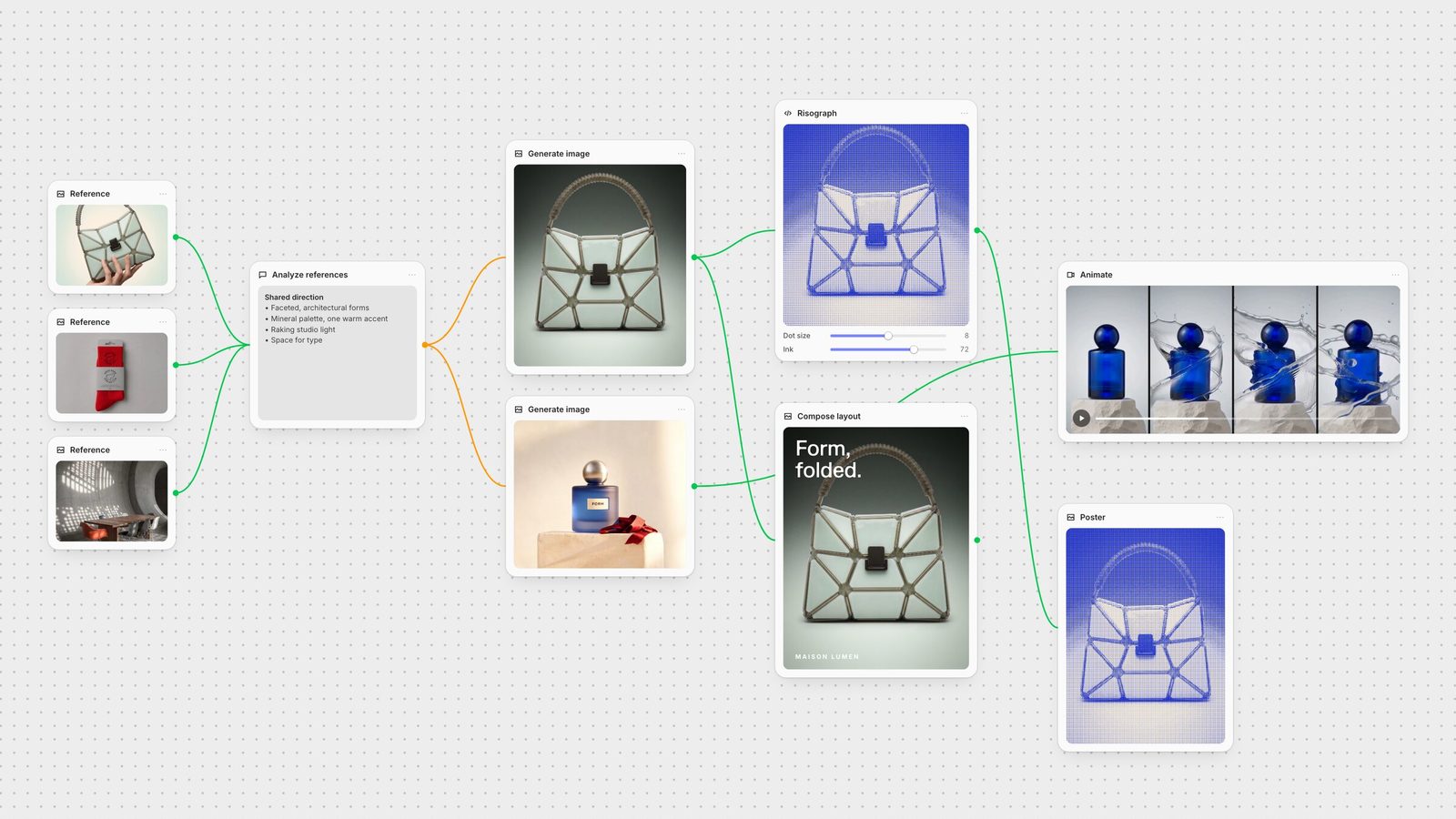
Choose Fuser when your creative workflow needs to produce more than a generation: editable campaign layouts, reusable processes and bespoke tools that fit your studio. Choose local ComfyUI when control of the inference stack is the priority. The other tools on this list each offer a different starting point for connected creative work.
Fuser is a node-based AI workflow builder on an infinite canvas, built for creative agencies and studio teams.
A useful graph preserves the relationship between a brief, references, prompts and outputs. For a studio, the next questions are practical: can a teammate run it again, can the final design stay editable, and can you build the controls your process needs? Local inference control, a stock library and hosted collaboration are different priorities. Choose around the work you need to complete.
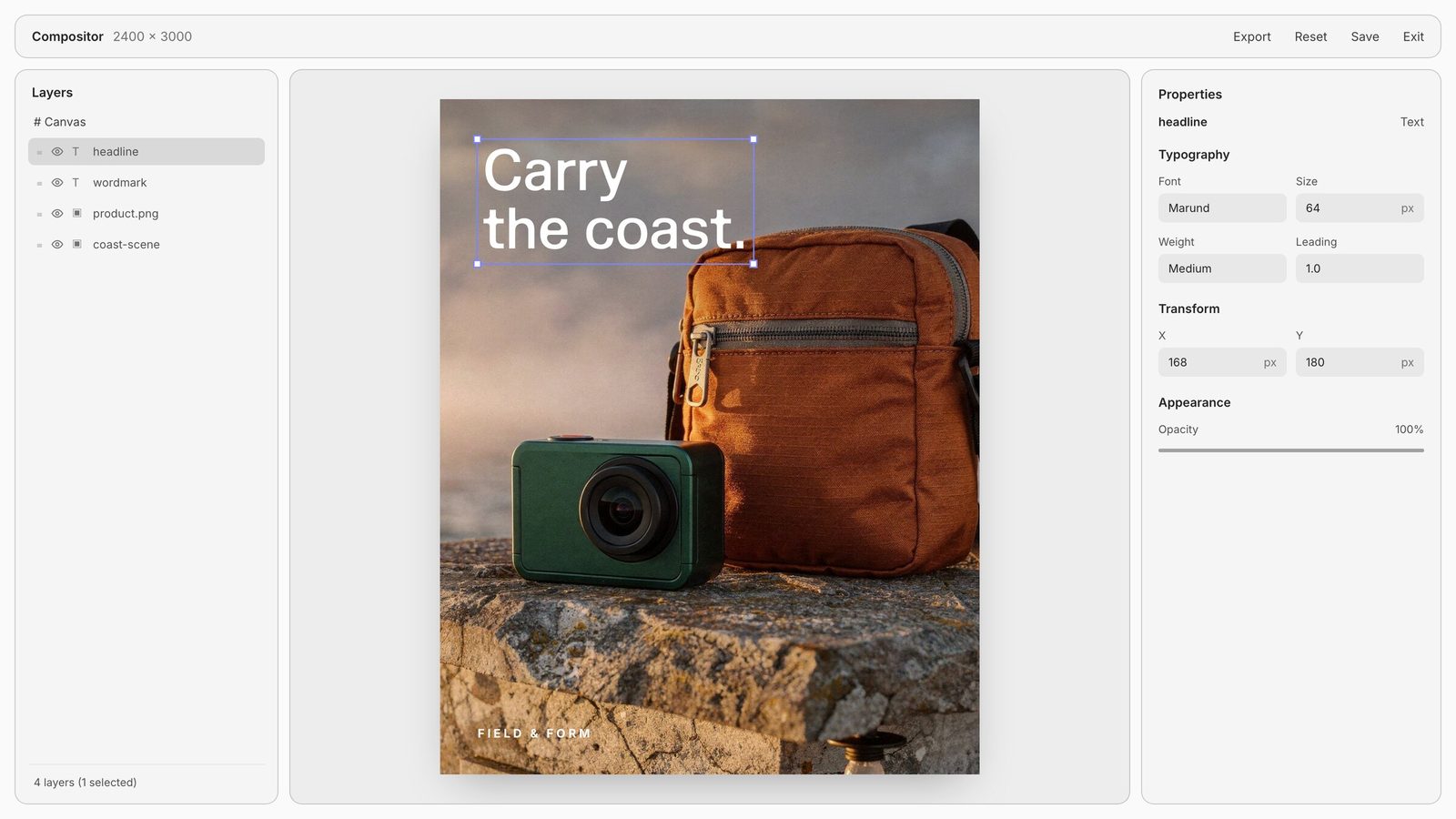
Connect generation with editable design, reusable Recipes and custom tool building. Compositor keeps brand assets and typography on separate layers. Creative Code can become an adjustable design instrument; Apps can become a bespoke running interface with canvas inputs and outputs. The benefit is a process you can keep developing as the brief changes.
For example, start with a product image, run Professional Product Campaign, select a direction and compose the final headline and logo in Compositor. Package repeated steps as a Recipe. If the team needs a particular image treatment or reference browser, build that tool beside the workflow.
Explore Fuser Recipes and choose a starting point from the public library.
Creative Code controls and media inputs
FLORA combines a visual canvas, a layer editor and reusable Techniques. Its paid plans add collaboration and pooled usage, with additional team controls on higher tiers. It fits teams whose creative process is already built around that canvas and library. Our reason to choose Fuser is the combination of editable design with bespoke tools built in Creative Code and Apps, alongside reusable Recipes.
FLORA product and pricing
Read the Fuser vs FLORA comparison
Choose local ComfyUI when open-source control, offline operation, your own checkpoints or custom Python nodes are essential. The core is free software; your hardware and any paid API calls still have costs. Comfy Cloud is a separate hosted option that removes local GPU setup and offers a supported selection of custom nodes. Choose Fuser when the team’s daily work spans generation, editable design, collaboration and building bespoke creative tools.
ComfyUI license and local capabilities
ComfyUI product and plan information
Read the full Fuser comparison
Figma Weave combines node-based generation with professional image editing, including layers, type, masks and relighting. Its Workflow → Tool mode turns a workflow into a simpler interface. Choose it if those editing tools and that workflow-to-tool handoff match the work you already do. Figma and Weave currently operate as separate products, with independent subscriptions and credits.
Figma Weave product and plan information
Read the full Fuser comparison
Krea Nodes is a strong fit when Krea’s generation, enhancement and model tools already anchor your workflow. It connects steps, branches work in parallel and shares templates; its offering also includes App Builder and Nodes Agent. Choose Fuser for a connected process that includes editable Compositor layouts and bespoke tools built with Creative Code and Apps.
The names cover different product contexts. Krea presents Apps as reusable creative workflow tools, so compare that job with Fuser Recipes. Fuser Apps builds running web tools, interactive experiences and websites, with inputs and outputs that can connect to the canvas.
Krea Nodes product and plan information
Read the full Fuser comparison
Magnific Spaces, formerly Freepik Spaces, brings connected generation, templates and real-time collaboration into a broader creative suite. Eligible paid plans include stock photos, video, vectors and PSD assets. Choose it when that stock library is central to production. Choose Fuser when you want generation, editable design and bespoke code or web tools connected around your studio’s own process.
Magnific Spaces product and plan information
Read the full Fuser comparison
Use one input your team understands: a product image, a logo or an approved reference. Check which steps remain editable, how another designer runs the process and which controls require a different plan. Compare the full job rather than the number of models or a headline credit allowance.
Start with Professional Product Campaign for studio, handheld and poster directions.
Try Merch Mockups from a Logo for a brand-led brief.
Explore Film Style Generator for visual treatments.
Last verified September 26, 2026.
Compare the workflow, design controls and starting materials each tool brings to your brief.
| Tool | Choose it for | Check before choosing |
|---|---|---|
| The shortlist at a glance | ||
| Fuser | Generation, editable design and bespoke tools on a shared canvas. | Use Compositor for layouts, Recipes for reuse, Creative Code and Apps for tools you build. |
| FLORA | A shared creative canvas, layer editor and reusable Techniques. | Match its library and team-plan controls to your production process. |
| ComfyUI | Free local software, checkpoints and custom-node control. | Local hardware and maintenance are your responsibility; paid Cloud is a separate option. |
| Figma Weave | Generation with image editing and Workflow → Tool. | Figma and Weave currently have independent subscriptions and credits. |
| Krea Nodes | Connecting Krea’s generation tools and reusable workflow interfaces. | Workflow Apps package Krea creation steps; Fuser Apps builds running web tools with canvas inputs and outputs. |
| Magnific Spaces | Creative nodes, collaboration and eligible-plan stock access. | Confirm which stock and generation features your chosen plan includes. |
We recommend Fuser when the agency needs generation, editable layouts, reusable workflows and bespoke creative tools in one process. Local ComfyUI is a stronger fit when controlling the inference stack is the primary requirement.
ComfyUI’s open-source local application is free software. You supply the hardware, and paid API nodes still have usage costs. Comfy Cloud is an optional hosted subscription.
They package connected steps into a process you can run with new inputs. Fuser Recipes are prebuilt AI workflow templates. Similar reuse concepts include FLORA Techniques, Krea workflow Apps, Weave Workflow → Tool and saved ComfyUI workflows, though their interfaces and capabilities differ.
In Fuser, Creative Code supports custom controls and connected media for adjustable design tools. Apps supports running web tools and websites with canvas inputs and outputs. These let you shape the interface around the way your studio works.
Use the same representative job and compare models, settings, output requirements and team access. Different providers’ credits are not equivalent units. Read current plan terms rather than assuming equal headline balances mean equal cost.
Choose Professional Product Campaign for a product image, Merch Mockups from a Logo for a brand mark or Film Style Generator for a visual treatment.
Choose a Recipe, bring your own inputs and make the workflow yours.