One click, whole workflow
Recipes are here. Package a whole workflow and run it in one click
Explore recipesOne click, whole workflow
Recipes are here. Package a whole workflow and run it in one click
Explore recipesInstagram's feed now runs from 1.91:1 to 3:4, so the tallest post is 1080 × 1440 px. Here are the current sizes for posts, carousels, stories and reels, and how to keep text out of the interface.
All guides · Every social image size
Quick answer: the best Instagram post size in 2026 is 1080 × 1440 pixels (3:4). Instagram now accepts feed images from 1.91:1 landscape to 3:4 portrait at 1080 px wide (Instagram Help), and profile grid tiles display at 3:4. Stories and reels are 1080 × 1920 (9:16).
The old advice of 1080 × 1350 (4:5) still works, because 4:5 sits inside the supported range. It is simply no longer the tallest option.
Instagram stores feed photos at a width of 1080 px. Images between 320 and 1080 px wide are kept at their resolution, smaller ones are enlarged, and wider ones are scaled down to 1080. The height follows the ratio:
Portrait 3:4: 1080 × 1440 px. The most screen space in the feed.
Portrait 4:5: 1080 × 1350 px. The previous maximum, still fully supported.
Square 1:1: 1080 × 1080 px.
Landscape 1.91:1: 1080 × 566 px. The smallest in the feed; use it only when the image must be wide.
Images outside the 1.91:1 to 3:4 range are cropped to fit.
Profile grids moved from square tiles to 3:4. A square post is centre-cropped into a taller tile on your profile, so text near the left and right edges of a square image can be cut off in the grid even though it shows in the feed. Designing at 1080 × 1440 means the post and its grid tile match.
Carousels hold up to 20 photos or videos and follow the same feed ratios (Instagram Help). Choose one ratio for the whole carousel. In practice, the other slides are shown at the first slide's shape, so a mixed set gets cropped.
Stories and reels are full-screen vertical at 1080 × 1920 px (9:16). Reels accept uploads anywhere from 1.91:1 to 9:16, at a minimum of 720 px and 30 frames per second (Instagram Help). Meta's ad specifications recommend 1440 × 2560 for ads, which is the same shape at a higher resolution.
The interface sits on top of the frame. Meta's guidance is to keep text and logos out of the top 14%, the bottom 35% and 6% on each side (Meta ads guide). On a 1080 × 1920 canvas, that leaves the middle band roughly from 270 px to 1250 px down.
Reel cover: 420 × 654 px. Pick it carefully, because the cover can't be changed after the reel is posted.
Profile photo and highlight covers: Instagram doesn't publish official pixel sizes for these. Both display as small circles, so use a square image with the subject centred.
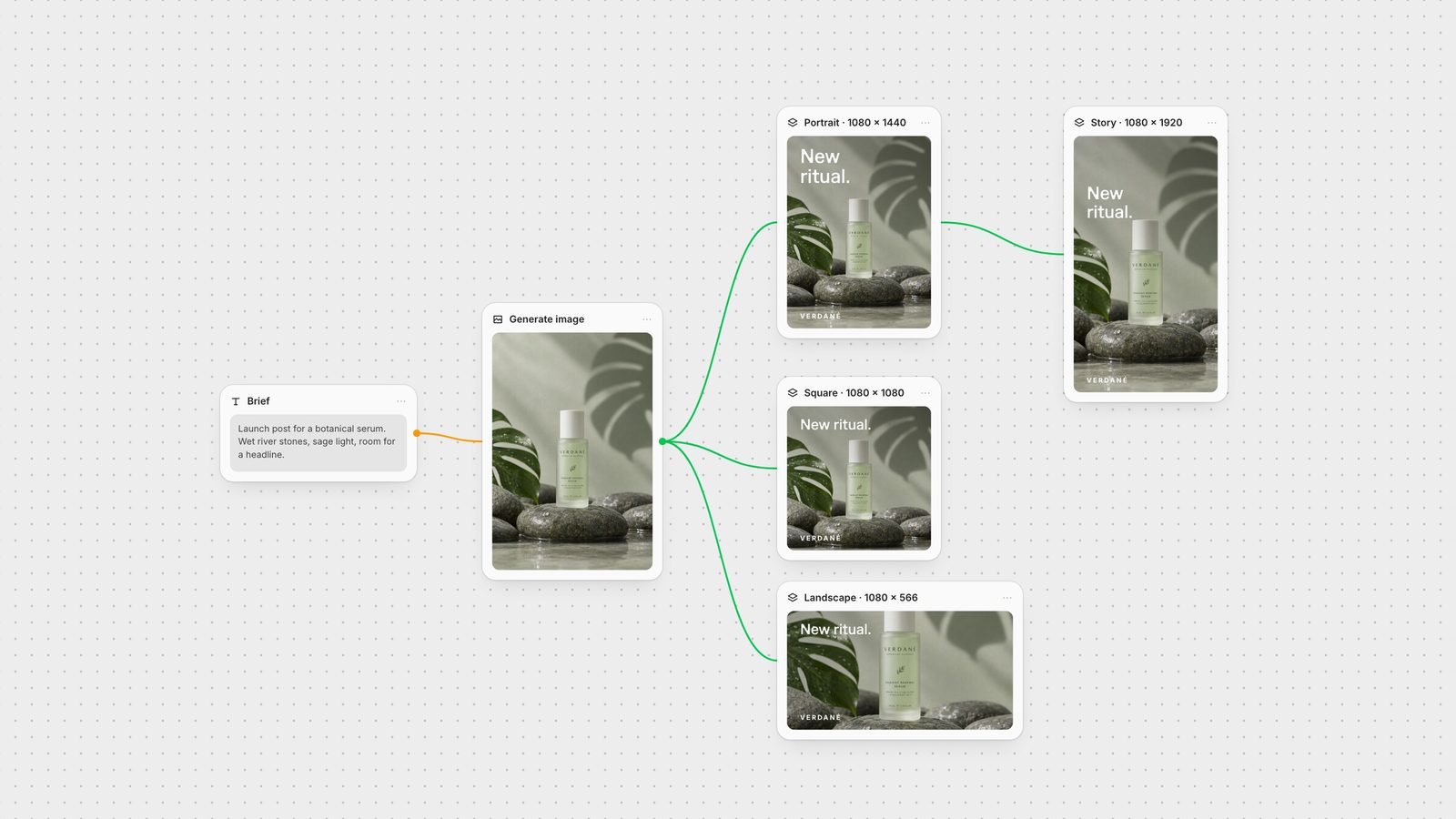
A product shot usually needs a portrait post, a square, a story and sometimes a landscape. Build them as one workflow rather than four separate edits.
Generate the image with space around the subject. On a Fuser canvas, prompt GPT Image or another image model with the product centred and calm space above and below. That margin is what lets one image become both a 3:4 post and a 9:16 story.
Create a Compositor for each shape. In the Compositor, set the canvas to 1080 × 1440, 1080 × 1080 or 1080 × 1920 (Compositor docs). Add the headline and logo as editable text layers.
Respect the story safe zone. On the 1080 × 1920 canvas, keep type inside the middle band described above.
Regenerate when a crop fails. If the subject doesn't survive the story crop, pass the sized frame to GPT Image with size set to Auto so the new image follows that frame, then place it back on the exact-size canvas.
Export PNG. Each Compositor exports at its canvas size to your project's media library (export docs).
For the rest of your channels, see LinkedIn banner size and YouTube thumbnail size.
Checked against Instagram Help and Meta's ads guide on 28 September 2026.
| Format | Size | Notes |
|---|---|---|
| Feed | ||
| Portrait post | 1080 × 1440 px (3:4) | Tallest supported; matches the 3:4 grid tile. |
| Classic portrait | 1080 × 1350 px (4:5) | Still supported. |
| Square post | 1080 × 1080 px (1:1) | Centre-cropped to 3:4 in the profile grid. |
| Landscape post | 1080 × 566 px (1.91:1) | Smallest presence in the feed. |
| Carousel | Any feed ratio | Up to 20 slides; keep one ratio throughout. |
| Vertical video | ||
| Story | 1080 × 1920 px (9:16) | Keep clear: top 14%, bottom 35%, 6% sides. |
| Reel | 1080 × 1920 px (9:16) | Uploads from 1.91:1 to 9:16; min 720 px, 30 fps. |
| Reel cover | 420 × 654 px | Can't be changed after posting. |
1080 × 1440 pixels (3:4). Instagram supports feed ratios from 1.91:1 to 3:4, and 3:4 gives the most screen space while matching the profile grid tile.
Yes. 4:5 is inside Instagram's supported range, so 1080 × 1350 displays without cropping in the feed. It is just shorter than the new 3:4 maximum.
Instagram's profile grid shows tiles at 3:4, so square posts are centre-cropped into a taller tile. Keep important content away from the left and right edges, or post at 3:4.
1080 × 1920 pixels (9:16). Keep text out of the top 14%, bottom 35% and 6% on each side, where Instagram's interface appears.
Instagram recommends 420 × 654 pixels. The cover can't be edited after the reel is posted, so choose it before publishing.
Generate the product image, compose the post, square and story on exact-size canvases and export them together.