One click, whole workflow
Recipes are here. Package a whole workflow and run it in one click
Explore recipesOne click, whole workflow
Recipes are here. Package a whole workflow and run it in one click
Explore recipesYouTube's recommended thumbnail is now 3840 × 2160 px. Here are the size, file and format limits for video and Shorts thumbnails, and how to design one that still reads at phone size.
All guides · Every social image size
Quick answer: YouTube recommends thumbnails at 3840 × 2160 pixels (16:9) with a minimum width of 640 px, in JPG or PNG. Files can be up to 50 MB when uploaded on desktop but only 2 MB from mobile (YouTube Help). Shorts thumbnails are the vertical version: 2160 × 3840 (9:16).
The old standard of 1280 × 720 and 2 MB is out of date. A 1280 × 720 file still uploads, but YouTube now asks for 4K, which keeps thumbnails sharp on TVs and large monitors.
Recommended size: 3840 × 2160 px.
Aspect ratio: 16:9. Other ratios are letterboxed or cropped.
Minimum width: 640 px.
Formats: JPG or PNG.
File size: up to 50 MB on desktop, 2 MB on mobile. If you upload from your phone, export a compressed JPG.
Shorts thumbnail: 2160 × 3840 px (9:16), minimum height 640 px.
Podcast thumbnail: square (1:1).
The same file appears as a large TV tile and as a small card in mobile search results. What holds up at the small size:
One subject, big. A face, a product or a dish filling a third of the frame reads at any size. Several small objects don't.
Three words or fewer. The title is already beneath the thumbnail; the image only needs a hook.
Hard contrast. Light type on a dark area, or the reverse. Glows and thin outlines disappear when the image is scaled down.
Keep the bottom-right corner simple. YouTube places the video length there, so don't put key text in that corner.
Check it small. Scale your export down to phone size before you upload. If the words don't read, cut words.
Image models don't always return the exact pixels you ask for. We requested 1920 × 1080 from one model and got 1920 × 1072 back. The dependable way to hit 3840 × 2160 is to compose the final frame at that size.
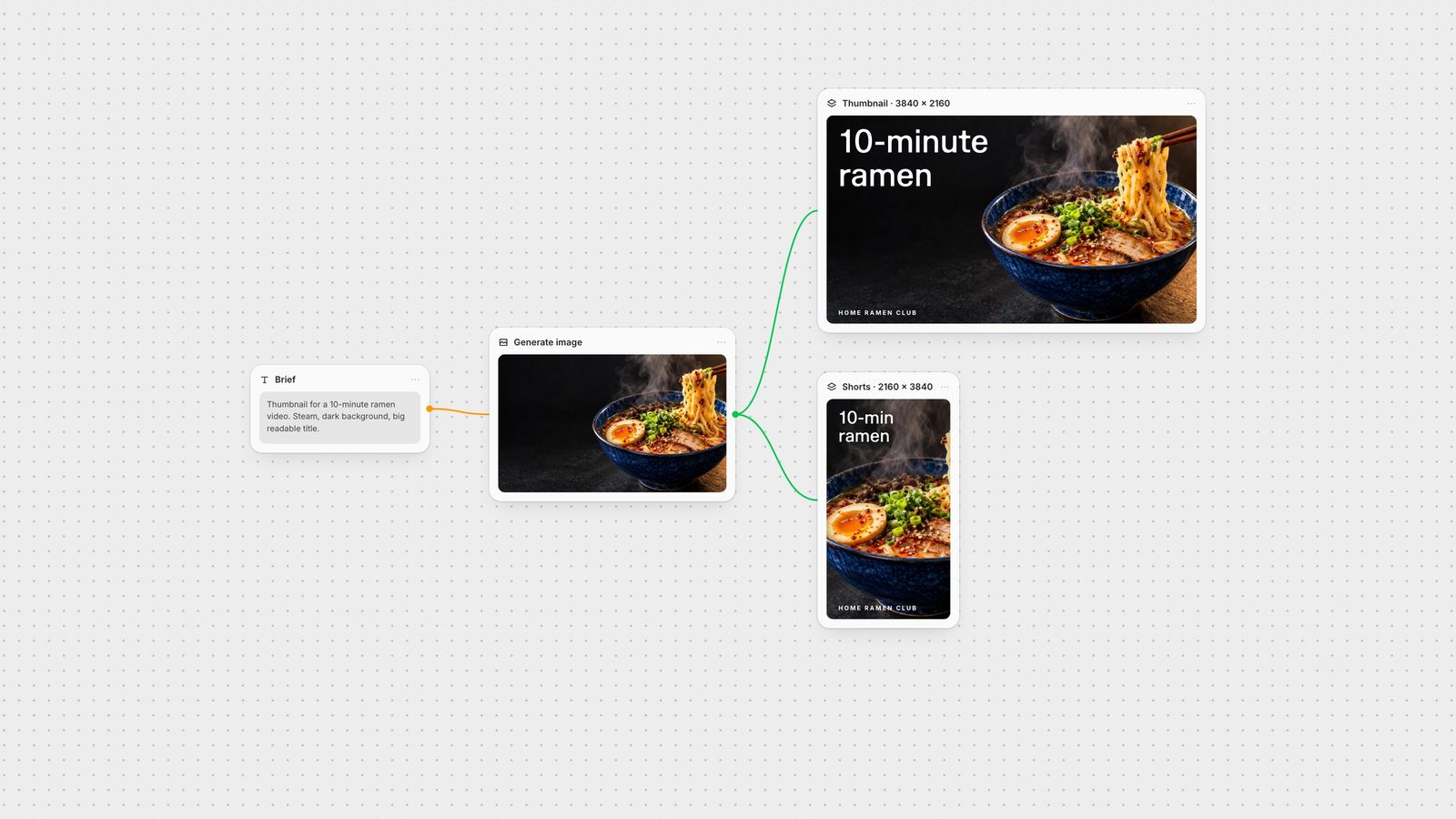
Generate the scene with room for type. On a Fuser canvas, prompt GPT Image with the subject on one side and a dark, clean area on the other. Fuser's GPT Image 2 and 2.5 nodes include a 3840 × 2160 output option, and other models can be upscaled in the same graph.
Open a Compositor at 3840 × 2160. In the Compositor, set the canvas to 3840 × 2160 (Compositor docs). Scale the image to fill it and add the title as a text layer, so you can test alternative hooks without regenerating.
Branch a Shorts version. Connect the same image to a second Compositor at 2160 × 3840. If the vertical crop loses the subject, pass that frame to GPT Image with size set to Auto so the new image follows the vertical frame.
Export PNG, then compress for mobile. Export renders at the canvas size and saves to your project's media library (export docs). A 4K PNG can exceed 2 MB, so convert it to JPG if you upload from your phone.
Keep the title as a separate layer and you can try several hooks on the same image. For the channel header, see YouTube banner size.
From YouTube Help, checked on 28 September 2026.
| Spec | Video thumbnail | Shorts thumbnail |
|---|---|---|
| Size and format | ||
| Recommended size | 3840 × 2160 px | 2160 × 3840 px |
| Aspect ratio | 16:9 | 9:16 |
| Minimum | 640 px wide | 640 px tall |
| Formats | JPG or PNG | JPG or PNG |
| Max file size | 50 MB desktop, 2 MB mobile | 50 MB desktop |
YouTube recommends 3840 × 2160 pixels (16:9) with a minimum width of 640 pixels, uploaded as JPG or PNG.
It still uploads because it is above the 640-pixel minimum, but YouTube now recommends 3840 × 2160. The larger size stays sharp on TVs and large screens.
Up to 50 MB when uploaded on desktop and 2 MB when uploaded from mobile. Compress to JPG if you upload from your phone.
2160 × 3840 pixels, a 9:16 vertical image, uploaded as JPG or PNG.
Generate a scene with space for type, then compose the final frame at 3840 × 2160 with the title as an editable text layer. In Fuser, a Compositor set to 3840 × 2160 exports the PNG at exactly that size.
Generate the scene, set the Compositor to 3840 × 2160 and test new titles without regenerating the image.