One click, whole workflow
Recipes are here. Package a whole workflow and run it in one click
Explore recipesOne click, whole workflow
Recipes are here. Package a whole workflow and run it in one click
Explore recipesYouTube channel banners are 2560 × 1440 pixels, but only a centred strip shows on every device. Here are the official dimensions, the safe area and a workflow for building a banner that survives every crop.
All guides · Social media image sizes
Quick answer: upload your YouTube channel banner at 2560 × 1440 pixels (16:9), no smaller than 2048 × 1152 and no larger than 6 MB. Keep the channel name, logo and any text inside the centred 1546 × 423 px safe area, because that is the only part every device shows (YouTube Help).
YouTube asks for a large 16:9 file because TVs display the whole thing. Every other screen crops it to a thin horizontal strip, which is why so many banners lose their logo on phones.
Recommended size: 2560 × 1440 px. YouTube recommends this size "especially for TV".
Minimum size: 2048 × 1152 px.
Maximum file size: 6 MB.
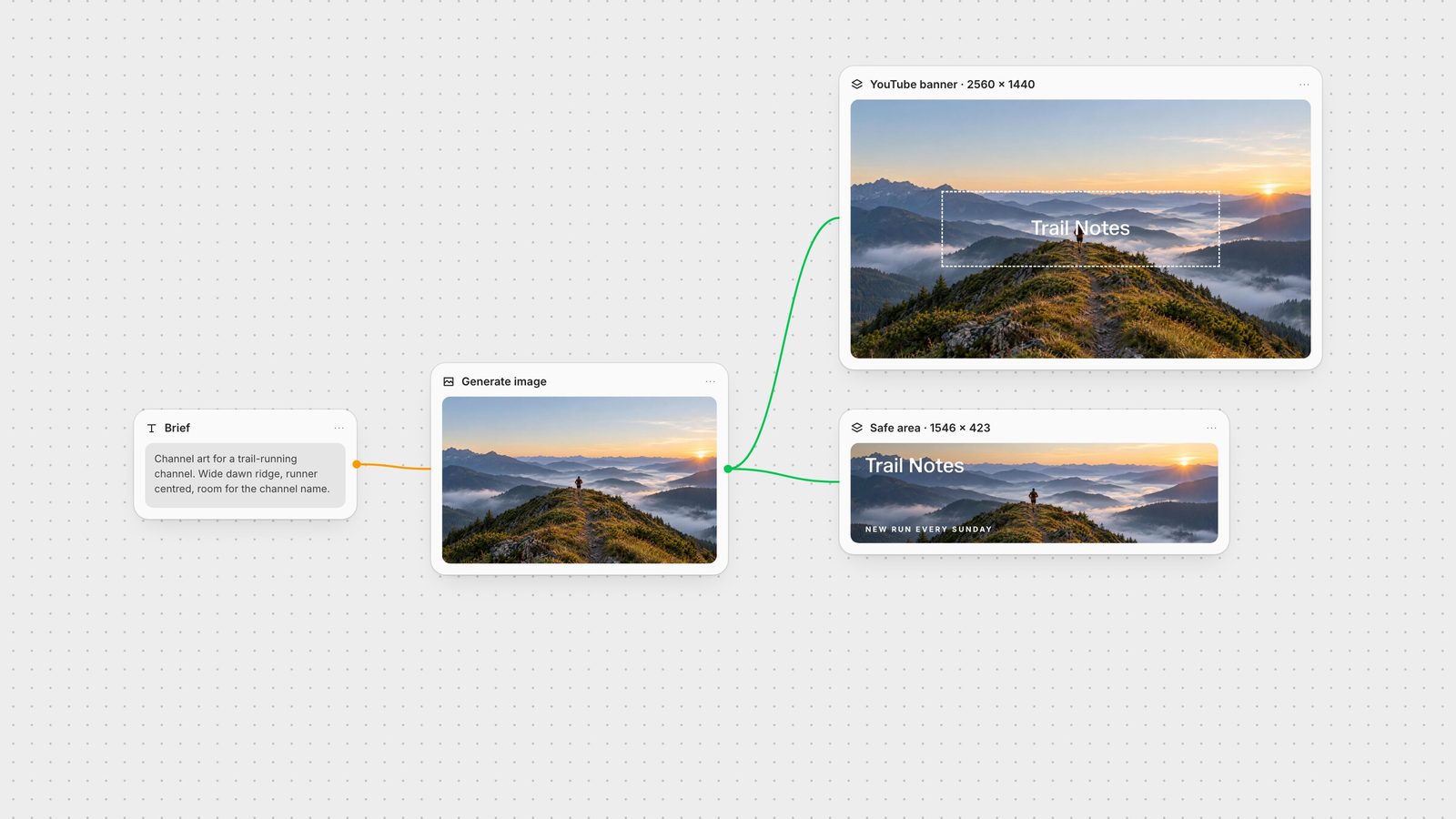
Safe area: 1235 × 338 px at the 2048 × 1152 minimum, which scales to about 1546 × 423 px on a 2560 × 1440 file (YouTube Help).
YouTube notes that the image "will get cropped on certain views and devices", so treat everything outside the safe area as background.
YouTube's help centre now publishes only the overall safe area. The per-device figures below are the widely used breakdown for a 2560 × 1440 file; they are not listed on YouTube's current page, but they line up with its official safe area once scaled.
TV: the full 2560 × 1440 image.
Desktop: a full-width strip, about 2560 × 423 px, through the vertical centre.
Tablet: about 1855 × 423 px from the centre.
Mobile: about 1546 × 423 px from the centre, the same as the all-device safe area.
In practice: design a full 16:9 scene for TV viewers, put the story in a horizontal band through the middle, and keep anything readable inside the central 1546 × 423 box.
Centre the subject vertically. Desktop and mobile only show a band roughly 29% of the banner's height. Skies and foregrounds are fine as atmosphere, not as the message.
Keep text short. A channel name plus one line ("New videos every Sunday") reads on mobile; a paragraph does not.
Leave the corners empty. Links, the channel name and the profile picture render around the banner on many layouts, so corner details rarely survive.
Export under 6 MB. A JPG at 2560 × 1440 comfortably fits; PNG is only worth it for flat graphics.
Check the result on a phone. YouTube shows a device preview when you upload; use it before you publish.
Generate a wide scene. Ask for the subject in the middle band with calm sky and ground above and below. In Fuser, generate it with GPT Image, which offers a 2560 × 1440 output size, or any other image model on the canvas.
Set the Compositor canvas to 2560 × 1440. In the Compositor, enter the Width and Height (any size from 1 to 4095 px) and add the channel name and logo as separate text and image layers inside the safe area (Compositor docs).
Export PNG. Export renders the frame at the canvas dimensions and saves it to your project's media library (export docs). Convert to JPG if the PNG is over 6 MB.
Keep the banner on the same canvas as your thumbnails, X header and LinkedIn banner, and a rebrand updates every channel from one source image.
Official YouTube figures, checked on 28 September 2026. Per-device crops are the widely used breakdown for a 2560 × 1440 file.
| Spec | Value | What it means |
|---|---|---|
| Banner file | ||
| Recommended size | 2560 × 1440 px (16:9) | Shows in full on TV. |
| Minimum size | 2048 × 1152 px | Smaller uploads are rejected. |
| Maximum file size | 6 MB | Use JPG for photographic banners. |
| Safe area | 1546 × 423 px (1235 × 338 at minimum) | The only region every device shows. |
| Display crops | ||
| TV | 2560 × 1440 px | Full image. |
| Desktop | about 2560 × 423 px | Full width, centre strip. |
| Tablet | about 1855 × 423 px | Centre strip, sides trimmed. |
| Mobile | about 1546 × 423 px | Matches the safe area. |
Upload 2560 × 1440 pixels (16:9). The minimum is 2048 × 1152 pixels and the file must be 6 MB or smaller.
About 1546 × 423 pixels in the centre of a 2560 × 1440 banner (1235 × 338 at the 2048 × 1152 minimum). Keep text and logos inside it so they show on every device.
Phones only show a centred strip about 1546 × 423 pixels. Anything outside that strip, including text near the top, bottom or sides, is cropped away.
Both are 16:9, but they do different jobs: the banner must read in a thin strip, while a thumbnail is shown whole at small sizes. Start from the same image, then compose each at its own size.
JPG or PNG both work. JPG keeps a photographic 2560 × 1440 banner well under the 6 MB limit.
Generate the scene, set the exact canvas size and export from one Fuser canvas.