One click, whole workflow
Recipes are here. Package a whole workflow and run it in one click
Explore recipesOne click, whole workflow
Recipes are here. Package a whole workflow and run it in one click
Explore recipesFive typography prompts, every character counted. GPT Image 2.5 Flare made no errors; Ideogram 4.5 swapped one hyphen and, with Expand Prompt on, changed case and layout. For editing text in finished artwork, Ideogram 4.5 changed only the date; GPT Image redrew the poster.
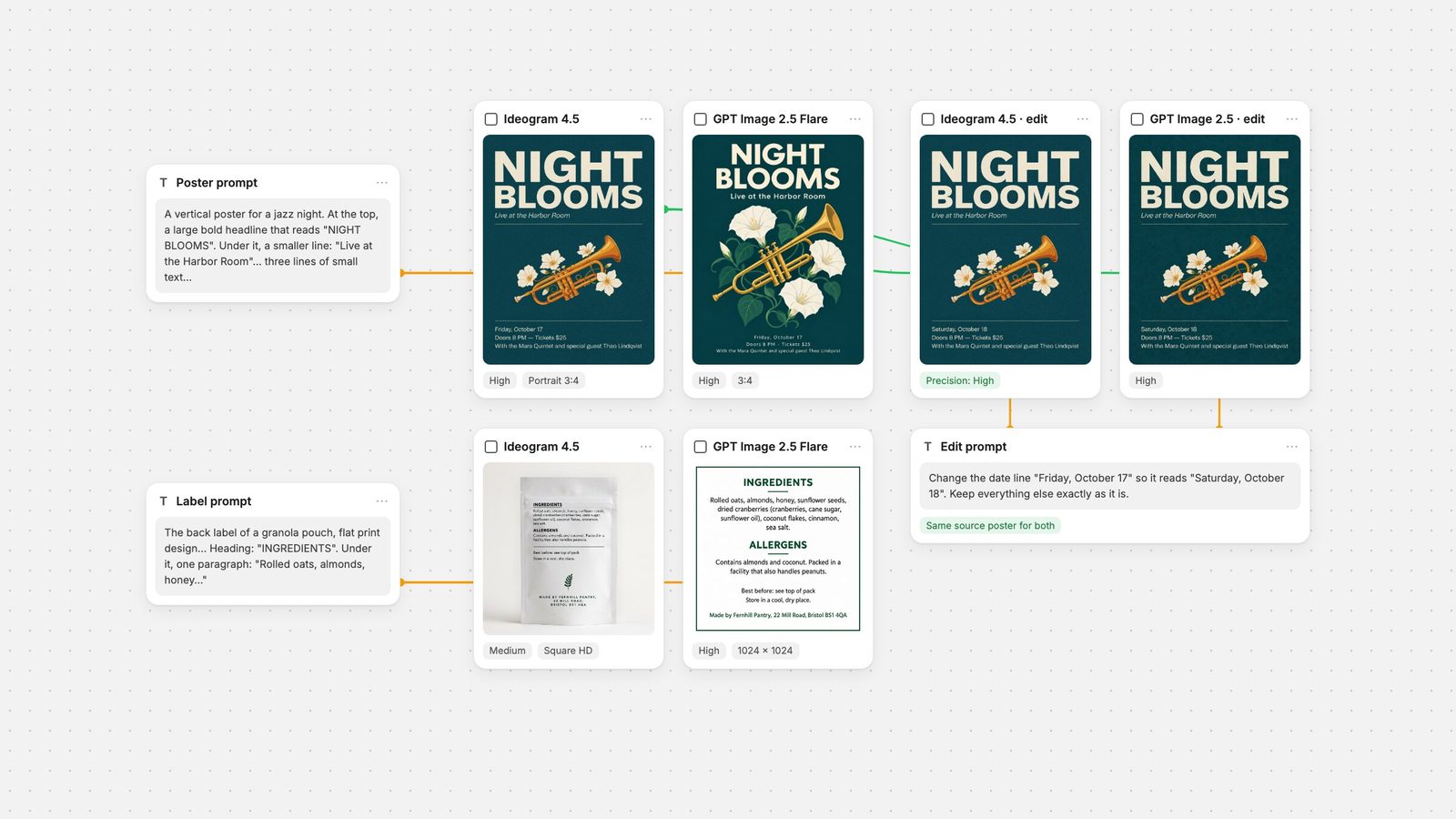
Quick answer: in our five typography tests (731 requested characters), GPT Image 2.5 Flare at High got every character right and kept every hyphen and capital as typed. Ideogram 4.5 also spelled every word correctly. Its only character error was a hyphen set as a long dash on the poster, at both Medium and High. With its default Expand Prompt step on, Ideogram also changed things we did not ask for: small print in capitals, gaps inside prices, a pouch mockup instead of a flat label. In the two runs we made with Expand Prompt off, it kept the text, case and punctuation exactly as typed. Editing went the other way. Both models changed a date on a finished poster correctly, but Ideogram 4.5 left 95.4% of the pixels identical to the source, while GPT Image 2.5 redrew the whole image. Use GPT Image 2.5 to generate text-heavy layouts; use Ideogram 4.5 to correct the text in artwork you want to keep.
Ideogram's API overview describes its 4.0 and 4.5 models as "known for prompt fidelity and crisp typography" when generating, and calls 4.5 "the most precise edit model", one that leaves pixels the edit does not touch copied exactly from your image. The Ideogram 4.5 model page leads with editing too: reduced drift across multi-turn edits and high-resolution edits without downsizing. Ideogram's headline pitch is editing, not first-pass typography.
OpenAI publishes GPT Image 2.5 in two versions. Flare is described as "fast, high-quality everyday image generation" (snapshot gpt-image-2.5-flare-2026-09-08), and Sunburst as "our most capable model for image generation and editing". Both take quality settings from low to max. OpenAI's image generation guide states that the models can still "struggle with precise text placement and clarity". Fuser's GPT Image node defaults to Flare, so Flare is what we tested.
Five prompts, each with the exact text in quotation marks. Two came from our six-model text-in-images test: a jazz-night poster with 111 characters of required text, most of it in three lines of small print, and a café menu with eight items, eight prices and an address, 172 characters. The GPT Image 2.5 Flare outputs for those two come from that test (High quality, 768 × 1024, one run each, 28 September 2026). We wrote three new prompts and ran both models on them on 2 October 2026:
Honey label (108 characters): "A front label for a jar of small-batch honey, flat print design on kraft paper with black ink and a simple line-drawn bee. Top line: "HOLLOW OAK APIARY". Large centre text: "Wildflower Honey". Under it: "Raw & Unfiltered". At the bottom, three lines of small text: "Net wt. 12 oz (340 g)", "Harvested June 2026, Batch 07", "Packed in Ashford, Vermont". Show only the label, flat and facing the camera, filling the frame."
Wordmark (40 characters): "A minimal logo for a design studio on a plain white background: the wordmark "Kestrel & Finch" in a custom geometric sans-serif, dark navy, with a small abstract bird mark to its left. Underneath, in small tracked capitals: "BRAND AND TYPE STUDIO, EST. 2019". No other text."
Granola back label (300 characters): an ingredients paragraph with nested brackets, an allergen line, storage lines and a postal address, flat print design, white background, black and dark green ink.
Ideogram 4.5 ran at Medium (the Fuser default) and at High, with Expand Prompt on (also the default), at Portrait 3:4 (864 × 1152) for the poster and menu and Square HD (1024 × 1024) for the rest. GPT Image 2.5 Flare ran at High, 1024 × 1024, for the three new prompts. Each configuration ran once, with no retries. We added two runs of Ideogram at Medium with Expand Prompt off, on the poster and the granola label, to see what that setting changes.
We read every output at full resolution and counted the requested characters that came out right, spaces excluded and case ignored. Changes of case, unrequested marks and layout changes are listed separately. One size caveat: Ideogram's 3:4 poster and menu have about 27% more pixels than the 768 × 1024 GPT outputs from the earlier test, which favours Ideogram on small print. In Fuser, the GPT Image node's portrait size is 1024 × 1536, larger than either.
GPT Image 2.5 Flare: 111/111, with the hyphen in "Doors 8 PM - Tickets" kept as typed. Ideogram 4.5 Medium: 110/111. It set that hyphen as a long dash and printed all three lines of small print in capitals, though we typed them in sentence case. Ideogram 4.5 High: 110/111, with the same long dash; case kept. With Expand Prompt off, Ideogram 4.5 Medium scored 111/111 and kept both the hyphen and the case.
Verdict: GPT Image 2.5. It reproduced the line exactly at High; Ideogram 4.5 matched it only once Expand Prompt was turned off.
GPT Image 2.5 Flare: 172/172, prices in a clean right-aligned column. Ideogram 4.5 Medium: 172/172, but every price was set with a visible gap after the decimal point, "3. 20" instead of "3.20", in all eight lines. Our count ignores spaces, so this scores as correct, but nobody would print that menu. Ideogram 4.5 High: 172/172, clean prices, with a plainer layout than GPT's framed card.
Verdict: tie between GPT Image 2.5 and Ideogram 4.5 High. Ideogram at its default Medium needed a fix.
All six outputs were spelled correctly: 108/108 on the honey label for GPT Image 2.5 and both Ideogram tiers, and 40/40 on the wordmark for all three. The differences were in following the rest of the brief. GPT Image drew a detailed, engraved bee where we asked for a "simple line-drawn" one. On the wordmark it drew two birds rather than "a small abstract bird mark". Ideogram also added marks we did not ask for: two small honeycomb hexagons beside the bee at Medium, and two bullet dots either side of the batch line at High. Neither Ideogram tier filled the frame with the honey label as asked (a thin white strip at Medium, a full white border at High), and both set the wordmark small in the middle of the square.
Verdict: tie on text. Ideogram's marks were closer to "minimal"; GPT's compositions used the frame better.
This was the hardest prompt: a 300-character ingredients block with nested brackets, an allergen statement and a postcode. All three outputs got 300/300. GPT Image 2.5 Flare set it as a flat, bordered label with the case as typed. Ideogram 4.5 Medium, with Expand Prompt on, ignored "flat print design" and "show only the label". It drew a photographed pouch with the text small on its front and set the address in capitals. Ideogram 4.5 High, also with Expand Prompt on, spelled everything correctly but set the label as a card photographed on a surface, again with the address in capitals. Both expanded runs added a small leaf sprig. With Expand Prompt off, Ideogram produced a flat label with the case as typed.
Verdict: GPT Image 2.5 against Ideogram at its default Expand Prompt setting; a tie once Expand Prompt was off. That is one run each, so treat the Expand Prompt result as an observation, not a rule.
The real-world typography job is often a correction, not a new image. We took Ideogram's High poster (864 × 1152) and sent the same file and the same prompt to both edit modes: "Change the date line "Friday, October 17" so it reads "Saturday, October 18". Keep everything else exactly as it is." Ideogram 4.5 ran with Edit Precision High at Medium quality. GPT Image 2.5 Flare ran at High with the default Auto size. Both edits read "Saturday, October 18" and, in our runs, came back at 864 × 1152. The source is Ideogram's own output, which is worth keeping in mind when reading the result.
We then compared each result with the source, pixel by pixel. Ideogram 4.5 left 95.4% of pixels bit-identical. Every pixel that changed by more than a small tolerance (3.2%) sits in one 312 × 94 box around the date, which also clips the start of the line below. GPT Image 2.5 changed nearly every pixel. 25% moved by more than the tolerance, across the headline, the trumpet and the background texture, even though the poster looks almost the same at a glance. That matches Ideogram's precise edit documentation, which says unchanged pixels are copied from the source. Ideogram's model page shows a multi-turn version of this comparison against GPT Image 2.5 Sunburst. We ran a single turn with Flare, the Fuser default; OpenAI positions Sunburst for "workflows where editing precision matters most", and we did not test it here.
Verdict: Ideogram 4.5. If the artwork is approved and only the words change, it is the safer edit. GPT Image also takes a mask in Fuser to limit an edit, but it requires a mask image with an alpha channel; we tested both models without one.
Ideogram's generate reference explains that its Magic Prompt modes auto and on "rewrite and expand the prompt before generation", while off "keeps your wording and only converts it into a structured prompt". In our runs, every case change and layout change we saw from Ideogram came with expansion on. The two runs with it off kept the text, case and punctuation as typed. In Fuser, the Ideogram 4.5 node has an Expand Prompt toggle in its controls. It is on by default and applies only to text-to-image generation; the node hides it once an image is connected for editing. For layouts where case and punctuation matter, turn it off first. The Ideogram 4.5 prompt guide covers the setting in more detail.
Fuser's credit costs depend on the settings. For a 1024 × 1024 image, Ideogram 4.5 at Medium costs slightly more than GPT Image 2.5 Flare at High, and Ideogram at High costs about four times as much. GPT Image at Medium costs less than a quarter of Ideogram's Medium. Ideogram's price per image does not change with size, while GPT Image's changes with quality and output size, so GPT Image at High in Auto size costs more than Ideogram at Medium. For the edit test, Ideogram's Medium edit cost less than GPT Image's High edit at the default Auto size.
Generating posters, menus and labels with lots of text: GPT Image 2.5 Flare at High. It made zero character errors across five prompts and kept case and punctuation as typed.
Correcting text in approved artwork: Ideogram 4.5 with Edit Precision High. It changed the words and left 95.4% of the image bit-identical. A mask can confine the edit further.
Ideogram for generation: worth trying for minimal marks and clean price lists, with Expand Prompt off and the High tier if small print matters.
Either way: proofread hyphens, dashes and decimal points. Ideogram's misses in this test were punctuation and spacing, not spelling.
On a Fuser canvas you can wire one prompt into both nodes, compare the lettering side by side, and send the winner on to an edit node or the Compositor. For a full layout workflow, see AI poster typography. For more models on the same prompts, see the best AI models for text in images, and for wordmarks, the best AI logo and vector generators. The GPT Image prompt guide covers OpenAI's model on its own.
Tested 2 October 2026 with the same model versions Fuser runs.
One run per setting, same prompts. Character counts exclude spaces.
| Test | Ideogram 4.5 | GPT Image 2.5 Flare |
|---|---|---|
| Typography | ||
| Poster (111 chars) | 110/111 at Medium and High (hyphen became a long dash); Medium set small print in capitals. 111/111 with Expand Prompt off. | 111/111, case and punctuation as typed. |
| Menu (172 chars) | 172/172 at both tiers; Medium put a gap after every decimal point. | 172/172, clean price column. |
| Honey label (108 chars) | 108/108 at both tiers; Medium added honeycomb marks, High two bullet dots. | 108/108; drew a detailed bee instead of a simple line drawing. |
| Wordmark (40 chars) | 40/40 at both tiers; minimal mark, small in frame. | 40/40; two-bird mark, set larger in the frame. |
| Back label (300 chars) | 300/300 at both tiers; Medium drew a pouch mockup, High a card photographed on a surface. Flat with Expand Prompt off. | 300/300, flat label as asked. |
| Editing and cost | ||
| Change one date line | Correct; 95.4% of pixels identical to the source. | Correct; the whole image redrawn, 25% of pixels changed by more than 3.2%. |
| Relative cost (1024 × 1024) | Medium slightly more than GPT High; High about four times GPT High. | Medium under a quarter of Ideogram Medium; varies with size and quality. |
Not in our generation tests. Across five prompts and 731 requested characters, GPT Image 2.5 Flare at High made no errors. Ideogram 4.5 also spelled every word correctly, but set one hyphen as a long dash and, with Expand Prompt on, changed case and layout in some outputs. In our single edit test, Ideogram 4.5 was better at changing text in an existing image.
In our runs, the case changes came with Expand Prompt on, which is the default. Ideogram documents that prompt expansion rewrites and expands the prompt before generation. With it off, both of our test runs kept the case exactly as typed.
Ideogram 4.5 with Edit Precision High. When we changed one date line on a poster, it left 95.4% of pixels identical to the source. GPT Image 2.5 also made the change correctly but redrew the whole image.
It depends on settings. For a square image, Ideogram 4.5 at Medium costs slightly more than GPT Image 2.5 Flare at High, and Ideogram at High costs about four times as much. GPT Image at Medium is the cheapest of these options.
Fuser defaults to Flare, which OpenAI describes as fast, high-quality everyday image generation, and which made no character errors in this test. OpenAI describes Sunburst as its most capable model for generation and editing. Both are available in the same node.
Yes. Connect one text node to an Ideogram 4.5 node and a GPT Image node, run them together and compare the outputs on the canvas before editing or exporting the one you keep.
Run the same copy through Ideogram 4.5 and GPT Image 2.5, compare the lettering and fix the winner in place.