One click, whole workflow
Recipes are here. Package a whole workflow and run it in one click
Explore recipesOne click, whole workflow
Recipes are here. Package a whole workflow and run it in one click
Explore recipesSix current image models, two typography prompts, every character counted. GPT Image 2.5 Flare was the only model with zero errors and zero additions on both. Seedream 5.0 Lite spelled everything right but added a word. The other models' character errors were all in the small print.
All guides · Best AI image models
Quick answer: for posters, menus and any image where every word has to be right, start with GPT Image 2.5 Flare. In our test it was the only model that reproduced all 283 requested characters across two prompts without adding or changing anything. Seedream 5.0 Lite also spelled everything correctly, but it put an unrequested "[BIG]" in front of one headline. Nano Banana 2, Recraft V4.1 Pro and Qwen Image 2 each got one or two characters wrong, all in the smallest line. FLUX.2 Pro spelled everything correctly but printed one menu item twice. Every model spelled the headlines correctly. Small print is where the differences show.
Short headlines no longer separate these models, so we wrote two prompts that put more pressure on small text. The first is a jazz-night poster with a two-word headline, a subtitle and three lines of small print, including a name that is easy to misspell. The second is a café menu with eight items, eight prices and an address line: 172 characters to get right, a lot of them digits.
Every model got the same text, verbatim, with each required string in quotation marks. Poster prompt:
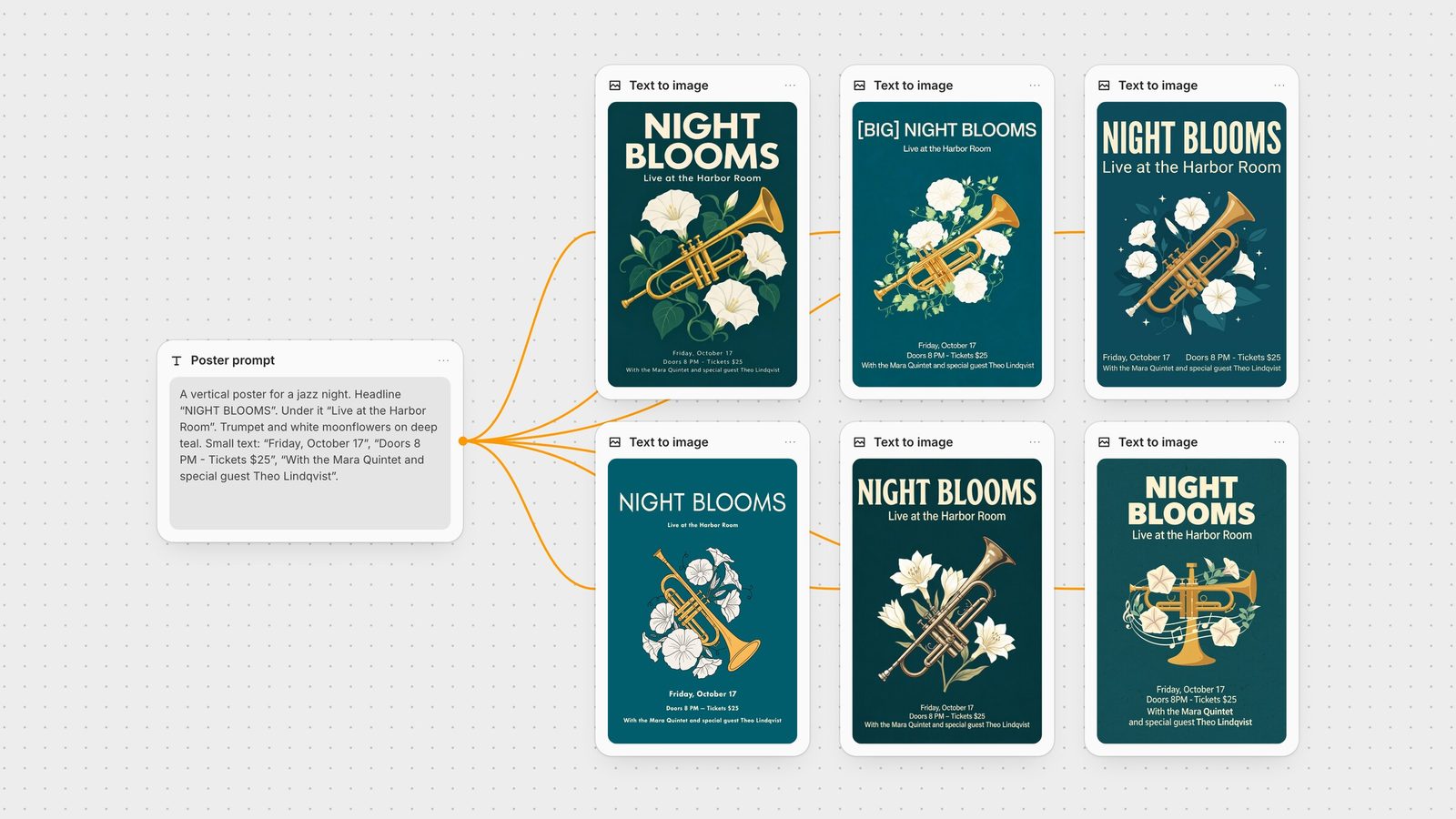
A vertical poster for a jazz night. At the top, a large bold headline that reads "NIGHT BLOOMS". Under it, a smaller line: "Live at the Harbor Room". In the middle, a flat illustration of a brass trumpet surrounded by white moonflowers on a deep teal background. At the bottom, three lines of small text: "Friday, October 17", "Doors 8 PM - Tickets $25", "With the Mara Quintet and special guest Theo Lindqvist". Clean modern sans-serif typography in cream.
Menu prompt:
A printed café menu card in flat graphic design: cream paper, dark brown ink, a small coffee cup icon. Title at the top: "CORNER STORE COFFEE". Below it, a price list with exactly these eight items and prices, one per line: "Espresso 3.20", "Cortado 3.80", "Flat White 4.10", "Oat Latte 4.60", "Cardamom Bun 3.90", "Rye Sourdough Toast 5.40", "Pistachio Croissant 4.75", "Iced Hojicha 4.95". At the bottom, in small text: "Open daily 7:30 to 16:00, 14 Wexford Lane".
Each model ran once on fal at a 3:4 portrait size with default settings. There were no retries and no cherry-picking. The endpoints were GPT Image 2.5 Flare at high quality, Nano Banana 2 (Gemini 3.1 Flash Image) at 1K, Recraft V4.1 Pro, Qwen Image 2 on the standard tier, Seedream 5.0 Lite and FLUX.2 Pro. We then read every output at full resolution and counted the characters that matched the request exactly, with spaces excluded: 111 on the poster, 172 on the menu.
GPT Image 2.5 Flare: 111/111 and 172/172. Both layouts followed the brief line for line, with nothing added. The menu had a framed border, a divider rule and prices set in a clean right-aligned column. It was the only model whose poster and menu both needed no edits.
Seedream 5.0 Lite: 111/111 and 172/172. It spelled every requested string correctly, and its menu was as clean as GPT Image's. But the poster headline came out as "[BIG] NIGHT BLOOMS". The model seems to have taken "large bold headline" as text to print. It also returned the largest files in the test, 2304 × 3072, which helps when the small print needs to hold up in a large format.
Nano Banana 2: 111/111 and 171/172. Nothing was misspelled. It did merge two of the poster's three small lines into one row. On the menu it ignored "flat graphic design" and drew a photographed card on a wooden table, stamped "CSC" on the coffee cup and broke the address line in two, which dropped the comma.
Recraft V4.1 Pro: 110/111 and 171/172. It had the most designed type of the set: tracked caps and consistent weights. It set the poster's hyphen as a long dash and split the menu's footer into two corners, again losing the comma. Its 1792 × 2432 output kept even the footer crisp.
Qwen Image 2: 110/111 and 171/172. The layout was clear and the menu type was large and readable. It printed the closing time as "16:90" and set the poster's hyphen as a dash. That is a factual error that a quick look would not catch.
FLUX.2 [pro]: 111/111 and 172/172, plus a repeated line. Every requested string appears, but "Flat White 4.10" is printed twice, so the menu has nine items. The poster lost the space in "8 PM" and broke the last line with mixed weights. It also rendered the menu as a mockup of a card on a surface.
Treat this as two prompts, not a benchmark. The pattern was consistent, though. All six models spelled the headlines correctly, and every wrong or dropped character came in the smallest line of text. The two additions, Seedream's "[BIG]" and FLUX.2's repeated menu item, are a separate failure: text that was never requested.
These tips come from the vendors' own documentation, and each one held up in our runs:
Put the exact words in quotation marks. Black Forest Labs' FLUX.2 prompting guide recommends quotes for exact text, for example The text 'OPEN' appears in red neon letters above the door. We quoted every string, and no model misspelled a quoted word.
Say where each line goes and how big it is. The same guide recommends stating placement relative to other elements and size with phrases like "large headline text" or "small body copy". Keep those phrases outside the quotes, and still check the result: our poster prompt did that, and Seedream 5.0 Lite printed "[BIG]" in front of the headline anyway.
Name the type style and colors. Describe the style you want ("elegant serif", "bold industrial lettering"). For brand colors, BFL documents hex codes tied to a specific element, such as 'ACME' in color #FF5733. In Fuser, the Recraft V4 node also takes a list of preferred hex colors as a palette.
Raise quality for small print. OpenAI's image generation guide suggests low quality for drafts and comparing higher settings for final assets. It also states that the model "can still struggle with precise text placement and clarity". The Fuser GPT Image node offers quality levels up to max.
Match the model to the amount of text. Recraft describes V4 as handling "short and mid-length phrases" with high fidelity. Alibaba says Qwen-Image-2.0 accepts instructions up to 1,000 tokens for posters, slides and infographics. Google lists legible text for infographics, menus and marketing assets among Gemini 3 image models' capabilities.
Proofread the smallest line first. Every miss in our test was in the footer or the fine print, and some were digits ("16:90"). Read prices, dates and times against your source before anything ships.
For prices, dates, legal lines or anything you will reuse across many versions, don't rely on a generator at all. Generate the artwork, with the headline if you like, then set the fine print as real text in Fuser's Compositor. Its text layers support custom fonts, variable font axes and fixed or auto-sizing text boxes, and you can export at the exact pixel size a placement needs. A price change is then an edit, not a re-roll. See social media image sizes for the dimensions.
For print-ready layouts with a lot of text, use GPT Image 2.5 Flare. For large outputs and clean menus or price lists, use Seedream 5.0 Lite, but check headlines for words you didn't ask for. Recraft V4.1 is the pick for designed typography and brand palettes. The Fuser node can also output vectors for wordmarks and logos; see the best logo and vector generators. Qwen Image 2 suits long, structured instructions for infographics and slides. We tested the standard tier; fal describes the Pro tier as the one tuned for text accuracy. Nano Banana 2 is best when the text is part of a photographic scene, and it can be refined in follow-up edits. Use FLUX.2 when you need exact hex colors or multiple references, and check it for repeated lines.
For single-model detail, see the guides to GPT Image, Nano Banana, Recraft V4, Seedream and FLUX.2. To change text in an image you already have, see the best AI image editing models.
Last verified September 28, 2026.
Based on two shared typography prompts plus each vendor's documentation.
| Model | Reach for it when | Watch out for |
|---|---|---|
| Every character right | ||
| GPT Image 2.5 Flare | Posters, menus and dense layouts that must be print-ready; masked edits. | Higher quality settings cost more and take longer. |
| Seedream 5.0 Lite | Clean price lists and large outputs (2304 × 3072 at 3:4 in our test). | Printed an unrequested "[BIG]" next to the headline. |
| FLUX.2 [pro] | Hex-exact brand colors and multi-reference layouts. | Repeated a menu line; dropped a space in "8 PM". |
| One or two characters off | ||
| Recraft V4.1 Pro | Designed typography, palette control and vector output. | Swapped a hyphen for a dash; dropped a comma. |
| Nano Banana 2 | Text inside photographic scenes; follow-up edits. | Drew a photo mockup when asked for flat design. |
| Qwen Image 2 | Long, structured instructions such as infographics and slides. | Printed "16:90" instead of "16:00". |
In our two-prompt test, GPT Image 2.5 Flare was the only model that reproduced all 283 requested characters with nothing added. Seedream 5.0 Lite spelled everything correctly but added an extra word to one headline. Nano Banana 2, Recraft V4.1 Pro and Qwen Image 2 each missed one or two characters in the small print.
Large headlines are easy for current models. The errors come in small, dense lines such as footers, dates and prices. Every wrong or dropped character in our test was in the smallest line. OpenAI's own documentation says its model can still struggle with precise text placement and clarity.
Put the exact text in quotation marks, say where each line goes and how large it is, describe the typeface style, and use a higher quality setting for small print. Keep size words such as "large" outside the quotes.
Yes. GPT Image 2.5 Flare and Seedream 5.0 Lite both produced a correct eight-item menu with prices in our test. Proofread every price anyway: Qwen Image 2 printed 16:90 as a closing time, and FLUX.2 repeated an item.
Generate the artwork, then set the final text as real, editable type. In Fuser, the Compositor has text layers with custom fonts and exports at an exact pixel size, so changing a price or date doesn't need a new generation.
Yes. On a Fuser canvas, connect one prompt to several image nodes, run them together and compare the outputs side by side before sending the best one to the next step.
Wire one prompt into several image models, compare the lettering and finish the layout in the Compositor.