One click, whole workflow
Recipes are here. Package a whole workflow and run it in one click
Explore recipesOne click, whole workflow
Recipes are here. Package a whole workflow and run it in one click
Explore recipesCompare Fuser, Photoroom, Krea and FLORA for product campaigns, catalog editing and reusable creative workflows. Keep product and brand details editable.
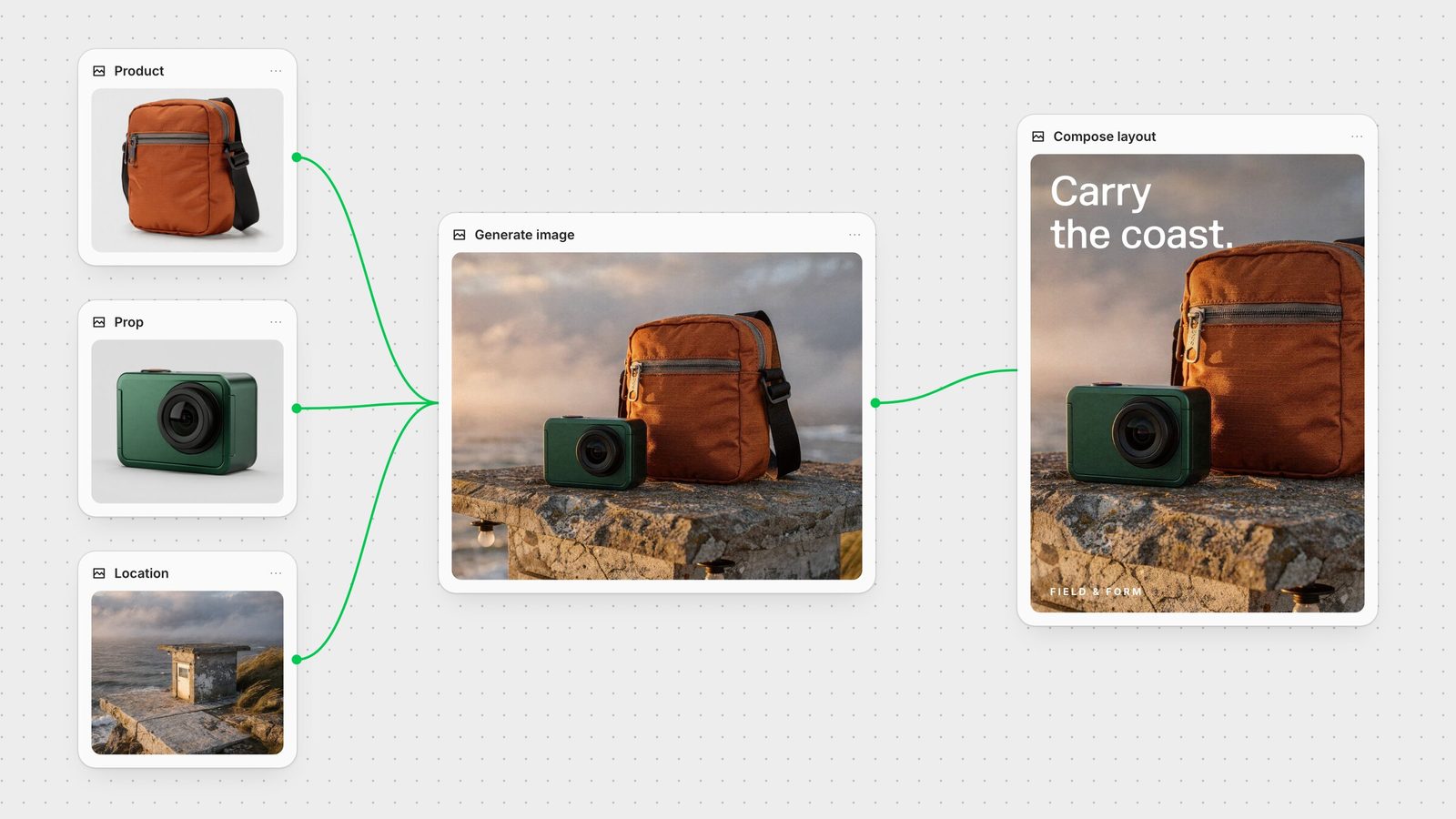
Choose Fuser when a product photograph needs to become a campaign: studio directions, lifestyle scenes, social layouts, motion and custom tools your team can reuse. Choose Photoroom when the main job is processing an existing product catalog. Krea and FLORA offer creative canvases for teams already working in those environments.
The useful starting question is what you need to deliver. A clean marketplace image, a new packaging concept and a campaign hero require different levels of control over the product and the surrounding scene.
Start with Professional Product Campaign, a Recipe that develops studio, handheld and poster directions from a product image. Copy the workflow when you want to change the references, models or creative direction. Keep the chosen inputs with the results so a teammate can rerun the process for the next product.
Use generation for the setting and visual direction. In Compositor, arrange the approved product, logo and text on separate layers. A request to change the headline or move the logo becomes a layout edit. Export the composition or connect it to another step in the canvas.
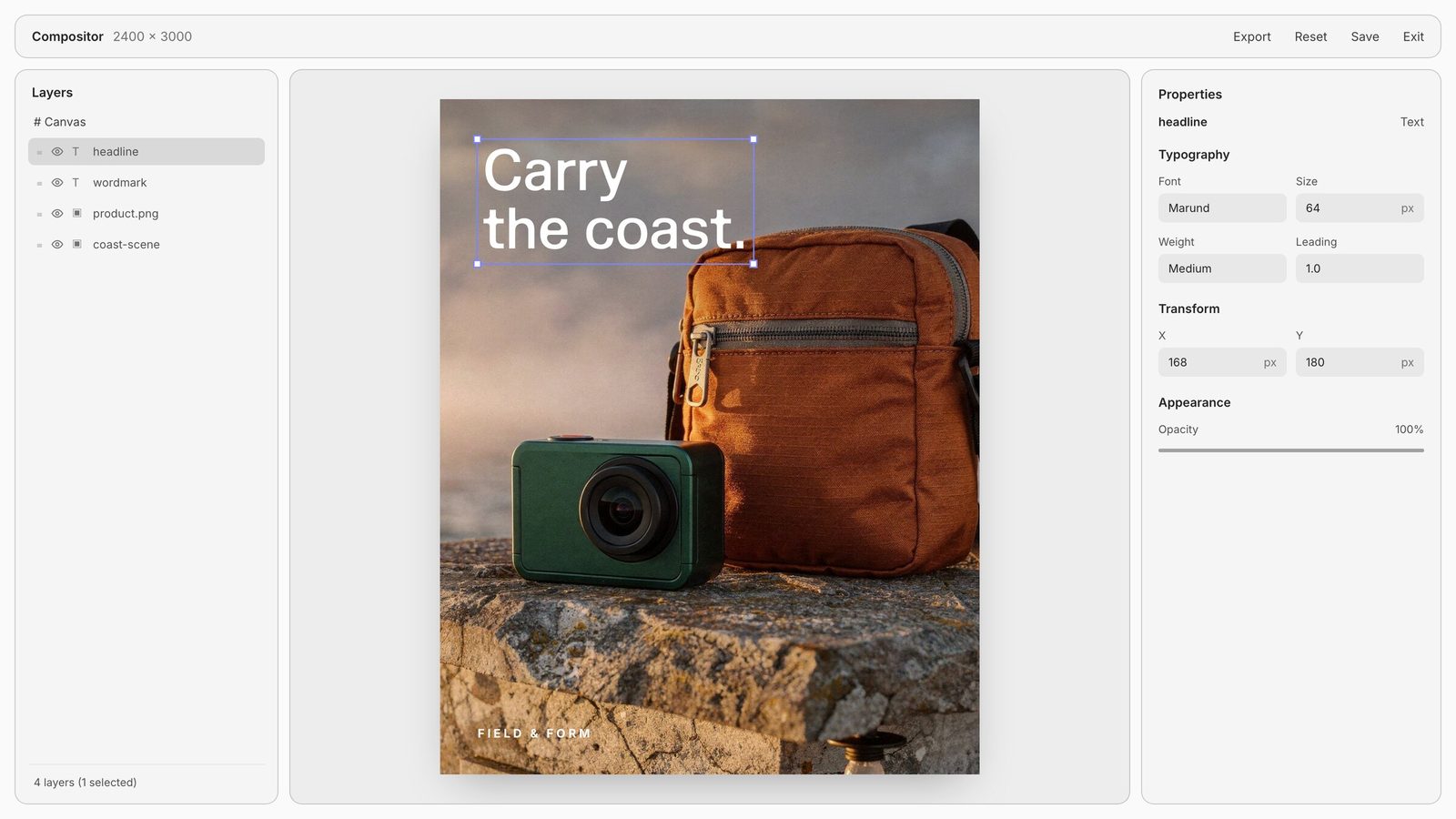
For a summer drinks campaign, combine an approved bottle cutout with a generated scene, place the brand copy as text and make a second arrangement for a vertical crop. Animate the selected still using the image-to-video guide. The same creative direction can carry across the still and the motion.
A studio often repeats work that is too specific for a generic preset: a particular grain treatment, a branded pattern or an interface for sorting references. Build an adjustable design instrument with Creative Code, or a running web tool with Apps. Expose the inputs and controls that matter to the job and connect the result to your canvas.
Apps can also become a campaign website or an interactive experience. Recipes preserve the repeatable creative process. Together, these give the studio ways to develop both the assets and the tools used to make them.
Photoroom combines background removal, product staging, batch editing and API workflows. It is a strong starting point when the main task is applying consistent treatments to many existing product photographs and delivering them into ecommerce channels.
Choose this route for a catalog operation; choose Fuser when the brief spans art direction, editable layouts, motion and bespoke tools. For either workflow, approve a representative set of products before scaling the treatment across the range.
Krea Nodes connects generation steps, supports parallel branches and provides reusable workflow interfaces. FLORA combines a creative canvas with a layer editor and reusable Techniques. Either can be useful when your team already has a process and library there.
Fuser brings the campaign’s generation, final composition and custom tool building together. Explore Fuser vs Krea and Fuser vs FLORA for the specific workflow and team differences.
For an exact product photograph, begin with an approved source image or cutout. Let the setting, lighting direction and surrounding graphics change around it. For concept development, use generated product imagery to explore materials and packaging before selecting a design.
Choose the model after choosing the task. The image-model guide covers reference-led editing, multi-image composition and SVG assets. Preserve final labels, logos and required copy in editable layers when the campaign needs precise placement and repeated revisions.
Check silhouette, material, color and scale against the product before delivery. Look closely at reflective caps, transparent glass, small attachments and labels. Then save the approved workflow as a Recipe so the next product starts with a process your team understands.
Last verified September 26, 2026.
Match the creative task to the inputs, controls and output you need.
| Option | Reach for it when | Plan the workflow |
|---|---|---|
| Your shortlist | ||
| Fuser | Campaign production across generated imagery, editable layouts, motion and custom tools. | Start with a Recipe; keep approved product, logo and text on separate layers. |
| Photoroom | Batch processing and staging existing product photography. | Match the catalog treatment, export channels and API requirements. |
| Krea Nodes | Connected generation across Krea’s creative toolset. | Build branches and reusable workflow interfaces around your visual direction. |
| FLORA | Creative exploration on a shared canvas with Techniques. | Use the canvas, layer editor and reusable process library. |
We recommend Fuser when the campaign needs generated scenes, editable layouts, motion and tools built around your team’s process. Start with Professional Product Campaign.
Photoroom is designed around product-photo editing, staging, batch processing and API workflows. Match its catalog and export controls to the operation you need to run.
Use an approved product image or cutout as the source. Keep the product and required brand details on separate Compositor layers, and review the final image against the item.
Yes. In Fuser, connect the selected image to a video node and direct the movement. Keep the source still, prompt and generated shot in the same canvas.
Use Creative Code for an adjustable visual tool with custom controls and media inputs. Use Apps for a running interface, such as a reference browser, with canvas inputs and outputs.
Copy and adapt a Recipe with new inputs. Save the connected process so the next brief starts with the chosen steps and controls.
Bring your brief, connect the steps and keep the process for the next project.