One click, whole workflow
Recipes are here. Package a whole workflow and run it in one click
Explore recipesOne click, whole workflow
Recipes are here. Package a whole workflow and run it in one click
Explore recipesMiniMax Music has no style prompt and no duration setting. You steer it with a reference song and the way you format your lyrics. Here is what each lever does, measured on five real tracks.
All guides · MiniMax Music in Fuser
Quick answer: MiniMax Music takes exactly two inputs: a reference song and your lyrics. The reference (a .wav or .mp3 with music and vocals, longer than 15 seconds) sets the style; there is no text field for genre or mood. The lyrics field takes up to 600 characters, where a new line starts a new sung line, a blank line adds a pause, and wrapping the whole lyric in ## adds accompaniment (fal API reference). There is no length setting either: in our tests the track length followed the lyrics, from 8.5 seconds for two lines to 57.1 seconds for sixteen.
The MiniMax Music node in Fuser runs fal-ai/minimax-music, the MiniMax endpoint on fal that takes a reference song plus lyrics. That is the design MiniMax introduced with Music-01: upload a piece of reference music, the model "will automatically learn the rhythm and style of the vocals and accompaniment", then you supply lyrics and get a new song with vocals and backing together, up to 60 seconds long (MiniMax, Music-01). fal's model page gives the same 60-second maximum (fal model page).
That design is different from MiniMax's newer music models, which take a written style prompt and section tags such as [verse] and [chorus] (MiniMax API docs). None of that applies here. The endpoint's schema has two fields, prompt (the lyrics) and reference_audio_url, and both are required (fal API reference). The first field is documented as lyrics only, so "upbeat synth-pop, 120 BPM" typed there is a lyric, not an instruction.
The reference does the job a style prompt does in other models, so pick it the way you would brief a session band.
It must contain vocals and music. The node's own help text says the reference "should contain music and vocals". The model learns the style of both from it.
Longer than 15 seconds, .wav or .mp3. Both are schema requirements. Our reference was fal's 45-second example song.
Use something you have the rights to. Your own demo, a track you licensed, or an earlier MiniMax output (see step 4).
Match the feel you want, not the words. The words come from your lyrics; the reference's own lyrics are not carried over. Our reference was a song about "wastelands" and "highways"; none of those words appeared in any output.
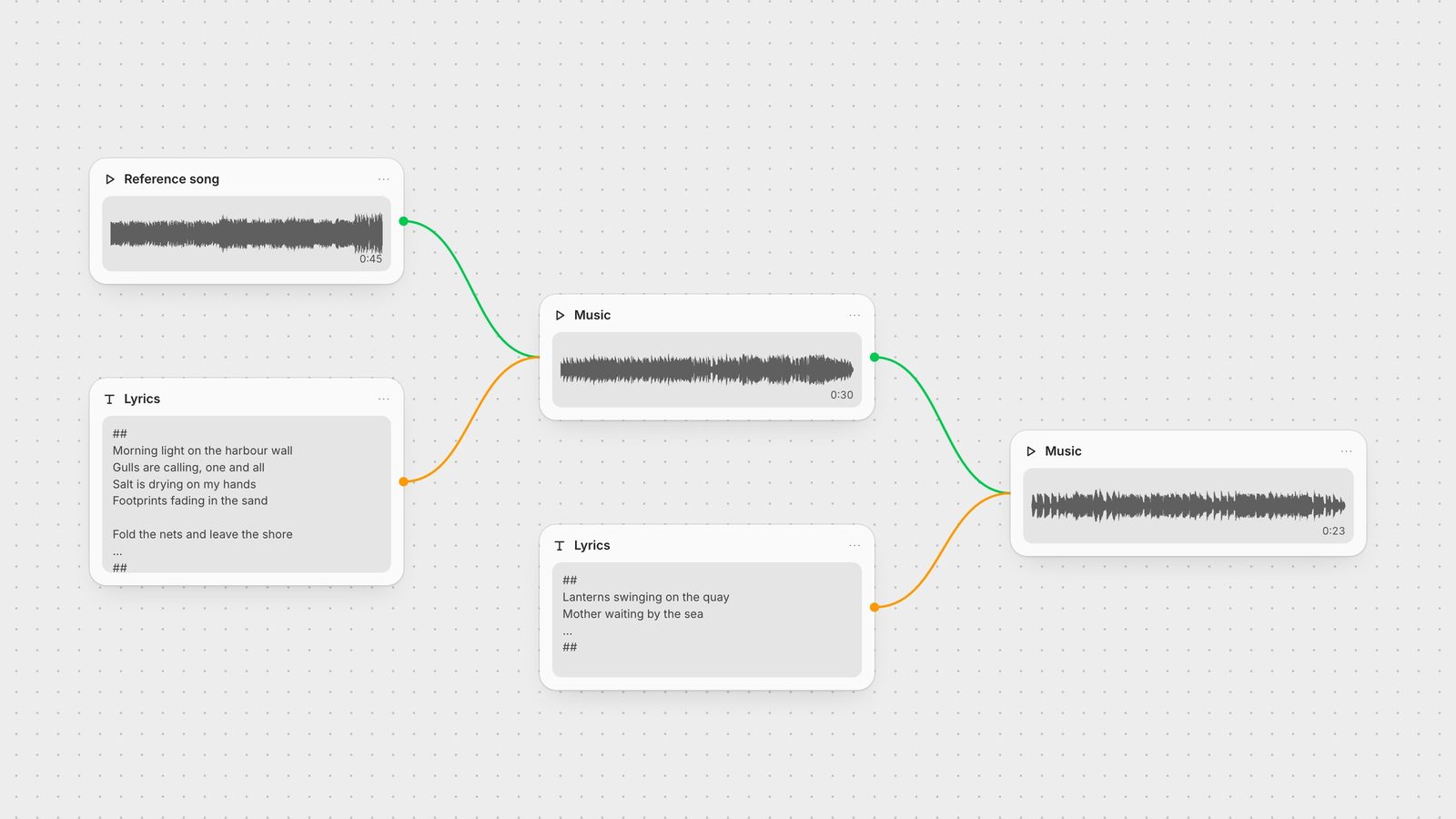
In Fuser, drag the audio file onto the canvas (importing media) and connect it to the Reference Audio input.
The lyrics box has three documented controls, all typed as plain text (fal API reference):
New line: each line becomes one sung line. Keep lines short and even, like real lyrics.
Blank line (two new lines): a pause between lines. Use it between verses.
## at the start and end: adds accompaniment. Put ## on its own line above the first lyric and below the last.
A formatted lyric looks like this, with each slash standing for a line break: ## / Morning light on the harbour wall / Gulls are calling, one and all / Salt is drying on my hands / Footprints fading in the sand / (blank line) / Fold the nets and leave the shore / ... / ##
We ran the same eight lines twice against the same reference, once wrapped in ## and once without. The ## version ran 30.5 seconds and its last transcribed line ended at 28.4, two seconds before the file did. The version without ## ran 24.8 seconds, with the first line sung at 0.6 seconds and the last ending 0.1 seconds before the end of the file. So ## made the same lyric about 5.6 seconds longer and left a tail after the last line. We can't say exactly where the ## vocal starts: one speech-to-text pass missed the opening line and the other returned the whole song as one segment. If you need room to fade or cut after the vocal, use ##.
Pauses showed up where we put them. In the sixteen-line run with three blank lines, the transcript had gaps of about 2, 3 and 5 seconds exactly at those breaks and none inside the verses.
There is no duration slider, so the lyric is the length control.
Two lines (70 characters): 8.5 seconds. The singing was hard to pick out; one speech-to-text model found no words, a second found the first line and part of the second. Give the model at least a verse.
Eight lines (about 250 characters): 24.8 to 30.5 seconds depending on ##.
Sixteen lines with three breaks (498 characters): 57.1 seconds, close to the 60-second limit MiniMax states. The transcript picked up 15 of the 16 lines; the final repeat of the last line did not appear, and the track closed on a sustained tail of about ten seconds.
As a working rule from these runs: roughly eight short lines for a 30-second track, and stay under about 500 characters if you want every line sung inside the 60-second cap. For anything longer, generate it in sections.
Because the reference carries the style, you can feed a finished output back in as the reference for the next section. We did this with the 30.5-second ## track and six new lines. The result ran 22.7 seconds and all six lines were transcribed, starting at 3.0 seconds. On the Fuser canvas that is one wire: connect the first MiniMax Music node's Generated Song output to the second node's Reference Audio input.
Style notes in the lyrics. Delete them. Style comes only from the reference song.
Track stops the moment the vocal does. Wrap the lyric in ##. In our test that added a two-second tail.
Track is too short. Add lines. Two lines produced an 8.5-second clip.
Last lines missing. You are near the 60-second cap. Cut lines or split into two generations.
Validation error on the reference. Check it is .wav or .mp3, over 15 seconds, and publicly reachable if you pass a URL.
Lyrics over 600 characters. The field rejects them. Split the song.
A track is rarely the end product. In Fuser you can send the Generated Song straight into a video node: Wan 2.6 Video accepts audio as background music and trims it to the clip's 5, 10 or 15 seconds, so a four-line lyric is often enough. LatentSync takes a video and an audio track for lip sync, and the Whisper node can transcribe the song for captions. For sound design around the music, see the ElevenLabs sound effects guide, and for how MiniMax compares with the other audio models Fuser runs, see the best AI music and sound effect generators. The general pattern is in chaining AI models in one workflow.
Every control the model has, and what it did in our runs.
| Control | How to use it | What we measured |
|---|---|---|
| Inputs | ||
| Reference song | .wav or .mp3, over 15 s, with music and vocals. Sets the style. | Its lyrics never appeared in the outputs. |
| New line | One sung line per line of text. | 8 lines in, 8 lines transcribed (no ##). |
| Blank line | Pause between lines or verses. | Gaps of about 2, 3 and 5 s at the three breaks. |
| ## ... ## | Wrap the whole lyric to add accompaniment. | 30.5 s vs 24.8 s without; 2 s tail after the vocal. |
| Lyric length | The only length control. Max 600 characters. | 70 chars: 8.5 s. 498 chars: 57.1 s. |
| Output as reference | Chain a finished track into the next node. | 6 new lines, 22.7 s, all transcribed. |
Not with this model. The endpoint Fuser runs has only two inputs, lyrics and a reference song, and the style comes from the reference. Anything you type in the lyrics field is treated as lyrics.
MiniMax states up to 60 seconds. There is no duration setting; length follows the lyrics. In our tests two lines gave 8.5 seconds, eight lines about 25 to 30 seconds, and sixteen lines 57.1 seconds.
Wrapping the lyric in ## at the start and end adds accompaniment. In our test the ## version ran 30.5 seconds against 24.8 seconds for the same lines without it, and it left about two seconds after the last sung line, where the plain version ended 0.1 seconds after it.
A .wav or .mp3 file longer than 15 seconds that contains both music and vocals. The model learns the rhythm and style of the vocals and backing from it.
Up to 600 characters. To have every line sung inside the 60-second limit, our runs suggest staying under about 500.
Generate songs with MiniMax Music and take them straight into video on one canvas.