One click, whole workflow
Recipes are here. Package a whole workflow and run it in one click
Explore recipesOne click, whole workflow
Recipes are here. Package a whole workflow and run it in one click
Explore recipesA tested guide to ElevenLabs Sound Effects v2: how to describe a sound, when to set a duration, what prompt influence changes, what happens with loops, and when a video-to-audio model like Mirelo or MMAudio is the better tool.
All guides · ElevenLabs SFX in Fuser
Quick answer: prompt ElevenLabs Sound Effects with a short, concrete description of what makes the sound, what it is made of, and where it happens: "heavy wooden door creaking open" beats "door". For anything with more than one event, write the events in order with "then" and set a duration long enough to hold them, because the automatic length can be too short. Keep Prompt Influence near the 0.3 default for variety and raise it when you need the model to stay literal. If you already have the video, a video-to-audio model such as Mirelo SFX or MMAudio will time the sound to the picture for you.
ElevenLabs' own guidance splits prompts into two kinds (ElevenLabs sound effects docs):
Simple effects: one clear, concise description, such as "glass shattering on concrete" or "thunder rumbling in the distance".
Sequences: the events in the order they happen, such as "footsteps on gravel, then a metallic door opens".
In practice a good one-line prompt answers four questions:
Source. What makes the sound: a kiln door, a car door, a bike bell.
Material and weight. Iron hinges, gravel, thin glass, a heavy door. This is what separates a creak from a clack.
Action and order. Opens, slams, rolls, then. One verb per event.
Space. A quiet studio, a tiled bathroom, an open field, or a distance cue like ElevenLabs' own "thunder rumbling in the distance". Name the place once rather than describing a whole scene.
The same docs list sound-design terms to use in prompts, and they are worth using because they are short and exact: impact, whoosh, ambience, one-shot, loop, stem, braam, glitch and drone. The model also takes musical elements, for example a drum loop with a tempo in BPM or a synth pad, but for full tracks use a music model such as MiniMax Music.
The fal endpoint Fuser calls accepts up to 450 characters of prompt (fal model page). That is plenty; if you are near the limit, you are probably describing a scene rather than a sound.
The ElevenLabs SFX node in Fuser has an optional Duration field from 0.5 to 22 seconds. Leave it empty and the model chooses a length from the prompt. We ran the same kinds of prompts both ways:
"door", no duration: a 6.0-second file with one hard hit at about 4 seconds, a faint tick near the start, and near-silence otherwise. In this run the vague prompt got a long, mostly empty file.
The kiln prompt ("heavy kiln door creaks open on iron hinges, then a low roar of heat from inside, quiet pottery studio"), no duration: 1.0 second. That is too short to hold a creak followed by a roar.
The same kiln prompt at 5 seconds: about 3 seconds of texture that then fades out, and quiet: it peaks around −21 dBFS. Plan to raise the gain in your editor.
"Three slow footsteps on gravel, a pause, then a car door slams shut", no duration: 2.0 seconds, with two hits in the first half-second, a gap, and the loudest hit at 1.4 seconds. The order came through, but we asked for three footsteps and the waveform shows two, and the pacing is tighter than "slow" suggests.
"Soft UI confirmation click, single short one-shot, clean, no reverb" at 0.5 seconds: a 0.48-second file that has decayed by about 0.2 seconds, ready to drop onto a button.
The rule that falls out: leave Duration empty for single hits, set it for sequences and for anything that has to fill a shot. For ambience we set the maximum, 22 seconds, on "Ambience: steady rain on a tin roof, distant thunder rolls twice, no music": the level stayed even for all 22 seconds and the two thunder rolls did not show up as separate peaks, so listen for timed events rather than assuming they landed.
Prompt Influence runs from 0 to 1 and defaults to 0.3. ElevenLabs describes high values as a more literal reading of the prompt and low values as a more creative one with more variation (ElevenLabs sound effects docs). The node has no seed, so the practical workflow is to run the node a few times at the default, keep the take you like, and only push the slider up when the model keeps drifting away from what you wrote.
ElevenLabs' API has a loop option that makes a sound effect repeat without a perceptible start or end (ElevenLabs API reference). Fuser's ElevenLabs SFX node does not expose it. In Fuser, generate the longest take you need (up to 22 seconds) and loop it in your editor, checking the join by ear.
The node's Output Format menu offers MP3 at 64, 128 (default) or 192 kbps, Opus at 128 kbps, and uncompressed PCM at 44.1 kHz. Use PCM when the sound goes into further editing, MP3 128 for quick previews.
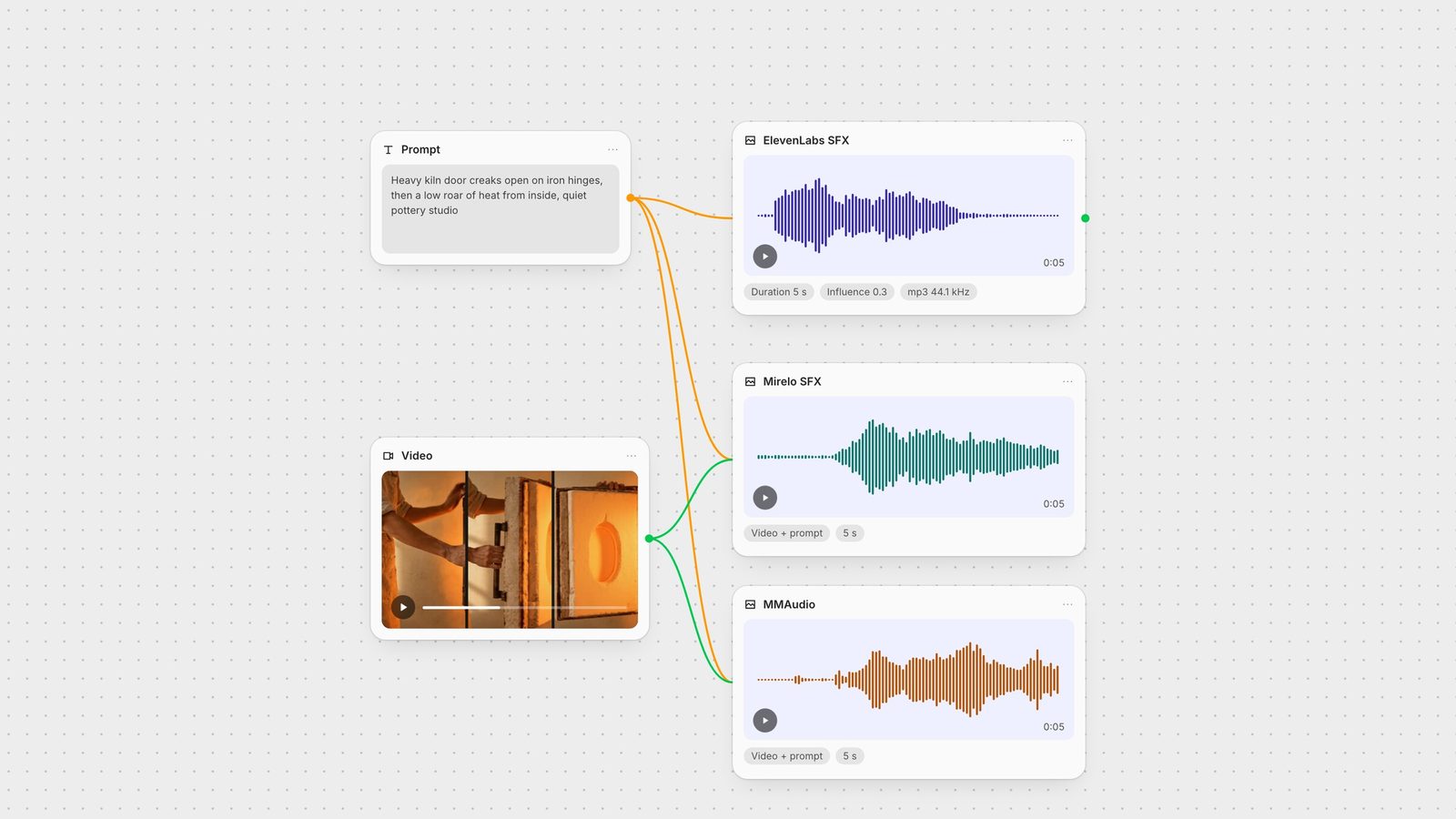
ElevenLabs SFX only reads text, so it does not know when something happens on screen. For a clip you already have, Fuser has two nodes that watch the video. We sent the same silent 5-second kiln clip and the same prompt to both, and ran the prompt through ElevenLabs at 5 seconds for comparison:
Mirelo SFX 1.6 takes a video and an optional prompt and returns the video with a new effects track. In Fuser it runs 1 to 60 seconds (default 10, so set it to your clip length), with 1 to 4 variations per run and a seed. fal notes that durations over 10 seconds use sliding-window generation (fal model page). In our run it stayed quiet for the first 1.25 seconds and rose as the door swung.
MMAudio V2 does the same job from 1 to 30 seconds (default 5), adds a negative prompt (default "noisy, low quality, low volume"), and switches to its text-to-audio endpoint when no video is connected (fal model page). With a video it returns the video with sound. Its authors note that its default output and training duration is 8 seconds (the Fuser node defaults to 5), that it sometimes produces unintelligible speech-like sounds, and that it struggles with unfamiliar concepts (MMAudio on GitHub). In our run it also rose with the door, and its level kept moving through the rest of the clip.
Both video-to-audio outputs came back far louder than the text-only take (both peaked within about 1.5 dB of full scale, against about −21 dBFS for the text-only take). Use ElevenLabs when you need a clean, specific sound to place yourself: UI sounds, a signature impact, a whoosh for a cut, a bed of ambience. Use Mirelo or MMAudio when the timing has to match what the camera shows. For a wider roundup, see the best AI music and sound effect generators.
In Fuser, keep the prompt in its own text node and wire it into the ElevenLabs SFX node, and into Mirelo or MMAudio when you also have the clip, as in the canvas at the top of this page. Generate the picture upstream with an image-to-video model, then use Download media on the node to take the audio or the finished video into your editor. For voice lines, add ElevenLabs TTS on the same canvas; for the whole chain from still to sound, see how to chain AI models.
Tested 28 September 2026 on the fal endpoints Fuser uses.
What to write for common sound types, and the settings that go with them in Fuser.
| Sound | Write | Example |
|---|---|---|
| Prompt patterns | ||
| Impact | Object, material, surface, space. | Ceramic bowl dropped on a stone floor, small room |
| Whoosh | Speed and texture of the movement. | Fast airy whoosh past the camera |
| Ambience | Place, weather, a few steady details. Set a long duration. | Steady rain on a tin roof, 22 s |
| Sequence | Events in order, joined with then. Set a duration. | Footsteps on gravel, then a car door slams |
| UI one-shot | Short, clean, dry, one-shot. | Soft UI confirmation click, no reverb, 0.5 s |
| Settings in Fuser | ||
| Duration | Empty for single hits; set it for sequences and beds. | 0.5 to 22 seconds |
| Prompt Influence | Keep 0.3 for variety; raise it if takes drift. | 0 to 1, default 0.3 |
| Output Format | PCM for editing, MP3 128 for previews. | MP3 64/128/192, Opus 128, PCM 44.1 kHz |
| Loop | Not exposed on the node; loop in your editor. | API-only option |
Describe the source, its material, the action and the space in one line, for example "heavy wooden door creaking open in a stone hallway". For several events, list them in order with "then". Sound-design terms such as impact, whoosh, ambience and one-shot help.
In Fuser, 0.5 to 22 seconds. Leave Duration empty and the model picks a length; ElevenLabs' own API allows up to 30 seconds.
ElevenLabs' API has a loop option, but Fuser's ElevenLabs SFX node does not expose it. Generate a longer take and loop it in your editor, then check the join by ear.
It sets how literally the model follows your text, from 0 to 1. The default is 0.3. Higher values follow the prompt more closely with less variation; lower values give more varied takes.
If you already have the clip, use a video-to-audio model such as MMAudio or Mirelo SFX so the sound follows the action. In our test both got loud when the on-screen door opened. Use ElevenLabs SFX for specific sounds you will place yourself.
Prompt effects, score silent clips and keep the whole chain on one canvas.