One click, whole workflow
Recipes are here. Package a whole workflow and run it in one click
Explore recipesOne click, whole workflow
Recipes are here. Package a whole workflow and run it in one click
Explore recipesPick an upscaler by what must stay true: Topaz for photos and generated art, Recraft for graphics and type, ESRGAN for fast faithful passes, and SeedVR or Topaz Video for AI video.
All guides · Best AI image models
Quick answer: use Topaz Image Upscale for photographs and generated artwork, Recraft Upscale for logos, UI and anything with type, ESRGAN for a fast, faithful pass, and SeedVR or Topaz Upscale for video. The real decision is whether the upscaler may invent detail. Faithful upscalers enlarge what is there; generative ones rebuild texture that was never in the file.
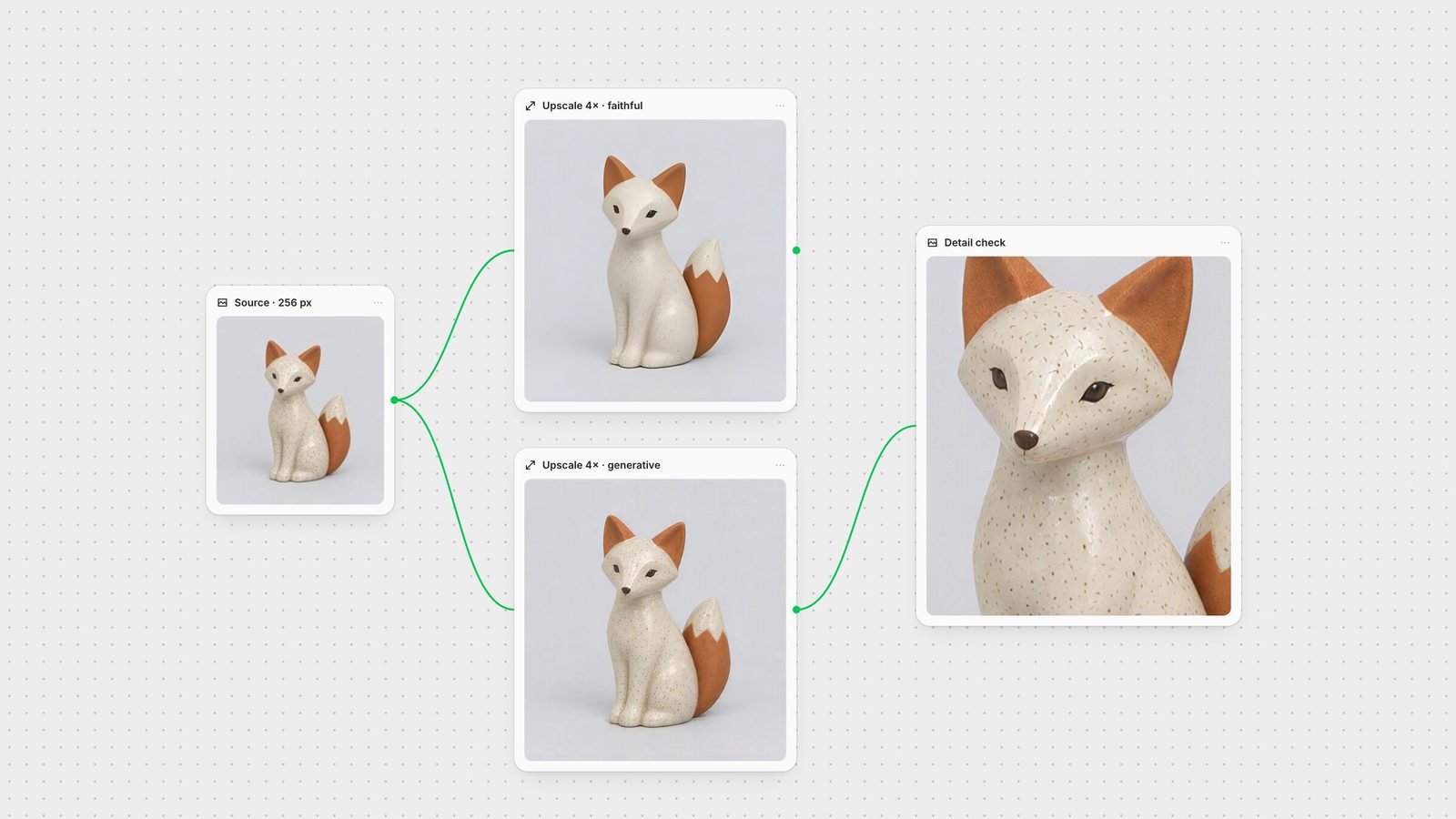
We took a 256 × 256 JPEG of a ceramic figurine and ran it through ESRGAN and Topaz Wonder 3 at 4×. ESRGAN produced clean edges and kept the silhouette exactly, but the speckled glaze turned into a smooth surface. Topaz rebuilt a convincing speckle across the whole body. It looks sharper, and the pattern is new: the source did not contain enough pixels to recover the original speckles.
That is the trade-off to plan around. For a campaign still or a concept render, invented texture is usually welcome. For a product photo where the customer expects the real surface, or for archival and evidential images, choose a faithful mode and accept a softer result.
Topaz Labs' Gigapixel models run in Fuser's Topaz Image Upscale node at up to 4× (Topaz Gigapixel). The node offers four modes. Precision (Standard, High Fidelity, Low Resolution, CGI, Text Refine) enlarges without inventing detail. Generative (Wonder, Recover, Redefine, Recovery) rebuilds skin, fabric and foliage in small or blurry sources. Creative uses Bloom to reinterpret detail in AI images, and Transparent keeps the alpha channel for logos and stickers.
Reach for Precision on photography and 3D renders you need to stay exact. Reach for Wonder or Recover when a thumbnail or old JPEG has to become a usable print. Avoid generative modes on legal, forensic or documentary images.
Recraft's crisp upscale is built for structural fidelity. It is the right choice for icons, illustrations, screenshots and branding where letterforms and lines must stay straight. It will not dream up skin pores or fabric weave, so it is the wrong tool for a degraded photograph.
Real-ESRGAN is a non-generative upscaler that removes compression noise and sharpens edges without changing the layout or lighting. In Fuser it scales from 1× to 8× and includes model variants for photographs and for anime or line art. Use it for concept art, game textures and quick passes. Skip it for clean logos, where it can add subtle waviness.
For AI-generated clips, SeedVR2 builds realistic skin, hair and fabric detail while keeping frames consistent; Fuser's SeedVR node scales from 1× to 10×. Avoid it on motion graphics or clips with important on-screen text, which diffusion can distort. Topaz Upscale (1× to 4×) favours temporal stability, reducing flicker in foliage, brick and fabric. Neither can rescue heavily compressed web rips; they will sharpen the blocks.
Upscale once, after the creative decisions are made. In Fuser, keep the upscaler as the last node before export, so a new generation or edit flows straight through at full resolution. Run two upscalers side by side when the brief is sensitive, then compare the crops before you choose. Chain it with your image-to-video step or the full multi-model workflow, and save the graph as a Recipe.
Last verified September 28, 2026.
Match the source and the risk of invented detail to the right node.
| Upscaler | Reach for it when | Watch out for |
|---|---|---|
| Images | ||
| Topaz Image Upscale · Precision | Photos and renders that must stay exact, up to 4×. | Cannot recover detail that is not in a tiny source. |
| Topaz Image Upscale · Generative | Thumbnails, old JPEGs and AI art that need texture. | Rebuilt texture is new detail; avoid on documentary images. |
| Recraft Upscale | Logos, UI, illustrations and type. | Not for degraded photographs. |
| ESRGAN | Fast faithful passes, 1× to 8×, photo or anime models. | Smooths fine texture; can make clean logos wavy. |
| Video | ||
| SeedVR | AI-generated clips that need organic detail, 1× to 10×. | Distorts on-screen text and flat graphics. |
| Topaz Upscale | Temporal stability on detailed surfaces, 1× to 4×. | Sharpens compression blocks in low-quality sources. |
It depends on the source. Topaz Image Upscale is the most flexible for photos and generated art, Recraft Upscale is best for graphics and type, ESRGAN is the fastest faithful option, and SeedVR or Topaz Upscale handle video.
Generative upscalers do. In our 256-pixel test, Topaz Wonder 3 produced a convincing glaze speckle that could not be recovered from the source, while ESRGAN kept the shapes and smoothed the texture.
Use Recraft Upscale. It prioritises structural fidelity, so letterforms and lines stay straight. Generative and GAN upscalers can warp type.
Use SeedVR when the clip needs realistic skin, hair or fabric detail, or Topaz Upscale when you need stable, flicker-free surfaces. Keep text-heavy motion graphics away from SeedVR.
Yes. In Fuser, connect one source to several upscaler nodes, compare the outputs side by side and send the one you choose to export or the next step.
Connect your generation, edit and upscale steps on one canvas, then reuse the workflow.