One click, whole workflow
Recipes are here. Package a whole workflow and run it in one click
Explore recipesOne click, whole workflow
Recipes are here. Package a whole workflow and run it in one click
Explore recipesA practical workflow for keeping one character's face, hair and wardrobe stable across new scenes and video: a single reference image, reference-led edits and animation that starts from approved frames.
All guides · Chain AI models into one workflow
Quick answer: to keep an AI character consistent, stop re-describing them from scratch. Create one clean reference image, generate every new scene by editing from that reference with a reference-led model such as Gemini Image or FLUX.1 Kontext, and animate from an approved still instead of from text. For a recurring character across a whole campaign, train a Style so the likeness is built into the model.
Text prompts drift because every generation reinterprets "silver bob, freckles, mustard jacket" slightly differently. Images do not. The more of your pipeline that starts from a picture of the character, the less the character changes.
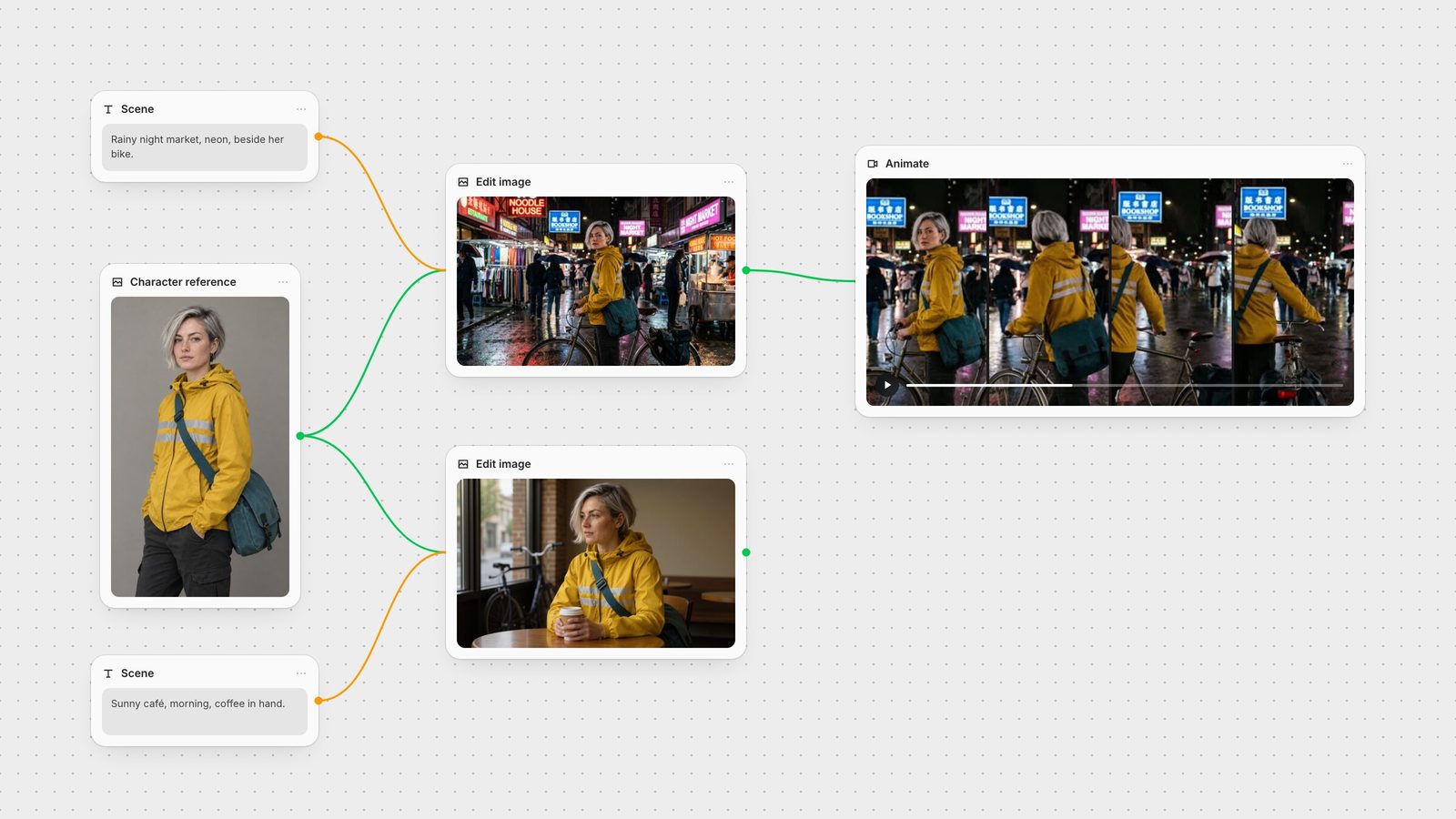
The reference is the source of truth for everything downstream, so make it boring on purpose: a plain background, even light, a three-quarter view that shows face, hair and outfit, and a neutral expression. Give the character two or three distinctive, easy-to-read features. Ours has a silver asymmetric bob, a mustard rain jacket with two reflective stripes and a teal messenger bag.
In Fuser, generate the reference with GPT Image or any image model, then keep that node on the canvas. Every later step connects to it rather than to a copy.
Connect the reference to an edit-capable model and describe only the new scene, plus what must stay: "Keep this exact woman: same face, silver bob, freckles, mustard jacket with two reflective stripes and teal bag. Place her at night in a rain-soaked street market beside her bicycle."
Gemini Image accepts one or more reference images, so you can add a second reference for the location or a product the character is holding (docs).
FLUX.1 Kontext is built for in-context edits and iterative scene changes from a single image (docs).
Qwen Image Edit adds instruction-driven presets, including a next-scene edit for continuity.
We ran exactly this: one GPT Image 2.5 reference, then a night-market edit with Gemini 3.1 Flash Image and a café edit with FLUX.1 Kontext [pro]. Face shape, hair, jacket stripes and the bag carried through both. Small details, like the earring, are the first things to drift, so check them before you move on.
Image-to-video keeps far more identity than text-to-video, because the model starts from pixels you have already approved. Connect your chosen still to a video node and prompt the motion, not the appearance.
Kling 3.0 takes a start image. We animated the night-market still into a five-second shot of the courier turning and wheeling her bike forward; her hair and jacket held through the turn (docs).
Veo 3.1 in Fuser accepts up to three Ingredients, reference images it combines into the shot, which helps when the character must appear with a specific product or setting (docs).
Seedance 2 uses a single image as the first frame, or several images as references: up to 9 on Seedance 2.0 and up to 30 on Seedance 2.5 (docs).
Keep shots short and let each one start from a still you like. Chaining many seconds from one frame gives the model more room to invent.
When the same character appears in dozens of assets, train a Style in Fuser. Styles are LoRAs, small fine-tunes trained on your reference images, with dedicated modes for a style, an object or a portrait. They apply directly to FLUX Dev and FLUX Krea Dev, and each Style also exposes a Master Prompt you can feed to other image models to keep the description consistent (Styles docs). Portrait training requires explicit consent from the person depicted; use it for your own talent or fictional characters, not for anyone who has not agreed.
Because reference, edits and animation are nodes on one canvas, swapping the reference updates every downstream step. Save the graph as a Recipe and the next episode, campaign or storyboard starts from the same character workflow. For picking the video model itself, see the best image-to-video models.
Match the step to the input the model can take. Every option below runs as a node in Fuser.
| Step | Reach for | Why it helps consistency |
|---|---|---|
| Images | ||
| New scene from a reference | Gemini Image or FLUX.1 Kontext | Edits start from the character's pixels instead of a text description. |
| Character plus product or location | Gemini Image with several references | Each reference supplies one element; describe the role of each. |
| Long-running character | A trained Style (FLUX Dev / Krea Dev) | The likeness lives in the model; the Master Prompt carries it to other models. |
| Video | ||
| Animate an approved still | Kling 3.0 image-to-video | The first frame is already approved; prompt only the motion. |
| Character with a product in shot | Veo 3.1 Ingredients | Up to three reference images combined into one clip. |
| Many references at once | Seedance 2.0 / 2.5 | Multiple images switch Seedance to reference mode (9 or 30 images). |
Generate one clean reference image, then create every new scene by editing from that reference with a reference-led model such as Gemini Image or FLUX.1 Kontext. Name the features that must stay, like hair, outfit and accessories, in each edit prompt.
Yes, if you animate from an approved still instead of generating from text. Image-to-video models such as Kling 3.0 start from your frame, and Veo 3.1 or Seedance can take extra reference images for the character and props.
Not for a handful of images; reference-led edits are enough. For a character that appears across a whole campaign, a trained Style (LoRA) makes the likeness more reliable and repeatable.
Usually because each image is generated from text alone, so the model reinterprets the description every time. Start each generation from a reference image and keep shots short so there is less room for drift.
Only with that person's explicit consent. Fuser permits portrait training on consented references and removes styles that violate this.
Keep the reference, the edits and the animation connected on one canvas.