One click, whole workflow
Recipes are here. Package a whole workflow and run it in one click
Explore recipesOne click, whole workflow
Recipes are here. Package a whole workflow and run it in one click
Explore recipesA hands-on guide to Vidu Q1 reference-to-video: what the model accepts, how to prepare references and prompts, what movement amplitude really changes, and what held or drifted in our own test clips.
All guides · Vidu Reference in Fuser
Quick answer: Vidu Q1 Reference makes a five-second, 1080p clip from a text prompt plus 1 to 7 reference images, and keeps the people, products and places in those images recognisable in the video (Vidu API docs). Use one clean image per subject, describe each subject in the prompt by what is visible in its image, and set Movement Amplitude to large when the subject has to travel through the frame. In our test, a character, a product and a location went in as three separate images and came out as one coherent shot with the character's face, hair and jacket intact; small label text was the first thing to break.
Most image-to-video models animate one picture: your image becomes the first frame. A reference-to-video model works differently. It reads several images as a cast list and builds a new scene around them, so the character from one image can hold the product from another inside the location from a third. None of the reference images has to be the opening frame.
Fuser ships this as the Vidu Reference node, which calls the Vidu Q1 reference-to-video model (Vidu API docs). The node's Model dropdown defaults to Q1. It also lists an older "Vidu" option that accepts only three references; there is no reason to pick it for new work.
What the model accepts and returns:
References: 1 to 7 images in PNG, JPEG or WebP, at least 128 × 128 px and no more stretched than 4:1 in either direction (Vidu API docs). Fuser rejects an eighth image before the job is sent.
Prompt: up to 1,500 characters in Fuser.
Output: a fixed five-second clip at 1080p. Our three clips each came back as 1920 × 1080 at 24 fps.
Aspect ratio: 16:9, 9:16 or 1:1.
Movement Amplitude: auto, small, medium or large.
Seed: 0 to 65,535 in Fuser, randomised on each run unless you set it.
Add Music: off by default. Switch it on for a generated background track; there is no speech or sound design.
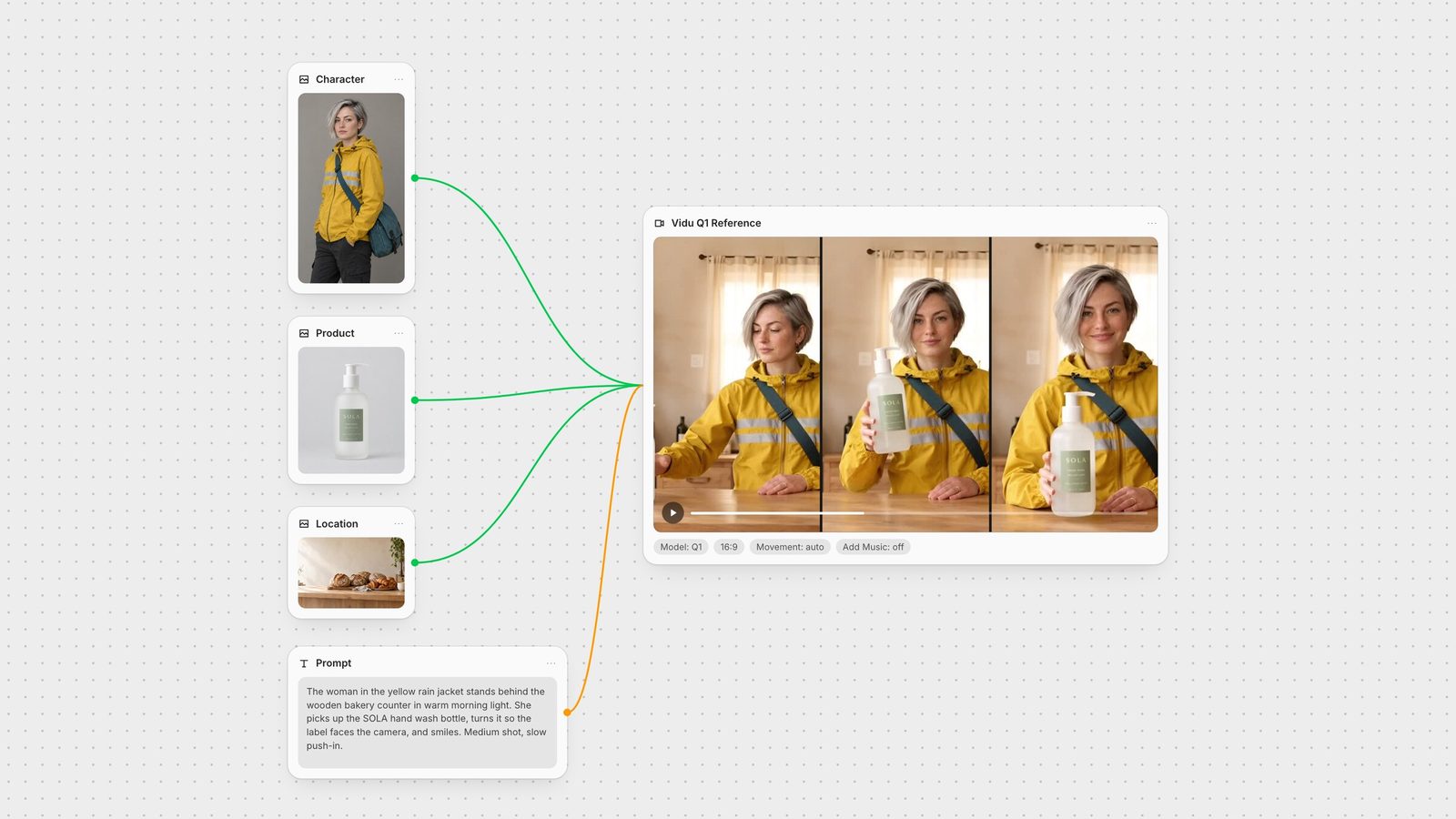
We reused assets from earlier guides: the courier character from our consistent-characters guide (silver asymmetric bob, mustard rain jacket with two reflective stripes, teal messenger bag), a packshot of a SOLA hand wash bottle, and an empty bakery counter. All three went into one Vidu Q1 Reference node with this prompt: "The woman in the yellow rain jacket stands behind the wooden bakery counter in warm morning light. She picks up the SOLA hand wash bottle, turns it so the label faces the camera, and smiles. Medium shot, slow push-in."
What held: her face, the bob, the jacket's two stripes and the teal strap stayed consistent for all five seconds. She did every action in order: reach, lift, turn the label to camera, smile. The camera pushed in slowly as asked. The SOLA wordmark and the label's sage-green panel matched the packshot.
What changed: the bakery was rebuilt, not copied. Loaves, croissants, the chalkboard sign and a coffee cup carried over, but the room gained a curtained window, a hanging lamp and new shelving, and the counter faced the camera head-on. A ring appeared on one of her fingers that is not in the reference. And the small lines of text on the label turned into letter-like shapes:
So treat reference-to-video as "these things, in a scene like this", not as compositing. If a label has to be legible in the final ad, put the real packshot over the frame afterwards, or keep the product small in the shot and cut to a clean product still.
For the second test we used the character image alone and asked her to walk toward the camera on a wet neon street, glance left, then look back. We ran the same prompt and seed twice, changing only Movement Amplitude.
Auto: she barely moved forward. She did turn her head to the left and back, and the camera stayed nearly still.
Large: she walked steadily toward the camera and the street moved past her, but the head turn mostly disappeared.
Two lessons. First, if the subject has to travel, set the amplitude yourself; auto can read "walk" as a gentle drift. Second, the seed does not lock the scene when another setting changes: the two street clips have different shopfronts and lighting. In both runs she kept her hands in her pockets, the pose from the reference image, even though walking would usually swing the arms. The reference pose carries weight, so choose one close to the action you want.
One subject per image. A character, a product or a location, each in its own image. Vidu's own API lets you name each subject and point to it in the prompt as @name (Vidu API docs); Fuser's node takes a plain list of images, so the prompt is the only way to tell the model which image is which.
Plain backgrounds for people and products. Our character and bottle were shot on flat grey, so nothing from their backgrounds leaked into the bakery.
Show the details that must survive. The model kept the jacket stripes and the strap because they were large and clear in the reference. It lost the fine print because it was small.
Pick the pose you need. See test 2: the reference pose carried into both clips.
Keep the set small. Seven is the ceiling, not a target. Every extra image is another thing the prompt has to place.
Name each subject by what is visible in its image. "The woman in the yellow rain jacket", "the SOLA hand wash bottle". Use the same words every time you run the shot.
Put the location in words even when you supply an image of it. "Behind the wooden bakery counter in warm morning light" gave the model a place to stand her.
Write actions as a short sequence. "Picks up, turns it so the label faces the camera, and smiles" was followed in order. Five seconds fits two or three beats.
Add one camera instruction. "Medium shot, slow push-in" was honoured. Stacking several moves in five seconds leaves little room for any of them.
Leave appearance to the images. Describe clothing only as far as you need to point at the right reference, not to restyle it.
Every reference is its own node, so the same character image can feed a still-image edit, this video node and the next shot at the same time. A typical chain: create the character with GPT Image or Gemini Image, connect the character, product and location images to the Vidu Reference node's Images input, then send the clip to SeedVR upscale or add sound with Mirelo SFX. Swap the product image and rerun, and the rest of the graph stays as it was.
For single-image animation, where one exact frame must open the shot, a start-frame model such as Kling 3.0 is the better fit, and the first and last frame guide covers fixing both ends of a clip. Veo 3.1 and Seedance 2 also take multiple references; see the best image-to-video models to compare them.
What each control does and what to start with.
| Setting | What it does | Start with |
|---|---|---|
| Vidu Reference node | ||
| Images | 1 to 7 reference images: characters, products, locations. | One clean image per subject |
| Prompt | Scene, action and camera, up to 1,500 characters. | Name each subject by what is visible |
| Model | Q1, or the older Vidu option (3 images max). | Q1 (default) |
| Movement Amplitude | How much the subject and camera move. | Large for walking or travel; auto for small gestures |
| Aspect Ratio | 16:9, 9:16 or 1:1. | Match the platform you are posting to |
| Seed | 0 to 65,535; same inputs and seed repeat a result. | Fix it while you tune the prompt |
| Add Music | Adds a generated background track. | Off; add sound in a later step |
Up to seven. In Fuser, connect them all to the Images input of the Vidu Reference node with the Q1 model selected; the older Vidu option is limited to three.
Five seconds at 1080p. Duration and resolution are fixed for this model; you choose the aspect ratio (16:9, 9:16 or 1:1).
Large, simple lettering usually survives; small text does not. In our test the SOLA wordmark held while the smaller label lines turned into unreadable shapes. Overlay the real packshot afterwards when the label must be legible.
Image-to-video starts from your image as the first frame. Reference-to-video treats your images as subjects to place in a new scene, so none of them has to be the opening frame and several can appear together.
Only optional background music, which is off by default in Fuser. It does not generate speech or sound effects; add those with a separate audio node.
Wire your character, product and location into Vidu Q1 Reference on one canvas.