One click, whole workflow
Recipes are here. Package a whole workflow and run it in one click
Explore recipesOne click, whole workflow
Recipes are here. Package a whole workflow and run it in one click
Explore recipesWhich video models generate dialogue and sound in the same pass, what each did with one shared dialogue prompt, and when to add audio afterwards with Mirelo SFX or MMAudio instead.
All guides · Seedance vs Kling vs Veo
Quick answer: seven video models in Fuser generate picture and sound, including spoken lines, in one pass: Veo 3.1, Kling 3.0, Seedance 2.5, Wan 2.6, Grok Imagine Video 1.5, MiniMax H3 and LTX-2.5. On one shared dialogue prompt, all seven spoke the line as written. Veo 3.1 and LTX-2.5 Pro were the most dependable for a person talking to camera, Seedance 2.5 held a clean single take, Kling 3.0 and Wan 2.6 changed the framing on their own, and Grok Imagine burned the line into its first frames as a caption. If your clip is already cut, or you only need sound effects and ambience, add audio afterwards with Mirelo SFX or MMAudio for much less than regenerating the video.
Each of these returns a video with its own soundtrack. Here is what each vendor says about sound and speech:
Veo 3.1 (Google): generates dialogue, sound effects and ambient noise. Put spoken lines in quotation marks (Gemini API: Veo).
Kling 3.0 (Kuaishou): native audio with lines matched to named characters, dialogue in Chinese, English, Japanese, Korean and Spanish, and tagged accents (Kling VIDEO 3.0 guide).
Seedance 2.5 (ByteDance): joint audio-video generation that keeps sound and picture in sync, and up to 10 audio clips as references (ByteDance Seed).
Wan 2.6 (Alibaba): audio-visual sync, clips up to 15 seconds and multi-shot storytelling (Alibaba Cloud).
Grok Imagine Video 1.5 (xAI): "Sound effects, ambience, and dialogue are generated in the same pass" (xAI). Every clip comes with audio unless you ask for a silent one (xAI docs).
MiniMax H3 (MiniMax): native stereo sound, with voice, effects and music generated together (MiniMax).
LTX-2.5 (Lightricks): "synchronized audio-video generation" (LTX-2.5 model card).
Gemini Omni 1.1 Flash also generates audio by default (Gemini API: Omni). It is a preview model, so we left it out of this test.
We gave all seven the same prompt, one generation each and no retries. Six ran on 28 September 2026; the LTX-2.5 take was generated on 29 September for our LTX-2.5 guide, with the same prompt:
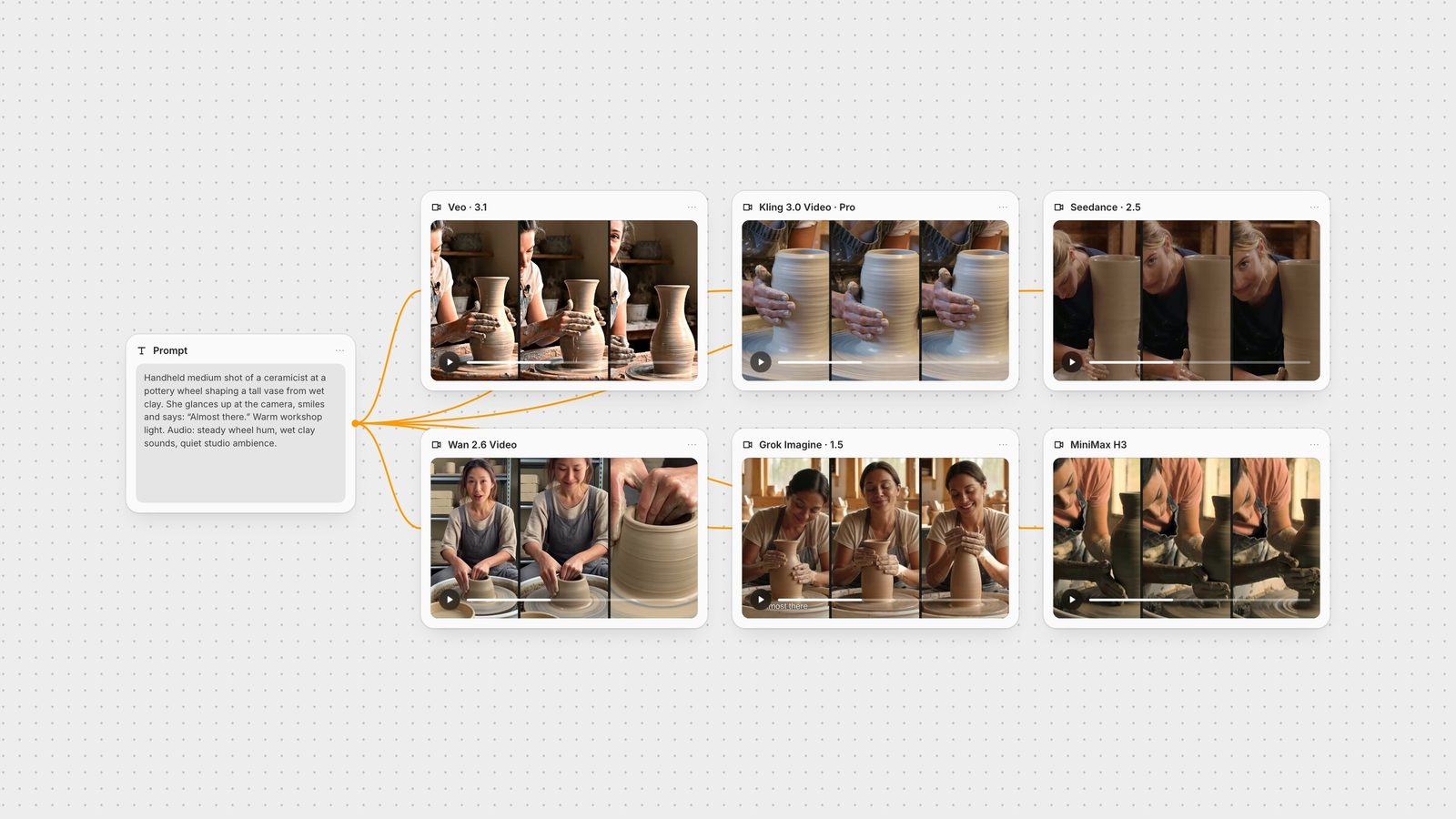
"Handheld medium shot of a ceramicist at a pottery wheel shaping a tall vase from wet clay, her hands glistening as the clay spins. She glances up at the camera, smiles and says: 'Almost there.' Warm workshop light. Audio: steady wheel hum, wet clay sounds, quiet studio ambience."
The settings were 16:9 with audio on. Veo 3.1 (standard, not Fast), Seedance 2.5 and Grok Imagine ran at 720p for 6 seconds, and Wan 2.6 at 720p for 5 seconds, its shortest length. Kling 3.0 Pro has no resolution setting and returned 1080p at 6 seconds. MiniMax H3 ran at 768p, one of its two native tiers, and returned 6.6 seconds. LTX-2.5 Pro ran at 1080p for 6 seconds, its shortest length, and returned 6.12 seconds. We transcribed each clip's audio to check the words and the timing.
Veo 3.1 held one continuous shot with her face and hands in frame. She looks up and says "Almost there" at about three seconds, with the fullest mix of wheel hum and clay sounds.
Kling 3.0 Pro framed the first four and a half seconds from the chest down, then cut to a wider shot where she speaks at about five seconds. Kling plans shots on its own, so write "one continuous shot" when you need a single take (Kling 3.0 prompt guide).
Seedance 2.5 kept a single take and delivered the line into the camera at about four and a half seconds. The light came out cooler than "warm workshop".
Wan 2.6 opened wide with her already looking at the camera and speaking at 0.6 seconds, then pushed in fast to a close-up of her hands. The line was clear, but the order we asked for (work, glance up, speak) was reversed.
Grok Imagine Video 1.5 held one take in warm light, but she is already smiling at the camera in the first frame and says the line at about 1.1 seconds, then goes back to the vase. The words "Almost there" also appear as a burned-in caption for the first half-second, so check the opening frames of any Grok take before you use it.
MiniMax H3 gave the most cinematic light, with low window light raking across the clay. Her eyes stayed on the vase for most of the clip, and she looked up and spoke at about 5.4 seconds, near the end. H3's default prompt expansion had rewritten our prompt to place the line at 3.5 seconds, and the model still delivered it late.
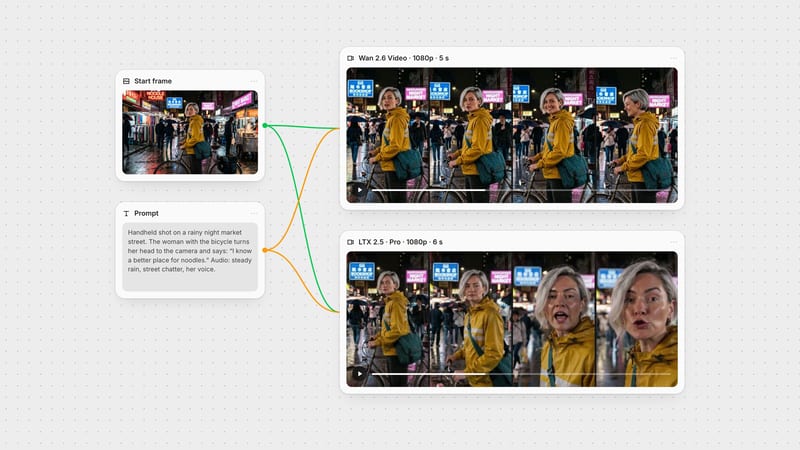
LTX-2.5 Pro held one continuous medium shot with her face in frame and a deep, detailed workshop behind her, and said the line to camera at about 4.0 seconds. It threw a squat vase rather than a tall one and added a clay-covered post beside the wheel. The cheaper Fast variant, run on the same prompt, also spoke the line (at 4.2 seconds) but framed her much tighter (LTX-2.5 guide).
Loudness varied a lot. As returned, the average level ran from about -28 dB (Veo 3.1 and LTX-2.5 Pro) through -32 to -33 dB (Seedance 2.5, Wan 2.6, Kling 3.0) and -34 dB (MiniMax H3) down to -38 dB (Grok Imagine). That is a 10 dB spread, so plan to level the clips in your edit.
A person speaking on camera: Veo 3.1. See the Veo 3.1 prompt guide for writing dialogue.
Several characters or languages: Kling 3.0, whose vendor documents lines matched to named characters and five dialogue languages. Name the speaker and the language before each line.
Long single takes: Seedance 2.5, which generates up to 30 seconds in one pass and accepts audio references (Seedance 2.5 prompt guide).
Short multi-shot stories: Wan 2.6, which plans shots on its own for up to 15 seconds. The Fuser node has Multi-Shots on by default; turn it off when you need one take (Wan 2.6 guide).
Warm, clean drafts: Grok Imagine Video 1.5, but check the first frames for a burned-in caption (Grok Imagine video guide).
Long or high-resolution takes with sound: LTX-2.5, whose Fast variant runs up to 20 seconds at 1080p or up to 10 seconds at 4K, and cuts between shots when you name each cut in the prompt (LTX-2.5 guide, LTX-2.5 vs Wan 2.6).
Atmosphere, light and stereo sound: MiniMax H3, but check where the spoken line lands before you cut around it (MiniMax H3 prompt guide, MiniMax H3 vs Kling 3.0).
In Fuser, the Veo and Seedance nodes have Generate Audio on by default. The Kling 3.0 Video and LTX 2.5 nodes have it off by default, so turn it on before you run a dialogue shot. Grok Imagine, Wan 2.6 and MiniMax H3 always return a clip with sound. The Wan 2.6 node also takes an audio file to use as background music, and the Seedance node takes up to 10 reference audio clips for Seedance 2.5.
Native audio isn't always the best route. You may like a silent take, a clip from an image-to-video model, or a cut that the video model's sound doesn't fit. Video-to-audio models watch the clip and write a soundtrack for it:
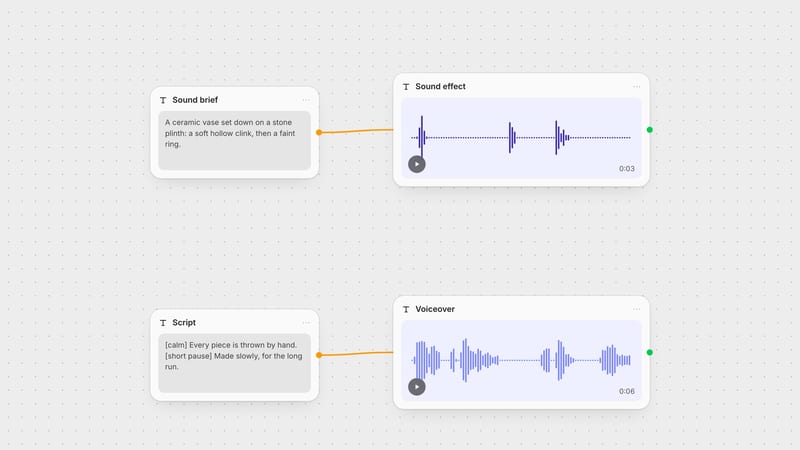
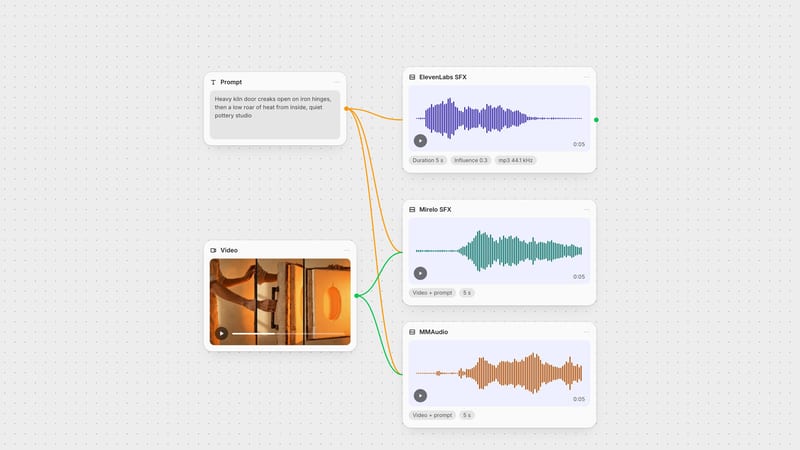
Mirelo SFX 1.6 generates sound effects, Foley and ambience for a video (Mirelo), up to 60 seconds, and returns up to four variations per run.
MMAudio V2 generates audio synchronised to a video from the video and an optional text prompt (MMAudio), up to 30 seconds, with a negative prompt for sounds to avoid.
To test them, we took our Kling 3.0 Pro product clip from the same-prompt test. Its own soundtrack was nearly silent, averaging -57 dB. We removed that audio and gave the silent clip to both models with the prompt "soft room tone and a faint breeze".
Mirelo SFX came back loud, averaging -11 dB, and MMAudio came back at -26 dB, closer to a quiet room. Mirelo SFX costs about ten times as much per second as MMAudio, and both cost much less than regenerating the video with sound.
Neither tool is built to speak. For dialogue on an existing clip, generate the line with ElevenLabs TTS and sync the mouth with a lip-sync model such as LatentSync. The best AI lip-sync tools guide compares the options. For sound design without a video, see the ElevenLabs sound effects guide and our music and sound effect generator roundup.
In Fuser, put your prompt in one text node and wire it into as many video nodes as you want to compare, as in the canvas above. Keep the take that works, then send it to Mirelo SFX or MMAudio in the same graph if the sound needs replacing. For more options beyond these seven, see Sora alternatives.
Our test: one dialogue prompt, one run per model, 28 September 2026. Vendor capabilities from each model's own documentation.
| Model | In our dialogue test | Reach for it when |
|---|---|---|
| Audio in the same pass | ||
| Veo 3.1 | One take, face in frame, line at about 3 s, fullest mix. | A character speaks on camera. |
| Kling 3.0 Pro | Added a cut; line at about 5 s in the wider shot. | Several speakers or languages, planned multi-shot sequences. |
| Seedance 2.5 | One take, line to camera at about 4.5 s, cooler light. | Takes up to 30 s, or audio references. |
| Wan 2.6 | Spoke at 0.6 s, before the action, then pushed in to the hands. | Short multi-shot stories up to 15 s. |
| Grok Imagine Video 1.5 | One take in warm light; line at 1.1 s, burned-in caption at the start. Quietest mix. | Quick drafts, after checking the opening frames. |
| MiniMax H3 | Richest light; line late, at 5.4 s. Quiet mix. | Atmospheric shots with stereo sound. |
| LTX-2.5 Pro | One take, face in frame, line at about 4 s; detailed room, squat vase. Loudest mix with Veo. | Takes up to 20 s (Fast), 1440p or 4K, or scripted multi-shot scenes. |
| Audio added after | ||
| Mirelo SFX 1.6 | Loud room tone on a silent clip, -11 dB average. | Effects, Foley and ambience for a finished clip, up to 60 s. |
| MMAudio V2 | Quieter room tone, -26 dB average. | Cheap synced ambience with a negative prompt, up to 30 s. |
In Fuser, Veo 3.1, Kling 3.0, Seedance 2.5, Wan 2.6, Grok Imagine Video 1.5, MiniMax H3, LTX-2.5 and Gemini Omni 1.1 Flash generate a soundtrack with the video. Mirelo SFX and MMAudio add sound to a video you already have.
In our same-prompt test, Veo 3.1 and LTX-2.5 Pro were the most dependable for one person speaking on camera. For several characters or languages, Kling 3.0's vendor documents lines matched to named characters in five languages.
Put the exact words in quotation marks in the prompt, and say who speaks and when, for example: She glances up at the camera, smiles and says: 'Almost there.' Add a short Audio: line for the background sounds.
Yes. Video-to-audio models such as Mirelo SFX 1.6 and MMAudio V2 watch the clip and generate matching effects and ambience. Both cost much less than regenerating the video, and MMAudio costs about a tenth as much per second as Mirelo SFX. They don't generate speech.
In Fuser, the Kling 3.0 Video and LTX 2.5 nodes have Generate Audio turned off by default. Switch it on in the node's settings before you run the shot.
Each model mixes its own audio, and levels vary. In our test the average ranged from about -28 dB to -38 dB across seven models, so normalise the clips in your edit before comparing or cutting them together.
One prompt into every video node with sound, then pick the take and fix the audio in the same graph.