One click, whole workflow
Recipes are here. Package a whole workflow and run it in one click
Explore recipesOne click, whole workflow
Recipes are here. Package a whole workflow and run it in one click
Explore recipesHow to write FLUX.2 prompts that hold: subject first, 30 to 80 words, quoted text, hex codes tied to objects, JSON for complex scenes and numbered references for edits. Every example below was run on FLUX.2.
Quick answer: put the main subject first, then the action, style and context, and aim for 30 to 80 words. Black Forest Labs' own guide says FLUX.2 "pays more attention to what comes first" (BFL FLUX.2 prompting guide). Put any text you want rendered in quotation marks, attach hex codes to the specific object they colour, and describe what you want rather than what you don't, because FLUX.2 has no negative prompt. For crowded scenes, FLUX.2 also accepts a structured JSON prompt. When you edit with reference images, say what each image contributes: "the can from image 1, the table from image 2".
FLUX.2 is Black Forest Labs' current image family, and it is the newest BFL image model Fuser runs. One FLUX.2 node covers seven variants: [turbo] (the default), [dev], [pro], [max], [flex], [klein] 4B and [klein] 9B. The same node generates from text, and it switches to the variant's edit endpoint when you connect images.
BFL's framework is subject + action + style + context, in order of importance (BFL):
Subject. The thing the image is about, with the details that must survive: "a matte aluminium soda can in deep cobalt hex #1E3A8A".
Action or state. What it is doing or how it sits: "stands on a wet black slate slab next to two halved yuzu fruits".
Style. Medium and finish. For photorealism BFL recommends naming a real camera, lens and aperture instead of "professional photo": "Shot on Hasselblad X2D, 80mm lens, f/4".
Context. Light, setting, mood: "soft window light from the left, dark minimal background".
Length follows the job. BFL puts 10 to 30 words at quick concepts, 30 to 80 at "usually ideal", and 80 or more at complex scenes. Our test prompt below is 65 words and FLUX.2 [pro] followed almost all of it.
The test prompt, run on FLUX.2 [pro] at 1920 × 1080 with seed 4217:
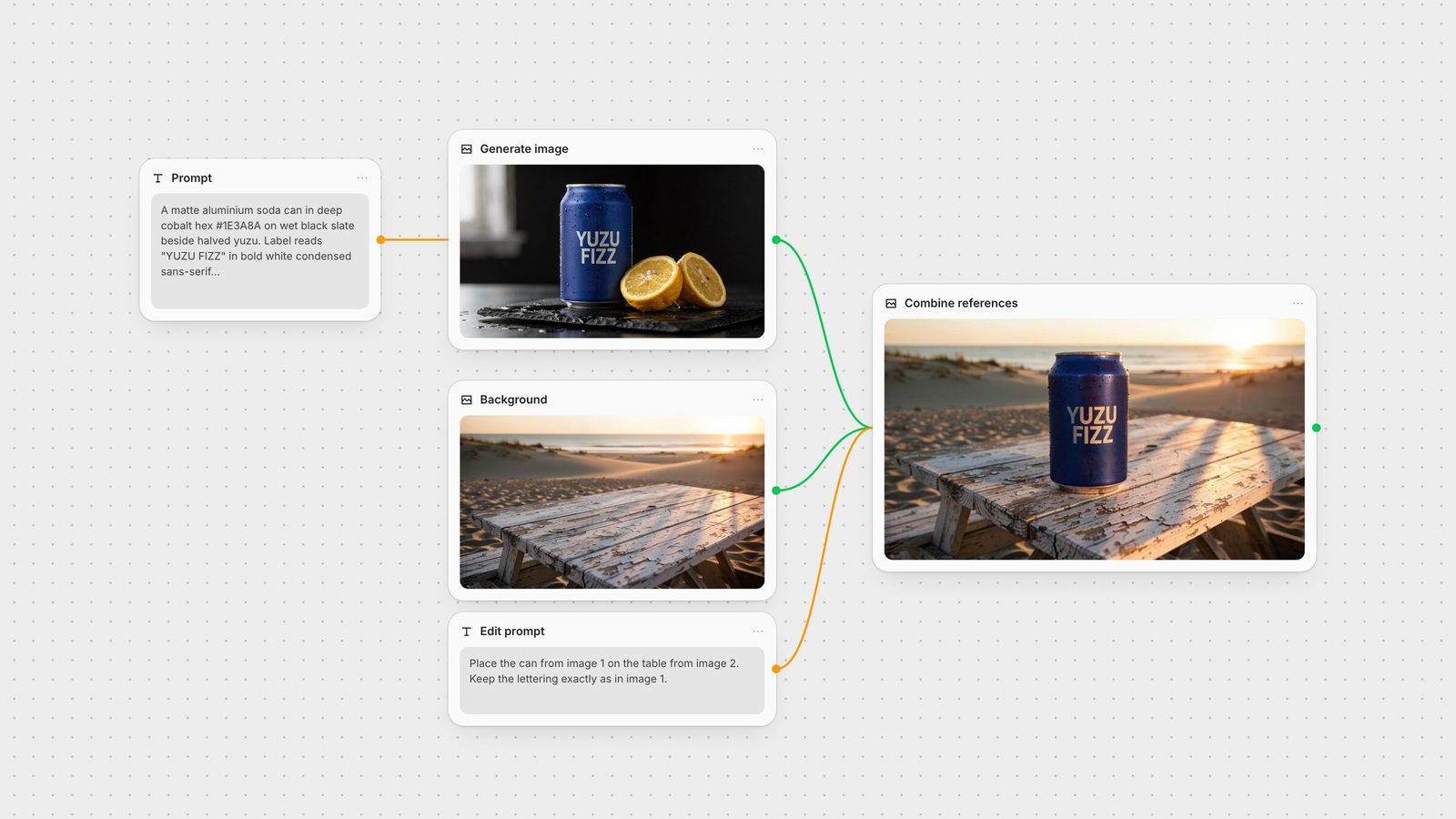
A matte aluminium soda can in deep cobalt hex #1E3A8A stands on a wet black slate slab next to two halved yuzu fruits. The can label reads "YUZU FIZZ" in bold white condensed sans-serif lettering, stacked on two lines. Fine condensation droplets cover the can. Soft window light from the left, dark minimal background. Shot on Hasselblad X2D, 80mm lens, f/4, shallow depth of field.
The lettering came back spelled and stacked correctly, and the light, slate and droplets all matched. The one miss was the fruit: it reads more like lemon than yuzu. That is a subject-knowledge limit, and more adjectives would not fix it; a reference photo would.
FLUX.2 accepts a JSON object as the prompt. BFL documents a base schema with scene, subjects (each with a description, position and action), style, color_palette, lighting, mood, background, composition and camera, and recommends it for production workflows, automation and complex scenes with several subjects (BFL). The Fuser node's prompt field shows the same pattern as an example.
We sent the same brief as JSON, with the same seed and size:
{ "scene": "Studio product photograph of a soda can on wet slate", "subjects": [ { "type": "aluminium soda can", "description": "Matte can with fine condensation droplets. The label reads \"YUZU FIZZ\" in bold white condensed sans-serif lettering, stacked on two lines.", "color_palette": ["#1E3A8A"], "color_match": "exact", "position": "center, slightly left of frame" }, { "type": "fruit", "description": "Two halved yuzu fruits, cut faces toward camera", "position": "right of the can, on the slab" } ], "style": "Commercial beverage photography, photorealistic", "color_palette": ["#1E3A8A", "#F2C94C", "#111111"], "lighting": "Soft window light from the left", "mood": "Fresh, crisp, premium", "background": "Dark minimal backdrop, wet black slate slab surface", "composition": "Eye-level medium close-up, can on the left third", "camera": { "angle": "eye level", "lens": "Hasselblad X2D, 80mm", "f-number": "f/4", "depth_of_field": "shallow" } }
What changed: the JSON run produced a deeper navy can, closer by eye to #1E3A8A than the prose run, and kept the lettering, fruit placement and slate. It also came back with a light grey background instead of a dark one, even though the "background" field asked for "dark minimal". JSON is not magic; it makes each attribute easy to find and change, which is its real value. Use it when you template prompts (swap the "subjects" array per product, keep lighting and camera fixed) or when a scene has several subjects that each need their own position and colour. For a single product shot, a well-ordered sentence is as good and easier to edit.
BFL's rule: put the word "color" or "hex" before the code and tie it to one object, as in "the sofa in deep teal hex #1B6B6F". Vague requests such as "use #FF0000 somewhere" give inconsistent results. For gradients, name both ends: "gradient starting with color #02eb3c and finishing with color #edfa3c" (BFL).
In our runs the hex steered the hue reliably, but none of the three generations matched #1E3A8A exactly on a wet, lit surface. The [pro] run read brighter and the [turbo] run far more saturated. Treat hex as strong direction. If a brand colour has to be exact, check it with an eyedropper and correct it with an edit.
FLUX.2 renders readable text when you describe it precisely (BFL):
Put the exact words in quotation marks: The label reads "YUZU FIZZ".
Say where the text sits: "stacked on two lines", "centred at the top of the poster".
Describe the lettering: "bold white condensed sans-serif", "handwritten script", "elegant serif".
Give it a size role: "large headline", "small body copy".
Colour it with a hex code if it matters: the logo text "ACME" in color #FF5733.
All three of our generations spelled YUZU FIZZ correctly and kept the two-line stack. BFL describes FLUX.2 [flex] as specialised for typography, so switch to it when text is the whole point of the image. For a wider comparison, see the best AI models for text in images.
BFL states plainly that FLUX.2 does not support negative prompts. Write the positive version: "sharp focus throughout" rather than "no blur", "empty tabletop" rather than "no objects on the table". The Fuser FLUX.2 node has no negative-prompt field for the same reason. Our background prompt asked for "the empty tabletop fills the lower third", and the table came back bare.
Connect images to the node's Images input and the node sends your prompt to that variant's edit endpoint. BFL's guidance is to state each image's role explicitly: "subject from image 1, style from image 2, background from image 3" (BFL). Name each reference by content as well as number ("the soda can from image 1") so the instruction still reads correctly if you reorder inputs.
We ran two edits on FLUX.2 [pro]:
Combine: "Place the soda can from image 1 standing on the picnic table from image 2, near the front edge of the tabletop. Keep the can's cobalt colour, the "YUZU FIZZ" lettering and the condensation exactly as in image 1. Relight the can with the warm low sun from the right in image 2 and add its long shadow across the wood. Keep the beach background from image 2."
Recolour: "Change the can colour to warm coral hex #E4572E. Keep the "YUZU FIZZ" lettering, the condensation, the yuzu halves, the slate and the lighting unchanged."
The combine kept the can's shape, droplets and spelling, and relit it convincingly. The relight also tinted the white letters warm, so "keep the lettering exactly" competed with "relight the can". When you ask for both, decide which wins and say so, for example "keep the lettering pure white". The recolour held the composition, fruit and slate, and switched the can to coral, and the lettering went slightly translucent. Always list the things that must not change. It was the listed items that survived intact.
How many references you can connect depends on the variant. The node accepts up to 10 images. Fuser checks the limit per model before it runs: up to 3 for [dev], 8 for [pro] and [flex], and 4 for each [klein]. BFL's own API figures are up to 8 references for [pro], [max] and [flex] and 4 for [klein] (BFL FLUX.2 overview). Fuser-hosted references are downscaled to fit 1024 × 1024 before they are sent, so give identity-critical details such as a logo a large area of the reference image.
[turbo] is the node default and the fastest way to draft. fal describes it as FLUX.2 [dev] "at turbo speed" (fal model page). Steps are fixed at 8.
[klein] 4B / 9B are BFL's sub-second models for high-volume work (BFL). In Fuser they run at 8 steps or fewer and a CFG of 1 or lower.
[dev] is the open-weights model, with steps and CFG under your control.
[flex] is BFL's "quality with control" variant: adjustable steps and guidance, and "specialized for typography" (BFL).
[pro] is BFL's production model. Its API takes no steps or guidance parameters (fal model page), so the node's Steps and CFG sliders don't change it.
[max] is BFL's highest-quality tier, with the "strongest prompt following" and the "highest editing consistency across tasks" (BFL). Like [pro], it sets its own steps and guidance. Use it for finals.
The [turbo] run in our test shows the trade-off. Fuser turns Expand Prompt on by default, and it rewrote our brief into a longer, more florid version that ended with "high resolution 4k". The result still had correct lettering, but the can was centred and more saturated than we asked for. Turn Expand Prompt off whenever your wording is deliberate.
Model Type: turbo (default), dev, pro, max, flex, klein 4B, klein 9B.
Image Size: square (1920 × 1920), portrait 4:3 (1440 × 1920), portrait 16:9 (1080 × 1920), landscape 4:3 (1920 × 1440) or landscape 16:9 (1920 × 1080). The model rounds to multiples of 16; our 16:9 [pro] outputs came back at 1920 × 1072.
Steps (default 8) and CFG Scale (default 2.5) for the variants that use them.
Expand Prompt (on by default) for the variants that support it; the fal APIs for [pro], [max] and [flex] don't take it.
Seed, Block NSFW and Output Format (JPEG, PNG or WebP; the fal APIs for [pro], [max] and [flex] return only JPEG or PNG).
Need an exact placement size? Generate at the nearest aspect ratio, then crop and export at exact pixels in the Compositor.
The hero image lays out this test as a Fuser graph: a text node with the brief feeds a FLUX.2 node on [pro]. A second FLUX.2 node on [turbo] makes the background. Both images, plus an edit prompt, feed a third FLUX.2 node that combines them. Because each step is a node, you can swap the product image and rerun only the combine step, or send the result on to an upscaler or an image-to-video model. For instruction-only edits of a single image, compare this with FLUX.1 Kontext editing. To see how FLUX.2 stacks up against Google's model on the same prompts, read FLUX vs Nano Banana. For more on multi-model graphs, see chaining AI models in one workflow.
What to write, with the wording we tested.
| Element | Write | Example |
|---|---|---|
| Prompt parts | ||
| Subject | First, with the details that must survive. | A matte aluminium soda can in deep cobalt hex #1E3A8A |
| Action / state | What it does or how it sits. | stands on a wet black slate slab |
| Style | Medium, or a real camera and lens. | Shot on Hasselblad X2D, 80mm lens, f/4 |
| Context | Light, setting, mood. | soft window light from the left, dark minimal background |
| Text | Exact words in quotes, plus position and style. | label reads "YUZU FIZZ", bold white condensed sans-serif, two lines |
| Colour | "hex" or "color" + code, tied to one object. | can colour to warm coral hex #E4572E |
| References | Role of each image, by number and content. | the soda can from image 1 on the table from image 2 |
| Exclusions | Positive phrasing; there is no negative prompt. | empty tabletop, sharp focus throughout |
Subject, action, style, context, in that order. Black Forest Labs says FLUX.2 pays more attention to what comes first, and puts 30 to 80 words at usually ideal.
Yes. BFL documents a JSON schema with scene, subjects, style, color_palette, lighting, mood, background, composition and camera. In our test a JSON prompt on FLUX.2 [pro] produced a correct image. It is most useful for templating and multi-subject scenes.
No. BFL says FLUX.2 does not support negative prompts, so describe what you want instead: sharp focus throughout rather than no blur. The Fuser FLUX.2 node has no negative-prompt field.
Write hex or color before the code and attach it to a specific object, such as the sofa in deep teal hex #1B6B6F. In our tests hex codes steered the hue well but were not pixel-exact on lit surfaces, so check brand colours afterwards.
In Fuser the FLUX.2 node accepts up to 10 images: up to 3 for [dev], 8 for [pro] and [flex], and 4 for [klein]. BFL's API lists up to 8 references for [pro], [max] and [flex].
Draft on [turbo] or [klein], finish on [pro] or [max], and use [flex] when readable typography is the priority. [dev] is the open-weights variant with full step and guidance control.
Generate, combine references and finish the image in one workflow.