One click, whole workflow
Recipes are here. Package a whole workflow and run it in one click
Explore recipesOne click, whole workflow
Recipes are here. Package a whole workflow and run it in one click
Explore recipesHow to write FLUX.1 Kontext edit instructions that change only what you ask for, keep a person recognisable and survive several rounds of edits, tested on real Pro and Max outputs.
All guides · FLUX.1 Kontext in Fuser
Quick answer: to edit an image with FLUX.1 Kontext, give it the image and one plain instruction that names exactly what should change ("Change the mug color to mustard yellow"). The image supplies everything else. Use a specific verb for the part you want changed rather than "transform", say what must stay ("while maintaining the same facial features and hairstyle"), and put text you want replaced in quotes: Replace 'OPEN STUDIO' with 'CLOSED SUNDAY'. Those rules come from Black Forest Labs' own Kontext prompting notes; every example below is a real output we generated on 28 September 2026.
FLUX.1 Kontext is Black Forest Labs' instruction-based image editor: one model that takes a text prompt plus a reference image and either makes a local edit or builds a new scene around what it sees (BFL overview). It comes in two hosted versions. [pro] is the fast default at $0.04 per image; [max] costs $0.08 and BFL positions it for maximum prompt adherence and typography (BFL model comparison, fal pricing).
BFL now labels Kontext a previous-generation model and recommends FLUX.2 for new editing work, citing multi-reference input and output up to 4 MP (BFL image editing docs). Fuser ships both. Kontext is still worth knowing: it is quick, cheap and predictable for single, targeted edits. For the newer path, see the FLUX.2 prompt guide.
BFL's guidance for Kontext is short, and our runs backed up each point:
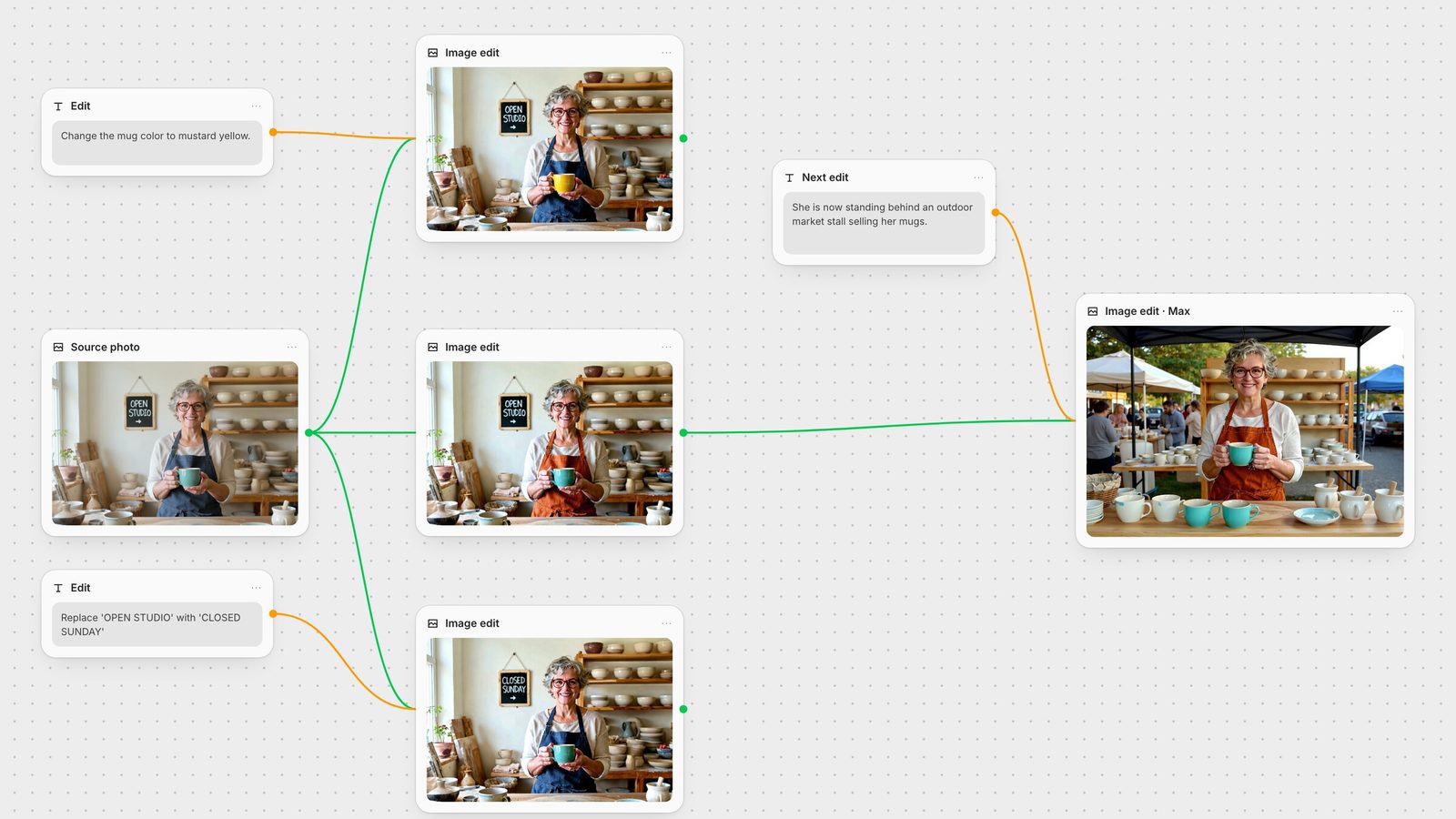
Say what changes, not what the picture is. The input image already carries the scene. "Change the mug color to mustard yellow" recoloured the mug and left the face, hands, sign and shelves as they were (hero image, top node).
Use a specific verb for a specific part. BFL advises "change the clothes" over "transform the person". We tested both on the same seed: "Transform the person into a Viking" replaced our ceramicist with a bearded man. "Change her clothes to a Viking warrior's outfit with a fur cloak and leather armour, while maintaining the same facial features, glasses and hairstyle" kept her and changed only the outfit.
Name what must stay. The preservation clause is part of the instruction, not a nice-to-have. When identity matters, list the features: face, glasses, hairstyle, the object in her hands.
Quote text you want replaced. BFL's pattern is Replace '[original text]' with '[new text]' (BFL text editing).
Be more explicit as the edit gets bigger. For several changes at once, BFL's advice is to add as many explicit details as possible. For a single colour swap, a short sentence is enough.
Kontext is built for character consistency: BFL's paper reports better preservation of objects and characters across multiple turns than the editing systems it compared against (FLUX.1 Kontext paper). In practice identity holds best when the edit touches something other than the person. Our apron, mug, sign and outfit edits all kept the same face, glasses and grey curls.
Identity is most at risk when the whole scene changes. BFL's own consistency example uses scene-level phrasing ("She is now taking a selfie in the streets of Freiburg, it's a lovely day out", BFL image editing docs) and we got the best relocation results with that style too. Writing "She is now standing behind an outdoor market stall selling her mugs" on Kontext [max] produced a complete outdoor market scene with the same face, glasses, apron and teal mug. The same sentence on [pro] left her in the studio.
Pro held on to the original scene hard. "Put her on a beach at sunset" swapped the back wall for sea and sky but left the shelves, bench and pots in place. Adding "Replace the whole studio, including the shelves, the chalkboard sign, the workbench and the pottery" removed the sign and little else. If you need to move a subject somewhere new, switch the node to Max before you rewrite the prompt a fourth time.
Short replacements are where Kontext is strongest. Replace 'OPEN STUDIO' with 'CLOSED SUNDAY' came back spelled correctly, in the same chalk hand, with the arrow kept. A longer replacement, Replace 'OPEN STUDIO' with 'KILN FIRING - BACK AT 3PM', failed on both versions: Pro wrote "KILN FINING", and Max spelled every word right but dropped "BACK". Keep new text close in length to the text it replaces, and check spelling on every output before you use it.
For text that has to move or resize, BFL documents a second technique: draw a brightly coloured box on the input image around the area to change and refer to it in the prompt. Kontext [pro] reads the box as an annotation and removes it from the output (BFL annotation boxes). In Fuser you can draw that box as a rectangle layer in the Compositor and export a PNG.
Feeding each output into the next edit works, and identity survives it. Image quality is the thing to watch. We ran three Pro edits in sequence (orange apron, then a SALE sign, then evening light). By the third pass the image had heavy contrast, oversharpened edges and a blotchy wall, and the lighting change hardly showed. The same lighting prompt applied once to the original came back clean.
Branch when edits are independent. Run each change from the original, as in the hero canvas where the mug, apron and sign edits all start from the same source.
Chain only when a step depends on the last one, and keep the chain short. Two or three steps is a sensible limit before you inspect the result closely.
Fix the seed while you iterate on wording. With the same seed, differences between two wordings come from the wording. The Kontext node in Fuser has a Seed field for this.
Combine small edits into one prompt instead of three passes when they don't conflict: "Change the apron to rust-orange linen and replace 'OPEN STUDIO' with 'SALE'."
The FLUX.1 Kontext node picks the endpoint for you from two things: the Model dropdown (Pro by default, or Max) and how many images you connect.
No image: text-to-image, using the Aspect Ratio setting (1:1 by default).
One image: a single-image edit. The output follows the input's proportions, so the aspect ratio setting is not sent. BFL says Kontext matches the input dimensions as closely as it can (BFL parameters); our 1248 × 832 input came back at 1248 × 832.
Two to four images: the multi-reference endpoint, for combining elements from several pictures.
CFG Scale defaults to 3.5 and sets how closely the output follows the prompt. Seed and Output Format (JPEG or PNG) are also on the node.
Images from your Fuser library are downscaled to fit 1024 × 1024 before they are sent, which is close to Kontext's roughly 1 MP output anyway.
Because it is a node, the edit is one step in a larger graph. Generate a keyframe with GPT Image or FLUX.2, make targeted fixes with Kontext, then pass the result to an upscaler or an image-to-video model on the same canvas. To keep a character consistent across a whole series, see consistent characters with AI, and for a wider view of editors, the best AI image editing models.
What to write for common edits, based on BFL's guidance and our 28 September 2026 runs.
| Edit | Write | Result in our test |
|---|---|---|
| Instructions | ||
| Recolour an object | Change the mug color to mustard yellow. | Mug recoloured, rest untouched (Pro) |
| Change clothing | Change her clothes to …, while maintaining the same facial features, glasses and hairstyle. | Outfit changed, identity kept (Pro) |
| Avoid | Transform the person into … | Replaced the person entirely (Pro) |
| Replace text | Replace 'OPEN STUDIO' with 'CLOSED SUNDAY' | Correct, same lettering style (Pro) |
| Long text | Keep replacements close to the original length. | Six words: errors on Pro and Max |
| Move the subject | She is now standing behind an outdoor market stall … | Full scene change on Max; Pro stayed in the studio |
| Several edits | Branch from the source, or combine them in one prompt. | Third chained pass visibly degraded |
Name only what should change, with a specific verb for that part ("change the clothes", not "transform the person"). Add what must stay, such as "while maintaining the same facial features and hairstyle". The input image supplies everything else.
Edit something other than the person where possible, and list the features to preserve in the prompt. Avoid "transform" wording: in our test "Transform the person into a Viking" replaced the woman with a different man, while "Change her clothes …" kept her face.
Quote both strings: Replace 'old text' with 'new text'. Short swaps are reliable; in our test a six-word replacement came back with errors on both Pro and Max, so check spelling on every result.
Pro is the default; at API list prices it costs $0.04 per image and Max $0.08. Max is aimed at stronger prompt adherence and typography. In our runs Max handled moving the subject to a new location where Pro kept the original room.
Yes, and identity holds, but image quality drifts: by the third chained Pro edit our image was oversharpened and blotchy. Run independent edits from the original, or combine compatible changes into one prompt.
BFL now recommends FLUX.2 for new editing work, with more reference images and higher resolution. Kontext remains a quick, low-cost option for single targeted edits. Fuser offers both.
Run Kontext Pro and Max side by side from the same source and keep every version.