One click, whole workflow
Recipes are here. Package a whole workflow and run it in one click
Explore recipesOne click, whole workflow
Recipes are here. Package a whole workflow and run it in one click
Explore recipesFour identical prompts through FLUX.2 [pro] and Nano Banana 2: a hex-colored product, a text-heavy poster, a counted flat lay and a product edit, with what each model got right and wrong.
All guides · Best AI image models
Quick answer: in our same-prompt test, FLUX.2 [pro] and Nano Banana 2 tied on poster typography and on placing counted objects, and both produced clean product scenes. They split on the details. Nano Banana 2 came closer to a requested hex color and, when told to keep every word on a product label, kept every word and number. FLUX.2 [pro] stuck more literally to the brief (no invented props) and gave the truer overhead flat lay, but its edit changed the small print on the label, and fal's FLUX.2 [pro] edit endpoint rejected our longer edit instruction three times. Pick Nano Banana 2 for edits where existing text has to survive; pick FLUX.2 [pro] when you want literal, prop-free compositions. This is four prompts with one run each, so read it as tendencies, not a benchmark.
We ran four prompts through each model on 28 September 2026, one generation each, with no cherry-picking:
Models: FLUX.2 [pro] from Black Forest Labs and Nano Banana 2, Google's Gemini 3.1 Flash Image. Both are in Fuser: FLUX.2 [pro] is the Pro option on the FLUX.2 node, and Nano Banana 2 is the default model on the Gemini Image node. The FLUX.2 node defaults to Turbo, a faster tier, so we switched it to Pro to compare the two flagships.
Settings: each model at what its Fuser node sends for a square image. That is 1920 × 1920 for FLUX.2 [pro] and 1:1 at 2K (2048 × 2048) for Nano Banana 2. Both ran through fal's hosted endpoints (fal-ai/flux-2-pro and fal-ai/gemini-3.1-flash-image-preview, plus their /edit versions). The FLUX.2 endpoint is the one Fuser calls. Fuser runs Nano Banana 2 through Google's own API, but it is the same model.
Judging: we zoomed every output at full resolution, read all text letter by letter, counted objects and sampled the glaze color against the hex value.
Prompt: "Studio product photograph of a matte ceramic pour-over coffee dripper glazed in color #1F6F5C, sitting on a glass carafe on a pale oak counter. Soft window light from the left, shallow depth of field, 50mm lens, clean off-white wall behind."
FLUX.2 [pro] produced a clean, literal shot: dripper, empty carafe, oak counter, nothing extra. The glaze came out as a dark forest green, noticeably darker and less blue than #1F6F5C. We followed Black Forest Labs' own advice to put the hex code right next to the object it colors (FLUX.2 prompting guide).
Nano Banana 2 matched the teal-green hue more closely. It also added props we didn't ask for: a paper filter with grounds, brewed coffee in the carafe and a linen cloth with a spoon.
Verdict: Nano Banana 2 for color closeness in this run. FLUX.2 [pro] if you want the brief rendered literally, with nothing added. Neither hit the swatch exactly, so check brand colors on the output before you ship.
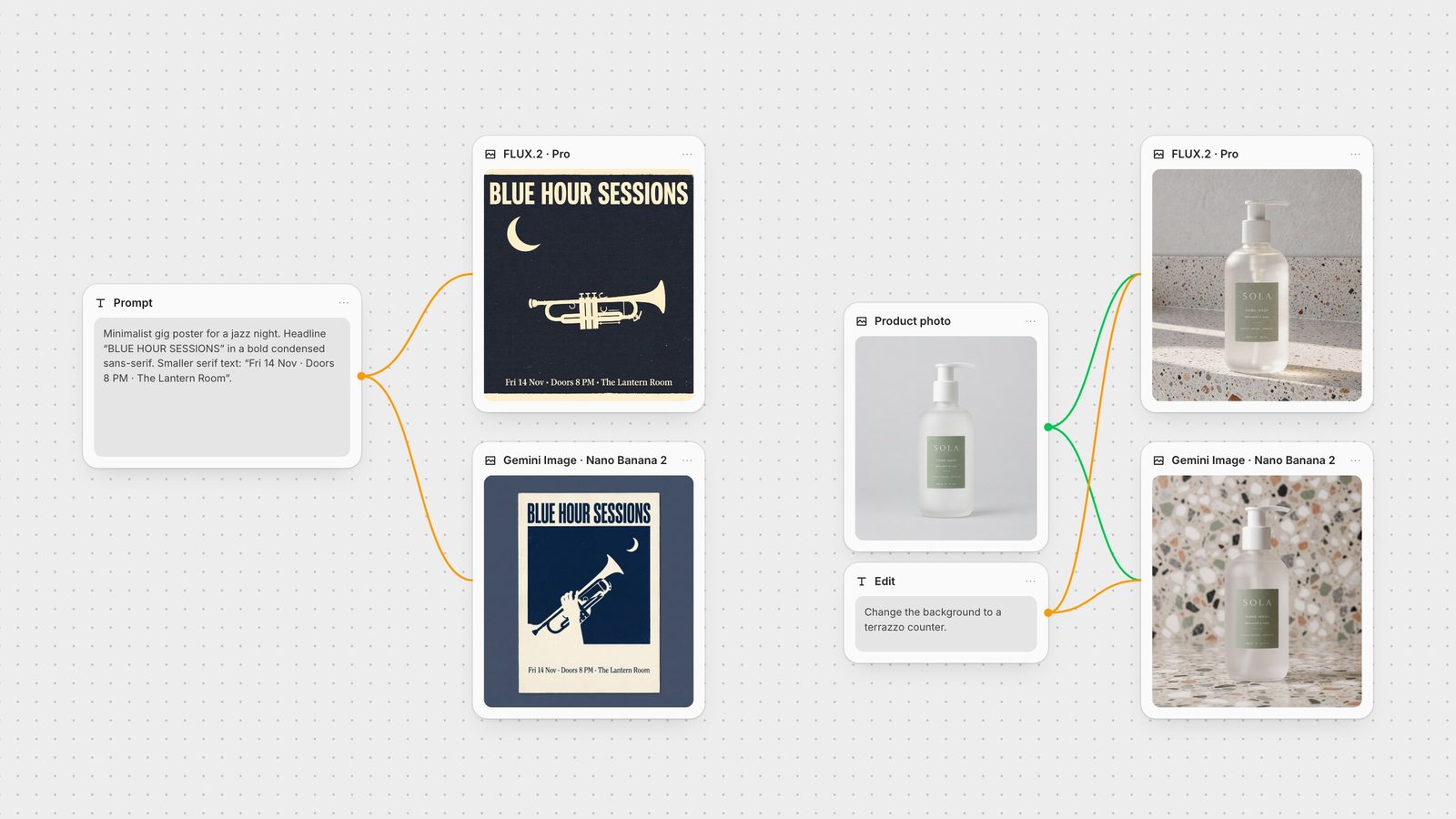
Prompt: a minimalist jazz poster with the headline "BLUE HOUR SESSIONS" in bold condensed sans-serif and a serif line reading "Fri 14 Nov · Doors 8 PM · The Lantern Room", with a trumpet silhouette, a crescent moon and a cream and navy palette.
Both models spelled every word of both lines correctly. Nano Banana 2 kept the middle dots as written; FLUX.2 [pro] drew them as heavier bullets. That fits what both vendors claim: Google calls Nano Banana 2's text "accurate, legible" (Google), and Black Forest Labs says FLUX.2 handles "complex typography" and "legible fine text" (Black Forest Labs). The difference was layout. FLUX.2 [pro] filled the frame with the poster itself. Nano Banana 2 showed the poster as a printed sheet on a blue backdrop, a mock-up rather than the artwork, and added a hand holding the trumpet.
Verdict: a tie on text. FLUX.2 [pro] if you need print-ready artwork edge to edge. If the poster is text-dense, Black Forest Labs recommends FLUX.2 [flex], which it describes as "specialized for typography" (FLUX.2 overview). Flex is also on the Fuser node. More in best AI models for text in images.
Prompt: "Overhead flat lay on a grey linen tablecloth: exactly three lemons on the left, a blue enamel mug in the center, two croissants on a white plate on the right, and a folded newspaper along the top edge. Natural morning light, photorealistic."
Both got every count and position right: three lemons, one mug, two croissants on a plate, and a newspaper at the top. FLUX.2 [pro] gave a true top-down view with the cloth filling the frame and the newspaper print left as unreadable texture. Nano Banana 2 tilted the view slightly so the table edge and floor show. It also wrote a readable masthead ("THE MORNING CHRONICLE") above headline and body copy that turns to invented words at small sizes.
Verdict: FLUX.2 [pro] for a clean, literal flat lay. Nano Banana 2 invents readable detail, which helps a lived-in look but means proofreading any text it adds.
Both models got the same source photo, a hand-wash bottle with small type on its label, and the same instruction: "Change the background to a terrazzo counter."
Both produced a convincing terrazzo scene with the bottle's shape and pump intact. The difference is in the small print:
FLUX.2 [pro] kept "SOLA", "HAND WASH" and "BERGAMOT & SAGE", but changed "300 ml · 10.1 fl oz" to "200 ml · 100 fl oz" and "EFFECTIVE" to "SFFECTNE".
Nano Banana 2 kept both volumes correct but misspelled two small words, "GANTLE" and "SFFECTIVE".
We had first tried a longer, more descriptive instruction that ended with "Keep the bottle, pump and label exactly as they are, including every word on the label." fal's FLUX.2 [pro] edit endpoint rejected it three times with a content-policy error, including once after we reworded the scene description, so we compared both models on the shorter line above. Nano Banana 2 accepted the longer instruction and returned every word and number on the label correctly (the last crop); the only slip was a small stray mark before "10.1 fl oz". That matches Google's editing advice to "be explicit about what to keep exactly the same" (Google Cloud).
Verdict: Nano Banana 2 for edits where packaging text must survive, especially with an explicit keep instruction. With either model, zoom into small print before you use an edit.
FLUX.2 [pro]: up to 4 MP output and up to 8 reference images through the API. Prompts can use hex codes or structured JSON, and BFL notes that "FLUX.2 pays more attention to what comes first" in a prompt (FLUX.2 prompting guide). On the Fuser node you choose from five sizes (square, plus 4:3 and 16:9 in portrait or landscape), which render at about 1920 px on the long side. The same node also offers Max, Flex, Dev, Turbo and Klein.
Nano Banana 2: 512 px to 4K output, and up to 14 reference images: up to 10 of objects and up to 4 of characters for consistency (Gemini API docs). It can also use Google Search to ground images in real-world facts. On the Fuser node you get Auto or ten aspect ratios from 21:9 to 9:16, 1K, 2K or 4K resolution, up to 10 input images, a system prompt and a Search Grounding toggle. The same node also offers Nano Banana Pro, Nano Banana 2 Lite and the original Nano Banana.
One test tells you more than any roundup. In Fuser, put your prompt in a text node and connect it to a FLUX.2 node set to Pro and a Gemini Image node side by side, as in the canvas at the top. For edits, connect the same product photo to both nodes. Keep whichever result wins, then pass it on to an upscaler or a video model on the same canvas (chain models in one workflow). For prompt-writing detail, see the FLUX.2 prompt guide and the Nano Banana prompt guide.
Four prompts, one run per model, 28 September 2026.
| Task | In our test | Pick |
|---|---|---|
| Verdict per task | ||
| Exact hex color | Nano Banana 2 came closer to #1F6F5C but added props. FLUX.2 [pro] was literal but rendered darker. | Nano Banana 2 for the color; FLUX.2 [pro] for a literal shot |
| Poster typography | Both spelled both lines exactly. FLUX.2 [pro] filled the frame; Nano Banana 2 made a mock-up. | Tie; FLUX.2 [pro] for edge-to-edge artwork |
| Counted layout | Both placed every object correctly. Nano Banana 2 invented readable newspaper text. | FLUX.2 [pro] for a clean, literal flat lay |
| Edit with small label text | FLUX.2 [pro] changed the volumes and one word. Nano Banana 2 misspelled two words, and was exact with a keep-every-word prompt. | Nano Banana 2 |
| Long edit instruction | fal's FLUX.2 [pro] edit endpoint rejected it three times; Nano Banana 2 ran it. | Nano Banana 2 |
Neither won outright in our test. They tied on poster text and on placing counted objects. FLUX.2 [pro] followed briefs more literally, while Nano Banana 2 came closer to a hex color and preserved label text better when editing.
Both rendered a two-line poster letter for letter. In an edit, both changed small label text, but Nano Banana 2 kept every word when told to keep the label exactly as it was.
FLUX.2 accepts hex codes in the prompt. In our run the glaze came out darker than #1F6F5C, so check brand colors on the output. Nano Banana 2 came closer to the hue in the same test.
The FLUX.2 node offers Turbo (the default), Pro, Max, Flex, Dev, Klein 4B and Klein 9B. This comparison used Pro. Black Forest Labs recommends Flex for text-heavy designs.
Nano Banana 2 is Google's name for Gemini 3.1 Flash Image, released on 26 February 2026. In Fuser it is the default model on the Gemini Image node, alongside Nano Banana Pro, Nano Banana 2 Lite and the original Nano Banana.
One prompt, a FLUX.2 node and a Gemini Image node: keep the result that fits your brief.