One click, whole workflow
Recipes are here. Package a whole workflow and run it in one click
Explore recipesOne click, whole workflow
Recipes are here. Package a whole workflow and run it in one click
Explore recipesTen identical tests through FLUX.3 Image and FLUX.2 [pro]: a product brief in prose and JSON, a hex colour, three typography prompts, a counted layout and four label-preserving edits, with a verdict per test and the relative cost.
All guides · FLUX.3 Image in Fuser · FLUX.2 in Fuser
Quick answer: in ten same-input tests, FLUX.3 Image won eight (one of them narrowly), FLUX.2 [pro] won one and one was a tie. The upgrade shows most in text and edits. FLUX.3 Image set every word of two posters and a menu exactly in every run, where FLUX.2 [pro] closed up "8 PM" in two of its four poster runs and printed one menu line twice, and it kept every word of a product label intact in two background edits where FLUX.2 [pro] changed the volumes and misspelled words. When we asked both to rewrite one line of that label, both garbled the small print, until we gave FLUX.3 Image the same change as a bounding-box edit, which came back exact. FLUX.2 [pro] was the more literal of the two on a styled product shot, and both got every count right in a counted flat lay. FLUX.3 Image at 2K costs about the same as a square FLUX.2 [pro] image. It has no seed, though, so you can't reproduce a result the way you can with FLUX.2. Most verdicts come from one run per model (three for the two-line poster), so read them as tendencies, not a benchmark.
Black Forest Labs released FLUX 3 Image on 1 October 2026. Its overview describes one model that generates from text, edits specific details and combines up to ten references. Three things in BFL's docs matter for this comparison:
Bounding boxes in the prompt. You can append a JSON table of elements to the prompt, each with a box on a 0 to 1000 grid. For edits, each row says whether an element is kept, moved, newly generated or removed, so the model knows what must not change (bounding boxes). BFL's FLUX.2 docs describe no equivalent.
Fewer request fields. BFL's prompt reference says FLUX 3 Image has no negative_prompt, seed, prompt_upsampling or guidance fields. It takes an aspect ratio (BFL lists 15, from 21:9 to 9:21) and a resolution tier instead of a pixel size (technical parameters).
Resolution tiers. BFL recommends its 768 px tier for drafts, 1K as the default, 2K for print and hero images, and 4K as the largest output, which "can take several minutes". Changing the tier makes a new generation, so the composition can differ from a draft.
FLUX.2, for reference, is BFL's previous family, from the sub-second [klein] models to [max], with up to 4 MP output, hex-colour and JSON prompting, and up to 8 references through BFL's API for [pro], [max] and [flex] (FLUX.2 overview). BFL notes that FLUX.2 [pro] has a 9 MP total limit for input plus output, so bigger outputs leave room for fewer references.
FLUX.3 Image is a separate node from FLUX.2. Both switch to editing as soon as you connect images. The differences:
One model vs seven. The FLUX.2 node has a Model Type switch: turbo (the default), dev, pro, max, flex, klein 4B and klein 9B. FLUX.3 Image has no variants. To compare like with like, we set FLUX.2 to Pro, BFL's production tier.
Resolution tier vs pixel size. FLUX.2 offers five sizes of about 1920 px on the long side (square 1920 × 1920, plus 4:3 and 16:9 in either orientation). FLUX.3 Image offers 512px, 768px, 1K (the default), 2K and 4K, with Auto or 14 aspect ratios from 21:9 to 1:2. In our runs, 2K at 1:1 came back at 2048 × 2048, 2K at 16:9 at 2736 × 1536 and 1K at 3:4 at 880 × 1184.
References. FLUX.3 Image accepts up to 10 at any resolution. On Pro, the FLUX.2 node allows up to 5 at the square size and 6 at the others, because of the 9 MP budget.
Controls that went away. FLUX.3 Image has no seed, steps or CFG. Its Expand Prompt toggle is off by default, and output is JPEG or PNG.
Cost. In Fuser credits, FLUX.3 Image at 2K costs about 10% less than a square FLUX.2 [pro] image and about 20% less than a square FLUX.2 [pro] edit, because FLUX.3 Image prices each image by tier, references included, while FLUX.2 adds a charge per reference. At 1K it costs about three quarters of FLUX.2 [pro]'s smallest size (16:9). 4K costs about six times as much as 2K.
We ran ten tests with identical prompts and input images. FLUX.3 Image ran on 2 October 2026, once per prompt except the two-line poster (three runs), with Expand Prompt off (the node default), at 2K for photos and the square poster and at 1K for the two 3:4 typography prompts. We reused FLUX.2 [pro] outputs from our 28 September tests wherever the prompt and input were identical: the FLUX.2 prompt guide, FLUX.2 vs Nano Banana and our text-in-images roundup. Four FLUX.2 [pro] runs are new: two more of the test 4 poster, and tests 9 and 10, which we hadn't run on FLUX.2 [pro] with this wording before. All were generated with the same model versions Fuser uses.
Settings can't match exactly. FLUX.2 [pro] ran at its node sizes (1920 × 1920 for squares, 1920 × 1072 for 16:9), except the two roundup prompts, which ran at 768 × 1024. FLUX.3 Image takes a tier, not a pixel size, so we picked the closest: 2K at 1:1 is about 4.2 MP against FLUX.2's 3.7 MP. FLUX.3 Image has no seed, so its runs can't be repeated exactly. We read every output at full resolution, counted characters and objects, and checked colours against the hex value.
The 65-word brief from the FLUX.2 prompt guide: "A matte aluminium soda can in deep cobalt hex #1E3A8A stands on a wet black slate slab next to two halved yuzu fruits. The can label reads "YUZU FIZZ" in bold white condensed sans-serif lettering, stacked on two lines. Fine condensation droplets cover the can. Soft window light from the left, dark minimal background. Shot on Hasselblad X2D, 80mm lens, f/4, shallow depth of field." Test 2 sends the same brief as a JSON object with scene, subjects, style, color_palette, lighting, mood, background, composition and camera fields (the full JSON is in the FLUX.2 guide).
Prose: both spelled YUZU FIZZ correctly on two lines. FLUX.2 [pro] followed the brief more literally: a matte can and a visible window on the left. FLUX.3 Image made the can glossy, dropped the window and centred a smaller can in more empty space. Neither fruit looks clearly like yuzu.
JSON: FLUX.2 [pro] came back on a light grey background although the background field asked for "dark minimal". FLUX.3 Image kept the dark background, the slate and the lettering. The FLUX 3 Image docs we read describe no JSON prompt format beyond the box table, but this structured prompt still worked.
Verdict: FLUX.2 [pro] for the prose brief, narrowly; FLUX.3 Image for JSON.
"Studio product photograph of a matte ceramic pour-over coffee dripper glazed in color #1F6F5C, sitting on a glass carafe on a pale oak counter. Soft window light from the left, shallow depth of field, 50mm lens, clean off-white wall behind."
Neither model hit the swatch. FLUX.2 [pro] rendered a dark forest green; FLUX.3 Image's glaze is the closer teal-green, though still darker than #1F6F5C in most of the cone. FLUX.3 Image also filled the carafe with brewed coffee, which the prompt didn't ask for, while FLUX.2 [pro] left it empty and showed the window light.
Verdict: FLUX.3 Image for the colour. Check brand colours on the output with either model.
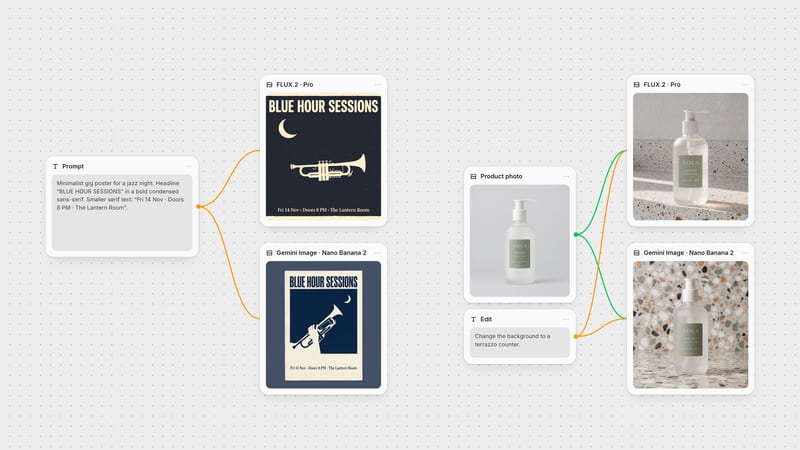
"A minimalist jazz poster with the headline "BLUE HOUR SESSIONS" in bold condensed sans-serif and a serif line reading "Fri 14 Nov · Doors 8 PM · The Lantern Room", with a trumpet silhouette, a crescent moon and a cream and navy palette." This is the poster prompt from our FLUX.2 vs Nano Banana test. Because the first FLUX.2 [pro] re-run on 2 October went wrong where the 28 September run hadn't, we ran this test three times per model rather than once.
All six posters spell every word. FLUX.3 Image set both lines exactly in all three runs, every space and middle dot included. FLUX.2 [pro] did the same in two of its three runs; in the other it wrote "Doors 8PM" and left most of the square empty. FLUX.3 Image's layouts were also more consistent: a large two-line headline, the trumpet across the middle and the date line at the bottom each time. Its first run drew the crescent moon inside the trumpet's bell, and its third drew four valves.
Verdict: FLUX.3 Image, narrowly: three exact runs out of three against two out of three.
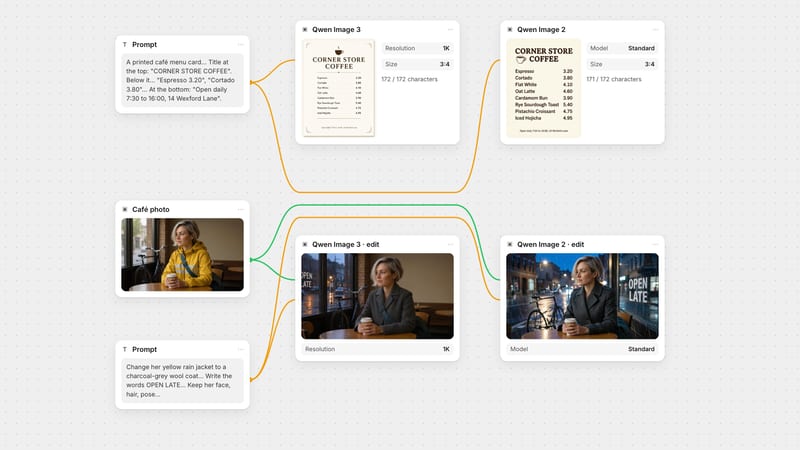
The two typography prompts from our roundup of models for text in images, both at 3:4. The poster asks for a headline ("NIGHT BLOOMS"), a subtitle and three lines of small print with a date, a doors-and-tickets line and a lineup, 111 characters in all. The menu prompt asks for a title, eight items with prices "one per line" and a footer with opening hours and an address, 172 characters in all.
Poster: both 111/111. FLUX.2 [pro] closed up "8 PM" into "8PM", as in one of its test 4 runs, and drew a trumpet with a malformed bell. FLUX.3 Image kept the spacing, put each small-print line on its own line as asked and drew a believable trumpet.
Menu: both 172/172 by our count, but FLUX.2 [pro] printed "Flat White 4.10" twice, giving nine lines for eight items. FLUX.3 Image set each item once, with the prices in a right-aligned column.
Verdict: FLUX.3 Image, twice. A repeated line passes a character count, which is why we read every line.
"Overhead flat lay on a grey linen tablecloth: exactly three lemons on the left, a blue enamel mug in the center, two croissants on a white plate on the right, and a folded newspaper along the top edge. Natural morning light, photorealistic."
Both got every count right: three lemons on the left, the mug in the middle, two croissants on a plate on the right. FLUX.2 [pro] was a little more literal on layout. It laid the newspaper straight along the whole top edge, where FLUX.3 Image set it at an angle across the top right and left the bottom third of the frame as empty cloth. FLUX.3 Image also used harder, lower sunlight with long shadows and printed large pseudo-words on the newspaper; FLUX.2 [pro] kept the newsprint small and unreadable.
Verdict: tie on the counts, with FLUX.2 [pro] slightly closer on placement.
Both models got the same 1024 × 1024 photo of a hand-wash bottle with small type on its label. Test 8 used one line: "Change the background to a terrazzo counter." Test 9 used a longer instruction that ends with an explicit keep rule: "Place this hand-wash bottle on a polished terrazzo bathroom counter with white, grey and terracotta chips, with soft daylight from a window on the left and a pale plaster wall behind. Keep the bottle, pump and label exactly as they are, including every word on the label."
All four edits produced a convincing terrazzo scene with the bottle and pump intact. The label is where they split:
FLUX.2 [pro], short: "300 ml · 10.1 fl oz" became "200 ml · 100 fl oz" and "EFFECTIVE" became "SFFECTNE".
FLUX.2 [pro], long: "BERGANOT & SAGE", "SFFECTIVE" and "101.5 cz". The keep rule didn't save the small print.
FLUX.3 Image, both: every word and number on the label matches the source, including the ℮ mark.
In our 28 September test, FLUX.2 [pro] rejected a differently worded long instruction three times with a content-policy error. This wording ran first time.
Verdict: FLUX.3 Image, twice.
Instruction for both: "Change the line "BERGAMOT & SAGE" on the label to "CEDAR & FIG". Keep every other word and number on the label, the bottle, the pump and the background exactly as they are."
Neither model managed it from the instruction alone. FLUX.2 [pro] put the new line where "HAND WASH" was and dropped both "HAND WASH" and the old scent line, and the tagline came back as "GENTLE · MATURAL · SFFECTIVE". FLUX.3 Image changed the right line but garbled the tagline into near-letters and turned "fl oz" into "fl ce".
Then we ran the same change on FLUX.3 Image as a box edit, following BFL's bounding-box format: one "new" row with a box around the scent line and the text "CEDAR & FIG", and "keep" rows for the brand name, the HAND WASH line, the tagline, the volume line, the bottle and the backdrop. That run came back with the new line in place and every other word and number on the label exact. We wrote the boxes by measuring the source photo; BFL also suggests asking a vision or language model to draft the element table. BFL's FLUX.2 docs describe no way to pin regions like this, so FLUX.2 [pro] had no equivalent run.
Verdict: FLUX.3 Image, with boxes. For text-only instructions, both need checking.
Reproducible results. FLUX.2 takes a seed, so the same prompt and seed give the same image. FLUX.3 Image doesn't, so save the outputs you like.
Fast, cheap drafts. The FLUX.2 node's turbo variant runs at a fixed 8 steps, and BFL describes [klein] as sub-second and built for high-volume work. FLUX.3 Image's 512px and 768px tiers are its draft option.
Typography-focused and top-tier variants. BFL describes FLUX.2 [flex] as specialised for typography and [max] as its highest-quality tier. We tested only [pro] here.
Literal styling. In test 1, FLUX.2 [pro] matched "matte" and "window light from the left" where FLUX.3 Image didn't.
Posters, menus, packaging and any image with words: FLUX.3 Image. It was exact on all three typography prompts.
Edits that must keep existing text or detail: FLUX.3 Image. For a change inside a small region, write it as a box edit; the FLUX.3 Image editing guide walks through the format.
Reproducible variations and cheap drafts: FLUX.2, using a seed, with turbo or klein for speed.
Exact brand colours: either, then check. Neither matched the hex value in test 3.
When the final text has to be exact to the letter, generate the artwork and set the words as real type in Fuser's Compositor. The poster typography workflow shows how.
Connect one prompt, or one photo plus an instruction, to a FLUX.3 Image node and a FLUX.2 node set to Pro, run them together and compare, as in the canvas at the top of this page. For prompt structure and layout tables, read the FLUX.3 Image prompt guide. To see how FLUX.3 Image compares with OpenAI's model, read FLUX.3 Image vs GPT Image.
Tests run on 28 September and 2 October 2026.
One run per model per test, three for the two-line poster. FLUX.3 Image at 2K (1K for the 3:4 prompts); FLUX.2 [pro] at its node sizes.
| Test | What happened | Winner |
|---|---|---|
| Verdict per test | ||
| Product brief, prose | Both spelled YUZU FIZZ. FLUX.2 [pro] kept the matte can and window light; FLUX.3 Image made it glossy. | FLUX.2 [pro], narrowly |
| Product brief, JSON | FLUX.2 [pro] ignored the dark background field. FLUX.3 Image kept it. | FLUX.3 Image |
| Hex colour #1F6F5C | Neither exact. FLUX.3 Image closer teal-green, but added coffee. | FLUX.3 Image |
| Two-line poster, three runs each | FLUX.3 Image exact in 3 of 3. FLUX.2 [pro] exact in 2 of 3; one wrote "8PM". | FLUX.3 Image, narrowly |
| Dense poster, 111 characters | Both 111/111. FLUX.2 [pro] closed up "8 PM" and malformed the trumpet. | FLUX.3 Image |
| Menu, 172 characters | Both 172/172. FLUX.2 [pro] printed one line twice. | FLUX.3 Image |
| Counted flat lay | Both got every count right. FLUX.2 [pro] laid the newspaper straighter along the top edge. | Tie |
| Background edit, short | FLUX.2 [pro] changed the volumes and a word. FLUX.3 Image kept the label exact. | FLUX.3 Image |
| Background edit, keep every word | FLUX.2 [pro] misspelled three words. FLUX.3 Image kept the label exact. | FLUX.3 Image |
| Rewrite one label line | From the instruction alone, FLUX.2 [pro] dropped a line and both garbled small print. FLUX.3 Image with boxes was exact. | FLUX.3 Image, with boxes |
In our ten same-input tests against FLUX.2 [pro], FLUX.3 Image won eight, FLUX.2 [pro] won one and one was a tie. FLUX.3 Image was more reliable with text in images and clearly better at edits that must keep a label intact. FLUX.2 [pro] followed a styled product brief more literally.
No. Black Forest Labs says FLUX 3 Image has no seed, negative prompt, prompt upsampling or guidance fields, and the Fuser node has none of them. Describe what you want instead of what to avoid, and save outputs you like, because you cannot regenerate the same image from a seed.
Not at comparable sizes. In Fuser credits, FLUX.3 Image at 2K costs about 10% less than a square FLUX.2 [pro] image and about 20% less than a square FLUX.2 [pro] edit. At 1K it costs about three quarters of FLUX.2 [pro] at 16:9. FLUX.3 Image at 4K costs about six times its 2K price.
A JSON table appended to the prompt that gives each element a box on a 0 to 1000 grid. In an edit, each row says whether the element is kept, moved, newly generated or removed. In our label test, a box edit changed one line and kept every other word exact, where the plain instruction garbled the small print.
FLUX.3 Image takes up to 10 at any resolution. In Fuser, FLUX.2 on Pro takes up to 5 at the square size and 6 at the other sizes, because FLUX.2 [pro] has a 9 MP limit for inputs plus output.
Yes, for reproducible variations with a seed, fast drafts on turbo or klein, and FLUX.2 [flex] or [max] when you want those specific variants. For text-heavy images and careful edits, FLUX.3 Image did better in our tests.
Wire one prompt or one photo into both nodes and keep the result that gets your text and details right.