One click, whole workflow
Recipes are here. Package a whole workflow and run it in one click
Explore recipesOne click, whole workflow
Recipes are here. Package a whole workflow and run it in one click
Explore recipesSeven identical tests through Qwen Image 3 and Qwen Image 2: a poster, a menu, a five-language sign, a dense newspaper page and three photo edits, with every character counted and a verdict per test.
All guides · Qwen Image 3 in Fuser · Qwen Image 2 in Fuser
Quick answer: in seven same-input tests, Qwen Image 3 won four, Qwen Image 2 won two and one was a tie. Qwen Image 3 got every character right on a poster and a menu where Qwen Image 2 missed one each, kept the small print sharp when it rewrote a product label, and was the only one of the two to keep the room intact in a three-part photo edit. Qwen Image 2 was exact on a five-language sign, where Qwen Image 3 broke the time, and on the required lines of a dense newspaper page, where Qwen Image 3 added a letter and wrote a story we never asked for. Upgrade for editing and short typography. For long layouts, Qwen Image 3 makes the more convincing page but gives you more text to proofread. At 1K, Qwen Image 3 costs about 14% more than Qwen Image 2 Standard; at 2K it costs about the same as Qwen Image 2 Pro. Each result is one run per model, so read them as tendencies, not a benchmark.
Alibaba's Qwen-Image-3.0 announcement, published 22 July 2026, makes four claims that matter for this comparison:
Small text. It "supports precise rendering of text as small as 10px".
Languages. It "supports native rendering of 12 languages". The post names only three of them in its examples: Japanese, Korean and Spanish.
Longer prompts. It "supports up to 4.5k token input", aimed at complex layouts "such as newspapers, storyboards, and exam papers". The Qwen Image 3.0 API reference gives a recommended maximum of 4,500 tokens. For the 2.0 series, Alibaba's Qwen-Image-2.0 announcement mentions 1k-token instructions and its API reference says up to 1,300 tokens.
Editing. Both generations generate and edit in one model. The 3.0 API reference accepts one to three input images, with output between 512 × 512 and 2048 × 2048 pixels in total.
Alibaba's API lists two 3.0 models: qwen-image-3.0-pro and qwen-image-3.0, the standard model that "balances quality and speed". Fuser's Qwen Image 3 node has no tier switch, and we found no public statement of which of the two it runs, so we don't claim either. For the 2.0 series, Alibaba describes Pro as having "stronger text rendering, realistic texture, and semantic adherence" than the standard model, and Fuser's Qwen Image 2 node offers both.
The two nodes look alike on the canvas. Both switch to edit mode when you connect one to three images, both have a negative prompt (up to 500 characters), an Expand Prompt toggle that is on by default, a Block NSFW toggle, a seed and PNG, JPEG or WEBP output. The differences:
Tier vs resolution. Qwen Image 2 has a Model switch: Standard (the default) or Pro. Qwen Image 3 has a Resolution switch instead: 1K (the default) or 2K. At 2K the long edge is 2048 pixels, so a 3:4 image comes back at 1536 × 2048. With the 3:4 preset, both Qwen Image 2 tiers returned 768 × 1024 in our tests.
No Auto size on Qwen Image 3. Qwen Image 2 has an Auto size that, in edit mode, keeps roughly the shape of your photo. Qwen Image 3 always uses one of its presets, which come in five shapes (square, plus 4:3 and 16:9 in landscape or portrait), and defaults to square. We set it to Landscape 16:9 for our 1392 × 752 café photo, so it came back at 1024 × 576; Qwen Image 2 on Auto returned 1408 × 768.
Longer edit instructions. The Qwen Image 3 node accepts prompts up to 5,000 characters in both modes. On Standard, the Qwen Image 2 edit endpoint Fuser calls caps the instruction at 800 characters.
Cost. In Fuser credits, a Qwen Image 3 image at 1K costs about 14% more than Qwen Image 2 Standard, and at 2K about the same as Qwen Image 2 Pro. Pro costs a little over twice as much as Standard.
We ran seven tests with identical prompts and input images. Each model ran once per test, with no reruns and no cherry-picking. Both used their Fuser node defaults: Expand Prompt on, Block NSFW on, PNG output. Unless noted, Qwen Image 3 ran at 1K and Qwen Image 2 on Standard, the closest cost match. The Qwen Image 2 poster and menu come from our text-in-images test on 28 September 2026, run at the same 3:4 size and settings. Everything else ran on 2 October 2026, generated with the same model versions Fuser uses. We read every output at full resolution and counted characters that matched the request exactly, spaces excluded.
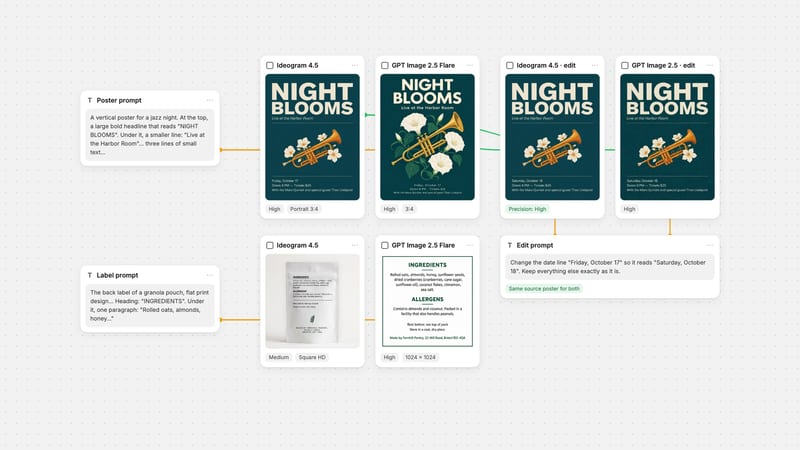
These are the two typography prompts from our roundup of models for text in images. The poster asks for a two-word headline ("NIGHT BLOOMS"), a subtitle and three lines of small print: a date, a doors-and-tickets line and a lineup that includes the name Theo Lindqvist, 111 characters in all. The menu prompt, verbatim:
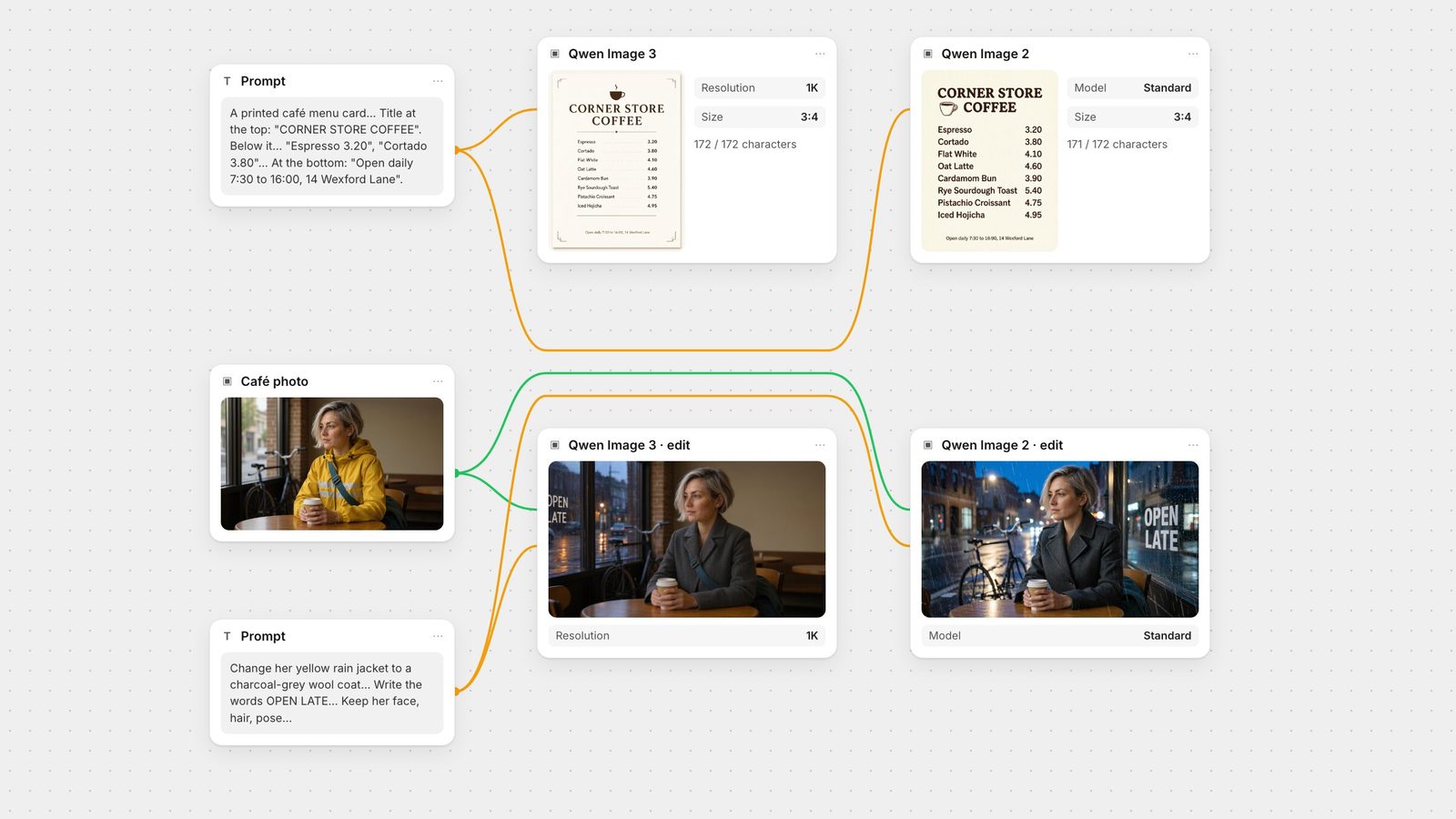
"A printed café menu card in flat graphic design: cream paper, dark brown ink, a small coffee cup icon. Title at the top: "CORNER STORE COFFEE". Below it, a price list with exactly these eight items and prices, one per line: "Espresso 3.20", "Cortado 3.80", "Flat White 4.10", "Oat Latte 4.60", "Cardamom Bun 3.90", "Rye Sourdough Toast 5.40", "Pistachio Croissant 4.75", "Iced Hojicha 4.95". At the bottom, in small text: "Open daily 7:30 to 16:00, 14 Wexford Lane"."
Poster: Qwen Image 3 111/111, Qwen Image 2 110/111. Qwen Image 2 set the hyphen in the tickets line as a dash; Qwen Image 3 kept it as typed. Qwen Image 3 added a small decorative emblem with no text in it.
Menu: Qwen Image 3 172/172, Qwen Image 2 171/172. Qwen Image 2 printed the closing time as "16:90". Qwen Image 3 set the prices in a right-aligned column with dot leaders and got the footer right.
Verdict: Qwen Image 3, twice. The margin is one character per prompt, but both misses were the kind a quick look won't catch.
Alibaba's post names only three of the twelve languages it claims for Qwen Image 3, so we tested those three plus Chinese and English. Prompt:
"A hand-painted wooden welcome sign at the entrance of a small seaside guesthouse, photographed straight on in soft daylight. The sign has five lines of white painted lettering, one per line, in this order: "Welcome", "Bienvenidos", "ようこそ", "환영합니다", "欢迎光临". Under them, a smaller line: "Check-in from 15:00". Nothing else is written on the sign."
Both models wrote all five words correctly, in the requested order. The difference was in the small line. Qwen Image 2 got all 48 characters right. Qwen Image 3 got 47: the time reads closer to "15:(0|" than "15:00", with one zero broken into a bracket-like stroke and a stray bar after it. Its sign also sat in a fuller scene, with a shingled cottage and hydrangeas.
Verdict: Qwen Image 2. Qwen Image 2 already handled these five scripts, so Qwen Image 3's language claim didn't show up as an advantage here. We didn't test any other languages.
This is the kind of layout Alibaba says Qwen Image 3 was built for. Our 1,269-character prompt asked for a broadsheet front page with twelve exact lines in quotation marks: a masthead ("The Harbor Ledger"), a dateline with volume and issue numbers, a headline, a subheadline, a photo caption, a second story's headline and first line, a three-line weather box with temperatures, and a section index. That is 352 required characters. The prompt said all other body text could be illegible filler. We ran four settings, as two cost-matched pairs.
Qwen Image 2 Standard: 352/352. Every required line exact, the filler left as unreadable texture as allowed.
Qwen Image 3 at 1K: every required character present, plus one extra letter: the caption reads "MV Corinine". It split each weather line in two and filled the columns with readable sentences, including invented names, figures and quotes, plus a second headline story ("Harbor Marina Upgrades Approved") that we didn't ask for.
Qwen Image 2 Pro: 351/352. The "y" in "Saturdays" came out malformed, closer to "Saturdajs".
Qwen Image 3 at 2K: one extra letter again, this time in the subheadline ("approsves"), and again an unrequested story ("Harbor Fest Announced"). At 1536 × 2048 its body copy is legible at full size and reads like a real page, with its own typos.
Verdict: Qwen Image 2 for accuracy; Qwen Image 3 for a convincing mock-up. Qwen Image 3 made the more realistic front page at both resolutions, which is what Alibaba's newspaper claim describes. But on the text we actually specified, Qwen Image 2 Standard was exact and Qwen Image 3 was not. Its readable filler also means more invented text to check before anything ships. Pro did not beat Standard here.
The label test from our Qwen editing guide, on the same product photo: "Change the label text "BERGAMOT & SAGE" to "CEDAR & FIG". Keep the same font, size, colour and position. Change nothing else."
Both models changed the line correctly and left the bottle, pump and background alone. The difference is in the small print. Qwen Image 2 smeared "EFFECTIVE" in the "Gentle · Natural · Effective" line and blurred "10.1 fl oz". Qwen Image 3 kept both lines as sharp as the source, which fits Alibaba's small-text claim.
Verdict: Qwen Image 3.
The edit from our image editing roundup, on the same café photo: "Change her yellow rain jacket to a charcoal-grey wool coat. Make it a rainy evening outside the window, with wet street reflections. Write the words OPEN LATE in white painted letters on the window glass. Keep her face, hair, pose, the coffee cup, the table and the bicycle exactly the same."
Qwen Image 2 made all three changes but turned the café into a street-side view, moved the bicycle outside and dropped the bag strap across her chest. It did the same thing in our earlier roundup, so this isn't a one-off. Qwen Image 3 kept the brick pillar, the back wall, the empty tables, the strap and the bicycle, and made the coat and rain changes cleanly. Its one flaw: it put the OPEN LATE lettering at the far left of the window, where the frame edge clips the first letters.
Verdict: Qwen Image 3, clearly. It also returned a different shape from the source (see the node section above), so crop or resize before you lay it over the original.
From the same Qwen editing guide: "Replace the coffee cup on the right with a tall glass of fresh orange juice. Keep the counter, the bread, the croissants, the lighting and the camera angle exactly the same."
Both models swapped the cup for a glass of juice in the same spot and kept the loaves, croissants, cloth and window light. Both cropped the small chalkboard sign at the right edge a little tighter than the source.
Verdict: tie. For a single, clearly named swap, Qwen Image 2 Standard is enough.
Posters, menus, labels and other short typography: Qwen Image 3 at 1K. It was exact on both prompts and kept fine print sharp in an edit.
Edits that must leave the rest of the photo alone: Qwen Image 3. It held the room together where Qwen Image 2 rebuilt it. Pick the Image Size closest to your photo, since there is no Auto option.
Simple, single swaps: either. Qwen Image 2 Standard is the cheaper of the two.
Long, multi-element layouts: Qwen Image 3 at 2K if you want a page that looks real, then proofread everything. Qwen Image 2 Standard if only the quoted lines matter and you want the filler to stay filler.
Times, dates and prices: check them by eye on both. Two of the six character errors across these tests were in a time ("16:90", "15:(0|").
When the final text has to be exact, generate the artwork and set the words as real type in Fuser's Compositor, which has text layers with uploadable fonts and a canvas you set to an exact pixel size. The poster typography workflow walks through that.
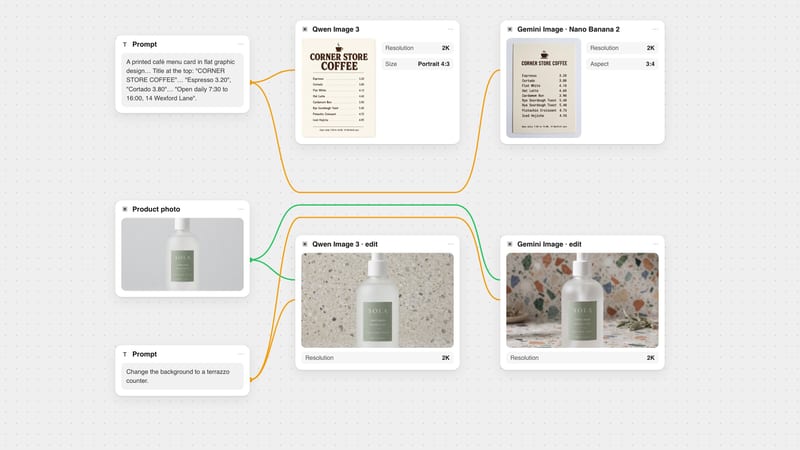
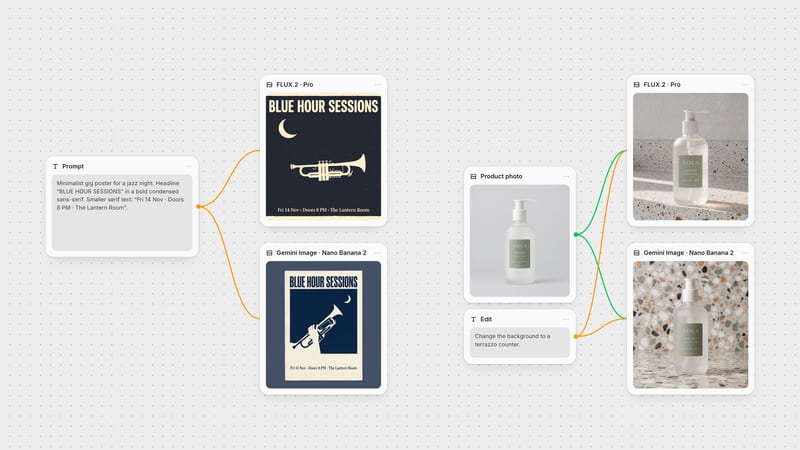
Connect one prompt node, or one image plus an instruction, to a Qwen Image 3 node and a Qwen Image 2 node, run them together and compare the results side by side, as in the canvas at the top of this page. For more on writing prompts for the new model, see the Qwen Image 3 guide. To see how it compares with Google's model, read Qwen Image 3 vs Nano Banana.
Tests run on 28 September and 2 October 2026.
One run per model per test. Qwen Image 3 at 1K and Qwen Image 2 Standard unless noted.
| Test | What happened | Winner |
|---|---|---|
| Verdict per test | ||
| Jazz poster, 111 characters | Qwen Image 3 111/111. Qwen Image 2 110/111 (hyphen set as a dash). | Qwen Image 3 |
| Café menu, 172 characters | Qwen Image 3 172/172. Qwen Image 2 171/172 ("16:90"). | Qwen Image 3 |
| Five-language sign, 48 characters | Qwen Image 2 48/48. Qwen Image 3 47/48, with the time broken. | Qwen Image 2 |
| Newspaper page, 352 characters | Qwen Image 2 Standard exact; Pro one wrong letter. Qwen Image 3 one extra letter at 1K and 2K, plus an unrequested story. | Qwen Image 2 for accuracy |
| Label text edit | Both changed the line. Qwen Image 2 smeared the small print; Qwen Image 3 kept it sharp. | Qwen Image 3 |
| Three-part photo edit | Qwen Image 2 rebuilt the room and dropped the strap. Qwen Image 3 kept the scene; lettering clipped at the edge. | Qwen Image 3 |
| Single object swap | Both swapped the cup and kept the counter. | Tie |
In our seven same-input tests, Qwen Image 3 won four, Qwen Image 2 won two and one was a tie. Qwen Image 3 was better at short typography and at edits that should leave the rest of the photo alone. Qwen Image 2 was exact on a five-language sign and on the required lines of a dense newspaper page, where Qwen Image 3 slipped by one character.
Alibaba says Qwen Image 3 natively renders 12 languages and shows Japanese, Korean and Spanish examples. In our test it wrote English, Spanish, Japanese, Korean and Chinese correctly, but Qwen Image 2 did too, and Qwen Image 3 broke the digits in the time on the same sign.
A little. In Fuser credits, Qwen Image 3 at 1K costs about 14% more than Qwen Image 2 Standard. At 2K it costs about the same as Qwen Image 2 Pro.
Pro is the higher tier of Qwen Image 2; Alibaba describes it as having stronger text rendering than Standard. Qwen Image 3 is a newer model; the Fuser node has no tier switch and offers it at 1K or 2K. On our newspaper test, Qwen Image 3 at 2K and Qwen Image 2 Pro each made one character error.
Yes. Connect one to three images to the Qwen Image 3 node and it switches to edit mode. Unlike Qwen Image 2, it has no Auto size and defaults to square, so choose the shape closest to your photo.
Alibaba recommends a maximum of 4,500 tokens. The Fuser node accepts up to 5,000 characters, for generation and editing alike. On Standard, the Qwen Image 2 edit endpoint Fuser uses caps instructions at 800 characters.
Wire one prompt or one photo into Qwen Image 3 and Qwen Image 2 and keep the result that gets your text right.