One click, whole workflow
Recipes are here. Package a whole workflow and run it in one click
Explore recipesOne click, whole workflow
Recipes are here. Package a whole workflow and run it in one click
Explore recipesTwo identical prompts through MiniMax H3 and Kling 3.0 Pro: a product dolly-in and a potter who speaks one line. H3 ran twice per prompt, at 768p and 2K. What each model did, what it cost, and a verdict per test.
All guides · Seedance vs Kling vs Veo
Quick answer: on the same two prompts, MiniMax H3 was the better pick for a person speaking on camera: one continuous shot, her face in frame the whole time, and the line delivered to the lens. Kling 3.0 Pro was the better pick for a directed camera move on a product: its push-in was clearly visible, while H3 barely moved. H3 also costs less per second at every resolution we checked. We ran H3 twice on each prompt, at 768p and at its default 2K, and it behaved the same way both times; Kling 3.0 had one run per prompt. Two prompts is a small test, so read it as a guide to each model's tendencies rather than a ranking.
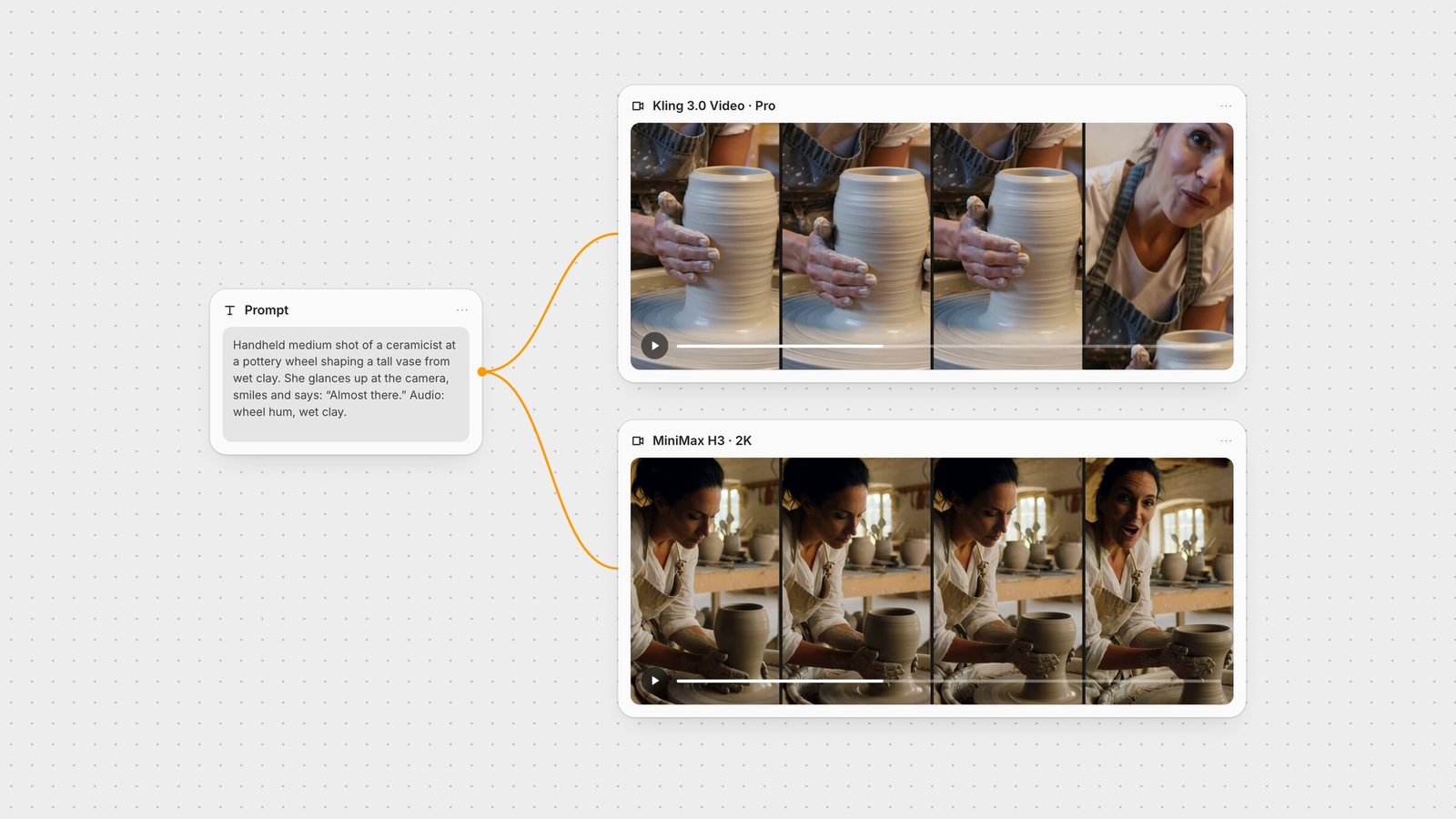
We reused the two Kling 3.0 clips from our three-model video test and ran MiniMax H3 on exactly the same prompt text on 28 September 2026. H3 got two generations per prompt, one at 768p and one at 2K; neither was a retry of a failed clip, and the clips above are the 2K runs:
Models: Kling 3.0 Video on the Pro tier, text-to-video, audio on; MiniMax H3, the generation MiniMax built after Hailuo 01 and 02 (MiniMax: H3), text-to-video. Both are the versions available in Fuser.
Settings: 6 seconds, 16:9, both models with sound. Kling 3.0 Pro returned 1080p. H3 generates natively at 768p, and MiniMax builds 2K by having the model regenerate its own lower-resolution output in-context (MiniMax: H3). We ran the native 768p tier first, then the 2K default (2544 x 1456) that Fuser's MiniMax H3 node uses. Every H3 clip came back at 6.6 seconds rather than 6. We left H3's prompt expansion at its default.
Test 1, product move: "Slow dolly-in on a matte terracotta vase standing on a travertine plinth in a sunlit plaster room. Late-afternoon light slides slowly across the wall as dust drifts through the beam. Calm, premium product film, shallow depth of field. Audio: soft room tone and a faint breeze."
Test 2, person and dialogue: "Handheld medium shot of a ceramicist at a pottery wheel shaping a tall vase from wet clay, her hands glistening as the clay spins. She glances up at the camera, smiles and says: 'Almost there.' Warm workshop light. Audio: steady wheel hum, wet clay sounds, quiet studio ambience."
We compared frames by eye, checked for cuts with scene-change detection, measured each soundtrack's level and transcribed the speech with Whisper to time the line. Both H3 runs of each prompt produced the same expanded prompt and the same behaviour, so the notes below apply to both unless stated.
Kling 3.0 Pro delivered the push-in you can actually see, with the vase growing steadily in frame, a raking patch of sun on the wall and the travertine block plinth as written. No dust was visible, and the soundtrack was close to silent (mean level about -57 dB).
MiniMax H3 built a more elaborate set than we asked for, adding an arched niche and pillars, and kept a pitted travertine plinth and a few dust motes in the light. The camera move was slight in both runs: the vase grows only a little over six seconds. The 2K run also started closer, with the vase filling more of the frame. Its room tone was clearly audible (about -45 dB mean at 768p and -34 dB at 2K).
The reason for H3's small move showed up in the API response. H3's endpoint rewrites the prompt before generating and returns the rewrite as `expanded_prompt`. Both of ours came back with "The camera performs a slow dolly-in with small amplitude at slow speed", so the 2K rerun did not change the move. If a move matters, read the expanded prompt, and ask for the size of the move explicitly (for example, "push in from a wide shot to a close-up of the vase").
Verdict for a directed product move: Kling 3.0. H3 gave the richer set and sound, but not the move we wrote.
Kling 3.0 Pro framed the first four and a half seconds from the chest down, so her face was out of shot, then cut to a closer angle where she says "Almost there" at about 5.3 seconds. Kling 3.0 plans multi-shot sequences on its own (Kling VIDEO 3.0 guide); ask for "one continuous shot" if you need a single take (Kling 3.0 prompt guide).
MiniMax H3 held one continuous handheld shot with her face, hands and the vase in frame throughout, in both runs. She looks up at about four seconds, smiles, and says "Almost there" at about 5.5 seconds (5.55 seconds in the 2K run), just before the end of the 6.6 second clip. Wheel hum and clay sounds sit under the line. The two runs cast different women in different workshops, but the staging and timing matched.
H3's expanded prompt showed how it plans a line: it labelled the speaker, scheduled the glance for 00:03.200 and tagged the dialogue with its language, then described the soundscape and set music to none. The line landed about two seconds later than that schedule, so leave room at the end of the clip for speech. More on writing for H3 in the MiniMax H3 prompt guide.
Verdict for a speaking character: MiniMax H3. One take, face on screen, line delivered to camera.
Price for these clips: at list price and with audio on, as in this test, H3 costs less per second than Kling 3.0 Pro at every resolution we checked. Kling 3.0 Pro costs half again as much with audio on as with it off. For a 6 second clip with sound, H3's 2K default costs about three quarters as much as Kling 3.0 Pro, and 768p drafts cost about a third as much.
Resolution: Kling 3.0 returned 1080p. H3 generates natively at 768p; MiniMax builds its 2K output by having the model regenerate its own lower-resolution output in-context rather than with plain super-resolution (MiniMax: H3).
Audio: both generate sound with the picture. MiniMax says H3 models voice, effects and music jointly in native stereo (MiniMax: H3); Kling 3.0 speaks five languages and can match lines to several characters (Kling VIDEO 3.0 guide). In Fuser, Kling's Generate Audio toggle is off by default, so switch it on.
Length and framing: H3 runs up to 15 seconds in six aspect ratios from 21:9 to 9:16 (MiniMax: H3 API reference); the Kling 3.0 node runs 3 to 15 seconds at 16:9, 9:16 or 1:1.
Inputs in Fuser: both nodes take a start and an end frame (first and last frame guide). The H3 node also has a reference mode: up to 9 images plus motion video and audio clips, 12 files in total, cited in the prompt as Image 1, Video 1, Audio 1. H3 Max, in the same node, trades 2K and references for 480p or 768p output tuned for prompt adherence.
In Fuser, put your prompt in one text node and wire it into a Kling 3.0 Video node and a MiniMax H3 node on the same canvas. The H3 node defaults to 2K; switch it to 768p for cheaper drafts, since our 768p and 2K runs made the same choices, then rerun the prompt that works at 2K. A rerun is a new generation, so expect a different take (our two runs cast different women); if you need that exact clip, send it to an upscaler such as Topaz instead. Set the Kling node's model to Pro to match this test, since it defaults to Standard. For more models with sound, see the best AI video generators with audio.
Two prompts, 28 September 2026. Kling 3.0 Pro: one run per prompt at 1080p. MiniMax H3: two runs per prompt, at 768p and 2K, with matching results.
| Test | Kling 3.0 Pro | MiniMax H3 |
|---|---|---|
| Results | ||
| Product dolly-in | Winner. Clear push-in, plinth as written; near-silent audio. | Slight move in both runs (expanded prompt asked for 'small amplitude'); richer set, audible room tone. |
| Person speaking | Chest-down framing, then a cut; line at about 5.3 s. | Winner. One continuous shot, face in frame; line to camera at about 5.5 s in both runs. |
| Price per second | With audio on, costs more than H3 at every tier; audio on costs half again as much as audio off. | The cheaper of the two with audio on; 2K costs about twice the 768p rate. |
| Reach for it when | You need a specific camera move or planned multi-shot sequences. | You need a single take with dialogue, or cheaper clips: 768p drafts, 2K finals. |
Yes. MiniMax released H3 on 31 July 2026 as the next generation after its Hailuo 01 and Hailuo 02 video models, on a new architecture rather than Hailuo 02's.
It depends on the shot. In our test H3 handled a speaking character better, holding one take with the face in frame in two separate runs, while Kling 3.0 Pro followed a product camera move more literally.
Yes. H3 generates sound with the picture; MiniMax describes it as native stereo with voice, effects and music modelled together. Our dialogue clip included the spoken line, wheel hum and clay sounds.
H3. At 768p it costs about a third as much per second as Kling 3.0 Pro with audio on, so a 6 second clip with sound costs about a third as much. H3 at 2K, the default in Fuser, costs about three quarters as much as Kling 3.0 Pro with audio.
H3's endpoint rewrites your prompt before generating. Ours was expanded to a dolly-in 'with small amplitude' at both 768p and 2K. Check the returned expanded prompt and state the size of the move you want.
One prompt into Kling 3.0 and MiniMax H3, side by side, then keep the take that fits.