One click, whole workflow
Recipes are here. Package a whole workflow and run it in one click
Explore recipesOne click, whole workflow
Recipes are here. Package a whole workflow and run it in one click
Explore recipesA how-to for first-and-last-frame video: which models in Fuser accept an end frame, how to build a matching pair of stills, and what four models produced from the same pair and prompt.
All guides · Best image-to-video models
Quick answer: to generate a video between a start and an end frame, give an image-to-video model both stills and a prompt that describes the change between them. Among Fuser's current video models, seven take an end frame: Veo 3.1, Kling 3.0, Seedance 2.5 and 2.0, MiniMax H3, Luma Ray 3.2, Vidu Q1 and FLUX.3. Every one of them needs the start frame too; the end frame only counts alongside it. Make the pair by generating the first frame with an image model, then editing that image into the end state, so the camera, subject and set stay identical. In our test, Veo 3.1 Fast, Kling 3.0 and Seedance 2.5 all landed on both frames and played the changes in the order we wrote them; MiniMax H3 hit both frames but lit the candle first, until we spelled the order out.
Every node below needs a start frame for the end frame to count. Most reject an end frame on its own; without a start image, Seedance switches to text-to-video, which has no end-frame input. The input names are the ones on each node in Fuser.
Veo 3.1 (Veo 3.1 and Veo 3.1 Fast): First Frame and Last Frame. Adding both switches the node to Google's first-and-last-frame mode (Gemini API: Veo 3.1). Only the 3.1 models take a last frame; Veo 3 does not. In Fuser, any Veo run with an image is 8 seconds, at 720p or 1080p.
Kling 3.0 Video (Standard or Pro): Image and End Image, 3 to 15 seconds. Kling lists start and end frames among Kling VIDEO 3.0's modes (Kling VIDEO 3.0 guide). Audio is off by default on the node.
Seedance 2 (2.5, and 2.0 Standard, Fast and Mini): End Image, used only when you give a single start image. With several images the node switches to reference mode, where the end image doesn't apply. ByteDance's API docs describe the mode as taking "two images as the first and last frames" (BytePlus ModelArk: Seedance 2.5 tutorial).
MiniMax H3 (H3 and H3 Max): Start Image and End Image, 5 to 15 seconds (MiniMax API docs: video generation). Reference images, video or audio switch the node to reference mode, which doesn't take a start image, so the end frame only works in image-to-video mode.
Luma Ray (Ray 3.2, generate mode): End Image. Luma's API takes an end frame as the clip's last frame; with an end frame the clip is 5 seconds, and it can't be combined with Loop (Luma API: video generation). Our Luma Ray 3.2 guide tests it on a push-in.
Vidu: First Frame and Last Frame on the Q1 model, which routes to Vidu's start-end endpoint. The Q2 model rejects a last frame.
FLUX.3 video node: Start Image and End Image, in full and draft quality, 5 to 20 seconds.
Hailuo 2.3, Wan 2.6 and Grok Imagine Video take a start frame but no end frame in Fuser. So does LTX 2.5: Lightricks' LTX-2.5 API accepts a last frame on image-to-video (LTX docs: LTX-2.5), but Fuser's node doesn't expose it yet, so it can open on your frame but not land on one (LTX-2.5 guide). To keep one shot going past a model's length limit, see how to extend AI video length.
The model has to invent every frame in between, so anything that differs between your two stills becomes motion. If the vase moves ten pixels or the window changes shape, you get drift or a morph. The reliable way to avoid that is to make the last frame from the first.
Generate the first frame with an image model, at the aspect ratio of the video you want. We used Nano Banana 2 (Gemini 3.1 Flash Image) at 16:9 and 2K, and put the candle in the first frame, unlit, so it wouldn't have to appear from nowhere.
Edit it into the end state. Feed the first frame back into an edit model and change only what should change. Our edit prompt began "Show this exact scene about an hour later, at dusk. Keep the camera position, framing… and every object exactly where they are. Change only the light." Google's pattern for a targeted Gemini edit is the same idea: "change only the [element] to [new element]. Keep everything else in the image exactly the same" (Gemini API: image generation). See our Nano Banana prompt guide and FLUX.1 Kontext editing guide for edit prompts.
Compare the two before spending on video. Flick between them: only the intended change should move.
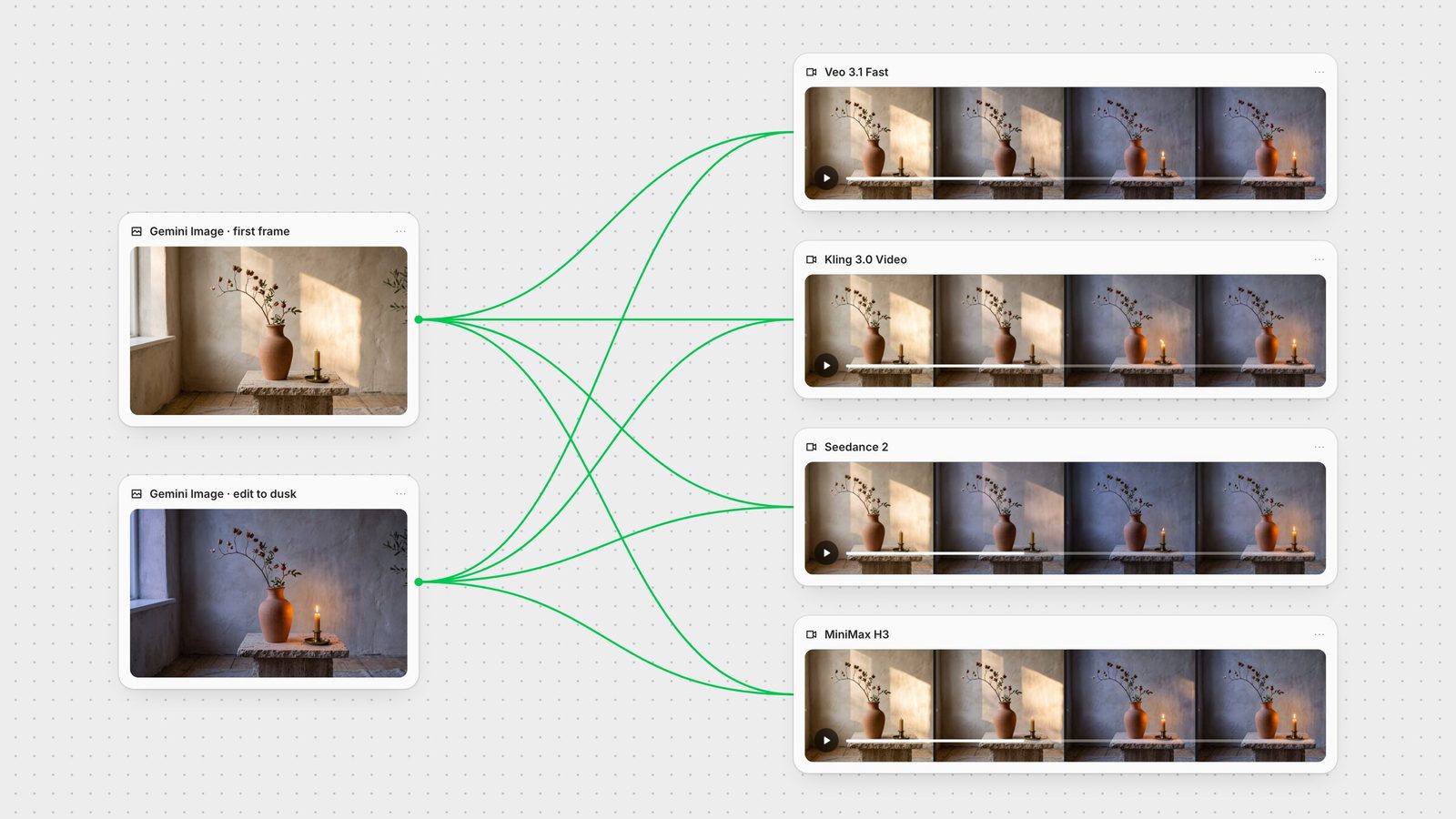
In Fuser this is two Gemini Image nodes: the first generates, the second takes the first's output as its image input and edits it. Wire the first node into the video node's start input and the second into its end input. You can connect the same two images to several video nodes at once, which is how we ran the test below.
Both frames already describe what the scene looks like. The prompt's job is what happens between them: the camera, the action and its order. We gave all four models the same prompt:
"Locked-off camera, one continuous shot. Time passes from late afternoon to dusk: the patch of sunlight on the wall slowly slides and fades away, the room cools to a soft evening blue, and the candle beside the vase flickers alight and glows warmly. Audio: quiet room tone and faint distant birdsong."
We ran Veo 3.1 Fast (1080p, 8 seconds, the length Fuser uses whenever a frame is attached), Kling 3.0 Standard (5 seconds, audio on), Seedance 2.5 (720p, 5 seconds) and MiniMax H3 (768p, 5 seconds) on 28 September 2026, one run each with the same frames and prompt.
All four hit both frames. We compared each clip's first and last frame against our inputs: Kling's were closest (about 1.5% average pixel difference), then Seedance (about 3%) and Veo (about 4%, rendered at 1080p). H3 was about 7 to 8%, partly because it returns 1344 x 768, a slightly narrower frame than our input.
Veo 3.1 Fast faded the sun off the wall by about four seconds in, let the room go blue, and lit the candle at about 5.3 seconds, then held the finished dusk scene for the last two and a half seconds.
Kling 3.0 Standard kept the sun patch on the wall longer than Veo and Seedance did, then lit the candle at about 3.7 seconds with a flame that flares sideways before settling, the closest of the four to a wick actually catching.
Seedance 2.5 turned the room blue fastest, within about two seconds, and lit the candle at about 3.7 seconds, so the flame comes up in an already dark room.
MiniMax H3 lit the candle at about 1.5 seconds, while the late-afternoon sun was still on the wall, then dimmed the room around it.
H3's response explained its order. The endpoint rewrites prompts and returns the rewrite in a field called expanded_prompt. It pinned our first frame to 0.00 seconds and our last to 5.00 seconds, then described the light shifting while, "Simultaneously, the wick of the candle flickers and ignites." Our prompt listed the changes but never said they came one after another. So we ran H3 once more, same frames and settings, with the order spelled out: "First, the patch of sunlight on the wall slowly slides and fades away as the room cools to a soft evening blue. Only then, in the final second, the candle beside the vase flickers alight and glows warmly." This time the rewrite scheduled the flame "At 00:04.000, as the room reaches its dimmest state", and the clip lit it at about 3.3 seconds, after the room had gone blue. It is the only model we ran twice; the grid above shows the first run.
Sound, measured by level. The clips on this page play muted, so we checked each track's loudness over time. Veo, Kling and Seedance each generated a steady background track with a short jump in level at about the moment the flame appears. H3's first track was close to silent (mean level about -58 dB) even though its rewritten prompt described birdsong and the candle's "whoosh"; the second run's was clearly audible (about -47 dB).
Put the order in words. If one change must happen before another, say "first" and "only then". That fixed H3's order in our rerun. If a model rewrites your prompt, as H3 does, read the rewrite before judging the clip.
Budget the length for the change. Veo's 8 seconds gave the dusk scene time to settle before the clip ended; at 5 seconds, Kling and Seedance lit the candle with little more than a second to spare.
Keep the pair honest. The four clips agreed on the start and end because the two frames only differed in light. Bigger differences, such as a moved camera or a new object, ask the model to invent more, and give more room for drift.
Use it for joins. A shared frame between two clips (the last frame of one, the first of the next) is the simplest way to cut between shots without a jump. Our storyboard-to-animatic guide and consistent characters guide build on that.
Per second of output on the day, Seedance 2.5 at 720p cost the most, about three times Veo 3.1 Fast. Veo 3.1 Fast (with audio, at 720p or 1080p) cost a little more than Kling 3.0 Standard with audio, and MiniMax H3 at 768p was the cheapest, at less than half Kling's rate. Per clip, the 5-second Seedance run cost almost twice the 8-second Veo run, Kling's clip cost about half of Veo's, and each H3 run about half of Kling's. For more on each model, see the Veo 3.1, Kling 3.0, Seedance 2.5 and MiniMax H3 guides.
Node inputs from Fuser; test results from one run per model on 28 September 2026.
| Model | End frame in Fuser | In our test |
|---|---|---|
| Video nodes | ||
| Veo 3.1 / 3.1 Fast | Last Frame, with a First Frame; 8 s; 720p or 1080p. | Light, then candle at ~5.3 s; held the end state for the last 2.5 s. |
| Kling 3.0 Standard / Pro | End Image, with an Image; 3 to 15 s. | Closest match to both frames; candle at ~3.7 s. |
| Seedance 2.5 / 2.0 | End Image with a single start image; not in reference mode. | Room went blue first; candle at ~3.7 s. |
| MiniMax H3 / H3 Max | End Image, with a Start Image; not in reference mode. | Candle at ~1.5 s, before the light changed; at ~3.3 s after dusk once the order was spelled out. |
| Luma Ray 3.2 | End Image, with an Image; 5 s; no Loop. | Not in this test; see the Luma Ray 3.2 guide. |
| Vidu Q1 | Last Frame, with a First Frame; Q2 has none. | Not tested. |
| FLUX.3 | End Image, with a Start Image; 5 to 20 s. | Not tested. |
You give a video model two still images, the first and last frame, plus a prompt, and it generates the motion between them. It's also called keyframe interpolation or start-end frame video.
Among Fuser's current models: Veo 3.1 and 3.1 Fast, Kling 3.0, Seedance 2.5 and 2.0, MiniMax H3, Luma Ray 3.2, Vidu Q1 and FLUX.3. Hailuo 2.3, Wan 2.6, Grok Imagine Video and LTX-2.5 take a start frame only.
No. Every current Fuser video node that accepts an end frame also needs a start frame. Most reject an end frame on its own; without a start image, Seedance switches to text-to-video, which has no end-frame input.
Generate the first frame, then edit that image into the end state with an edit model such as Nano Banana, asking it to keep the camera, framing and objects and change only what should change.
A model can merge a list of changes into one simultaneous transition. MiniMax H3's rewritten prompt did exactly that in our test; when we rewrote ours with 'first' and 'only then', H3 put the changes in order.
Long enough for the change to finish. In our test the 8-second Veo clip had time to settle on the end state; the 5-second clips finished the change with about a second to spare.
Make the pair with an image node and an edit, connect it to several video nodes and keep the take that lands.