One click, whole workflow
Recipes are here. Package a whole workflow and run it in one click
Explore recipesOne click, whole workflow
Recipes are here. Package a whole workflow and run it in one click
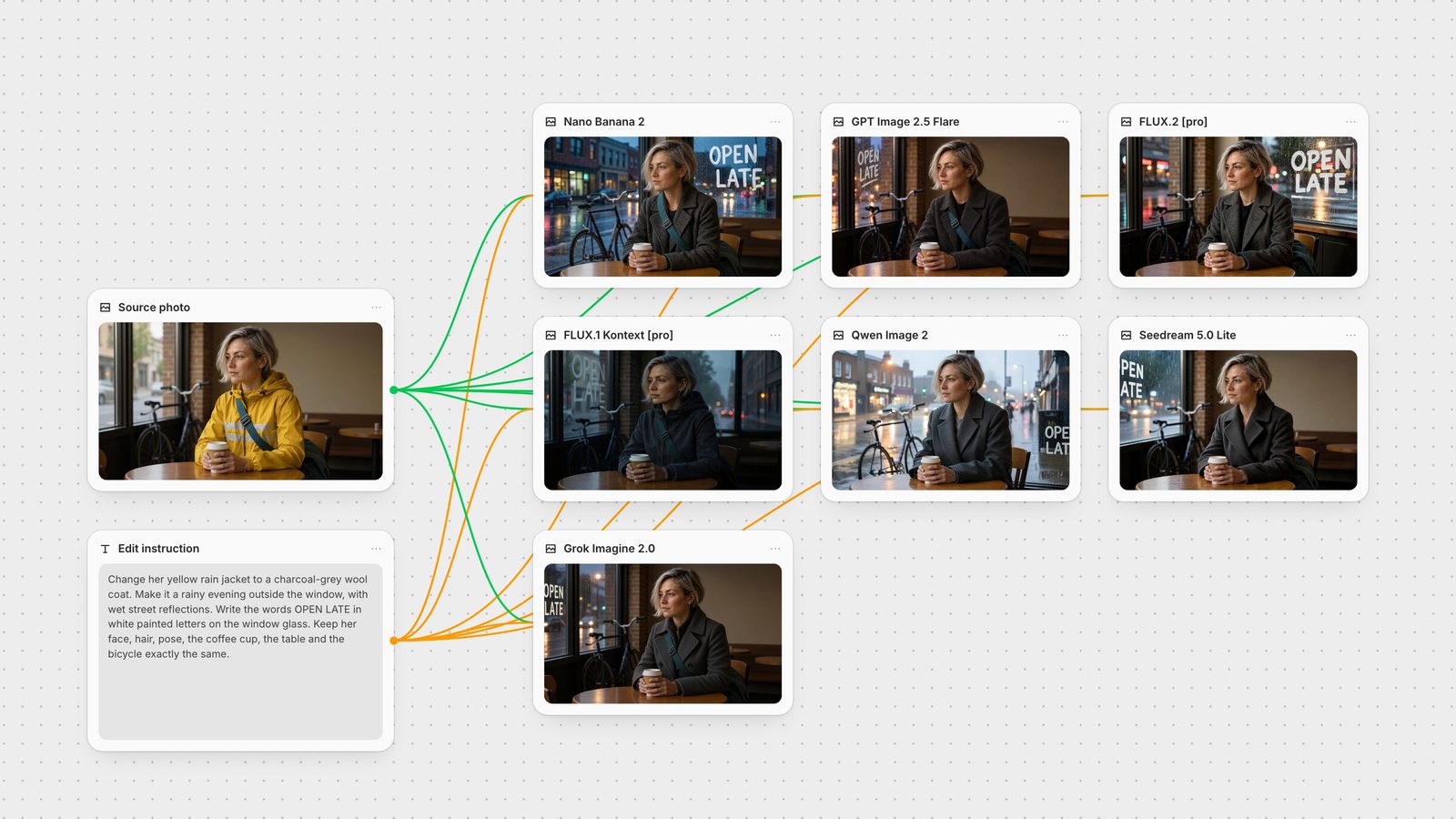
Explore recipesWe sent one café photo and one three-part edit instruction to seven instruction-based editing models. GPT Image 2.5 Flare changed only what was asked; Grok Imagine 2.0 and Seedream 5.0 Lite came close; Nano Banana 2 and FLUX.2 made the strongest edits but rebuilt part of the room.
All guides · Best AI image models
Quick answer: for edits where everything you didn't mention must stay put, start with GPT Image 2.5 Flare. In our test it was the only model that made all three requested changes without altering anything else. Grok Imagine 2.0 and Seedream 5.0 Lite were close behind. Nano Banana 2 and FLUX.2 Pro produced the boldest rain and lettering but rebuilt part of the room to do it. Qwen Image 2 and FLUX.1 Kontext Pro drifted furthest on this particular task.
Instruction-based editing means you give the model an image and a sentence, with no mask or selection, and it decides what to change. The hard part is the rest of the picture. So we picked an edit that mixes three kinds of change and one explicit constraint. The source is an AI-generated café photo of a woman in a yellow rain jacket with a teal bag strap across her chest, a bicycle in the window and a plain wall behind her. Every model got this instruction, verbatim:
"Change her yellow rain jacket to a charcoal-grey wool coat. Make it a rainy evening outside the window, with wet street reflections. Write the words OPEN LATE in white painted letters on the window glass. Keep her face, hair, pose, the coffee cup, the table and the bicycle exactly the same."
Each model ran once through its API on fal with default settings, output size matched to the input where the model offers that option, and no retries or cherry-picking. The endpoints were fal's edit APIs for GPT Image 2.5 Flare, Nano Banana 2, FLUX.2 Pro, FLUX.1 Kontext Pro, Qwen Image 2, Seedream 5.0 Lite and Grok Imagine 2.0.
GPT Image 2.5 Flare made the coat swap, the rainy evening and legible hand-painted "OPEN LATE" lettering on the left window. The back wall, the empty tables, the bag strap, the bicycle and her face are unchanged. It is the result you could drop into a layout without a second pass. In Fuser the GPT Image node also accepts a mask, so you can restrict an edit to one region when a sentence alone isn't precise enough.
Grok Imagine 2.0 kept the room, the strap and the bike, and set clean white lettering on the window. Two costs: it returned 1280 × 720 rather than the source's 1392 × 752, and the framing shifted slightly, so it won't line up pixel for pixel with the original.
Seedream 5.0 Lite kept the room and wrote the crispest lettering of the set, but removed the bag strap even though it wasn't part of the change. It returned the edit at twice the input's width and height (2784 × 1504), because fal's default size for this endpoint is auto_2K. That is useful if you need a large file.
Nano Banana 2 (Gemini 3.1 Flash Image) produced the most convincing rain: wet street, reflections, bold lettering and the strap intact. It also turned the plain back wall into a second window to fit the street scene. Google's editing guidance recommends stating what must not change, and multi-turn editing to refine a result, so a follow-up "keep the back wall as it was" is the natural next step.
FLUX.2 [pro] got the coat and a dramatic painted sign, but dropped the strap and also replaced the back wall with a window. The sign came with stray brush-stroke framing lines.
FLUX.1 Kontext [pro] kept her pose and the strap, but read "wool coat" as a dark hooded jacket, darkened the whole frame, and rendered faint, ghosted lettering. Black Forest Labs' own docs now recommend FLUX.2 for new projects, and list iterative editing, a series of single edits from one reference, among Kontext's core uses.
Qwen Image 2 kept her face, the cup and the coat change, but replaced the café interior with a street-side view and dropped the strap. It snapped the output to 1408 × 768.
Treat this as one task, not a benchmark. It rewards restraint on a multi-part edit; a single-change edit or a text-replacement edit could rank the models differently.
These come from the vendors' own documentation and from what we saw in this run:
Name what stays. Google's guidance gives the pattern: describe the change, then add "Do not change any other elements of the image." Even with that line, six of seven models changed something beyond the three requested edits, so check every region, not just the one you asked about.
Split big edits into steps. Google calls multi-turn conversation the recommended way to iterate on images, and Black Forest Labs lists iterative editing as a core Kontext use. Three changes in one sentence is where drift showed up in our test.
Quote the text you want. Kontext's docs say the most effective way to edit text is to put it in quotation marks, in the form Replace 'OPEN' with 'CLOSED'.
Refer to reference images by number. When you feed several images, FLUX.2's editing docs use "image 1", "image 2" in the prompt to say which picture supplies which element.
Check the output size. Three of seven models returned a different size from the input. If the edit has to replace the original in a layout, resize or crop it before it goes further.
The models differ in how many images they accept and which settings Fuser exposes:
Nano Banana 2 accepts up to 10 reference images and outputs at 1K, 2K or 4K. The same node also offers Gemini 3 Pro Image.
GPT Image 2.5 Flare is the default in the GPT Image node, with a mask input and a quality setting.
FLUX.2 has a Model Type setting: Turbo is the default, and we set it to Pro for this test. Dev, Max, Flex and the Klein variants are also available. BFL documents up to 8 reference images through the API.
FLUX.1 Kontext takes up to 4 images and offers Pro or Max. Max has better prompt adherence and typography, at double the cost of Pro.
Qwen Image 2 switches to edit mode when you connect one to three images, with Standard and Pro tiers.
Seedream 5.0 Lite accepts up to 10 reference images, with auto output sizes of 2K, 3K or 4K.
Grok Imagine 2.0 edits one or more images at 1K or 2K.
On a Fuser canvas, connect one image and one text node to several editing nodes and run them together, as in the canvas above. You compare results side by side instead of across browser tabs, then send the winner to the next step: an upscaler, an image-to-video model or another edit. For single-model detail, see the FLUX Kontext editing guide and the Qwen Image Edit guide. For lettering-heavy work, see the best models for text in images, and for keeping a person the same across many edits, consistent characters. Save the graph as a Recipe to run the same comparison on your next photo.
Last verified September 28, 2026.
Based on one shared edit test plus each vendor's documentation.
| Model | Reach for it when | Watch out for |
|---|---|---|
| Closest to the original | ||
| GPT Image 2.5 Flare | Edits where everything you didn't mention must stay; masked edits. | Higher quality settings add latency and cost. |
| Grok Imagine 2.0 | Clean edits that keep the scene and small details. | Returned 1280 × 720 and reframed slightly. |
| Seedream 5.0 Lite | Crisp lettering, large output, up to 10 references. | Dropped a detail we didn't ask to change. |
| Strongest transformations | ||
| Nano Banana 2 | Big scene and lighting changes, multi-turn refinement, up to 10 references. | Rebuilt part of the room to fit the edit. |
| FLUX.2 [pro] | Bold restyles and multi-reference composites. | Dropped the strap; stray marks around the sign. |
| Better on narrower edits | ||
| FLUX.1 Kontext [pro] | Single targeted changes and quoted text replacement. | Misread the garment; faint lettering on a multi-part edit. |
| Qwen Image 2 | Chinese and English typography; one to three input images. | Replaced the café interior on this task. |
It depends on the edit. In our shared test, GPT Image 2.5 Flare changed only what was asked. Grok Imagine 2.0 and Seedream 5.0 Lite were close. Nano Banana 2 and FLUX.2 [pro] produced the strongest scene changes but also altered parts of the room.
You give a model an image and a plain-language instruction, such as "change the jacket to a grey wool coat", with no mask or selection. The model decides which pixels to change and which to keep.
Say what must stay the same, make one change per pass, and use a mask when the model supports one. In Fuser the GPT Image node takes a mask input. Then check the whole image, not just the area you edited.
Yes. All seven models in our test wrote the requested words on the window, though legibility varied. For replacing existing text, Black Forest Labs recommends quoting it: Replace 'OLD' with 'NEW'.
Not always. In our test FLUX.2 [pro], FLUX.1 Kontext, Nano Banana 2 and GPT Image 2.5 kept 1392 × 752, Qwen Image 2 returned 1408 × 768, Grok Imagine 2.0 returned 1280 × 720, and Seedream 5.0 Lite returned 2784 × 1504.
Yes. In Fuser, connect one image and one instruction to several editing nodes on the same canvas, run them, and send the best result to the next step.
Send one photo to several editing models, keep the best result and carry it into the next step.