One click, whole workflow
Recipes are here. Package a whole workflow and run it in one click
Explore recipesOne click, whole workflow
Recipes are here. Package a whole workflow and run it in one click
Explore recipesSix identical tests, one run each: Qwen Image 3 and Nano Banana 2 on a photoreal portrait, a counted flat lay, a poster, a menu and two product edits, with characters counted and labels compared letter by letter.
All guides · Best AI image models
Quick answer: across six identical tests, Qwen Image 3 won three, Nano Banana 2 won one and two were ties. Qwen Image 3 was the more literal of the two: it kept a café menu flat and exact, changed only the background in a product edit, and left every character on the label untouched. Nano Banana 2 set a poster's small print perfectly where Qwen Image 3 swapped a hyphen for a dash and added a logo nobody asked for. Both swapped a line of label text exactly. At 2K, Qwen Image 3 uses about three-quarters of the credits Nano Banana 2 does in Fuser; Nano Banana 2 goes up to 4K and takes more reference images. Each test is one run per model, so read this as tendencies, not a benchmark.
We reused the prompts and the product photo from our earlier same-prompt tests (FLUX.2 vs Nano Banana 2, Nano Banana 2 vs GPT Image and best AI models for text in images) and ran both models on them on 2 October 2026. Every output here is a single run; nothing was re-rolled or picked from several takes.
Models: Qwen Image 3 (Alibaba's Qwen-Image-3.0, the model on Fuser's Qwen Image 3 node) and Nano Banana 2 (Google's Gemini 3.1 Flash Image, the default model on Fuser's Gemini Image node). Both were generated with the same model versions Fuser runs.
Resolution: 2K for both, the highest setting on Fuser's Qwen Image 3 node and Nano Banana 2's default in Fuser. Qwen Image 3 rendered at exactly what its node sends (2048 × 1536 at 4:3, 2048 × 2048 square, 1536 × 2048 portrait). Nano Banana 2 returned 2400 × 1792 at 4:3, 2048 × 2048 square and 1792 × 2400 at 3:4.
Aspect ratios: Qwen Image 3's node offers square, 4:3 and 16:9 shapes, so the photo test used 4:3 for both models instead of the 3:2 in the original test. The posters and menus used 3:4 portrait, as before.
Other settings: each node's defaults. For Qwen Image 3 that means Expand Prompt on (Alibaba lists its prompt rewriting as on by default and "recommended" in the API reference); we fixed its seed at 4242. Fuser does not send a seed to Nano Banana 2.
Judging: we read every output at full resolution, counted the requested characters on the poster and menu (spaces excluded: 111 and 172), counted objects and compared edited labels with the source letter by letter.
Prompt: "A photorealistic candid photograph of an elderly fisherman mending a bright orange net on a weathered wooden dock at dawn. Mist hangs over the harbour behind him, his calloused hands are in sharp focus, and the background falls off into soft blur. Natural light, 50mm lens look, muted colours."
Qwen Image 3 lit the scene with a pale, cool early-morning light under a hazy sky, gave the net a muted rust orange and kept the calloused hands sharp around a wooden netting shuttle. The background harbour sits in mist. It also lettered a crate "DAILY CATCH / PORTLAND HARBOUR", a real place name the prompt never mentioned.
Nano Banana 2 produced a crisp, convincing portrait with more pixels (2400 × 1792) but read as grey overcast rather than dawn, with a saturated orange net. It painted the names "AMELIA" and "SEA BREEZE" on the boats behind him.
Verdict: Qwen Image 3, narrowly. It matched "dawn" and "muted colours" more closely. Neither model gave the background much lens blur; in both, the mist does most of the softening. Both models added text to the scene, so check any photoreal output for words you did not ask for. Nano Banana 2 drew the same kind of boat names when we ran this prompt in our GPT Image comparison.
Prompt: "Overhead flat lay on a grey linen tablecloth: exactly three lemons on the left, a blue enamel mug in the center, two croissants on a white plate on the right, and a folded newspaper along the top edge. Natural morning light, photorealistic."
Qwen Image 3 placed three lemons on the left, the blue enamel mug in the middle, two croissants on a white plate on the right and a newspaper across the top. The paper's headline reads "Sunny Skyes Ahead", a misspelling in text it invented.
Nano Banana 2 got the same counts and positions, and added a spoon and lemon leaves. Its newspaper is upside down to the camera, and the invented headline includes the non-word "GLOBMIT".
Verdict: a tie. Both followed every count and placement. Both wrote newspaper text that was not in the prompt, each with an error, which is worth knowing if the image will be seen up close.
Poster prompt: a vertical jazz-night poster with the headline "NIGHT BLOOMS", the line "Live at the Harbor Room", a flat illustration of a brass trumpet among white moonflowers on deep teal, and three lines of small cream sans-serif text: the date "Friday, October 17", a doors-and-tickets line, and "With the Mara Quintet and special guest Theo Lindqvist". The full prompt is in our text-in-images roundup; we used it verbatim.
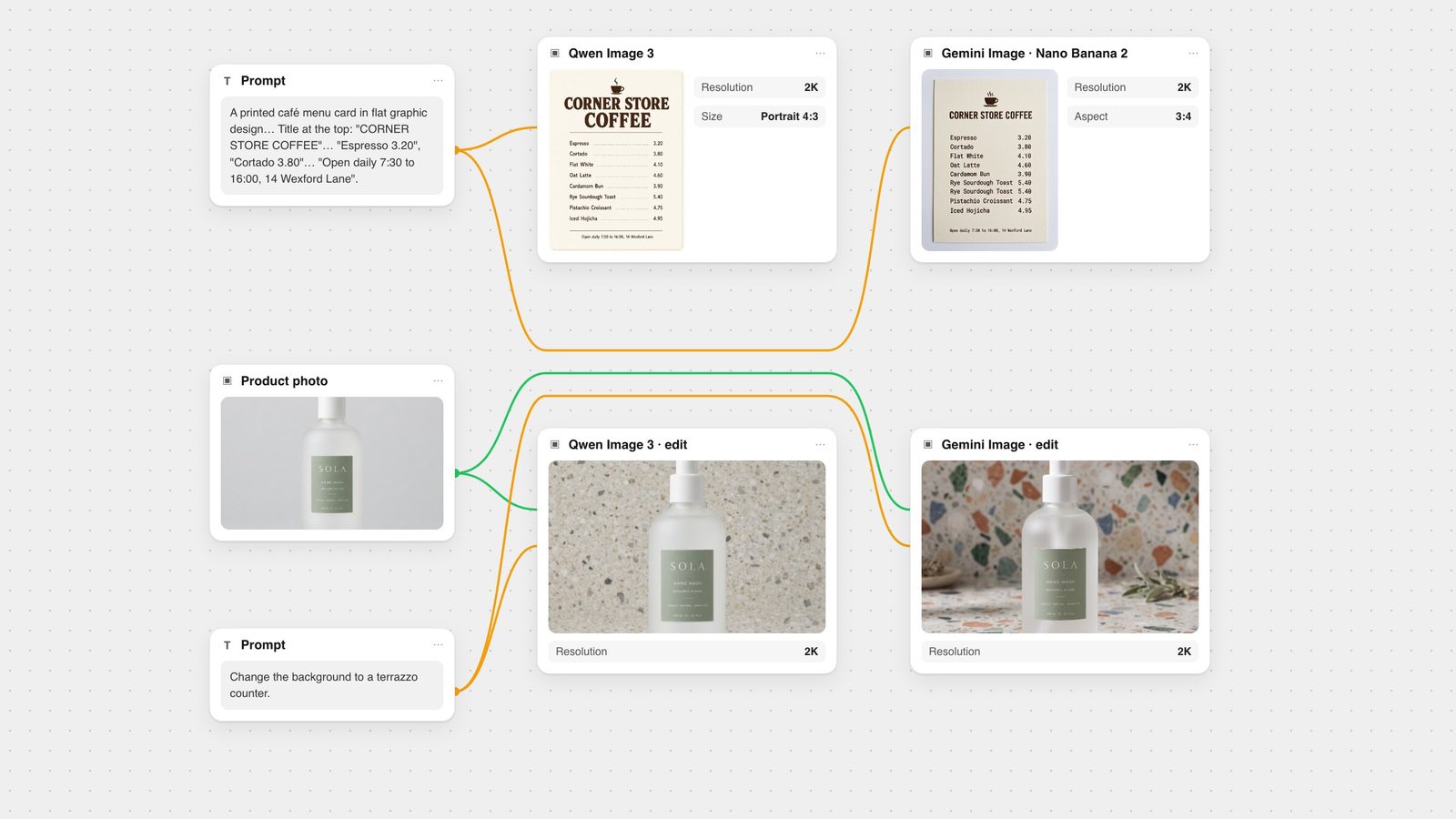
Menu prompt: "A printed café menu card in flat graphic design: cream paper, dark brown ink, a small coffee cup icon. Title at the top: "CORNER STORE COFFEE". Below it, a price list with exactly these eight items and prices, one per line: "Espresso 3.20", "Cortado 3.80", "Flat White 4.10", "Oat Latte 4.60", "Cardamom Bun 3.90", "Rye Sourdough Toast 5.40", "Pistachio Croissant 4.75", "Iced Hojicha 4.95". At the bottom, in small text: "Open daily 7:30 to 16:00, 14 Wexford Lane"."
Poster, Qwen Image 3: 110 of 111. Every word is right, but the hyphen in the "Doors 8 PM - Tickets" line came out as a longer dash, and it added a round "HARBOR JAZZ CLUB" logo in the corner. The illustration is the richer of the two.
Poster, Nano Banana 2: 111 of 111. Every character matched, with a tall condensed headline and nothing added.
Menu, Qwen Image 3: 172 of 172. All eight items, all eight prices and the footer were exact, on a flat card as the prompt asked, with dot leaders between items and prices.
Menu, Nano Banana 2: 172 of 172, plus a ninth line. Every requested string is there, but "Rye Sourdough Toast 5.40" is printed twice, and the card is shown as a photographed print on a surface rather than flat graphic design.
Verdict: split. Nano Banana 2 for the poster, Qwen Image 3 for the menu. A duplicated price line is the more expensive mistake to miss, but an unrequested logo would also have to come out before printing. Alibaba says Qwen-Image-3.0 "supports precise rendering of text as small as 10px" and accepts up to 4.5k tokens of input (Alibaba Cloud); Google lists "legible, stylized text for infographics, menus, diagrams, and marketing assets" among the capabilities of its Gemini 3 image models, the family Nano Banana 2 belongs to (Gemini API docs). For more models on the same two prompts, see best AI models for text in images, where Nano Banana 2 at 1K scored 111 and 171 and also turned the menu into a photographed card.
Both models got the same 1024 × 1024 product photo, a frosted hand wash bottle with small type on its label, and the instruction "Change the background to a terrazzo counter."
Qwen Image 3 replaced the grey backdrop with a fine-grained terrazzo wall and counter and changed nothing else: same framing, same bottle, no props.
Nano Banana 2 built a bolder, more styled terrazzo scene and added a sprig of leaves and a small dish that were not in the prompt. The frosted bottle also came out noticeably clearer than in the source.
The label close-ups decide it. Qwen Image 3 kept every character on the label, including the small dots in "GENTLE · NATURAL · EFFECTIVE". Nano Banana 2 kept every word and number but turned those dots into hyphens. When we ran this same edit for our FLUX.2 comparison, Nano Banana 2 misspelled two small words instead, so its small-print changes vary from run to run.
Verdict: Qwen Image 3. It did only what was asked and left the packaging text exactly as it was.
Same photo, new instruction: "Change the line "BERGAMOT & SAGE" on the label to "CEDAR & FIG". Keep every other word and number on the label, the bottle, the pump and the background exactly as they are."
Both models swapped the line to "CEDAR & FIG" and kept "SOLA", "HAND WASH", "GENTLE · NATURAL · EFFECTIVE" and "300 ml ℮ 10.1 fl oz" exactly, with the bottle, pump and grey background unchanged (the last two crops above).
Verdict: a tie. With an explicit "keep everything else" instruction, both were exact. Google's own edit example in the Gemini API docs ends the same way: "Do not change any other elements of the image." More text-edit technique in our Qwen Image 3 guide.
Qwen Image 3: Alibaba announced Qwen-Image-3.0 in July 2026 as the third generation of its Qwen-Image series, citing inputs of up to 4.5k tokens, legible text down to 10px and native rendering in 12 languages (Alibaba Cloud). Its API produces between 512 × 512 and 2048 × 2048 total pixels and edits from 1 to 3 input images (API reference). Fuser's node offers 1K (the default) or 2K, six shapes (square, square HD, 4:3 and 16:9 in portrait or landscape), up to 3 reference images (connecting one switches it to editing), a negative prompt, Expand Prompt and a seed.
Nano Banana 2: Google released Nano Banana 2 (Gemini 3.1 Flash Image) on 26 February 2026 (Google). The API offers 512px, 1K, 2K and 4K output, aspect ratios including 21:9, 16:9, 3:2, 4:5 and 9:16, up to 10 object reference images and up to 4 character images, Google Search grounding, a built-in thinking step and a SynthID watermark on every image (Gemini API docs). Google's announcement gives higher consistency figures (five characters, 14 objects), so treat the API page as the conservative number. Fuser's Gemini Image node offers 1K, 2K (the default) or 4K, Auto or ten aspect ratios, up to 10 input images, a system prompt and a Search Grounding toggle, and the same node also runs Nano Banana Pro, Nano Banana 2 Lite and the original Nano Banana.
Both nodes charge per image, and the price depends on resolution. In Fuser's credits:
At 2K (as tested): Qwen Image 3 costs about three-quarters of what Nano Banana 2 does.
At 1K: Qwen Image 3 costs about 60% of Nano Banana 2.
Above 2K: only Nano Banana 2 goes further; its 4K output costs about 1.5 times its 2K price.
Pick Qwen Image 3 for price lists, menus and product edits where everything you did not mention has to stay put, and when you want a cheaper 2K image. Proofread for small substitutions such as a dash for a hyphen, and for logos or badges it adds on its own.
Pick Nano Banana 2 when you need 4K, an aspect ratio Fuser's Qwen Image 3 node does not offer (3:2, 4:5, 21:9), more than three reference images, or search grounding for real-world subjects. Expect it to style scenes with extra props unless you tell it not to.
Run both when the text has to be right. In Fuser, wire one prompt node into a Qwen Image 3 node and a Gemini Image node, as in the canvas at the top, and keep the version that needs fewer fixes. For fine print that must be exact every time, set it as real text in the Compositor instead. See also our poster typography workflow.
Related: Qwen Image 3 vs Qwen Image 2, Nano Banana prompt guide, Seedream vs Nano Banana and best AI image editing models.
One run per model per test, both at 2K, 2 October 2026.
| Test | Qwen Image 3 | Nano Banana 2 |
|---|---|---|
| Results | ||
| Photoreal portrait | Narrow winner. Dawn light, muted colours; invented crate text. | Sharper and larger, but overcast and saturated; invented boat names. |
| Counted flat lay | Tie. Every count and position right; misspelled invented headline. | Tie. Every count and position right; added props, garbled headline. |
| Poster text (111 characters) | 110/111: hyphen became a dash; added a logo. | Winner. 111/111, nothing added. |
| Menu text (172 characters) | Winner. 172/172, flat card as asked. | 172/172 but one line printed twice; photographed card. |
| Background edit | Winner. Only the background changed; label exact. | Added props, clearer glass; label dots became hyphens. |
| Label text swap | Tie. Swap exact, rest kept. | Tie. Swap exact, rest kept. |
| Beyond the test | ||
| Relative cost | About three-quarters of Nano Banana 2 at 2K; about 60% at 1K. | Costs more; 4K about 1.5 times its 2K price. |
| Max resolution in Fuser | 2K | 4K |
| Reference images in Fuser | Up to 3 | Up to 10 |
In our six same-prompt tests, Qwen Image 3 won three (a photoreal portrait, a menu and a background edit), Nano Banana 2 won one (a poster) and two were ties. Qwen Image 3 was the more literal model; Nano Banana 2 added props and styling more often. Each test was one run per model.
Neither was perfect. Nano Banana 2 set the poster exactly but printed one menu line twice. Qwen Image 3 set the menu exactly but swapped a hyphen for a dash and added a logo to the poster. Proofread both before you publish.
Qwen Image 3 in our test: it changed only the background and kept every character on the label. Nano Banana 2 added props and turned the label's small dots into hyphens. With an explicit "keep everything else" instruction, both swapped a line of label text exactly.
Yes. In Fuser's credits, Qwen Image 3 costs about three-quarters of Nano Banana 2 at 2K and about 60% at 1K. Nano Banana 2 also offers 4K, at about 1.5 times its 2K price.
Qwen Image 3 generates between 512 × 512 and 2048 × 2048 total pixels, offered as 1K or 2K in Fuser. Nano Banana 2 supports 512px, 1K, 2K and 4K; Fuser's Gemini Image node offers 1K, 2K and 4K.
Yes. Google introduced Nano Banana 2 as Gemini 3.1 Flash Image on 26 February 2026. In Fuser it is the default model on the Gemini Image node.
One prompt, a Qwen Image 3 node and a Gemini Image node on one canvas. Keep the version that needs fewer fixes.