One click, whole workflow
Recipes are here. Package a whole workflow and run it in one click
Explore recipesOne click, whole workflow
Recipes are here. Package a whole workflow and run it in one click
Explore recipesA tested guide to Wan 2.6: the three video modes, how to write timed multi-shot prompts and dialogue, what reference-to-video carries over, the image model, settings and relative costs, and where Wan's open weights actually stop.
All guides · Wan 2.6 Video in Fuser · Wan 2.6 Image in Fuser
Quick answer: Wan 2.6 is Alibaba's video model with sound. Fuser's node makes 5, 10 or 15-second clips at 720p or 1080p from a prompt, a start image or up to three reference videos, and it generates dialogue and ambience in the same pass. Its standout feature is multi-shot: write an overall line, then each shot with a time range such as "First shot [0-3s]", and it cuts where you asked. In Fuser, Multi-Shots is on by default, so switch it off when you want one continuous take. Unlike Wan 2.1 and 2.2, Wan 2.6 is not open weights: you use it through an API.
Alibaba released the Wan2.6 series on 16 December 2025: text-to-video, image-to-video, reference-to-video and image models, with clips "of up to 15 seconds" and "intelligent multi-shot storytelling" (Alibaba Cloud announcement). Alibaba's Model Studio lists all three video variants at 720p or 1080p, 30 fps, with "audio sync" (Model Studio video generation). Every clip we made came back at 30 fps, 1920 × 1080 at 1080p or 1280 × 720 at 720p, with an audio track.
Fuser runs it as two nodes. Wan 2.6 Video covers all three video endpoints and picks one from what you connect: reference videos send the job to reference-to-video, a single image to image-to-video, and a prompt alone to text-to-video (Fuser docs). Wan 2.6 Image does text-to-image and image editing.
No. The Wan-AI organisation on Hugging Face and the Wan-Video organisation on GitHub publish Wan 2.1 and Wan 2.2 models (text-to-video, image-to-video, first-last-frame, VACE editing, speech-to-video and animation) plus a separate Wan-Dancer model, and there is no Wan 2.5 or 2.6 repository in either (Hugging Face, GitHub). Wan 2.2 is licensed under Apache 2.0 (Wan2.2-T2V-A14B model card). Wan 2.6 is available only through APIs, from Alibaba Cloud and third-party hosts, so you can't run it on your own GPU or fine-tune it. If you need weights you can download, see the best open-source video models.
To line up with our other video guides we reused the dialogue prompt from our Seedance, Kling and Veo comparison, with Multi-Shots switched off:
"Handheld medium shot of a ceramicist at a pottery wheel shaping a tall vase from wet clay, her hands glistening as the clay spins. She glances up at the camera, smiles and says: 'Almost there.' Warm workshop light. Audio: steady wheel hum, wet clay sounds, quiet studio ambience."
Wan 2.6 held one continuous shot with a slow push-in that ends close on her hands and the vase, and had her look up at the camera and smile. A Whisper transcription of the clip returned exactly "Almost there." between 2.3 and 3.2 seconds, over audible wheel and studio sound.
Alibaba's prompt guide gives a basic formula of entity + scene + motion, and a sound formula that adds a description of the audio: for a voice, "Character's lines + Emotion + Tone + Speed + Timbre + Accent"; for effects, "Source material + Action + Ambient sound"; for music, "Background music/score + Style" (Alibaba prompt guide). Quoting the line after "says" and putting the rest of the sound in its own "Audio:" sentence worked here. The prompt field takes up to 1,500 characters (Wan 2.6 text-to-video API reference).
Alibaba's multi-shot formula is "Overall description + Shot number + Timestamp + Shot content" (Alibaba prompt guide). Alibaba's API only applies the multi-shot setting when prompt expansion is on (Wan 2.6 text-to-video API reference), even though its prompt guide says the structured formula doesn't need expansion, so the Fuser node turns expansion on for you whenever Multi-Shots is on.
We asked for three shots in 10 seconds at 1080p and described the character once in the overall line:
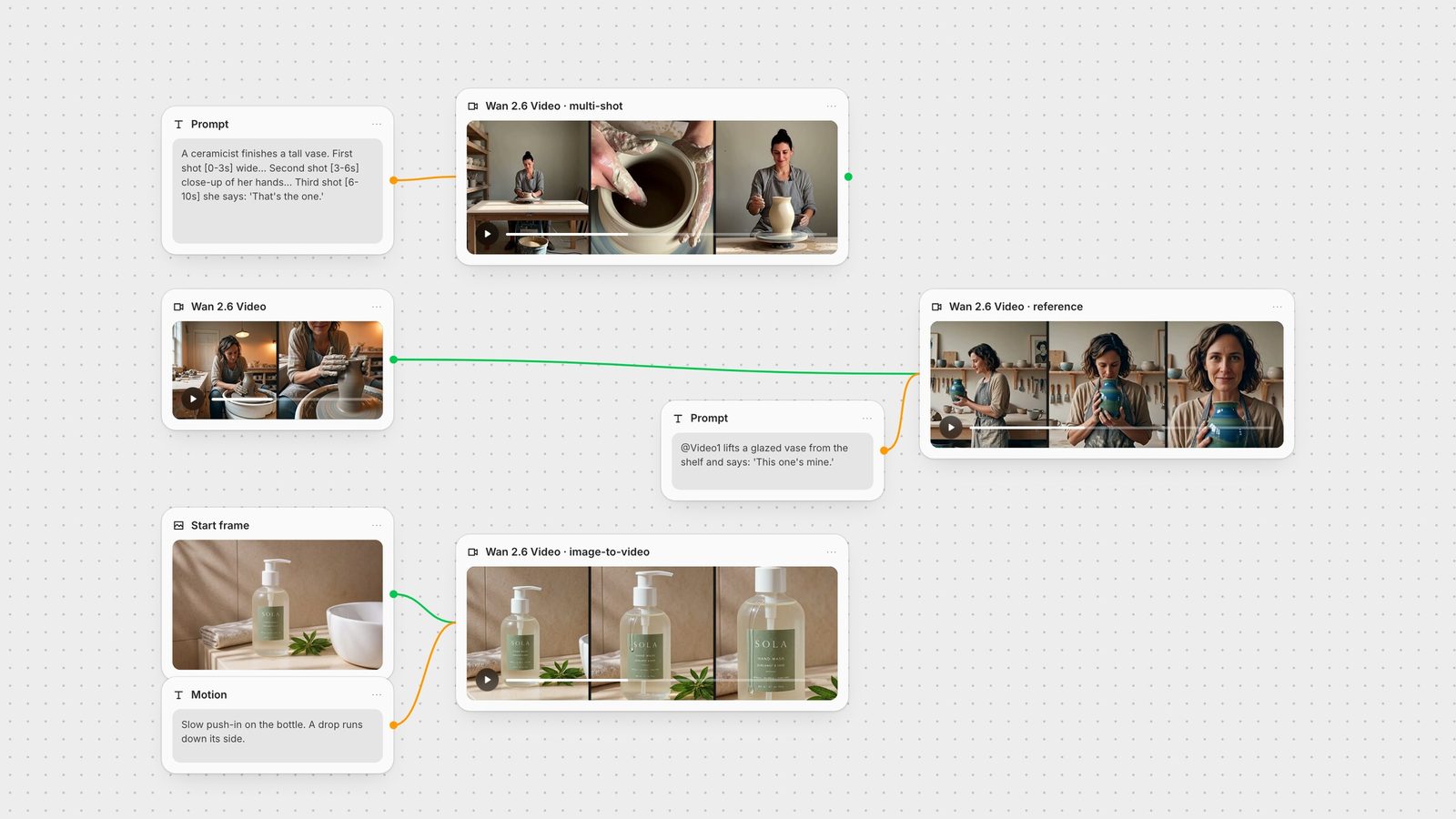
"A ceramicist finishes a tall vase in her workshop. Warm afternoon light, the same woman in every shot: early thirties, dark hair tied back, grey linen apron. First shot [0-3s] Wide shot of the workshop: she sits at the pottery wheel as the clay spins. Second shot [3-6s] Close-up of her wet hands pulling up the walls of the vase. Third shot [6-10s] Medium shot: she stops the wheel, looks at the finished vase, smiles and says: 'That's the one.' Audio: wheel hum, wet clay sounds, quiet workshop ambience."
Frame-difference detection found cuts at 3.0 and 5.7 seconds, close to the 3 and 6 we asked for, and each shot used the framing we wrote. The woman in the wide shot and the medium shot is recognisably the same person, hair bun and grey apron included. Whisper found "That's the one." at 9.0 to 9.7 seconds, inside the third shot. The object didn't carry over as well: the close-up shows an open, wet grey form, and the medium shot a smooth, pale vase that looks finished. Describe any prop that must match across shots as carefully as the character.
A few things that follow from this:
Write the character into the overall line, not into one shot, so every shot inherits it.
Give each shot enough seconds. Our 3-second shots held one action each, and the line in our 4-second third shot came in its last second.
For one continuous take, switch Multi-Shots off. It is on by default in Fuser, and Alibaba's API reference says the shot setting takes priority over what the prompt asks for (Wan 2.6 text-to-video API reference).
Connect one image and it becomes the opening frame. Its width and height must each be at least 240 pixels (Wan 2.6 image-to-video API reference). We used two 1920 × 1080 stills from earlier guides, one product shot and one character:
"Slow push-in on the hand wash bottle standing on the stone ledge. Soft sunlight shifts slowly across the tiled wall and a single drop of water runs down the side of the bottle. The label stays sharp and readable. Calm, premium product film. Audio: quiet bathroom ambience and one faint drip."
"Handheld shot on a rainy night market street. The woman with the bicycle turns her head to the camera and says: ‘I know a better place for noodles.’ Rain keeps falling, people with umbrellas walk past behind her, and neon signs reflect on the wet road. Audio: steady rain, distant street chatter, and her voice."
The product clip pushed in steadily and the SOLA label stayed sharp and legible through the move. In the night-market clip the woman turned to camera and Whisper found the full line, "I know a better place for noodles.", in the first 2.5 seconds, while shoppers with umbrellas kept moving behind her. Both came back at 1920 × 1080, the same shape as the input. Crop your still to the frame you want before you animate it.
Connect up to three videos to the node's Video References input and name them in the prompt as @Video1, @Video2 and @Video3. Each reference must be 2 to 30 seconds long and at most 100 MB (Wan 2.6 reference-to-video API reference). Alibaba describes the model as taking "a character reference video with both appearance and voice" and says you can feature "a person, animal or object, or even multiple subjects together" (Alibaba Cloud announcement).
We fed our 5-second text-to-video clip back in as @Video1 at 720p:
"@Video1 stands behind the counter of a small sunlit ceramics shop, lifts a finished glazed vase from the shelf, turns to the camera and says: 'This one's mine.' Slow push-in, soft morning light. Audio: her voice, quiet shop ambience."
The same woman came through: wavy dark hair, oatmeal top and grey apron, in a new room with a new vase and a slow push-in. She says "This one's mine." at 3.2 seconds. The model took liberties with the staging: the room looks like a studio with shelves rather than a shop counter, and she holds the vase from the first frame instead of lifting it off a shelf. We didn't run a formal voice comparison against the reference.
The node enforces three limits for reference jobs: duration must be 5 or 10 seconds, you can't also connect an image, and you can't connect an audio track.
With no audio connected, Wan 2.6 writes its own soundtrack; Alibaba says the model "generates background music or sound effects" and every one of our clips with a quoted line spoke it (Model Studio API reference). The node's optional Audio input takes a WAV or MP3 of 3 to 30 seconds and up to 15 MB, which is used as background music. If it is longer than the clip it is cut to length; if it is shorter, the rest of the video is silent (Wan 2.6 text-to-video API reference). We didn't test the audio input for this guide. To score a clip, MiniMax Music can make the track on the same canvas.
The image node has two modes. With a prompt alone it calls text-to-image; with an image connected it calls image-to-image, which Alibaba documents as an editing mode (Wan 2.6 image API reference, Fuser docs). Sizes are presets from square HD to landscape and portrait 16:9.
The text-to-image endpoint can return text as well as images: Alibaba describes an interleaved text-and-image output mode, and says the model may return fewer images than requested (Wan 2.6 image API reference). Our first run, a plain description of the vase, came back with no image and a single Chinese word as text. The second run, which began "Generate an image:" and used a different seed, returned the image above with the ARGILLA label spelled correctly, plus a short paragraph of text. We changed two things at once, so we can't say which fixed it, but phrasing the prompt as a request is the cheap thing to try if a run comes back empty.
Wan 2.6 Video node:
Duration: 5 (default), 10 or 15 seconds. Reference jobs: 5 or 10.
Resolution: 1080p (default) or 720p.
Aspect ratio: 16:9 (default), 9:16, 1:1, 4:3 or 3:4. Ignored with video references.
Multi-Shots: on by default. Turn it off for a single continuous shot.
Expand Prompt: on by default; lets the model rewrite your prompt. Forced on while Multi-Shots is on.
Negative prompt: up to 500 characters.
Seed: 0 to 65535.
1080p costs one and a half times as much per second as 720p, and the per-second rate is the same for all three modes. Cost scales with length, so a 15-second clip costs three times as much as a 5-second one at the same resolution. Draft at 720p and render finals at 1080p.
Unwanted cuts: Multi-Shots is on. Switch it off.
Cuts in the wrong place: give every shot a time range, and keep the ranges contiguous and inside the duration you set.
The character changes between shots: describe them once in the overall line with two or three fixed details (hair, clothing), and repeat nothing that contradicts it.
A prop changes between shots: describe it in the overall line too, including its state ("unfired", "glazed blue-green").
The line isn't spoken: quote it after "says", keep it short and place it in a shot long enough to deliver it.
Reference job fails: remove the image or audio input, or set the duration to 5 or 10 seconds.
No image from Wan 2.6 Image: run it again; our successful retry also phrased the prompt as a request ("Generate an image: ...").
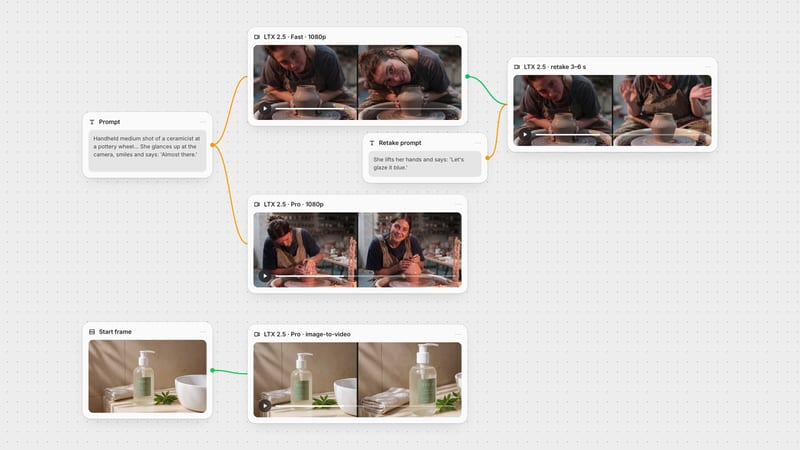
The hero image shows the pattern: a prompt node into Wan 2.6 Video for a multi-shot scene; a finished Wan clip wired into a second Wan 2.6 Video node as @Video1 for a new scene with the same person; and a product still animated by image-to-video. From there a 720p draft can go to SeedVR for upscaling and Whisper can check the dialogue or produce captions. To add or replace sound after the fact, use MMAudio. For other models with native sound, see the best AI video generators with audio; for making clips longer than 15 seconds, see how to extend AI video length.
What each mode takes and returns, from Alibaba's API references, Fuser's nodes and our runs on 28 September 2026.
| Mode | Input and limits | In our test |
|---|---|---|
| Wan 2.6 Video node | ||
| Text-to-video | Prompt up to 1,500 characters. 5/10/15 s, 720p or 1080p, 5 aspect ratios. | 1080p, 5 s: one continuous take, line spoken at 2.3 s. |
| Multi-shot | Overall line plus timed shots. Needs prompt expansion; on by default in Fuser. | 10 s: cuts at 3.0 s and 5.7 s, same person, vase changed between shots. |
| Image-to-video | One image as the first frame; output follows its shape. | Label stayed sharp; a full line spoken from a still. |
| Reference-to-video | 1–3 videos as @Video1–3. 5 or 10 s; no image or audio input. | 720p, 5 s: same woman in a new scene, line spoken; staging loosely followed. |
| Wan 2.6 Image node | ||
| Text-to-image / edit | Prompt, optional image. Six size presets. | First run returned text only; second returned the image with correct label text. |
Wan 2.6 is Alibaba's video and image model series, released in December 2025. The video model generates clips of up to 15 seconds at 720p or 1080p with synchronized audio, from a text prompt, a start image or reference videos, and can plan several shots in one generation.
No. Only Wan 2.1 and Wan 2.2 have public weights on Hugging Face and GitHub, with Wan 2.2 under Apache 2.0. Wan 2.6 is available only through APIs, from Alibaba Cloud and third-party hosts, which is how Fuser runs it.
Start with an overall description of the story and the character, then list each shot with a time range, for example: First shot [0-3s] wide shot of the workshop. Second shot [3-6s] close-up of her hands. Keep Multi-Shots on; it only works with prompt expansion, which Fuser turns on for you. In our 10-second test the cuts landed within a third of a second of the times we wrote.
Yes. Without an audio input it generates its own sound, and it speaks quoted lines of dialogue. All four of our clips with a quoted line spoke it, and a transcription matched the words exactly. You can also supply a WAV or MP3 of 3 to 30 seconds as background music.
5, 10 or 15 seconds in Fuser. Reference-to-video is limited to 5 or 10 seconds.
Cost is per second of video, and 1080p costs one and a half times as much per second as 720p, so at the same resolution a 15-second clip costs three times as much as a 5-second one. Wan 2.6 Image is charged per image.
Within one clip, describe the character once in the multi-shot overall line. Across clips, connect an earlier clip to the node's Video References input and call it @Video1 in the prompt; in our test the same woman carried over into a new scene.
Run Wan 2.6 next to image models, upscalers and audio on one canvas.