One click, whole workflow
Recipes are here. Package a whole workflow and run it in one click
Explore recipesOne click, whole workflow
Recipes are here. Package a whole workflow and run it in one click
Explore recipesA tested guide to Wan 3.0 in Fuser: what Alibaba changed, Standard vs Prime, timed multi-shot prompts, start and end frames, image references, settings and relative costs, and why it isn't open weights.
All guides · Wan 3.0 Video in Fuser · Wan 3.0 vs Wan 2.6
Quick answer: Wan 3.0 is Alibaba's newest video model with native sound. In Fuser, one Wan 3.0 Video node makes clips of any whole number of seconds from 2 to 30, at 480p, 720p or 1080p, from a prompt, a start image (with an optional end image) or up to 10 reference images, 5 reference videos and 5 reference audio clips. You name references in the prompt as Image 1, Video 1 and Audio 1. Shots, dialogue and sound are all written into the prompt; there is no separate multi-shot switch. Pick Standard or Prime: Alibaba says Prime has the same capabilities with faster end-to-end generation, and in Fuser it costs about 40% more. Wan 3.0 is an API model: Alibaba has not published its weights.
Alibaba opened a public beta of Wan 3.0 in early August 2026 (Alibaba Cloud: Wan3.0 beta) and on 24 August 2026 announced the API as officially available, callable without applying, with clips "up to 30 seconds", "up to 1080P", native audio, and references that "combine up to 10 images, 5 videos, and 5 audios" (Alibaba Cloud notice). The model ships in two versions: wan3.0-video, and wan3.0-video-prime, which Alibaba describes as a "high-speed version with capabilities aligned to the standard version, with significantly improved end-to-end speed" (Wan3.0 API reference). Output is MP4 at 30 fps (Wan3.0 video generation guide), and every clip we made came back at 30 fps with an audio track.
Fuser runs both versions in one node, Wan 3.0 Video, with a Standard/Prime dropdown. The node chooses the mode from what you connect: any reference image, video or audio sends the job to reference-to-video, a start image to image-to-video, and a prompt alone to text-to-video (Fuser docs).
No. Alibaba's launch posts describe Wan 3.0 as available through Alibaba Cloud Model Studio (Alibaba Cloud blog), and when we checked on 2 October 2026, the official Wan-AI organisation on Hugging Face and Wan-Video on GitHub carried Wan 2.1 and Wan 2.2 family models, Wan-Dancer and Wan-Animate-2, but no Wan 3.0 weights (Hugging Face, GitHub). You use Wan 3.0 through an API, which is how Fuser runs it. For models you can download and run yourself, see the best open-source video models.
Alibaba's own comparisons are with Wan 2.7, which Fuser doesn't run. Its beta announcement says 15 seconds "is the maximum clip duration of Wan2.7-Video, the preceding Wan video generation model", and Wan 3.0 doubles it to 30 (Alibaba Cloud: Wan3.0 beta). Its launch blog lists the rest (Alibaba Cloud blog):
30 seconds in one generation, with "smart duration recommendation and video extension".
Documents and web pages as input, a first for the family (doc, xls, ppt, pdf and more; one file or link per request).
"Diverse, lifelike human faces (no more same-face AI people)" and consistency for "characters, props, spaces, and style" in reference-to-video.
Video editing, "first introduced in Wan2.7", carried forward.
Alibaba is open about the weak spots: "audio texture and on-screen text rendering accuracy are improving but not yet where we want them" (Alibaba Cloud blog). Keep that in mind before asking it for readable signage or a finished mix.
Fuser's node exposes generation only. Video editing, video extension, document and web-page input, and smart duration are part of Alibaba's API but not of the Fuser node, so set a fixed duration and use other tools to edit or extend: see editing video with text prompts and how to extend AI video length.
Fuser also runs Wan 2.6, so here is what is different on the canvas, node to node:
Length: Wan 2.6 offers 5, 10 or 15 seconds. Wan 3.0 takes any whole number from 2 to 30.
Resolution: both do 720p and 1080p; Wan 3.0 adds 480p for drafts.
Inputs: Wan 2.6 takes a start image or up to three reference videos named @Video1 to @Video3, plus an optional background-music track outside reference mode. Wan 3.0 adds an end frame and mixes reference images, videos and audio, named Image N, Video N and Audio N.
Shots: Wan 2.6 has a Multi-Shots switch. Wan 3.0 has none; you write single or multiple shots into the prompt.
Negative prompt: Wan 2.6 has a field for it. Wan 3.0 doesn't, so Alibaba's prompt guide puts a "Negative prompt list" at the end of the prompt itself (Wan3.0 prompt guide).
Cost: at 720p Wan 3.0 Standard costs the same per second as Wan 2.6; at 1080p it costs about a third more per second.
For the same prompts run through both models, see Wan 3.0 vs Wan 2.6.
We reused the dialogue prompt from our Seedance, Kling and Veo comparison and the Wan 2.6 guide, on Standard at 1080p, 5 seconds, 16:9, with Expand Prompt on and Enhanced Reasoning off (the node's defaults for both):
"Handheld medium shot of a ceramicist at a pottery wheel shaping a tall vase from wet clay, her hands glistening as the clay spins. She glances up at the camera, smiles and says: 'Almost there.' Warm workshop light. Audio: steady wheel hum, wet clay sounds, quiet studio ambience."
Wan 3.0 held one continuous handheld take with her hands on the clay throughout. She looks up at about three seconds, and a Whisper transcription of the clip returned exactly "Almost there." between 3.3 and 4.6 seconds. We didn't write "one continuous shot", and the model didn't cut; if you need to be sure, Alibaba's prompt guide says to put "Generate single shot" or "One continuous shot" on the first line (Wan3.0 prompt guide).
Alibaba's formula for multi-shot is "Overall description + Shot number + Timestamp + Shot content", with shots that "connect end-to-end with no gaps or overlaps". Shot 1 [0-3s] and (00:00-00:03) styles both work, as long as you pick one and stick to it (Wan3.0 prompt guide). Alibaba's two pages disagree on shot length: the prompt guide says 2 to 5 seconds per segment, the video generation guide says 4 to 6 (Wan3.0 video generation guide). We ran the same three-shot, 10-second prompt we used for Wan 2.6, on Standard at 720p:
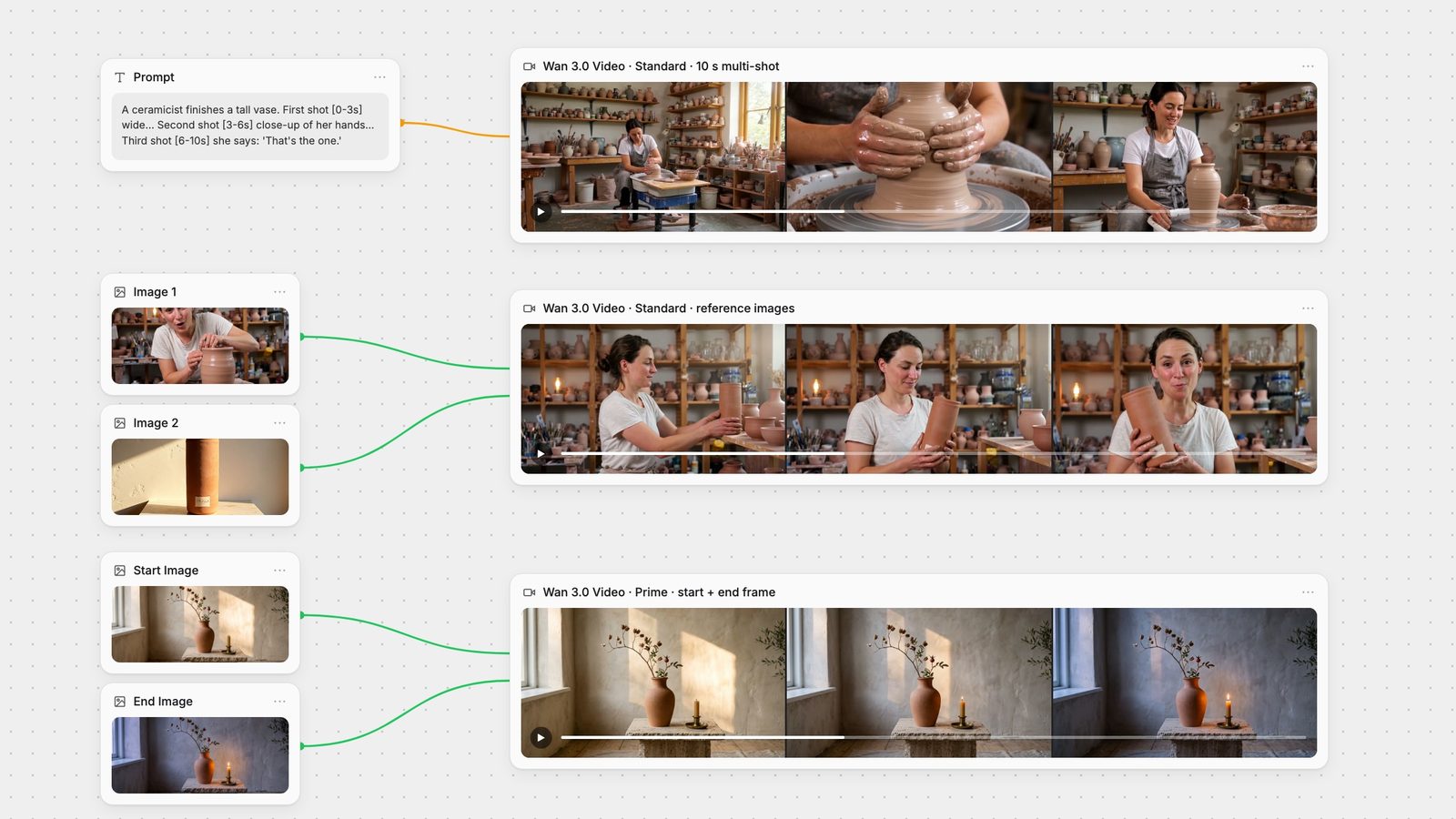
"A ceramicist finishes a tall vase in her workshop. Warm afternoon light, the same woman in every shot: early thirties, dark hair tied back, grey linen apron. First shot [0-3s] Wide shot of the workshop: she sits at the pottery wheel as the clay spins. Second shot [3-6s] Close-up of her wet hands pulling up the walls of the vase. Third shot [6-10s] Medium shot: she stops the wheel, looks at the finished vase, smiles and says: 'That's the one.' Audio: wheel hum, wet clay sounds, quiet workshop ambience."
Frame-difference detection found cuts at 2.97 and 5.97 seconds, within a frame of the 3 and 6 we wrote, and each shot used the framing we asked for. The woman is the same across the wide and medium shots: dark hair tied back, white T-shirt, grey apron. Whisper found "That's the one." from 9.0 seconds to the very end of the clip, so a line placed late in the last shot has little room to spare. The pot changed shape between the close-up and the medium shot, so describe any prop that must match as carefully as the person.
Connect a Start Image and, optionally, an End Image. Alibaba calls this "pixel-level reproduction of the reference image" for the frames you set and recommends the adaptive aspect ratio, which matches the first frame's shape (Wan3.0 video generation guide). Images must be JPEG, PNG, BMP or WEBP, 240 to 8,000 pixels a side and up to 20 MB (Wan3.0 API reference). We used the dusk pair from our first and last frame guide, the same prompt we gave Kling, Seedance, Veo and MiniMax there, and ran it on Prime at 720p, 5 seconds, adaptive:
"Locked-off camera, one continuous shot. Time passes from late afternoon to dusk: the patch of sunlight on the wall slowly slides and fades away, the room cools to a soft evening blue, and the candle beside the vase flickers alight and glows warmly. Audio: quiet room tone and faint distant birdsong."
The clip opens on our first frame and ends on our last, at 1284 × 716, the same shape as the 2752 × 1536 inputs. The camera stayed locked off. The candle catches at about two seconds and is fully lit by 2.6, while the sun patch is still on the wall; the room only turns blue between three and four seconds. The prompt listed the changes but never said which comes first, which is the same ordering problem we saw with MiniMax H3 in the first and last frame guide. If order matters, write it: "first ... only then ...".
Reference mode is where Wan 3.0 goes furthest beyond Wan 2.6. In Fuser you can connect up to 10 reference images, up to 5 reference videos totalling at most 15 seconds (each at least 16 fps), and up to 5 audio clips totalling at most 15 seconds (Fuser docs). Alibaba counts each type separately, so the first image is Image 1 and the first video is Video 1, and they can appear in the same prompt (Wan3.0 video generation guide). With a video reference, input plus output must stay within 30 seconds (Wan3.0 API reference). Alibaba's prompt guide lists what each kind of reference can carry: a person or object's appearance (and, from video, its voice), motion or camera movement from a video, a style, or music, dialogue or a voice to match from audio; for voice it suggests "Voice timbre references Audio 1" (Wan3.0 prompt guide).
We tested the most common case, a person plus a product, with two images: a still of the potter taken from our text-to-video clip as Image 1, and a terracotta vase with an ARGILLA label as Image 2. This ran on Standard at 480p, 5 seconds, 16:9:
"The woman in Image 1 stands behind the counter of a small sunlit ceramics shop. She lifts the terracotta vase from Image 2 off the shelf, turns to the camera and says: 'This one's mine.' Slow push-in, soft morning light. Audio: her voice, quiet shop ambience."
The same woman came through, face, hair bun and white T-shirt included, with clay still on her hands. The vase kept its tall cylinder shape, colour and cream label, though at 480p the label text is too small to read. She takes it off a shelf, turns to camera and says "This one's mine." at 3.4 seconds. The room did not follow the prompt: instead of a shop counter it is a workshop full of shelved pots, much like the background of Image 1. If the setting matters, give it its own reference image and name it in the prompt, as Alibaba's examples do ("the modern apartment in Image 2").
References can't be combined with start or end frames: Alibaba's API treats them as mutually exclusive (Wan3.0 API reference), and the Fuser node stops with an error if you connect both.
Alibaba's complete formula is: overall description, then reference citations (Image N, Video N, Audio N), then each shot with its start and end seconds, then dialogue, sound effects or music, style and mood, and finally a negative prompt list. Skip any part you don't need (Wan3.0 prompt guide). The details that matter most:
Dialogue: write the speaker, a speaking verb, a colon and the quoted words, as in she whispers: "content". For several speakers, one line each. Add "Lip sync" to ask for lip sync.
Silence: write "No dialogue" if nobody should speak; otherwise "the model decides on its own whether to include dialogue". "No background music" removes the score and keeps ambient and action sounds.
Sound effects: describe the action and materials clearly and the model fills in matching sound; name specific effects as their own sentences, with a time if needed.
Camera: plain words ("push in", "orbit", "handheld follow"), "Fixed shot, camera static" for a locked-off frame, and "hard cut" or "dissolve" between shots.
Negatives: list only what you don't want ("No subtitles", "No watermark", "No costume changes") and don't repeat the positive prompt.
All of this goes in one prompt field, which takes up to 20,000 characters (Wan3.0 API reference). Alibaba also publishes a prompt-optimisation skill for AI chat assistants on the same page.
Model: Standard (default) or Prime.
Duration: 2 to 30 seconds, default 5.
Resolution: 480p, 720p or 1080p, default 1080p.
Aspect ratio: adaptive (default), 16:9, 4:3, 1:1, 3:4 or 9:16. Alibaba's API reference also lists 21:9; the Fuser node doesn't offer it.
Generate Audio: on by default. Turn it off for a silent clip.
Expand Prompt: on by default. The model rewrites your prompt before generating; turning it off saves time but may reduce quality.
Enhanced Reasoning: off by default; the node describes it only as enhanced reasoning before generation, and we left it off for every test.
Seed: fix it to get close to a previous result; Alibaba notes that the same seed may not give an identical clip (Wan3.0 API reference).
Cost scales with seconds and resolution. In Fuser, 480p costs half as much per second as 720p and 1080p twice as much, and Prime costs about 40% more than Standard at every resolution. A 30-second clip costs six times a 5-second one, so draft short and at 480p or 720p, and render the keeper at 1080p.
A cut you didn't want: put "One continuous shot" on the first line.
Cuts in the wrong place: give every shot a start and end time, end to end, inside the duration you set.
A line comes too late or is clipped: put it earlier in its shot, or give the last shot more seconds.
Things happen in the wrong order: say "first ... then ..." instead of listing changes in one sentence.
The setting ignores your prompt in reference mode: add a reference image of the place and name it.
The job fails with references connected: remove the start and end images, and keep reference video and audio within 15 seconds each in total.
Unwanted speech or music: write "No dialogue" or "No background music", or switch Generate Audio off.
The hero image is the canvas from this guide: a timed multi-shot prompt into Wan 3.0 Video, two images feeding a reference job, and a start and end frame on Prime. From there, Auto Caption can add captions from the generated dialogue, SeedVR can upscale a 480p or 720p draft, and MMAudio can replace the soundtrack if you switch Wan's audio off. For keeping one person consistent across several clips, see consistent characters in AI video; for a head-to-head with ByteDance's model, see Wan 3.0 vs Seedance 2.5.
What each mode takes, from Alibaba's Wan3.0 API reference and Fuser's node, and what happened in our runs on 2 October 2026.
| Mode | Input and limits | In our test |
|---|---|---|
| Wan 3.0 Video node | ||
| Text-to-video | Prompt up to 20,000 characters. 2–30 s, 480p/720p/1080p, adaptive or five fixed ratios. | Standard, 1080p, 5 s: one continuous take, line spoken at 3.3 s. |
| Multi-shot | Written in the prompt: overall line, then shots with start and end times. No toggle. | Standard, 720p, 10 s: cuts at 2.97 s and 5.97 s, same woman, pot changed shape. |
| Start / end frame | Start image, optional end image. Can’t be combined with references. | Prime, 720p, 5 s: matched both frames; candle lit before the light changed. |
| Reference | Up to 10 images, 5 videos (≤15 s total) and 5 audio clips (≤15 s total), named Image 1, Video 1, Audio 1. | Standard, 480p, 5 s: person and vase kept, line spoken; setting ignored. |
| In Alibaba’s API, not in Fuser | ||
| Editing, extension, documents | Video editing and extension, document or web-page input, smart duration. | Not tested; the Fuser node does not expose them. |
Wan 3.0 is Alibaba's video generation model, released as an API in August 2026. It makes clips of up to 30 seconds at up to 1080p with native audio, from text, a start and end frame, or a mix of reference images, videos and audio. Fuser runs both versions, Standard and Prime, in its Wan 3.0 Video node.
No. Alibaba offers Wan 3.0 through its Model Studio API and had not published weights when we checked on 2 October 2026. The open-weight models on the official Wan Hugging Face and GitHub pages were earlier releases: the Wan 2.1 and Wan 2.2 families, Wan-Dancer and Wan-Animate-2.
Alibaba describes Prime as a high-speed version whose capabilities are aligned with Standard, with significantly improved end-to-end speed. Inputs and settings are the same in Fuser. Prime costs about 40% more per second at every resolution.
Up to 30 seconds in one generation. In Fuser you set any whole number of seconds from 2 to 30; the default is 5. When you use a reference video, Alibaba requires the input video and the output together to stay within 30 seconds.
Connect them to the node and name them in the prompt by type and order: the first image is Image 1, the first video Video 1, the first audio clip Audio 1. Fuser takes up to 10 images, 5 videos and 5 audio clips, with video and audio each limited to 15 seconds in total. References cannot be combined with start or end frames.
Open with an overall description, then number each shot with its start and end time, for example: Shot 1 [0-3s] wide shot of the workshop. Shot 2 [3-6s] close-up of her hands. Shots should run end to end inside the duration you set. In our 10-second test the cuts landed within a frame of the times we wrote. For a single take, write 'One continuous shot' on the first line.
Not with the Wan 3.0 Video node. Alibaba's API includes video editing and extension, but Fuser's node only generates new clips. Fuser has other models for editing a clip with a text prompt and for making videos longer.
Run Wan 3.0 next to image models, upscalers and audio on one canvas.