One click, whole workflow
Recipes are here. Package a whole workflow and run it in one click
Explore recipesOne click, whole workflow
Recipes are here. Package a whole workflow and run it in one click
Explore recipesThree ways to get past a single generation's length, tested on the same 6-second clip: native extend endpoints, last-frame chaining and longer multi-shot generations, with what each returned and where the join still happens.
All guides · First and last frame video guide
Quick answer: there are three ways to get an AI video longer than one generation. Extend the clip with a model that continues footage from where it ends: in Fuser, Grok Imagine Edit's Extend mode adds 2 to 10 seconds and returns the whole clip, and FLUX.3 continues a clip and returns only the new part. Chain clips by taking the last frame of one and using it as the start frame of the next, which works with any image-to-video model. Or generate longer in the first place: Seedance 2.5 goes up to 30 seconds in one pass, LTX-2.5 up to 20 seconds, Wan 2.6 up to 15 seconds with several shots inside that clip, and Kling 3.0 also reaches 15 seconds. Extending keeps motion and sound most continuous; chaining gives you the widest choice of models. In both cases you still join the pieces in a video editor, because Fuser's Compositor can't place clips one after another.
We started from one clip, a 6-second, 720p Grok Imagine shot of a ceramicist at a pottery wheel who looks up and says "Almost there." It's the text-to-video clip from our Grok Imagine Video guide. We then asked for the same next beat three ways, with the same prompt each time:
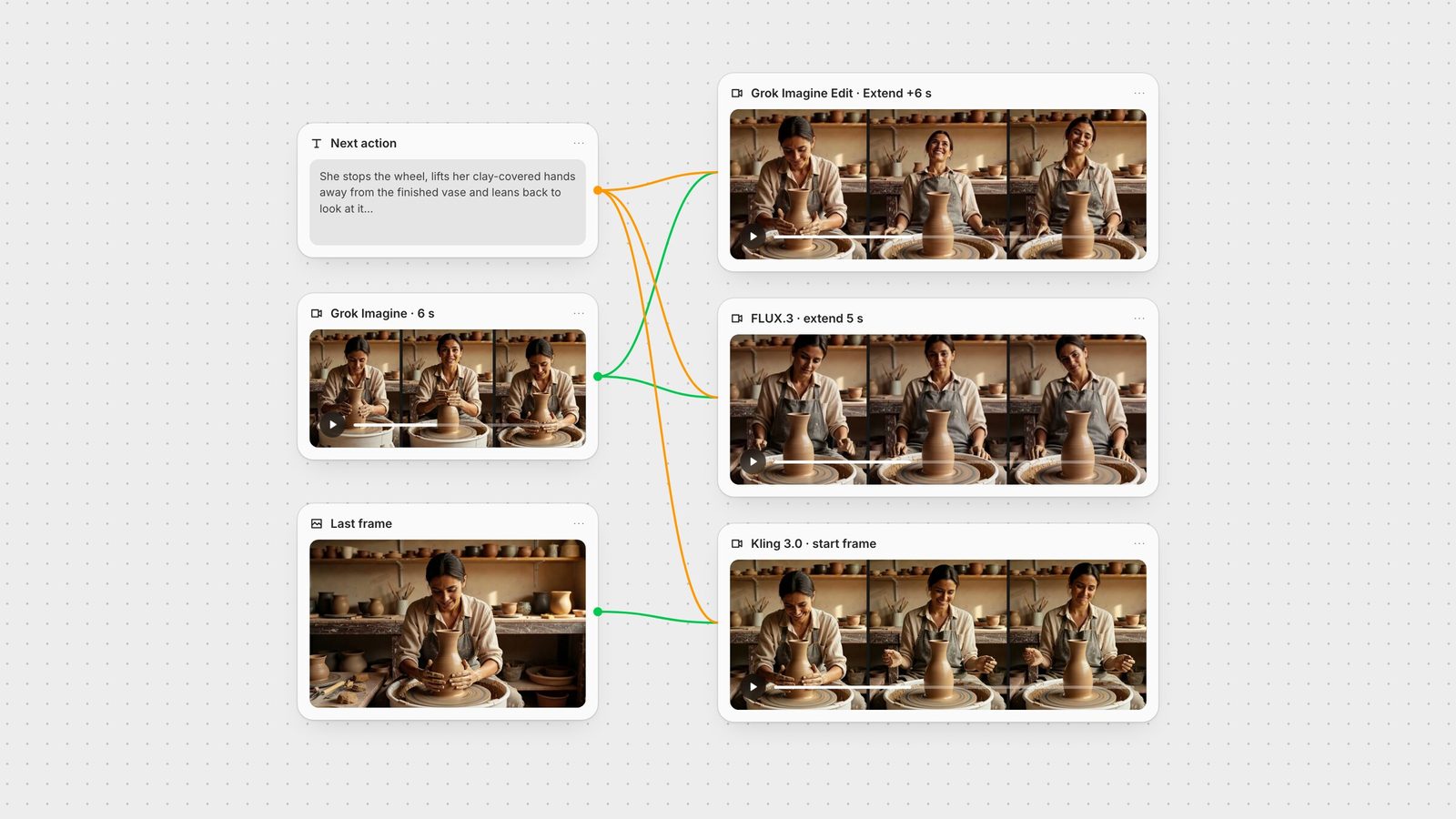
"She stops the wheel, lifts her clay-covered hands away from the finished vase and leans back to look at it, then nods, satisfied. The camera stays handheld at the same framing. Audio: the wheel slowing to a stop, quiet studio ambience."
Every method got one run on 28 September 2026, no retries. We checked each result frame by frame, measured how similar the frames on either side of each join were (for reference, two consecutive frames inside the source scored 0.95 on a structural-similarity scale where 1 is identical), measured loudness and transcribed the audio with Whisper to check for stray speech. None of the extensions added any speech.
An extend endpoint reads the end of your clip and generates what comes next, so motion, framing and lighting carry over. It is the closest thing to "make this shot longer".
In Fuser this is the Grok Imagine Edit node with Mode set to Extend. The input must be an MP4 of 2 to 15 seconds, and Extension Duration sets 2 to 10 new seconds (Fuser docs). xAI's docs are explicit that the duration covers "the extended portion only, not the total output", and that the result "picks up seamlessly from the last frame of the input" (xAI video extension docs).
We asked for 6 more seconds and got back one 12.04-second file at 1280 × 720. The first 6 seconds were our source, unchanged (a similarity check against the original scored 0.99), so there's nothing to join. She lifts her hands off the vase, leans back and smiles broadly; we didn't see a clear nod. The vase kept its shape, and the room tone continued at the source's quiet level after the line. You can extend the result again while it is 15 seconds or shorter, so the longest file one extend can return is 25 seconds (15 plus 10); past that, trim or switch to chaining. For more on the node, see the Grok Imagine Video guide.
The FLUX.3 node switches to extend mode when you connect a clip to its Video input, and it can't be combined with start or end images. In Fuser it takes 5 to 20 seconds of Duration (Black Forest Labs' own API docs list 5 to 15 seconds for continuation), 720p or 1080p, optional audio, and a Draft toggle for cheaper 720p iterations. Black Forest Labs' API reference takes the source as an MP4 and says "the generated clip carries on from its final frames" (BFL FLUX 3 API reference). Black Forest Labs says "momentum, framing, and scene logic carry into the new footage" (BFL FLUX 3 docs).
At 5 seconds and 720p, FLUX.3 returned only the new 5 seconds, at 1280 × 704, not the source plus extension. Its first frame picked up from the source's last one (similarity 0.89 after cropping to the same frame, close to the 0.95 between consecutive source frames). She lifts her hands from the vase and turns her head toward the camera; the camera eases back a little rather than holding the framing exactly. The audio was quiet room tone with one louder sound around 3 seconds. To use it you add the new part after the source in an editor, which is also how you chain further: feed the new part back in.
Any image-to-video model can continue a shot if you give it the final frame as its start frame. In Fuser, right-click a video's preview, choose Extract frame, then Last frame: Fuser adds an Image node with that frame beside the video. Connect it to the start-image input of a video node and describe what happens next.
We connected the extracted frame to Kling 3.0 Pro image-to-video, 5 seconds with audio on, and joined its output to the source.
The new clip opened on our frame (similarity 0.94) and did what the prompt asked: hands lifted away, a smile down at the vase, framing held. Two things show the limits of chaining:
Sound doesn't carry over. A still frame has no audio, so Kling generated its own mix. The source's last second and a half was near-silent (about −60 dB), and Kling's first two seconds opened with a much louder wheel sound (about −22 dB). The join is visible to the ear even where it isn't to the eye. Match levels in your editor, or replace the soundtrack on the joined clip with a video-to-audio model such as MMAudio.
Resolution and frame shape can change. Kling returned 1920 × 1080 from a 720p source. Scale both to the same size before you join.
What chaining gives you is choice: the next shot can come from a different model, a different aspect of the scene, or a first-and-last-frame model that lands on a frame you've drawn yourself (first and last frame guide). It also doesn't need the source to be shorter than 15 seconds.
If you know the whole sequence up front, the cleanest join is no join. Four models in Fuser go well past the usual 5 to 8 seconds:
Seedance 2.5 generates "30-second audio-video clips in a single pass" and can arrange several connected shots inside that take (ByteDance Seed). Fuser's Seedance node takes 4 to 30 seconds. ByteDance also says the model "supports multiple rounds of extension", appending shots to an existing output. In Fuser the node's way to bring in existing footage is its reference videos input (up to 10, referred to as @Video1, @Video2 and so on); we didn't test either feature here; see the Seedance 2.5 prompt guide.
Wan 2.6 makes 5, 10 or 15-second clips with a Multi-shots switch, on by default. Alibaba's docs describe a timed shot list in the prompt, such as "Shot 1 [0-3s]:", and require prompt rewriting for multi-shot, which the Fuser node turns on automatically when Multi-shots is on (Alibaba Model Studio).
Kling 3.0 generates 3 to 15 seconds. In Kling's own app a Multi-Shot toggle lets the model plan shot changes from the prompt (Kling VIDEO 3.0 guide). Fuser's Kling 3.0 node has no shot toggle and sends a single prompt, so describe any cuts in that prompt; we haven't tested how reliably it follows them (Kling 3.0 prompt guide).
LTX-2.5 generates 6 to 20 seconds with sound in Fuser's LTX 2.5 node; anything over 10 seconds needs the Fast model, 720p or 1080p, and 25 fps. There is no multi-shot switch: it cuts where the prompt names each cut, and Lightricks suggests two to four shots per generation (LTX prompting guide). In our LTX-2.5 guide, a 10-second, three-shot prompt cut at 2.7 and 5.7 seconds and kept the same woman and vase in every shot.
We ran Wan 2.6 at 10 seconds and 1080p with a three-shot prompt: "A ceramicist finishes a tall vase in a warm, sunlit pottery workshop. First shot [0-4s]: handheld medium shot, she shapes wet clay on the spinning wheel with both hands. Second shot [4-7s]: close-up of her clay-covered fingers smoothing the rim of the vase. Third shot [7-10s]: wide shot of the workshop, she stops the wheel, leans back and smiles at the finished vase. Audio: steady wheel hum, wet clay sounds, quiet studio ambience."
It followed the structure: a wider opening, a close-up of fingers on the rim by about 4.5 seconds, then a wide shot of the finished vase. The timings were approximate and the moves between shots mixed cuts with camera pushes, and she stood behind the wheel rather than leaning back. The person and room stayed consistent across the three shots. It is a new scene, not a continuation of our source clip: text-to-video can't continue existing footage, so use it when you're starting fresh.
Grok Imagine extend is the only method here that hands back a finished long clip. Everything else ends with separate files that need to be placed end to end. Fuser's Compositor layers media on one timeline and exports PNG or MP4, but it can't put clips one after another, so do the join in any video editor. Before you do:
Match resolution and frame rate. Our three sources came back at 1280 × 720, 1280 × 704 and 1920 × 1080; our Wan 2.6 clip came back at 30 fps where the others were 24.
Check the frame at the join. If the new part starts on a near-copy of the last frame, trim one of them so the motion doesn't stall.
Listen across the join, and even out the levels or lay one soundtrack over the whole clip.
To finish the long clip, it can go back into Fuser: an upscaler such as SeedVR or Topaz can lift the joined clip to 1080p or higher, and Whisper produces captions.
Fuser's LTX 2.5 node makes long clips in one pass (above), but it doesn't extend them: Lightricks lists extend as unsupported on both LTX-2.5 variants (LTX-2.5 docs). Connecting a video to that node switches it to retake instead, which regenerates a section inside the clip with LTX-2.3 and keeps the clip's length (LTX-2.5 guide).
The separate LTX Extend node runs LTX-Video 0.9.5, an earlier LTX model. It works differently too: you pick the frame (0 to 120, in steps of 8) at which your clip is placed in the output, at 480p or 720p (Lightricks LTX-Video repo). We didn't test it for this guide and would start with the methods above.
You like the shot and want more of it: extend with Grok Imagine for a single finished file, or FLUX.3 when you want 1080p or a longer continuation.
The next shot should come from a different model or framing: extract the last frame and chain.
You're planning a sequence from scratch: write it as one multi-shot prompt in Seedance 2.5, LTX-2.5 or Wan 2.6.
The result has to run minutes: combine them. Generate the longest clean take you can, extend it, chain from its last frame when the scene changes, and join in an editor. For keeping a character stable across all of it, see consistent characters with AI.
Limits from vendor docs and Fuser's nodes; results from one run each on 28 September 2026.
| Method | How it works in Fuser | In our test |
|---|---|---|
| Continue an existing clip | ||
| Grok Imagine extend | Grok Imagine Edit, Extend mode. MP4 of 2–15 s in, 2–10 s added, returns the whole clip. | 6 s → one 12 s file; source unchanged, no join needed. |
| FLUX.3 extend | FLUX.3 node with a clip on Video. 5–20 s new in Fuser (BFL docs: 5–15), 720p or 1080p. | Returned only the new 5 s (1280 × 704); joined afterwards. |
| Last-frame chaining | Right-click the video, Extract frame, Last frame; wire it into any image-to-video node. | Kling 3.0 Pro picked up cleanly; sound jumped at the join. |
| Generate longer in one pass | ||
| Seedance 2.5 | 4–30 s per generation; up to 10 reference videos. | Not tested here. |
| Wan 2.6 multi-shot | 5, 10 or 15 s; Multi-shots on by default; timed shot list in the prompt. | 10 s, three shots roughly on cue; consistent subject. |
| LTX-2.5 | 6–20 s with audio (over 10 s: Fast, up to 1080p, 25 fps); cuts named in the prompt. | Not tested here; a 10 s three-shot test is in our LTX-2.5 guide. |
| Kling 3.0 | 3–15 s; single prompt, no shot toggle in Fuser. | Not tested here; see our Kling 3.0 guide. |
Extend it with a model that continues footage from the end of the clip, such as Grok Imagine or FLUX.3; chain clips by using the last frame of one as the start frame of the next; or generate a longer clip in one pass with Seedance 2.5 (up to 30 seconds), LTX-2.5 (up to 20 seconds), Wan 2.6 or Kling 3.0 (up to 15 seconds). Then join the pieces in a video editor.
Among the models in Fuser, Seedance 2.5 generates up to 30 seconds in a single pass. LTX-2.5 and FLUX.3 go up to 20 seconds, and Wan 2.6 and Kling 3.0 up to 15 seconds.
With Grok Imagine extend the original audio stays in the returned file and the new part gets its own sound. FLUX.3 returns only the new part with its own audio. Last-frame chaining starts from a still, so the next clip's sound is generated from scratch and may not match; in our test it was much louder than the end of the source.
Taking the final frame of a clip and using it as the start frame of a new image-to-video generation, so the next clip picks up where the previous one ended. In Fuser, right-click a video, choose Extract frame and then Last frame to get it as an Image node.
Not on the canvas. The Compositor layers media on one timeline and exports PNG or MP4, but it can't place clips end to end, so join the files in a video editor. Grok Imagine extend avoids the join by returning the source and extension as one file.
No. Fuser's LTX Extend node runs the older LTX-Video 0.9.5 model. LTX-2.5 runs in the separate LTX 2.5 node, which generates clips of up to 20 seconds but has no extend mode; connecting a video there retakes a section of it instead.
Extend, extract the last frame and chain into any video model, side by side.