One click, whole workflow
Recipes are here. Package a whole workflow and run it in one click
Explore recipesOne click, whole workflow
Recipes are here. Package a whole workflow and run it in one click
Explore recipesA tested guide to LTX-2.5 in Fuser: what changed from LTX-2, when to use Fast or Pro, how Lightricks says to write prompts, multi-shot scenes, image-to-video, native audio, the limits on resolution, frame rate and length, and how retake regenerates part of a clip.
All guides · LTX 2.5 in Fuser · LTX-2.5 vs Wan 2.6
Quick answer: LTX-2.5 is Lightricks' video model with sound, released on 11 August 2026. In Fuser's LTX 2.5 node it makes 6 to 20-second clips at 720p up to 4K from a prompt or a start image, with dialogue, effects and ambience generated in the same pass. Use Fast (the default) for drafts, long clips and 1440p or 4K; use Pro for 6 to 10-second clips at 720p or 1080p. Write the prompt as one flowing paragraph in the present tense, put spoken lines in quotation marks, and name every cut if you want several shots. Turn on Generate Audio, which is off by default in Fuser. Connect a video to the node to retake part of it; that step runs LTX-2.3, because LTX-2.5 has no retake endpoint.
Lightricks added LTX-2.5 to its API on 11 August 2026 in two variants, ltx-2-5-fast and ltx-2-5-pro, for text-to-video, image-to-video and audio-to-video (LTX changelog). Lightricks lists four changes over earlier versions: native multi-shot scenes that keep "character identity, environment, lighting, voice, and visual style across cuts", a diffusion video decoder for "sharper faces, textures, and on-screen text", a Gemma 4 12B text encoder that "holds complex prompts together", and a better distilled model (LTX-2.5 model card).
It replaces LTX-2. Lightricks announced on 2 July 2026 that ltx-2-fast and ltx-2-pro would be deprecated, and its notice now says they "are no longer available" and that requests for them return an error; the migration path is LTX-2.3 or LTX-2.5 (LTX-2 deprecation notice, LTX-2 removal). Fuser's LTX node now runs LTX-2.5 and is labelled LTX 2.5. Saved canvases that used the old node keep working, because the node kept its inputs.
Fuser has two other LTX nodes, and neither is LTX-2.5. LTX Extend and the older LTX node run LTX-Video 0.9.5, an earlier model without sound. To make an LTX-2.5 clip longer than 20 seconds, see how to extend AI video length.
It has open weights, under a licence with a revenue limit. The weights are on Hugging Face (gated behind a sign-in and contact-sharing form), in a distilled checkpoint and a trainable one, both 22 billion parameters (LTX-2.5 model card). They are released under the LTX-2.x Community License, dated 11 August 2026, which lets anyone use, modify and fine-tune the model, but requires entities above an annual revenue threshold set in the licence to get a paid licence (LTX-2.x Community License). That makes it open weights rather than open source in the OSI sense. In Fuser you use LTX-2.5 through a hosted API, so you don't need a GPU. For other models you can download and run yourself, see the best open-source video models.
Lightricks describes Fast as the variant "for speed and low cost" and Pro as the one "for higher fidelity" (LTX-2.5 docs). In Fuser, the two also have different limits:
Fast: 720p, 1080p, 1440p or 4K. 6 to 20 seconds at 720p or 1080p and 24 or 25 fps; 6, 8 or 10 seconds at 1440p, at 4K, or at 48 or 50 fps.
Pro: 720p or 1080p only, 6, 8 or 10 seconds. Lightricks' own API added 1440p and 4K to Pro on 2 September 2026 (LTX changelog), but the Fuser node doesn't offer them yet.
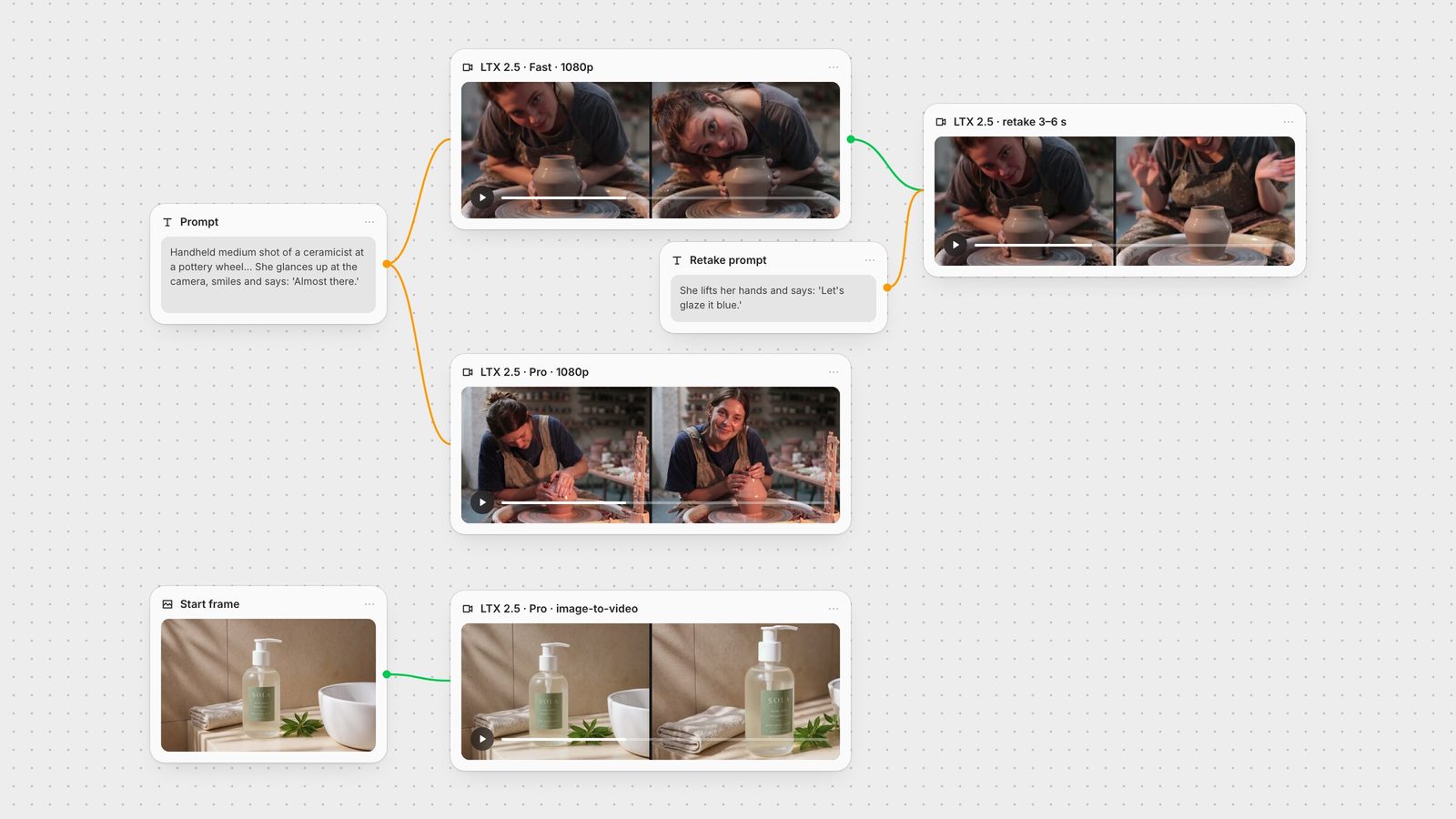
To see the difference we ran the same dialogue prompt through both, at 1080p, 6 seconds, with audio on. It is the prompt from our Seedance, Kling and Veo comparison, so the clips line up with our other video guides:
"Handheld medium shot of a ceramicist at a pottery wheel shaping a tall vase from wet clay, her hands glistening as the clay spins. She glances up at the camera, smiles and says: 'Almost there.' Warm workshop light. Audio: steady wheel hum, wet clay sounds, quiet studio ambience."
Both held one continuous shot and both spoke the line: a Whisper transcription found "Almost there." at 4.2 seconds in the Fast clip and 4.0 seconds in the Pro clip. The framing is where they differed. Fast went for a tight shot and had her lean down until her head was almost on the vase. Pro kept a true medium shot of a natural pose, with a deep, detailed workshop behind her, although it also added a clay-covered post beside the wheel that doesn't belong there. Neither made a tall vase; both threw a squat, rounded one. Both clips came back at 1920 × 1080, 25 fps and 6.12 seconds.
On this prompt Pro was the better take, at about 30% more per second. Our reading: draft and explore with Fast, and render the shot you keep with Pro if it is 10 seconds or less.
Lightricks' prompting guide asks for six things: the shot (scale and cinematography terms), the scene (light, colour, texture), the action "as a natural sequence that flows from beginning to end", the characters (age, hair, clothing, emotion shown through "physical cues"), the camera movement, and the audio, with "spoken dialogue in quotation marks" (LTX prompting guide). For one continuous take it recommends:
One flowing paragraph, not a shot list or tags.
Present-tense verbs for movement. Lightricks' reason: "Appearance alone gives the model little to animate."
Roughly 4 to 8 descriptive sentences, with more detail for close-ups than wide shots.
Camera movement described relative to the subject, including how the subject looks after the move.
One light logic per shot, because "mixed light sources confuse the result".
The guide also warns against pasting a prompt written for Kling or Seedance unchanged: "tag syntax and shot-list formatting don't" carry over. Our pottery prompt follows the six-part shape and both variants delivered the line on cue, but the "tall vase" detail didn't survive; if a prop's shape matters, give it its own sentence.
Two parts of the guide apply to running the model yourself, not to Fuser: the prompt enhancer, which Lightricks says is for local pipelines and not for API requests, and the duration predictor, which the LTX API exposes as an automatic duration that the Fuser node doesn't offer. In Fuser you pick the length, so write enough action to fill it; Lightricks notes the model "won't stretch a moment or add a pause you didn't prompt for".
LTX-2.5 can cut between shots inside one generation. Lightricks' rule is to write "the full scene as one chronological paragraph", name each transition in words ("A hard cut transitions to...", "The view cuts to a close-up of..."), re-describe who is in the new shot, and say whether the sound continues across the cut. It suggests two to four shots per generation (LTX prompting guide). There is no multi-shot switch in Fuser; the prompt alone decides.
We asked Fast for three shots in 10 seconds at 1080p:
"A wide shot frames a small ceramics workshop in warm afternoon light. A ceramicist in her early thirties, dark hair tied back, grey linen apron, sits at a pottery wheel as a tall vase of wet grey clay spins in front of her. The steady hum of the wheel fills the room. A hard cut transitions to a close-up of her wet hands pulling the walls of the vase upward, the clay glistening; the wheel hum continues across the cut. The view cuts to a medium shot of the same woman in the grey apron as she stops the wheel, leans back, looks at the vase and smiles, then says softly, "That's the one." The wheel hum fades out, leaving quiet workshop ambience."
Frame-difference detection found cuts at 2.7 and 5.7 seconds, giving three shots of about three, three and four seconds, and each used the framing we asked for. The woman is recognisably the same in the wide and medium shots, down to the grey work dress and tied-back hair, and this time the tall, narrow-necked vase stayed the same shape in all three shots. Whisper found "That's the one." at 9.2 to 9.8 seconds, at the end of the third shot. The clip came back at 10.28 seconds. Lightricks' guide recommends a single continuous take instead when you animate a start image, unless you mean to cut away from it.
Connect an image to the node and it becomes the opening frame; the node then calls LTX-2.5 image-to-video instead of text-to-video. In Fuser, Aspect Ratio: Auto follows the image and is only available when an image is connected. The LTX API also accepts an end frame and camera-motion presets for these endpoints (LTX image-to-video API reference), but the Fuser node doesn't expose them yet. For start-and-end-frame control, see our first and last frame guide.
These two clips come from our LTX-2.5 vs Wan 2.6 test, run with Pro at 1080p from two 1920 × 1080 stills:
"Slow push-in on the hand wash bottle standing on the stone ledge. Soft sunlight shifts slowly across the tiled wall and a single drop of water runs down the side of the bottle. The label stays sharp and readable. Calm, premium product film. Audio: quiet bathroom ambience and one faint drip."
"Handheld shot on a rainy night market street. The woman with the bicycle turns her head to the camera and says: "I know a better place for noodles." Rain keeps falling, people with umbrellas walk past behind her, and neon signs reflect on the wet road. Audio: steady rain, distant street chatter, and her voice."
The product clip drifted sideways with a slight push rather than the straight push-in we asked for, and the drop of water never appeared. The SOLA name stayed sharp; the small print on the label did not. In the night-market clip the camera pushed in to a close-up as she turned, and Whisper found the whole line, "I know a better place for noodles.", between 3.6 and 5.8 seconds. The bicycle left the frame on the way in.
Connect a video to the LTX 2.5 node and it stops generating and retakes instead. The node hides the generation controls and shows three: Retake Mode (replace the audio, the video, or both), Retake Start Time in whole seconds, and Duration, which now means how many seconds to replace. The prompt describes what should happen in that window.
This step does not run LTX-2.5. Lightricks' own model table lists retake and extend as unsupported on both LTX-2.5 variants (LTX-2.5 docs), so Fuser sends retakes to LTX-2.3's retake mode (LTX retake API reference). You can retake any video, not only LTX clips.
We gave our 6-second Fast clip a new line, replacing picture and sound from 3.0 to 6.0 seconds:
"The ceramicist lifts her wet hands from the clay, looks up at the camera, laughs and says: "Let's glaze it blue." The wheel keeps humming."
A frame-by-frame comparison shows the first 2.8 seconds are unchanged. From there the new section takes over: she lifts her hands, laughs and says "Let's glaze it blue." (Whisper, 4.3 to 5.1 seconds), in the same room, apron and vase. It didn't follow the prompt exactly: she waved her hands rather than looking up, and her face left the top of the frame for part of the section. We ran this 3-second window outside Fuser, with the same LTX-2.3 retake model. In Fuser the Duration menu starts at 6 seconds, so the shortest retake from the node is 6 seconds, which suits longer clips.
So we also retook the 10-second multi-shot clip with settings the node accepts, start time 4 and duration 6, replacing both picture and sound:
"The view cuts to a medium shot of the same woman in the grey apron. She lifts the finished vase off the wheel with both hands, turns to the camera and says: "Ready for the kiln." Quiet workshop ambience."
The first 3.6 seconds match the original, so the wide shot and the cut to the close-up survive. The close-up of her hands then runs on to about 6.8 seconds, followed by a short pale-green glitch and a cut to a new shot of her standing in the same workshop, holding the same narrow-necked vase, where she says "Ready for the kiln." (8.2 to 9.2 seconds). It gave us a wide shot rather than the medium shot we asked for, and the glitch at the cut would need trimming. Retake is a fast way to change a line or an ending without losing a take you like, but check the join.
LTX-2.5 generates sound with the picture in one pass: Lightricks lists "synchronized audio-video generation" as a core capability (LTX-2.5 model card). Every clip in this guide has a generated soundtrack, and every quoted line was spoken with the exact words we wrote.
Two things to know in Fuser. Generate Audio is off by default in the node, while the LTX API's own default is on (LTX text-to-video API reference), so switch it on if you want sound. And LTX lists one per-second rate for each resolution, with no separate charge for sound (LTX pricing). For sound effects added after the fact, MMAudio and Mirelo SFX take a finished video; for the wider field of video models with sound, see the best AI video generators with audio.
The LTX 2.5 node:
Model: Fast (default) or Pro.
Resolution: 720p, 1080p (default), 1440p or 2160p (4K). Pro: 720p or 1080p.
Duration: 6 (default), 8, 10, 12, 14, 16, 18 or 20 seconds. There is no 5-second option. Over 10 seconds needs Fast, 720p or 1080p, and 25 fps.
FPS: 25 (default) or 50. 50 fps caps the length at 10 seconds.
Aspect Ratio: 16:9 (default) or 9:16; Auto follows a connected image.
Generate Audio: off by default.
Retake Mode, Retake Start Time: shown only when a video is connected.
The node limits each menu to valid combinations, so you can't pick Pro at 4K or 20 seconds at 50 fps.
LTX-2.5 is charged per second of video, and the rate rises with resolution: Fast at 4K costs more than three times as much per second as Fast at 720p, and Pro costs about 30% more per second than Fast at the same resolution (LTX pricing). Image-to-video costs the same as text-to-video. Retake is also charged per second, at a rate between Fast's 720p and 1080p rates. So a 6-second 1080p clip costs about 30% more with Pro than with Fast, and a 20-second 1080p Fast clip costs more than three times as much as a 6-second one.
No sound: switch on Generate Audio.
Pro won't offer 4K or 20 seconds: Pro stops at 1080p and 10 seconds. Switch to Fast for 1440p, 4K or anything over 10 seconds.
Can't pick 12 seconds or more: set the frame rate to 25 and the resolution to 1080p or lower.
A prop comes out the wrong shape: give it its own sentence with its shape and state, as in our multi-shot prompt, instead of one adjective in a longer sentence.
Unwanted cuts, or no cuts: cuts come from the prompt. Name each one ("A hard cut transitions to...") to get them; describe one continuous camera move to avoid them.
The line isn't spoken: put it in quotation marks after "says", and leave enough seconds after it for delivery.
Only part of a clip is wrong: connect it to a second LTX 2.5 node and retake that section instead of regenerating the whole clip.
Small text on a product is garbled: Lightricks says "exact spelling and consistency across frames are not guaranteed" and suggests adding critical titles, labels or logos in post (LTX prompting guide).
The hero image shows the pattern: one prompt node wired into two LTX 2.5 nodes set to Fast and Pro, so you can compare takes side by side; the Fast clip wired into a third LTX 2.5 node that retakes one section with a new line; and a product still animated by image-to-video. From there a 720p draft can go to SeedVR or Topaz for upscaling. For a head-to-head against another model with native sound, read LTX-2.5 vs Wan 2.6; for chaining several models into one graph, see how to chain AI models.
What each mode takes and returns, from Lightricks' docs, Fuser's LTX 2.5 node and our runs on 29 September 2026.
| Mode | Limits in Fuser | In our test |
|---|---|---|
| LTX 2.5 node | ||
| Fast, text-to-video | 720p to 4K. 6–20 s at 720p/1080p and 25 fps; 6–10 s otherwise. The cheaper variant per second. | 1080p, 6 s: tight close-up, line spoken at 4.2 s. |
| Pro, text-to-video | 720p or 1080p, 6–10 s, 25 or 50 fps. About 30% more per second than Fast. | 1080p, 6 s: natural medium shot, detailed room, line at 4.0 s. |
| Multi-shot (prompt only) | Name each cut in the prompt; Lightricks suggests 2–4 shots. | Fast, 1080p, 10 s: cuts at 2.7 s and 5.7 s, same woman and vase. |
| Image-to-video | Start image as first frame; Auto aspect ratio follows it. Same limits and prices. | Pro, 1080p: label name sharp, drop missing; full line spoken. |
| Retake (LTX-2.3) | Connect a video. Replace audio, video or both; 6–20 s window from a whole-second start. Charged per second. | 3 s (outside Fuser) and 6 s windows: earlier frames unchanged, new lines spoken; one glitch at a cut. |
LTX-2.5 is Lightricks' video model with synchronized audio, released on 11 August 2026 in Fast and Pro variants. It generates video, dialogue and sound together from a text prompt or a start image, and can cut between several shots in one generation.
Lightricks positions Fast for speed and low cost and Pro for higher fidelity. In Fuser, Fast goes up to 4K and 20 seconds, while Pro is limited to 720p or 1080p and 10 seconds and costs about 30% more per second. In our same-prompt test Pro gave the more natural shot.
It has open weights on Hugging Face under the LTX-2.x Community License. The licence is free for organisations below an annual revenue threshold it sets; larger ones need a paid licence, so it is open weights rather than open source in the strict sense.
6 to 20 seconds in Fuser, in 2-second steps. Anything over 10 seconds needs Fast, 720p or 1080p, and 25 fps. There is no 5-second option.
Yes, in the same pass as the picture, including spoken dialogue. In Fuser the Generate Audio toggle is off by default, so switch it on. Every quoted line in our tests was spoken word for word.
Not by itself: Lightricks lists retake as unsupported on LTX-2.5. Fuser's LTX 2.5 node sends retakes to LTX-2.3 when you connect a video, and can replace the picture, the sound or both in a window you set.
No. Lightricks deprecated LTX-2 in July 2026 and removed ltx-2-fast and ltx-2-pro from its API in August 2026, pointing users to LTX-2.3 or LTX-2.5. Fuser's LTX node now runs LTX-2.5.
Write the whole scene as one chronological paragraph and name each cut in words, such as 'A hard cut transitions to a close-up of...'. Re-describe the character after each cut and say whether the sound carries over. Our three-shot, 10-second test cut close to where we asked and kept the same woman and vase.
Run LTX 2.5 next to image models, upscalers and audio on one canvas.