One click, whole workflow
Recipes are here. Package a whole workflow and run it in one click
Explore recipesOne click, whole workflow
Recipes are here. Package a whole workflow and run it in one click
Explore recipesA working guide to Recraft V4.1 for logos, icons, packaging and posters: how to prompt it, how the vector and colour settings behave, and what our own test runs showed.
All guides · Recraft V4 in Fuser
Quick answer: Recraft V4.1 is a text-to-image model built for design work. It can return a raster image or a real SVG, it renders quoted text reliably, and it accepts exact brand colours as RGB values. For logos and icons, switch the output to Vector and describe the graphic as a system: type of mark, shape logic, palette, stroke, layout and what to avoid. For packaging and posters, put every word in quotation marks and say which line is largest and where it sits. Use Pro when you need higher-resolution output for print or hero images; use the normal model to explore.
Recraft released V4 in February 2026 (Recraft V4 model docs) and V4.1 on 14 May 2026. Recraft's release notes describe V4.1 as better than V4 with short prompts, photorealism, 3D and gradients, and cleaner vector and text work (Recraft V4.1 release notes). Each version comes as a normal and a Pro model, and each of those has an image endpoint and a vector endpoint that returns an SVG file (fal model page).
Recraft's own model page lists style creation and prompt-based editing among the things V4 does not support (Recraft V4 model docs), and the V4 endpoints Fuser calls take no style parameter and no input image. Style comes from your words, and every generation starts from text. If you need an edit, generate with Recraft and then pass the image to an editing model such as Nano Banana or Qwen Image Edit.
Recraft's prompting guide describes two modes. Short prompts are "interpretive": the model fills in composition, light and styling on its own, which is useful for exploring. Long, structured prompts are "architectural": they make the result "intentional, controllable, and repeatable" (Recraft prompting guide). Order matters, because elements placed earlier get more weight.
For raster images the guide works from global to local:
Core concept: the subject and scene.
Background and environment.
Framing and pose of the main subject.
Physical details that must be right.
Secondary elements and where they sit.
Lighting direction.
Camera, depth and contrast.
Mood and overall composition.
Two habits to drop: stacking adjectives ("stunning, ultra-detailed, award-winning") and vague style words with nothing structural behind them. Recraft's guide says concrete description beats exaggeration.
Recraft's guide says vector prompts should define six things: graphic type, shape logic, color system, line discipline, layout structure and constraints. It also warns against texture or material language, because vector output "responds to structural definition and geometric clarity" (Recraft prompting guide). Our logo prompt followed that list:
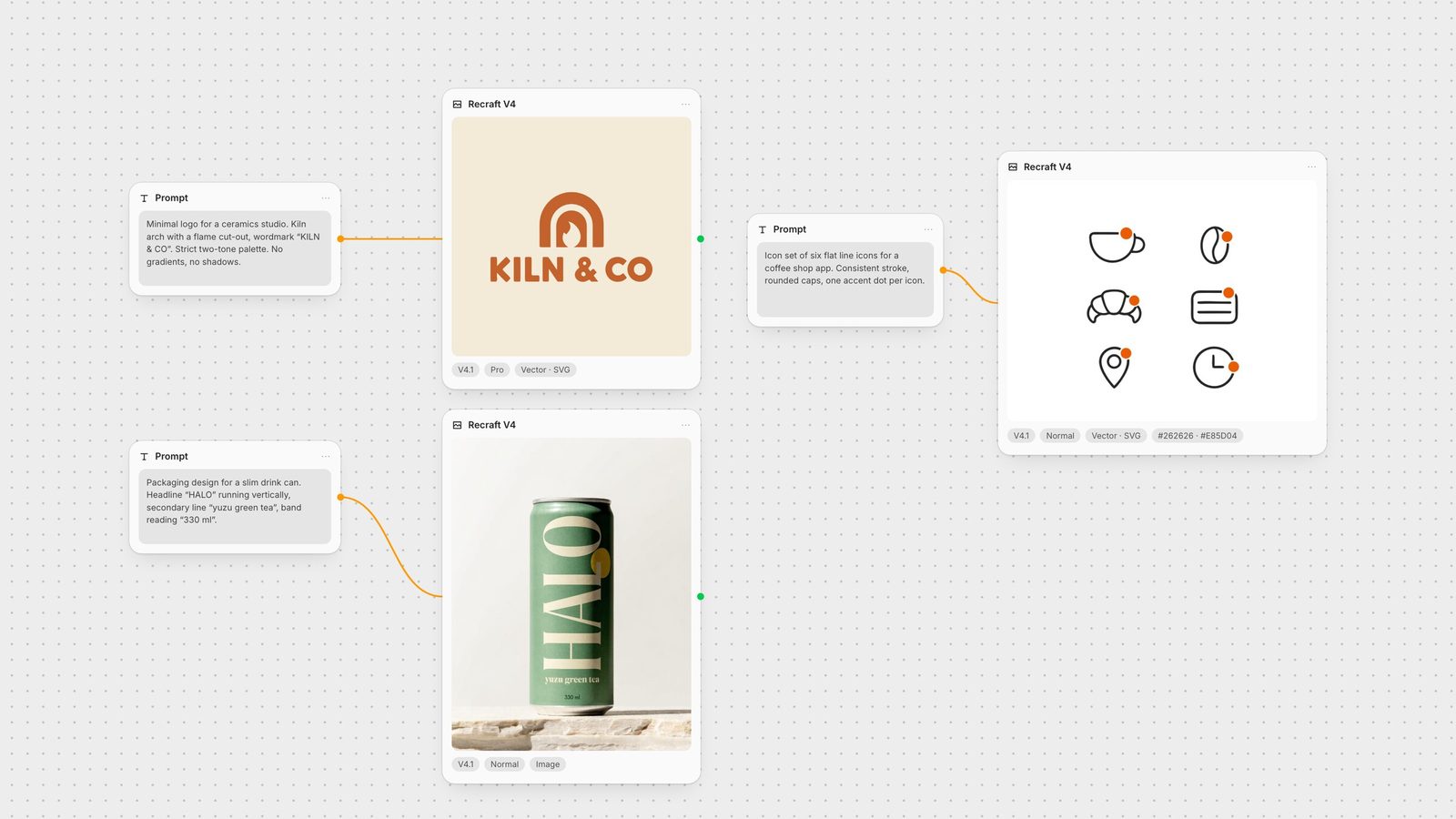
"Minimal logo for a small ceramics studio. Graphic type: symbol plus wordmark. Shape logic: a single rounded kiln arch built from two thick concentric arcs, with a small flame shape cut out of the centre, perfectly symmetrical, clear silhouette. Wordmark "KILN & CO" set below the symbol in a bold geometric sans-serif with wide letter spacing. Color system: strict two-tone palette, terracotta on warm cream. Line discipline: consistent stroke weight. Layout: centered, generous margins. Flat colors only, no gradients, no shadows, no texture."
What we found when we opened the files:
They are small, clean SVGs. The logo is 13 paths; the six-icon set is 24. That is a file you can open and adjust in any vector editor, not a traced bitmap with thousands of nodes.
The colours are exact. We passed terracotta (#C4622D) as the preferred colour and cream (#F4EAD8) as the background. Every fill in the logo file is one of those two values. The icon set used exactly our charcoal and orange, plus white.
Text arrives as outlines. The wordmark is drawn as paths, not live type. You can recolour and reshape it, but you cannot retype it. For a real brand, treat the generated lettering as a sketch and set the final wordmark in a licensed typeface.
Be literal about layout. We asked for icons "in a 3 by 2 grid" and got two columns and three rows. Write "three columns, two rows" if the arrangement matters.
For more options for marks and icon sets, see the best AI logo and vector generators.
Recraft's guidance is to put every required string in quotation marks and to describe the typographic system, not just the words: format, headline size and placement, secondary lines, colour blocking and readability (Recraft prompting guide). Across our five runs with text, the model wrote "KILN & CO", "NIGHT MARKET", "FRI 14 AUG", "yuzu green tea" and "330 ml" exactly as quoted every time. One headline was damaged, and not by spelling.
On the drink can, we asked for "one small yuzu-yellow circle behind the headline". The normal model put the circle beside the last letter. The Pro model put it on top of the L and broke the word. If a shape and a word share space, say where the shape goes relative to the letters, or leave it out and add it later.
For more on this, see the best AI models for text in images.
The Preferred Colors field takes hex values and sends them to Recraft as RGB colours; Background Color does the same for the ground. With the same poster prompt, the run without colours picked a bright red-and-rainbow palette. With navy, amber and coral set, those three colours took over the headline, lanterns and stalls. The cream background and dark outlines stayed, and the lettering and layout changed too, so treat the palette as a strong steer on raster output rather than a lock. On vector output, as shown above, the fills matched our values exactly.
Name the colour roles in the prompt as well ("terracotta mark on warm cream"), because the fields say which colours to use but not where.
Pro is the higher-resolution model. fal describes Recraft V4.1 Pro as going "up to 2048×2048 and ultra-wide formats" for "hero imagery, campaign work, and print" (fal: Recraft V4.1 Pro), and Recraft's own docs list 2048 × 2048 for V4 Pro (Recraft V4 model docs). In our portrait 3:4 test, the normal model returned 896 × 1216 and Pro returned 1792 × 2432, with noticeably richer surfaces and light. On fal's price list the V4.1 Pro image endpoint costs $0.21 per image against $0.035 for normal, six times as much, so the sensible split is: explore with normal, then re-run the chosen prompt on Pro. Pro did not beat normal on text or layout in our one-run test; it lost.
The Recraft V4 node runs all eight fal endpoints. It defaults to V4.1, Pro, Image output and Square HD.
Prompt: up to 10,000 characters. Connect a text node to reuse one prompt across runs.
Output Type: Image (raster) or Vector (SVG).
Version: V4.1, or V4 for older workflows.
Model: Normal or Pro.
Image Size: Square HD, Square, Portrait 3:4, Portrait 9:16, Landscape 4:3 or Landscape 16:9.
Preferred Colors: hex values separated by commas or new lines.
Background Color: one hex value.
Block NSFW: content moderation, on by default.
To get the SVG file, use Download media on the node. Recraft V3 is also available as a separate node (Recraft V3) if you want its preset styles, such as vector illustration or hand-drawn; V4 has no style dropdown.
A brand kit is rarely one image. In Fuser you can keep the palette and the prompt structure in text nodes, run a Vector logo, an icon set and a Pro packaging render side by side, and compare them on one canvas. Raster outputs can go straight into other nodes: animate the packaging shot with an image-to-video model, or upscale it with Recraft Upscale. If you are choosing between image models for a brand system, the best AI image models compares the others Fuser runs.
What to write and which setting to change for each kind of brand asset.
| Asset | Prompt for | Settings |
|---|---|---|
| By job | ||
| Logo | Graphic type, shape logic, two-colour palette, constraints (no gradients, no shadows). | Vector output, Pro, Preferred Colors + Background Color |
| Icon set | Count, exact grid (columns × rows), stroke style, same weight in every icon. | Vector output, normal, Preferred Colors |
| Packaging | Every string in quotes, which line is largest, where each sits, colour blocking. | Image output, normal to explore, Pro for the final |
| Poster | Headline and date in quotes, layout top to bottom, illustration style. | Image output, Portrait 3:4, Preferred Colors |
| Exploration | A short prompt of a few words; let the model compose. | Image output, normal |
Yes. The vector endpoints return a real SVG. In our tests the files were compact (13 paths for a logo, 24 for a six-icon set) and used exactly the colours we supplied. Text in the SVG is outlined as paths, not editable type.
Not through the V4 endpoints Fuser uses: they take no style parameter, and Recraft lists style creation as unsupported for V4. Describe the style in the prompt. Recraft V3 has preset styles such as vector illustration, and Fuser runs it as a separate node.
Put each string in quotation marks and describe the hierarchy: which line is largest, where each one sits and how it contrasts with the background. Keep decorative shapes off the letters; in our test a shape placed behind a headline broke one letter.
Pro generates at higher resolution; fal lists it at up to 2048 × 2048 plus ultra-wide formats. In our portrait 3:4 test Pro returned twice the pixel dimensions of the normal model for the same size setting, and fal prices the Pro image endpoint at six times the normal one.
Yes. Enter hex values in Preferred Colors and, optionally, Background Color. On vector output the fills matched our values exactly; on raster output they steered the palette strongly but the model kept some neutrals of its own.
No. It generates from text only. Generate with Recraft, then connect the result to an editing model such as Nano Banana or Qwen Image Edit in the same Fuser canvas.
Run the logo, icons and packaging in Recraft V4.1 side by side, then take the results further.