One click, whole workflow
Recipes are here. Package a whole workflow and run it in one click
Explore recipesOne click, whole workflow
Recipes are here. Package a whole workflow and run it in one click
Explore recipesA practical Seedance 2.5 prompt guide built on ByteDance's own documentation and our test runs: prompt order, multi-shot and timestamp syntax, camera language, sound brackets, references and fixes for common failures.
All guides · Seedance in Fuser
Quick answer: write a Seedance 2.5 prompt in ByteDance's own order: subject and action, scene, visual style, camera movement and cuts, then sound. Split anything longer than one shot into "Shot 1 / Shot 2" and, on 2.5, give each shot an integer-second range such as [0-2s]. Put sound in brackets so the model can tell it apart: angle brackets for effects, curly braces for dialogue, round brackets for music. When you add references, name each one (@Image1, @Video1, @Audio1) and say what it supplies (BytePlus: Seedance 2.5 tutorial).
The Seedance node in Fuser is labelled "Seedance 2" and defaults to Seedance 2.5. A Model dropdown switches to Seedance 2.0, 2.0 Fast or 2.0 Mini. There is no "Pro" variant. What changes between them:
Seedance 2.5: 4 to 30 seconds in one generation, 480p to 1080p, up to 30 reference images, 10 reference videos and 10 reference audio clips. Audio references work only here.
Seedance 2.0: up to 15 seconds, up to 4K, up to 9 images and 3 videos.
2.0 Fast and 2.0 Mini: the same 15-second ceiling, 480p or 720p only. Mini has no bitrate setting.
All four are billed by tokens. Seedance 2.5 has the highest rate per token, 2.0 costs less, Fast less again, and Mini costs about a third as much per token as 2.5 (BytePlus: ModelArk pricing). The price list does not count generated audio as a separate cost. ByteDance notes that 2.0 and 2.5 have noticeably different looks from the same prompt, so pick one version for a sequence rather than mixing them (BytePlus: Seedance 2.5 prompt guide).
ByteDance's rule for 2.5 is "subject + action/event + scene and environment + visual style + camera movement/shot cuts + sound", leaving out any part you don't need (BytePlus: Seedance 2.5 tutorial). The 2.0 guide frames the same idea as writing an engineering instruction rather than copy: who, where, doing what, how the camera moves, and in what order (BytePlus: Seedance 2.0 prompt guide).
Subject and action. Name the subject once and reuse the same label every time. Describe movement by body part, with speed and force: "slowly raises a hand", "quickly turns her head".
Scene. Place, time of day and light source.
Style. Look, colour and lens: "photorealistic, natural colors, shallow depth of field".
Camera and cuts. Shot size, one movement, and where the cuts fall.
Sound. Effects, dialogue and music in their brackets.
Constraints. What must not appear: "no subtitles", "no BGM", "do not generate a logo".
The 2.0 guide asks for slow, continuous, small movements over sprints and big jumps, and for emotions shown through physical detail ("her shoulders drop") rather than words like "very sad". The 2.5 guide relaxes this: give general action descriptions and reserve detail for the few moments that matter.
Seedance reads standard film terms directly. The 2.5 guide lists shot sizes (extreme wide, wide, medium, medium close-up, close-up), movements (push in, pull out, pan, track, follow, orbit, tilt up, handheld shake), angles (low angle, overhead, first-person) and techniques such as one-shot long take, dolly zoom, FPV, bullet time and speed ramp.
One move per shot. The 2.0 guide warns that asking for push, pull, pan and move at once "will increase image instability".
Explain niche terms. Write the term, then what it looks like: "Rack focus: the trees in the foreground blur as the character behind them comes into focus."
Say when and how a transition happens. "At the 5-second mark, the camera transitions left with a wipe."
For more than one shot, write a small storyboard: "Shot 1 / Shot 2 / Shot 3", each with camera, action, place and sound, in the order things happen. Seedance 2.5 also reads integer-second timestamps such as [0-3s] or "at the 5-second mark". Seedance 2.0 does not: it responds to shot numbers only, and its guide says forcing exact durations "may lead to abnormal generation results" (BytePlus: Seedance 2.5 prompt guide, Seedance 2.0 prompt guide).
Keep the timeline continuous (no gap between 0-3s and 5-6s) and don't overpack it. Too little in a range and the model improvises; too much and it adds extra cuts or drops beats.
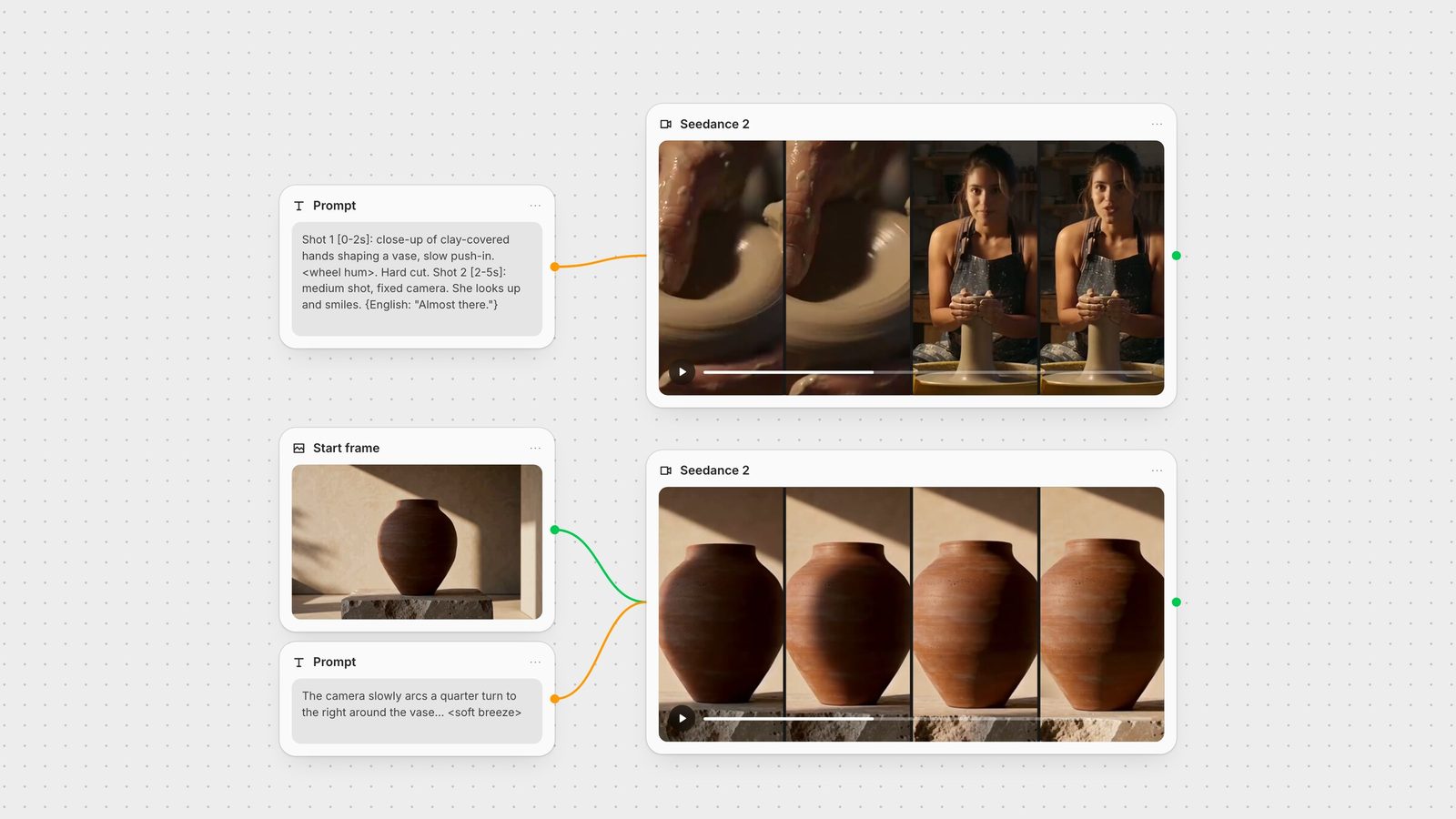
We ran the prompt from the diagram above once on Seedance 2.5 (text-to-video, 480p, 5 seconds, audio on). What held:
The cut landed on the timestamp. ffmpeg scene detection puts the hard cut at 2.17 seconds, against the [0-2s] boundary we wrote.
The line landed inside its range. A Whisper transcript of the clip's audio has "Almost there." at 4.3 to 4.9 seconds, inside Shot 2's [2-5s].
Shot 2 matched the brief: a fixed medium shot, the potter looking into the lens under a work lamp, with a blue dusk window behind her.
What didn't: Shot 1 shows almost no push-in, and the pot changes between shots, a low open bowl in the close-up and a tall cylinder in the medium shot. When an object appears in two shots, describe it the same way in both, or give it an image reference so the model has one version to hold.
Seedance 2.5 generates up to 30 seconds in one pass, up from 15 on 2.0, so a whole scene can be one continuous shot. In our Seedance vs Kling vs Veo test, two single-shot prompts at 720p and 6 seconds, one run each, 2.5 delivered a steady push-in on a product and kept a speaking potter in one take, with the line arriving at about four and a half seconds. The potter's hands ended up mostly hidden behind the vase, and the light came out cooler than the "warm workshop" we asked for. That article puts both clips next to Kling 3.0 and Veo 3.1.
To go past 30 seconds, connect the clip as a reference video and ask for a continuation. ByteDance's 2.5 guide says an extension prompt should use words like "extend", "continue", "continue from" or "extend the story", and its examples open with "Extend @Video 1" followed by what happens next (in Fuser, write the reference as @Video1) (BytePlus: Seedance 2.5 prompt guide). How to extend AI video compares this with cutting separate clips together.
Generate Audio is on by default in Fuser's Seedance node, and the model produces effects, ambience and lip-synced speech with the picture. ByteDance's bracket convention for 2.5:
<angle brackets> for sound effects: <rain on a tin roof>
{curly braces} for dialogue: {English: "We're closed."}
(round brackets) for music: (slow piano)
【corner brackets】 for on-screen subtitles you actually want
Name the language before non-Chinese dialogue, and keep one language per line; the 2.0 guide says not to mix Chinese and English except for proper nouns. ByteDance lists 11 languages for prompts and generated speech on 2.5: Chinese, English, Spanish, Indonesian, Malay, Thai, Arabic, Portuguese, Vietnamese, Japanese and Korean (BytePlus: Seedance 2.5 tutorial). Negative sound constraints work: "No BGM; generate only environmental sounds and action sounds." For performance notes, attach them to the speaker, not the words: Nora's line (tired): "One more." Repeating dialogue words or tagging individual words with emotions is one of the triggers for unwanted subtitles.
The node decides the mode from what you connect:
One image becomes the first frame (image-to-video). Add an End Image for a first-and-last-frame clip. Image-to-video on 2.5 always takes its aspect ratio from the first frame (BytePlus: Seedance 2.5 tutorial); our 1344 × 768 frame came back as a 1270 × 726 clip. Size that image first; first and last frame video covers the technique.
Two or more images, or any video or audio switch to reference mode. Refer to them in the prompt as @Image1, @Video1, @Audio1, in the order they are connected. An end image is not available in reference mode.
Audio references are 2.5 only, and in Fuser they need at least one image or video alongside.
We tested image-to-video with the same start frame the MiniMax H3 guide uses, so the two can be compared directly. The prompt asked for one move, "the camera slowly arcs a quarter turn to the right around the vase", told the model to keep the vase unchanged, and put the sound in angle brackets. One run at 720p, 4 seconds. The shape, the plinth and the leaf shadows carried over from the frame and there was no cut. The arc came back much smaller than a quarter turn, with a slight push-in, and the vase came out lighter and warmer in tone than in the start frame as the camera moved toward the sunlit side. The soundtrack was quiet ambience with no music, as asked. In a short clip, ask for less movement than you want, or give the move more seconds.
ByteDance's advice on writing reference prompts:
Bind every asset to a job. "Image 1 is the knight. Use the camera orbit from Video 1. The knight speaks with the voice in Audio 1." Don't rely on names written inside the image.
Say what not to take. If you only want the motion from a clip, say "refer to the action in Video 1", not "use Video 1".
Fewer, better assets. The 2.0 guide recommends four or five: one or two character images, one scene, one camera-movement clip and one audio clip. Using the full allowance makes it harder for the model to decide what matters.
Faces: use a separate headshot plus a full-body image. Multi-view sheets are discouraged on 2.0 because they can read as several people; 2.5 accepts them.
Order matters with several characters. Connect references in the order characters first appear, and put the asset that needs the most precision first.
Subtitles you didn't ask for: add "No subtitles" and remove any text from reference images and videos. ByteDance says landscape output produces fewer stray subtitles than portrait.
Watermarks or logos: "Do not generate watermarks. Do not generate logos."
Music despite "no BGM": list the synonyms (music, score, instrumental, melody) and repeat the constraint at the start and end of the prompt.
Duplicated characters: tag each character with its image ("Mara (Image 1)") and add "no duplicated people".
Glowing eyes: swap intense emotion words like "fanatical" for neutral ones like "amazed", and add "normal human eyes".
Misspelled on-screen text: have the word appear letter by letter, or supply it as an image reference.
Fingerprint-like texture in grass or foliage: downscale high-resolution reference images to no larger than the output resolution.
Style drifting to live action: state the style explicitly ("2D Japanese anime style"), or restyle the reference image first.
Product reveal, single take: "Slow orbit around a brushed-steel watch on black volcanic sand at dawn. Macro close-up, one continuous shot. Cool blue light warming to gold. <soft wind, grains of sand settling>. No subtitles."
Two-shot dialogue: "A night diner. Shot 1 [0-3s]: wide shot, fixed camera, a waitress wipes the counter. Shot 2 [3-6s]: close-up, she looks up. {English: "We're closed."} <fridge hum>. No BGM. No subtitles."
Travel montage: "Shot 1 [0-2s]: FPV glide over rice terraces. Hard cut. Shot 2 [2-4s]: tracking shot of a cyclist on a coast road. Hard cut. Shot 3 [4-6s]: slow push-in on a lighthouse at dusk. (upbeat acoustic guitar)."
First frame from a keyframe: connect one image, then: "The camera slowly pulls out to reveal the full kitchen as steam rises from the pan. Keep the product and label unchanged."
Character reference: "Image 1 is a headshot of Mara. Image 2 is her outfit. Mara walks through a rainy market at night, tracking shot from the side. {English: "Almost home."} <rain, distant traffic>."
Motion from a clip: "Refer to the camera movement in Video 1. A paper boat drifts down a flooded street; low angle; photorealistic. No subtitles."
Seedance is strongest when it starts from a frame you already like. In Fuser, generate the keyframe with an image model such as GPT Image or Nano Banana and connect it to the Seedance node's Images input as the first frame. Keep the prompt in its own text node so you can wire the same words into a second Seedance node and compare settings side by side. Iterate at 480p and short durations, which use fewer tokens, then re-run the take you like at 720p or 1080p on the same model; ByteDance warns that 2.0 and 2.5 look different from the same prompt, so don't draft on one and finish on the other. Send the result to SeedVR upscaling or Topaz on the same canvas. For how Seedance compares with other models that generate sound, see the best AI video generators with audio.
What each model option on the Seedance node accepts.
| Setting | Seedance 2.5 (default) | Seedance 2.0 / Fast / Mini |
|---|---|---|
| Limits | ||
| Duration | 4 to 30 seconds | 4 to 15 seconds |
| Resolution | 480p, 720p, 1080p | Up to 4K on 2.0; 480p or 720p on Fast and Mini |
| Reference images | Up to 30 | Up to 9 |
| Reference videos | Up to 10 | Up to 3 |
| Reference audio | Up to 10 clips, with an image or video | Not supported |
| Timestamps in the prompt | Integer seconds, e.g. [0-3s] | Shot numbers only |
| Relative cost per token | Highest of the four | Lower on 2.0, lower again on Fast; Mini about a third of 2.5 |
ByteDance's order is subject and action, scene and environment, visual style, camera movement and shot cuts, then sound. Leave out parts you don't need, and add constraints such as "no subtitles" at the end.
Label each shot (Shot 1, Shot 2) and describe its camera, action and sound in order. Seedance 2.5 also reads integer-second timestamps such as [0-2s]; Seedance 2.0 responds to shot numbers only.
Keep Generate Audio on and put the line in curly braces with the language first, for example {English: "Almost there."}. Use angle brackets for sound effects and round brackets for music.
Seedance 2.5 generates 4 to 30 seconds in one pass. Seedance 2.0, Fast and Mini stop at 15 seconds. In Fuser you set the length with the Duration slider on the Seedance node.
Connect two or more images (or any video or audio) and the node switches to reference mode. Refer to them as @Image1, @Image2 in connection order and say what each one supplies, such as the face, the outfit or the location.
No. The Seedance node in Fuser offers Seedance 2.5, 2.0, 2.0 Fast and 2.0 Mini. Fast and Mini cost less per token and stop at 720p.
Generate the frame, animate it with sound and finish the clip on one canvas.