One click, whole workflow
Recipes are here. Package a whole workflow and run it in one click
Explore recipesOne click, whole workflow
Recipes are here. Package a whole workflow and run it in one click
Explore recipesChoose a 3D generator by input and destination: Hunyuan3D V3 for clean, budget-controlled meshes, Trellis 2 for faithful single-image assets, Tripo and Rodin for game props, SAM 3D for objects in real photos, and Meshy to remesh, retexture and rig.
All guides · Best AI image models
Quick answer: start with Hunyuan3D V3 when you need a clean mesh with control over polygon count, Trellis 2 for a faithful asset from a single concept image, and Tripo 3D or Rodin for game-ready props. Use SAM 3D Objects to lift one object out of an everyday photo. Then finish with Meshy's remesh, retexture and rigging nodes. All of them export GLB, and none of them replace CAD for parts that need exact dimensions.
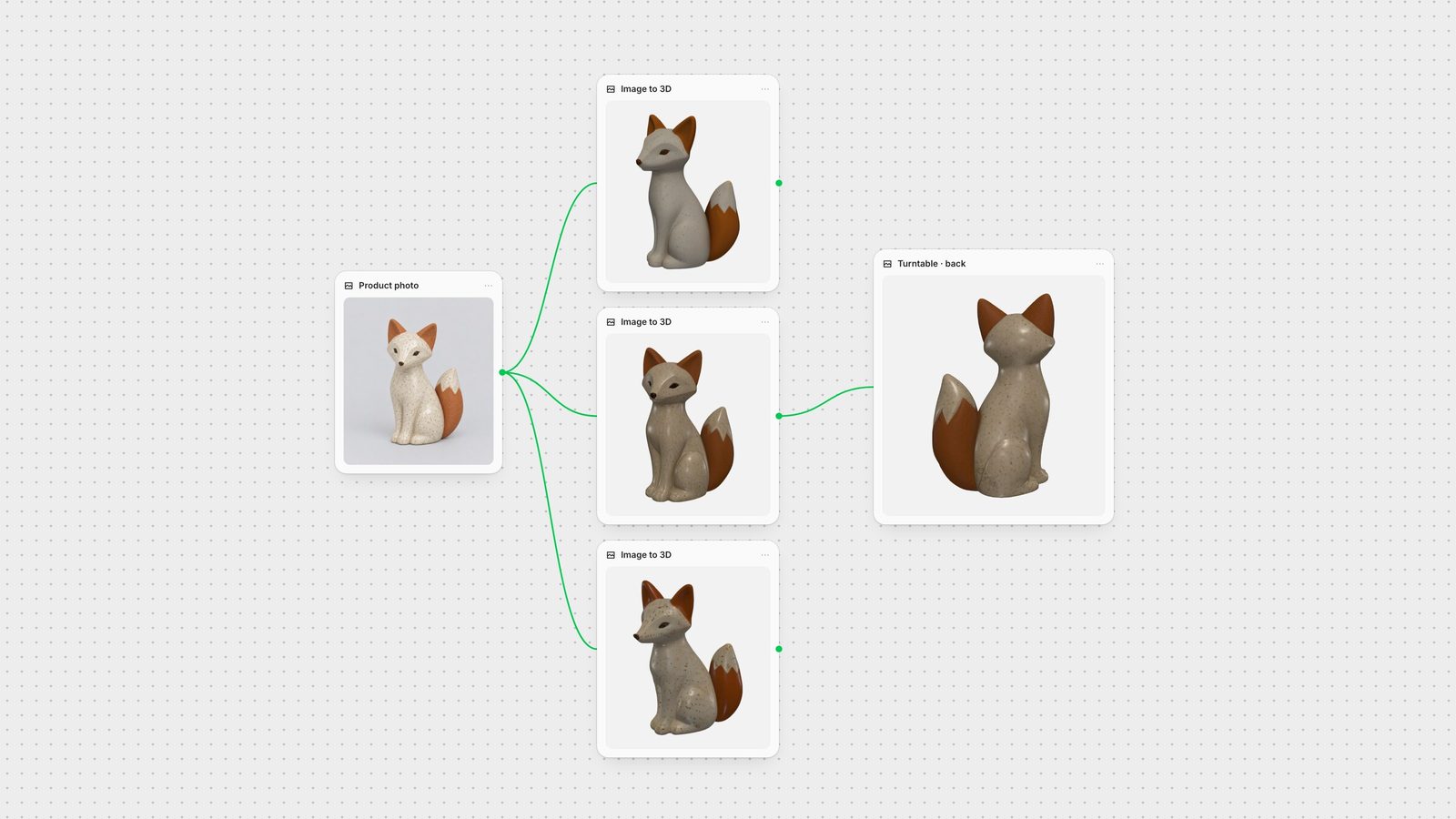
We generated a studio photo of a ceramic fox figurine and sent the same image to Hunyuan3D V3, Trellis 2 and Tripo 2.5, then rendered every GLB from the front and the back under identical lighting.
All three produced a complete object with a plausible back and tail, even though the back was never photographed. The differences are in the surface. Hunyuan3D V3 gave the smoothest, cleanest body and softened the glaze speckle. Trellis 2 kept the sculpted facets and texture closest to the photo, with a slightly warmer glaze. Tripo 2.5 with PBR textures produced the most pronounced speckle. Treat this as one object, not a benchmark: pick by the surface quality your project needs, and test on your own subject.
Tencent's Hunyuan3D V3 generates from text, a single image or a sketch. In Fuser you set face count and generation type, which makes it the right choice for props, furniture and characters you plan to retopologise, rig or ship to a real-time engine. It is trained for single, isolated subjects, so it struggles with multi-object scenes, transparent glass and legible text decals. When you have front, back and side views, use Hunyuan3D Multiview instead for better back-side geometry.
Trellis 2 is strong at staying close to a single 2D concept, including organic shapes and open surfaces such as leaves or clothing, and it returns PBR materials ready for a DCC tool or game engine. Avoid it for articulated joints, hair cards and engraved text.
Tripo 2.5 is fast and works from one image or from aligned multi-view sheets, which reduce guessing on the unseen sides. Rodin Gen-2.5 targets hard-surface props, weapons, vehicles and stylised characters, with quad topology, quality tiers and PBR textures. Neither is built for photoreal human heads or complex multi-part scenes.
Meta's SAM 3D Objects reconstructs a specific item from a casual, cluttered photograph, which is useful for product digitisation and AR previews when you have no clean studio shot. Harsh directional light bakes into the texture, and reflective or transparent surfaces break its depth estimate.
Meshy covers generation (v7 single image, v6, and v5 multi-image) and, in Fuser, three finishing nodes. Meshy 5 Remesh turns dense AI or scan geometry into lighter, quad-based meshes. Meshy 5 Retexture re-skins existing geometry, for example clean, rusted and sci-fi variants of one prop. Meshy Rigging adds a standard biped skeleton and motion presets to humanoid characters. Rigging is humanoid-only, and retextured lettering is unreliable.
In Fuser, generate or pick a product image, branch it into two or three 3D generators, compare the GLBs, then send the winner through remesh, retexture or rigging. Pair it with image-to-video for a turntable, or see the full multi-model workflow. Save the graph as a Recipe so the next product goes through the same steps.
Last verified September 28, 2026.
Match your input and destination to the generator, then finish in the same workflow.
| Model | Reach for it when | Watch out for |
|---|---|---|
| Generate | ||
| Hunyuan3D V3 | Clean props and characters from text, image or sketch, with face-count control. | Single subjects only; blurs text decals. |
| Hunyuan3D Multiview | You have front, back and side views. | Needs coordinated views, not one photo. |
| Trellis 2 | Faithful asset from one concept, including open surfaces. | Articulated joints, hair cards, engraved text. |
| Tripo 2.5 | Fast props and stylised characters; multi-view sheets supported. | Photoreal faces, glass, multi-object scenes. |
| Rodin Gen-2.5 | Hard-surface props with quad topology and PBR. | Complex scenes and photoreal heads. |
| SAM 3D Objects | One object from a cluttered, casual photo. | Harsh shadows bake in; reflective surfaces fail. |
| Finish | ||
| Meshy 5 Remesh | Dense AI or scan meshes that need a clean, lighter layout. | Sharp hard-surface bevels need higher counts. |
| Meshy 5 Retexture | New materials or variants on existing geometry. | Logos and lettering come out garbled. |
| Meshy Rigging | Humanoid characters that need a skeleton and motion presets. | Humanoids only; no facial rigs. |
There is no single best. Hunyuan3D V3 is a strong default for clean, budget-controlled meshes; Trellis 2 stays closest to a single concept image; Tripo and Rodin suit game props; SAM 3D Objects reconstructs objects from real photos.
Yes. Image-to-3D models infer the unseen sides. In our test, Hunyuan3D V3, Trellis 2 and Tripo 2.5 all produced a complete figurine with a plausible back from one front-facing photo. Multi-view inputs reduce guessing.
The models covered here return GLB, which opens in Blender, Unity, Unreal and most web viewers. Some also provide OBJ or separate PBR texture maps.
Often close. Use a model with polygon or topology controls, then run Meshy 5 Remesh for a lighter layout and Meshy Rigging for humanoid characters. Check scale, UVs and topology before shipping.
Yes. In Fuser, connect one image to several 3D nodes, compare the results on the canvas and send the best mesh to the next step.
Generate, compare and finish 3D models on one canvas, then reuse the workflow.