One click, whole workflow
Recipes are here. Package a whole workflow and run it in one click
Explore recipesOne click, whole workflow
Recipes are here. Package a whole workflow and run it in one click
Explore recipesThe same portrait and script through HeyGen Avatar IV, Veo 3.1 Fast, Kling 3.0 and MiniMax H3, with every clip shown, plus the two performance-driven options for animating a character from your own acting.
All guides · Best AI lip sync tools · Best AI video generators with audio
Quick answer: for a person talking to camera from a single photo, use HeyGen Avatar IV. It is the only model here built for the job: it takes a portrait plus either a typed script and a HeyGen voice or your own voice recording, holds eye contact, and in our test kept the face closest to the photo. Veo 3.1, Kling 3.0 and MiniMax H3 are general video models that also speak a quoted line, and all three delivered our script word for word. They add more body movement and room sound, but in the image-to-video mode we tested they invent the voice; HeyGen is the one built to lip-sync to a recording you supply. If you want a character to copy a performance you record, skip all four and use Runway Act-Two or Kling 3.0 Motion Control.
"AI avatar" covers three different jobs, and the models split cleanly along them:
Script-driven avatars turn a photo and a script or voice track into a talking clip. In Fuser that is HeyGen Avatar IV.
Video models that speak take a start frame and a prompt with the line in quotes, and generate picture, voice and sound together: Veo 3.1, Kling 3.0, MiniMax H3 and Seedance 2.5.
Performance-driven models take a video of someone acting and transfer the motion and expression to your character: Runway Act-Two and Kling 3.0 Motion Control.
If you already have footage and only need the mouth to match new audio, that is lip sync, a fourth job with its own tools; see the best AI lip sync tools.
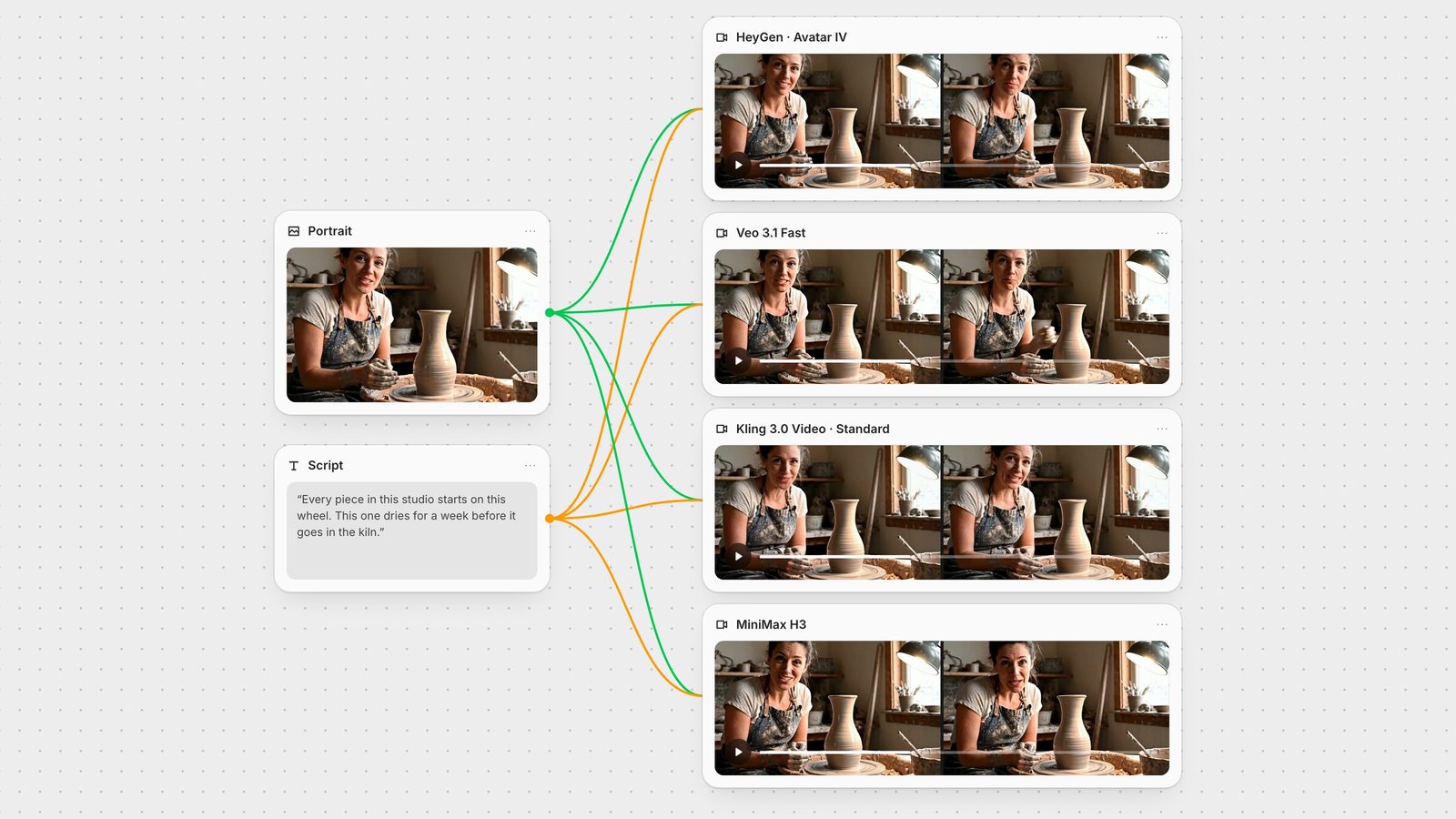
One portrait, one script, four models, one run each on 28 September 2026, using the same model versions Fuser's nodes call. None needed a retry.
Portrait: a 1280×720 still of a potter at her wheel, facing the camera. It is the same image we used in the lip sync test, so you can compare across the two articles.
Script: "Every piece in this studio starts on this wheel. This one dries for a week before it goes in the kiln."
HeyGen Avatar IV: the script as its text input with the voice "Jane", 1080p, 16:9, Stable talking style, captions off. We ran it a second time with an uploaded voice recording of the same words instead of the text.
Veo 3.1 Fast, Kling 3.0 Standard and MiniMax H3: image-to-video from the portrait, 8 seconds, audio on, with this prompt: "The potter looks into the camera and says in a warm, relaxed voice: "Every piece in this studio starts on this wheel. This one dries for a week before it goes in the kiln." Locked-off camera, natural small head movements, her hands resting on the clay. Quiet studio ambience, no music." Veo ran at 1080p, Kling's Standard tier returned 720p, and H3 ran at its 768p tier with prompt expansion left on.
We transcribed every clip with Whisper to check the words and time the speech, checked for cuts with scene-change detection, and compared faces frame by frame.
All four said the script exactly, and none cut away from the single shot. The differences were in the face, the body and the voice.
Best for: presenters, explainers, course and product videos where one person talks to camera, especially in your own voice.
HeyGen's Avatar IV turns one photo into a speaking clip, lip-syncing either to text it voices itself or to an audio file you supply; audio and a script are alternatives, so you use one or the other (HeyGen API: Audio to Video). HeyGen describes an "audio-to-expression engine" that reads tone, rhythm and emotion to drive head tilts, pauses and micro-expressions from a single image (HeyGen: Avatar IV guide).
What we saw: the face stayed the closest to the source photo of the four, with steady eye contact and small, calm head movement; her hands kept a slight kneading motion. Each clip ends with the speech: 5.9 seconds from the typed script, 6.6 seconds from the recording. That is the practical difference from the video models: you control the voice and the length, and nothing is invented beyond the face and a little motion. The scene stays as still as the photo, so do not expect camera moves.
In Fuser: the HeyGen node takes an image plus either an audio input or a prompt and voice (connect audio and the prompt and voice fields hide). You can set 16:9, 9:16, 4:5, 5:4, 1:1 or auto, 360p to 1080p (720p by default), a Stable or Expressive talking style, and burned-in captions. Per second of output, it costs less than Kling 3.0 Standard with audio or Veo 3.1 Fast, and more than MiniMax H3 at 768p.
HeyGen has since launched Avatar V in its own app, which learns your mannerisms from a short video of you (HeyGen: Avatar V); the model in Fuser is Avatar IV.
Best for: a speaking character inside a scene, where hands, glances and room sound matter more than a locked gaze.
Google's prompt guide says to put speech in quotes and to describe sound effects and ambience separately (Gemini API: Veo), which is what our prompt did. Google's docs also say 1080p output requires an 8-second clip.
What we saw: the most natural body. Her hands moved on the clay as she talked, and midway through the second sentence she glanced down at the vase, then smiled back up at the end. That reads like real footage, but it also means she looks away from the lens for part of the line, which a presenter shot usually avoids. The line ran from the start to 6.8 seconds of the 8.
In Fuser: the Veo node defaults to Veo 3.1 Fast at 720p with audio on; image-to-video must be 8 seconds. With audio on, Veo 3.1 Fast costs the same per second at 720p and 1080p, and it was the most expensive of the four per second; our clip was the priciest in this test. For more on prompting it, see the Veo 3.1 prompt guide.
Best for: dialogue in several languages or between several characters, and scenes you will extend into multi-shot sequences.
Kling says VIDEO 3.0 speaks Chinese, English, Japanese, Korean and Spanish, matches each quoted line to the character you assign it to, and follows accents written into the prompt (Kling VIDEO 3.0 guide).
What we saw: a good likeness with a small head tilt and her hands working the clay, and eye contact held throughout. The delivery was the slowest of the four: a pause of just over a second between the sentences, finishing at 7.1 seconds. The Standard tier returned 720p.
In Fuser: the Kling 3.0 Video node runs Standard or Pro, 3 to 15 seconds, at 16:9, 9:16 or 1:1. Generate Audio is off by default, so switch it on or you get a silent clip. Audio raises Standard's per-second cost by half, and our clip cost a little less than Veo's. See the Kling 3.0 prompt guide.
Best for: energetic, expressive delivery and cheap drafts of a speaking shot.
MiniMax says H3 generates native stereo sound with voice, effects and music modelled together (MiniMax: H3). In our run, H3 rewrote the prompt before generating and returned the rewrite; ours came back as a full shot description with the quoted line intact.
What we saw: the liveliest performance, with raised eyebrows, broad smiles and a nod on the emphasis. To our eyes the face also drifted furthest from the photo, and the expression reads more like an enthusiastic ad than a calm tutorial. The line finished at 6.8 seconds.
In Fuser: the MiniMax H3 node runs 5 to 15 seconds and defaults to 2K; prompt expansion is on by default. 2K costs about twice as much per second as 768p, and our 768p clip was the cheapest in this test. More in the MiniMax H3 prompt guide.
Seedance 2.5 also generates sound with the picture; ByteDance describes it as an "audio-video joint generation model" (ByteDance Seed: Seedance 2.5). Its image-to-video runs 4 to 30 seconds from one start frame, which suits a longer piece to camera. We left it out of this test because at 720p it costs several times as much per second as the others. In Fuser it is the Seedance node; see the Seedance 2.5 prompt guide.
A script cannot direct a raised eyebrow or a shrug at a precise moment. For that, act the scene yourself and transfer it to a character.
Runway Act-Two takes a driving performance video (3 to 30 seconds) and a character as an image or a video. It transfers facial expression, and with body control on (the default in Fuser) also body movement and gestures (Runway: Act-Two, Runway API). It runs through Runway's own API. Guide: Runway Act-Two guide.
Kling 3.0 Motion Control takes a character image and a motion video and makes the character perform that motion in the image's setting. The driving clip can run 3 to 30 seconds (Kling: Motion Control). It is built for body movement: there is no script or audio input, and the prompt is optional. Guide: Kling 3.0 Motion Control guide.
Neither takes a script, so they were not part of the same-script test above.
Put the portrait in an image node and the script in a text node, then wire both into several of the models above on one canvas and keep the take you like. For a presenter in a consistent voice, generate the voice once with ElevenLabs text to speech and connect it to HeyGen's audio input, so every clip shares one voice. From there you can add captions with VEED subtitles or upscale with Topaz. If you need the same character across many clips, start from consistent character references.
Only animate faces you have the right to use: your own, a consenting person's, or a character you generated.
Same portrait and script, one run each, 28 September 2026. Cost comparisons are for the settings we used.
| Model | What we saw | Use it when |
|---|---|---|
| Tested: same portrait, same script | ||
| HeyGen Avatar IV | Closest likeness, steady eye contact, calm motion; clip length matches the speech. Roughly half the cost of the Veo clip. | One person talks to camera, ideally in your own recorded voice. |
| Veo 3.1 Fast | Most natural hands and glances; looked down at the vase mid-line. 1080p, the most expensive clip. | The speaker is part of a living scene with room sound. |
| Kling 3.0 Standard | Close likeness, eye contact held, slow read with a long pause. 720p, the second most expensive clip. | Multilingual or multi-character dialogue. |
| MiniMax H3 | Most expressive; face drifted furthest from the photo. 768p, the cheapest clip. | Energetic delivery or cheap drafts. |
| Not in the test | ||
| Seedance 2.5 | Generates sound with the picture; 4 to 30 s from one frame. Several times the per-second cost of the others at 720p. | A longer continuous take. |
| Runway Act-Two | Needs a 3 to 30 s driving performance, not a script. | You act the scene and want a character to copy it. |
| Kling 3.0 Motion Control | Needs a motion video, up to 30 s. | Full-body movement transferred to a character. |
For a person talking to camera from a photo, HeyGen Avatar IV. In our same-portrait test it kept the face closest to the photo, and it is the one built to lip-sync to your own voice recording. Veo 3.1, Kling 3.0 and MiniMax H3 also spoke the script word for word, with more movement but a generated voice.
Yes. HeyGen Avatar IV needs only a portrait and either a script or an audio file. Video models like Veo 3.1, Kling 3.0 and MiniMax H3 can also animate a photo into a speaking clip if you put the line in quotes in the prompt.
With HeyGen Avatar IV, yes: connect an audio file and it lip-syncs to it, and the clip runs as long as the audio. In the image-to-video mode we tested, Veo 3.1, Kling 3.0 and MiniMax H3 generate their own voice from the prompt; to put your voice on their footage afterwards, use a lip sync model.
Per second at our settings, MiniMax H3 at 768p was the cheapest, followed by HeyGen Avatar IV, Kling 3.0 Standard with audio, and Veo 3.1 Fast with audio. Our most expensive clip, from Veo, cost about two and a half times our cheapest, from MiniMax H3.
An avatar model animates a face from a script or audio. Act-Two copies a performance: you record yourself acting, and it transfers your expressions, and with body control on your gestures, to the character.
Yes, in Chinese, English, Japanese, Korean and Spanish. In Fuser the Kling 3.0 Video node's Generate Audio toggle is off by default, so turn it on for dialogue.
One portrait, one script, several models side by side. Keep the take that sounds like you.