One click, whole workflow
Recipes are here. Package a whole workflow and run it in one click
Explore recipesOne click, whole workflow
Recipes are here. Package a whole workflow and run it in one click
Explore recipesOne product photo, three image-to-3D models at their default settings: what Meshy 7, Rodin Gen-2.5 and Tripo 2.5 returned for polycount, topology, texture maps, materials, time and cost, and which to pick for games, product renders and quick drafts.
All guides · Best AI 3D model generators
Quick answer: from the same product photo at default settings, Meshy 7 returned the most usable file straight away: a 30,076-triangle mesh with full PBR maps. Rodin Gen-2.5 was the only model to turn the chrome parts into real metal, and it carved the most detail into the geometry, but at 500,000 triangles. Tripo 2.5 was the fastest and cheapest and made the cleanest speaker grille, but by default it bakes everything into one colour texture, so the chrome came out as matte grey. Pick Meshy for game and real-time assets, Rodin for close-up product renders, and Tripo for fast drafts and blockouts.
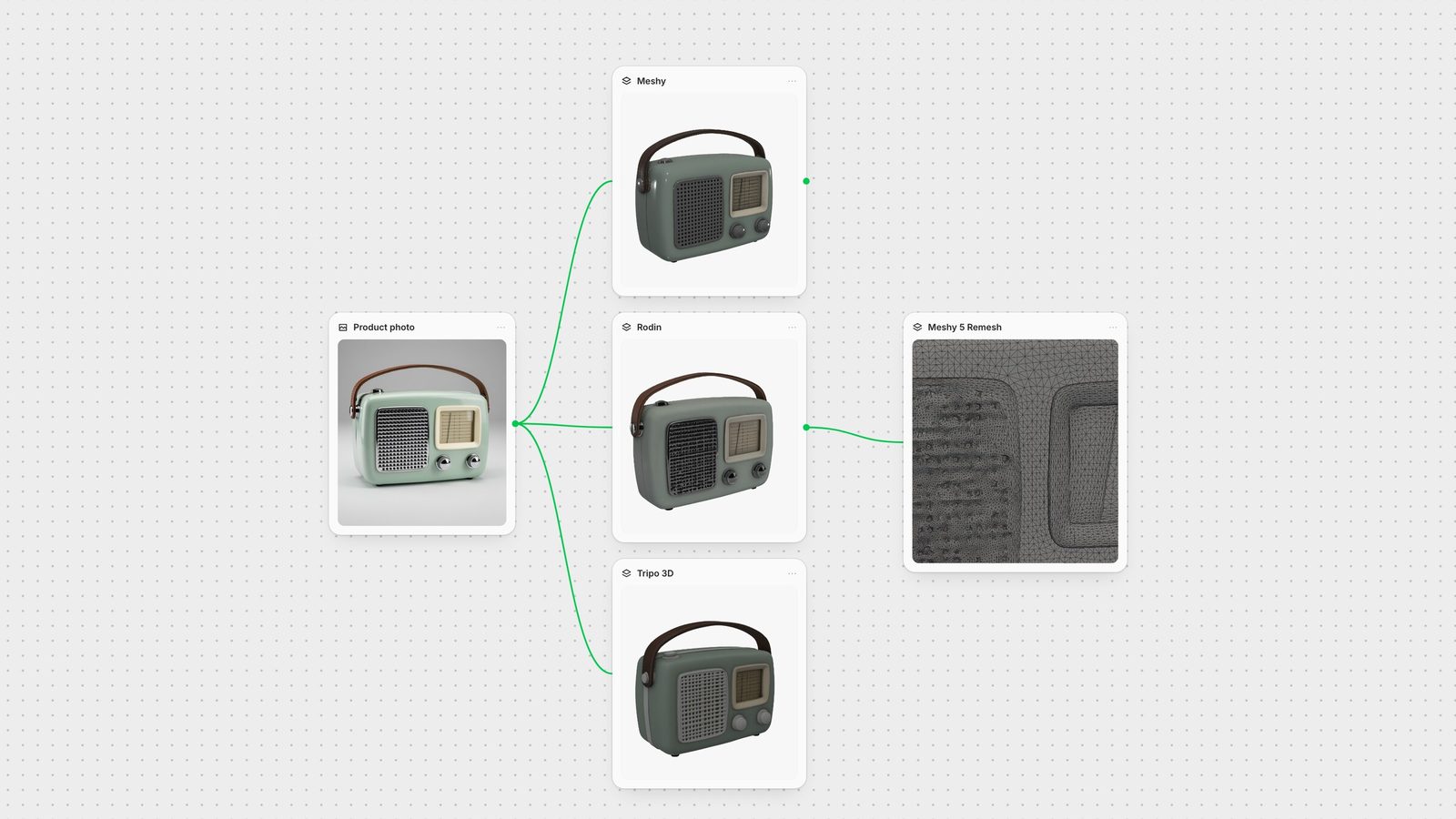
We made one 1024 px studio photo of a retro portable radio with FLUX.2 Pro: mint enamel body, chrome speaker grille and knobs, a cream dial with fine tick marks and a leather handle. It is a hard test on purpose: small perforations, thin printed lines and reflective metal next to glossy paint. The photo also came back with small numbers on the dial even though the prompt asked for none, which gave the texture pass something fine to reproduce.
The same image went to each model once, on 28 September 2026, with the defaults the Fuser node uses and no retries:
Meshy 7 (fal endpoint meshy/v7/image-to-3d): Remesh on, triangle topology, 30,000 polygon target, PBR on.
Rodin Gen-2.5 (fal-ai/hyper3d/rodin/v2.5): Gen-2.5-High tier, Mesh Quality Auto, material All.
Tripo 2.5 (tripo3d/tripo/v2.5/image-to-3d): standard texture, PBR off, quad off, no face limit.
We then read each GLB's triangle count and texture maps, and rendered every file from the front, from the back and without textures, with the same camera and lighting.
Meshy 7: 30,076 triangles, which is the 30,000 target it was given. Three 2048 px textures: base colour, a packed metallic-roughness map and a normal map. The enamel came out glossy, as in the photo, and every grille hole is a clean, regular dent in the geometry. The dial lines are slightly smeared in the texture. Meshy also returned the same model as FBX, OBJ, USDZ and STL; the Fuser node passes the GLB to the next step. Meshy's changelog describes Meshy 7 as having "higher-fidelity geometry than Meshy 6" (Meshy changelog). Took about five and a half minutes.
Rodin Gen-2.5: 500,000 triangles with 2048 px base colour, metal-roughness and normal maps, plus a second GLB with the lighting baked in (that is what material All returns). It was the only model whose grille and knobs render as metal. It also carved the dial's tick marks and the knob grip into the mesh itself. The weak spot is the grille: the perforations are irregular and noisy. Took about two and a half minutes.
Tripo 2.5: 501,532 triangles with a single 2048 px colour texture. The grille holes are the roundest and most even of the three, but the chrome parts became flat grey paint because PBR is off by default. It also invented details that are not in the photo: a grey trim band around the sides and a small dark rectangle on the back. Took about a minute and a half.
All three built a plausible back for an object photographed only from the front, and all three kept the handle attached. Times are wall-clock, including queue, from one run each.
The biggest practical difference is mesh density. Meshy remeshes by default to the polygon target you set, so its file is ready for a game engine or a web viewer. It decimates adaptively: large triangles on the flat panels, dense ones around the grille holes. Meshy's own API docs recommend turning remeshing off "for the highest-quality model" (Meshy API: Image to 3D), so turn the node's Remesh toggle off when you want the raw detail and plan to retopologise yourself. The Fuser node also offers Quad topology and Smart topology, which the node describes as clean, natively separated parts; Meshy's API caps Smart topology at 15,000 polygons.
Rodin and Tripo both returned half a million evenly spread triangles. That is fine for renders and 3D printing but heavy for real-time use. In Rodin, set Mesh Quality instead of Auto: the Fuser node offers quad meshes from 4K to 200K faces and, at the default High tier, triangle meshes from 20K to 2M. In Tripo, set Face Limit, or turn on Quad Mesh. Tripo's docs say quad output is delivered as FBX and costs extra (Tripo API: image to model v2.5).
If a mesh is already generated, send it through Meshy 5 Remesh. We ran Rodin's 500,000-triangle radio through it with quad topology and a 30,000 target. The file dropped from 34.3 MB to 11.6 MB, the GLB now holds 67,416 triangles, and the shape plus the colour and metal-roughness textures survived. Two things did not: the carved dial ticks were smoothed away, and the normal map was not carried over. Remesh before you judge fine surface detail, not after.
Meshy and Rodin both return physically based materials by default in Fuser, which is why their chrome and enamel react to light in a render. Rodin read the metal correctly; Meshy made the whole body glossy and the chrome a darker grey. Tripo's default is one colour texture with no metallic or roughness data. Turn on PBR in the Tripo node when materials matter; its fal schema says PBR overrides the texture setting (fal: Tripo 2.5).
For more resolution, Rodin's High Pack switches textures from 2K to 4K (Hyper3D: Rodin Gen-2.5), Tripo's Texture Quality has an HD option, and Meshy's node takes a Texture Prompt or a Texture Image to steer the look. Rodin's Material set to Shaded bakes lighting into the texture, which helps for unlit web viewers but looks wrong under new lights.
Tripo was fastest at about 90 seconds, Rodin took about two and a half minutes and Meshy 7 about five and a half. On fal the list prices were $0.80 per Meshy 7 generation (fal: Meshy 7), $0.40 per Rodin Gen-2.5 generation at the High tier, and about $0.30 for Tripo 2.5 with standard texture. Rodin's High Pack adds $0.80 (fal: Rodin Gen-2.5), and a Meshy 5 Remesh pass is $0.20 (fal: Meshy 5 Remesh). Treat the times as a single sample; queue load changes them.
Shoot for the model. Meshy asks for a clear subject on a simple background, at least 512 × 512, evenly lit and close to orthographic, and says cluttered scenes merge into one distorted mesh (Meshy: Image to 3D). Run a background remover first when your photo isn't a studio shot.
Add views for the back. A single photo leaves the back to guesswork, which is where Tripo invented a panel. Tripo 2.5 switches to multiview in Fuser when you connect a back, left or right image; Tripo asks for at least two views (Tripo API: multiview v2.5). Meshy 7 takes one to four images of the same object (Meshy API) and Rodin Gen-2.5 one to five (Hyper3D docs).
Pick the Rodin tier by the job. Hyper3D describes Low as suited to "clean assets and small hard-surface props" and High as "richer structure and smoother surfaces" (Hyper3D docs). Fuser defaults to High.
Characters need a pose. Meshy and Rodin both have a T/A pose toggle for humanoids. Generate in that pose, then send the mesh to Meshy Rigging.
Game, AR and web assets: Meshy 7. It is the only one that hands you a budgeted mesh with full PBR by default. Follow with Meshy 5 Retexture for material variants.
Close-up product renders: Rodin Gen-2.5. It got the materials right and kept the most modelled detail. Set a quad option if the mesh has to be edited.
Fast drafts, blockouts and 3D printing: Tripo 2.5. It is quick and cheap, its geometry was clean, and colour-only texture doesn't matter for a print. Turn PBR on for anything shiny.
The easiest way to decide is to run your own object through all three. In Fuser, connect one image to the Meshy, Rodin and Tripo 3D nodes, compare the meshes on the canvas, then send the winner to Remesh, Retexture or Rigging. If your subject is organic or you want polygon control from one image, also try Hunyuan3D V3 (Hunyuan3D guide) and Trellis 2. For the whole chain from image to video and sound, see the multi-model workflow.
Last verified September 28, 2026.
Fuser node defaults, one run each, 28 September 2026. Prices are fal list prices.
| Model | In our test | Reach for it when |
|---|---|---|
| Default output | ||
| Meshy 7 | 30,076 triangles; base colour, metallic-roughness and normal maps at 2K; 11.0 MB GLB; about 5.5 min; $0.80. | You need a game-ready polycount and PBR straight away, or FBX, OBJ, USDZ or STL too. |
| Rodin Gen-2.5 (High) | 500,000 triangles; base colour, metal-roughness and normal at 2K plus a baked-lighting GLB; 34.3 MB; about 2.5 min; $0.40. | Materials and carved detail matter more than file size: product renders, hero props. |
| Tripo 2.5 | 501,532 triangles; one 2K colour texture, no PBR; 15.9 MB; about 1.5 min; about $0.30. | You want fast, cheap drafts, clean geometry for printing, or multiview input. |
| Finish | ||
| Meshy 5 Remesh | Rodin mesh, quad, 30,000 target: 67,416 triangles, 11.6 MB; kept shape, colour and metal-roughness, dropped the normal map and fine carving; $0.20. | Any heavy mesh has to go into a real-time engine or be rigged. |
It depends on where the model is going. In our test Meshy 7 gave a 30,000-triangle mesh with full PBR maps, ready for a game engine. Rodin Gen-2.5 rendered metal correctly and carved more detail into the geometry, but at 500,000 triangles.
Its geometry was the cleanest of the three in our test, with round, even grille holes, and it was the fastest and cheapest. For printing you don't need the texture. For renders, turn on PBR, because the default is a single colour texture.
At Fuser's defaults: Meshy 7 hit its 30,000 target (30,076 triangles), Rodin Gen-2.5 High returned 500,000 triangles and Tripo 2.5 returned about 500,000. Each has a setting to change it: Polycount in Meshy, Mesh Quality in Rodin and Face Limit in Tripo.
Yes. Send the mesh to Meshy 5 Remesh. In our test it took Rodin's 500,000-triangle mesh to a quad layout stored as 67,416 triangles and kept the shape and colour, but fine carved details and the normal map were lost.
In our single run, Tripo 2.5 finished in about 90 seconds, Rodin Gen-2.5 in about two and a half minutes and Meshy 7 in about five and a half. Queue load changes these times.
One image, three 3D nodes, one canvas. Keep the best mesh and finish it in the same workflow.